
Important Safety Instructions
Please read all instructions carefully before using the CURSOR FITNESS U17 Treadmill. Retain this manual for future reference.
- Always place the treadmill on a flat, stable surface.
- Keep children and pets away from the treadmill during operation.
- Ensure adequate space around the treadmill for safe use and emergency stops.
- Wear appropriate athletic footwear. Do not use the treadmill barefoot or in socks.
- If you experience pain, dizziness, or shortness of breath, stop exercising immediately.
- Do not operate the treadmill if it is damaged or malfunctioning.
- Unplug the treadmill from the power outlet when not in use or before cleaning/maintenance.
- Consult a physician before starting any new exercise program.
Setup and Assembly
The CURSOR FITNESS U17 Treadmill is designed for minimal assembly. Follow these steps to prepare your treadmill for use.
- Unpacking: Carefully remove all components from the packaging. Check for any damage during transit.
- Placement: Choose a suitable location with a flat, stable surface. Ensure there is at least 2 meters (6.5 feet) of clear space behind the treadmill and 0.5 meters (1.6 feet) on each side.
- Unfolding: The treadmill comes largely pre-assembled. Gently unfold the handlebars and secure them in place according to the quick start guide included in the box.
- Power Connection: Plug the power cord into a grounded electrical outlet. Ensure the power switch on the treadmill is in the OFF position before plugging it in.
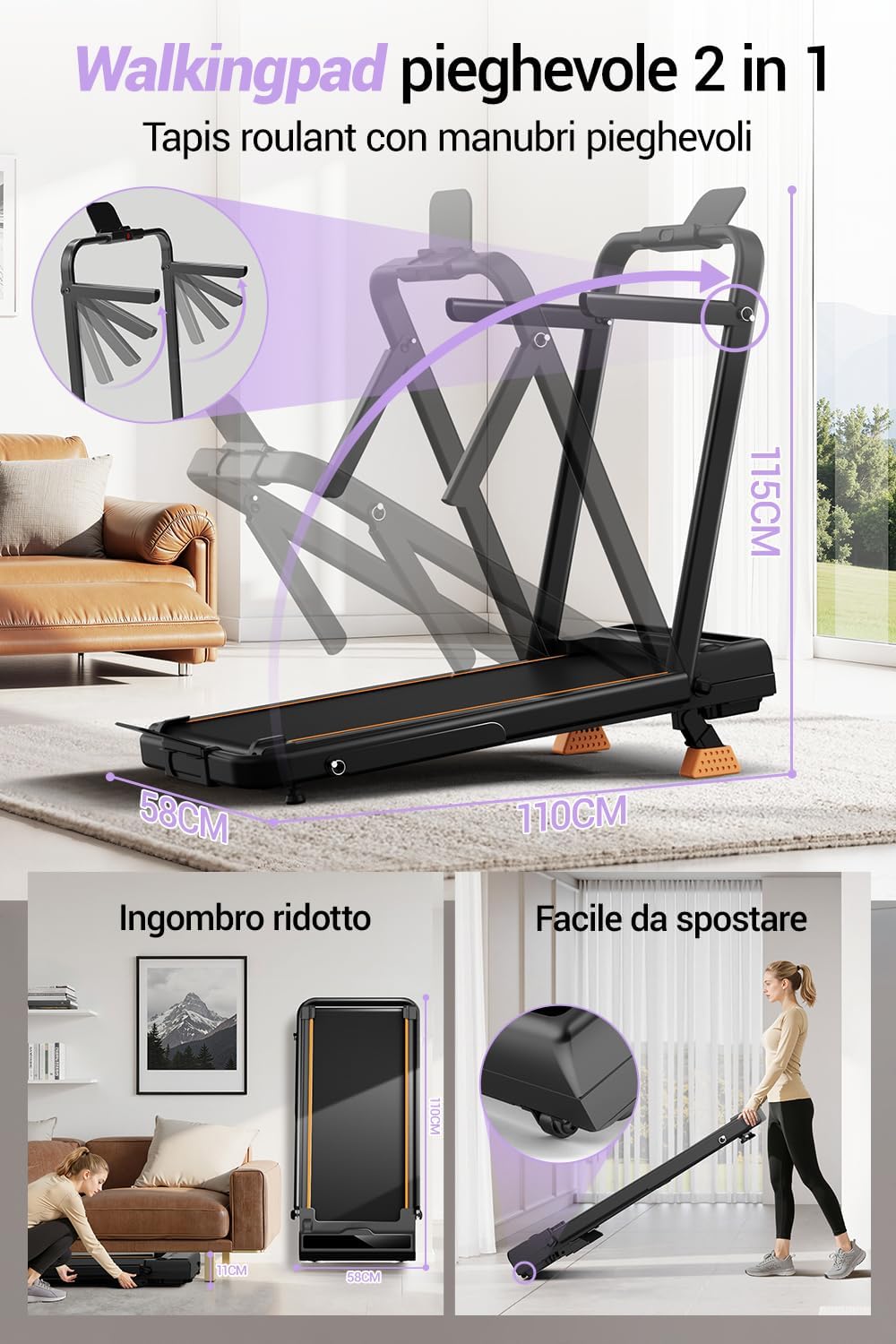
Figure 1: The CURSOR FITNESS U17 Treadmill in folded and unfolded positions, demonstrating its space-saving design and portability with integrated wheels.
Operating Instructions
Familiarize yourself with the control panel and functions of your CURSOR FITNESS U17 Treadmill.
Powering On/Off
- To power on, ensure the treadmill is plugged in and flip the main power switch to the ON position. The display will illuminate.
- To power off, press the STOP button on the console, then flip the main power switch to the OFF position and unplug the unit.
Adjusting Speed
- Press the START button to begin the workout. The belt will start moving at a low speed.
- Use the "+" and "-" buttons on the console to increase or decrease the speed. The speed range is 1 to 8 Kilometers per Hour.
Adjusting Incline
The U17 Treadmill features a manual incline adjustment up to 9%.
- To adjust the incline, stop the treadmill and step off the running belt.
- Locate the manual incline adjustment mechanism at the rear of the treadmill.
- Adjust the incline to your desired level (0%, 12%, or 16% as indicated on the mechanism). Ensure it is securely locked in place before resuming your workout.

Figure 2: Manual incline settings for the U17 Treadmill, offering varied workout intensity.
Workout Modes
The treadmill supports various workout intensities:
- Working Mode: 1.0-2.0 KM/H
- Walking Mode: 2.0-4.0 KM/H
- Jogging Mode: 4.0-7.0 KM/H
- Running Mode: 7.0-10.0 KM/H (Note: Maximum speed is 8 KM/H as per specifications. Please adhere to the maximum speed of 8 KM/H.)
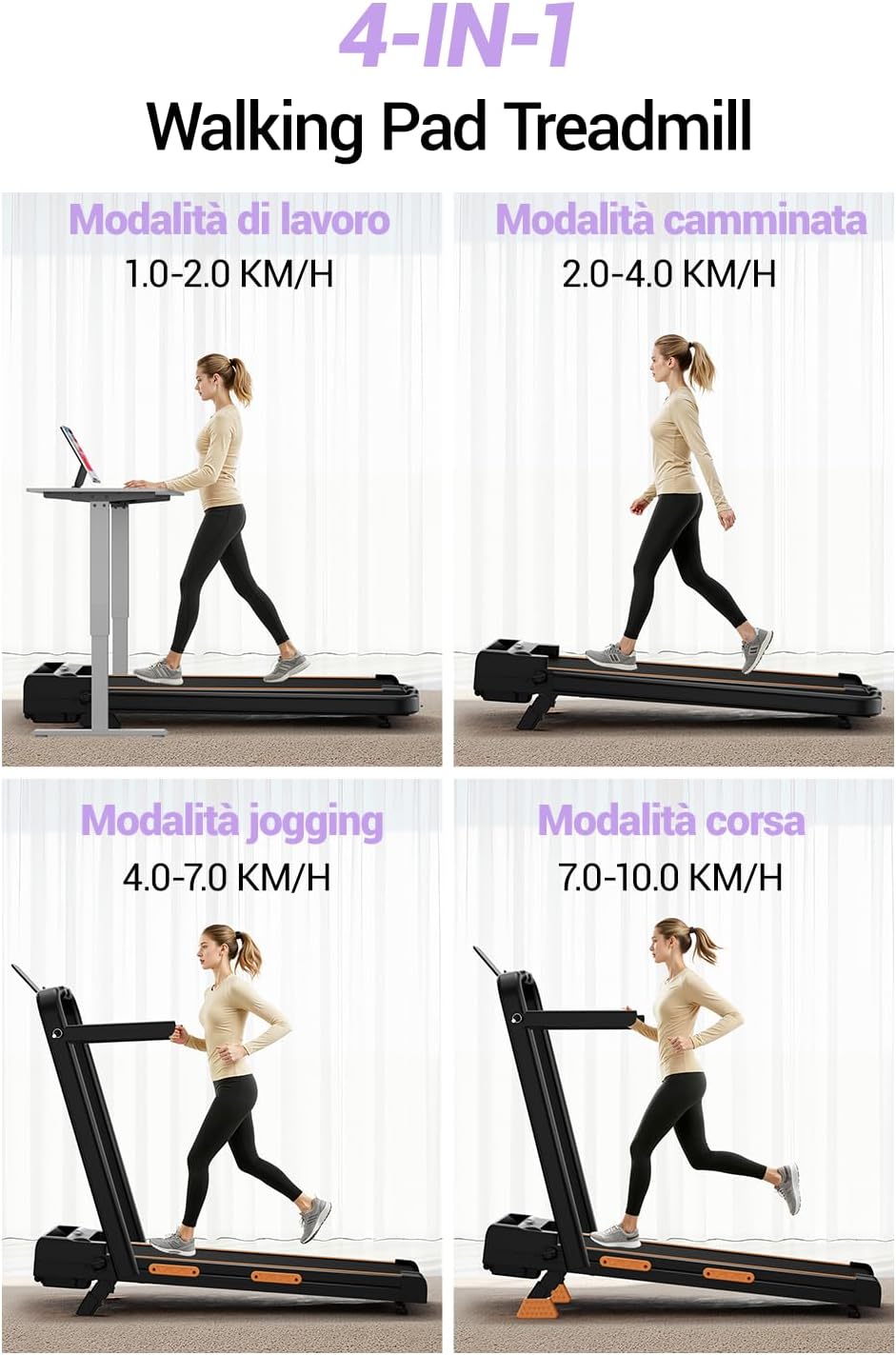
Figure 3: Different exercise modes and their recommended speed ranges on the U17 Treadmill.
Bluetooth Connectivity
Connect your treadmill to a compatible fitness app via Bluetooth to track your progress and access additional courses.
- Ensure Bluetooth is enabled on your mobile device.
- Open the recommended fitness app (refer to the quick start guide for app details).
- Follow the in-app instructions to pair with your CURSOR FITNESS U17 Treadmill.
Maintenance
Regular maintenance ensures the longevity and optimal performance of your treadmill.
- Cleaning: Wipe down the treadmill surfaces with a damp cloth after each use. Avoid using abrasive cleaners or solvents.
- Belt Lubrication: The running belt requires periodic lubrication to reduce friction. Refer to the quick start guide for specific lubrication instructions and recommended lubricant type. Typically, this is needed every 3-6 months depending on usage.
- Belt Tension and Alignment: Check the running belt tension and alignment regularly. If the belt feels loose or drifts to one side, adjust it according to the instructions in the quick start guide.
- Motor Area: Periodically vacuum the area around the motor to prevent dust buildup, ensuring proper ventilation. Unplug the treadmill before performing this.

Figure 4: The U17 Treadmill's wide running belt and triple cushioning system, designed for joint protection and comfort. Regular cleaning and lubrication of the belt are essential for maintaining these features.
Troubleshooting
If you encounter issues with your treadmill, refer to the following common problems and solutions.
| Problem | Possible Cause | Solution |
|---|---|---|
| Treadmill does not power on. | Power cord not plugged in, power switch off, circuit breaker tripped. | Ensure power cord is securely plugged in. Check main power switch. Reset household circuit breaker if necessary. |
| Running belt slips or hesitates. | Belt too loose, insufficient lubrication, user weight exceeds limit. | Adjust belt tension (refer to quick start guide). Lubricate the belt. Ensure user weight is within the maximum limit (159 kg). |
| Unusual noise during operation. | Loose components, motor issue, belt friction. | Check all bolts and screws for tightness. Lubricate the belt. If noise persists, contact customer support. |
| Bluetooth connection fails. | Bluetooth off on device, app not open, treadmill not discoverable. | Ensure Bluetooth is active on your device. Restart the app and treadmill. Try pairing again. |
If the problem persists after attempting these solutions, please contact CURSOR FITNESS customer support.
Specifications
Detailed technical specifications for the CURSOR FITNESS U17 Treadmill.
- Model: U17
- Brand: CURSOR FITNESS
- Motor: 2.5 HP Brushless Motor (1865W)
- Speed Range: 1 - 8 Kilometers per Hour
- Maximum Incline: 9% (Manual)
- Running Surface Dimensions: 93 cm x 39 cm (36.6" x 15.3")
- Product Dimensions (D x W x H): 114 cm x 55 cm x 13 cm (44.88"D x 21.65"W x 5.12"H)
- Folded Size: 121 cm x 58 cm x 10 cm (47.6" x 22.8" x 3.9")
- Item Weight: 17.6 Kilograms (38.8 lbs)
- Maximum User Weight: 159 Kilograms (350 lbs)
- Material: Carbon Steel
- Power Source: Corded Electric
- Metrics Measured: Calories Burned, Distance, Speed, Time
- Special Features: Manual Incline, Portable, Shock Absorbent, Wheeled

Figure 5: Comparison of the U17 Treadmill's 2.5 HP brushless motor, emphasizing its powerful, quiet, and energy-efficient operation.
Warranty and Support
For warranty information or technical support, please contact CURSOR FITNESS customer service.
Please have your model number (U17) and purchase date available when contacting support.
Contact Information: Refer to the contact details provided on the product packaging or the official CURSOR FITNESS website.