
GarveeHome FSJAGHLBDLD2508250i
GarveeHome Twin Loft Bed with Desk and Storage: User Manual
Model: FSJAGHLBDLD2508250i | Brand: GarveeHome
Introduction
This manual provides comprehensive instructions for the assembly, operation, and maintenance of your GarveeHome Twin Loft Bed. Please read all instructions carefully before assembly and use to ensure safe and proper functioning of the product. Retain this manual for future reference.
Safety Information
Your safety is paramount. Failure to follow these warnings could result in serious injury or death.
- Weight Limit: The loft bed is designed to support a maximum weight of 350 pounds. Do not exceed this limit.
- Assembly: Ensure all parts are correctly assembled and tightened according to the instructions. Periodically check and re-tighten all connections.
- Anti-Tip Kit: Always use the included anti-tip kit to anchor the bed firmly to the wall. This prevents accidental tipping and enhances stability.
- Guard Rails: The top loft bed is equipped with a 16-inch high safety guard rail. Ensure it is properly installed and maintained.
- Ladder Safety: Use the built-in ladder for access to the loft bed. Ensure secure footing on the non-slip steps. Do not use the bed if the ladder is damaged.
- Mattress: Use only a mattress that complies with the recommended dimensions and thickness to ensure the effectiveness of the guard rails. No box spring is needed.
- Children: This product is intended for use by teens. Young children should not be allowed on or under the loft bed unsupervised.
- Electrical Safety: The charging station contains electrical components. Do not expose to water or excessive moisture. Disconnect power during cleaning or if any damage is suspected.
- Ventilation: Ensure adequate ventilation around the charging station to prevent overheating.

Image Description: A close-up view of the anti-tip safety system, showing a black strap securely anchoring the loft bed frame to a wall. This system is crucial for preventing accidental tipping and ensuring the bed's stability.
Product Overview
The GarveeHome Twin Loft Bed is designed to maximize space with integrated storage and functional features. It includes a sleeping area, a desk, storage shelves, fabric drawers, LED lighting, and a charging station.
Key Features:
- Integrated Desk: A spacious desk area for study or work.
- Charging Station: Built-in power outlets (2 AC, 1 USB, 1 Type-C) for electronic devices.
- Storage Solutions: Four large fabric drawers and two open storage shelves.
- RGB LED Lights: Customizable lighting with app, button, or remote control.
- Heavy-Duty Construction: Robust metal frame with steel slats for durability.
- Safety Features: 16-inch guard rails, non-slip ladder steps, and an anti-tip kit.
Components:
The GarveeHome Twin Loft Bed consists of the following main components:
- Metal Bed Frame (various sections)
- Steel Slats
- Integrated Desk Surface
- Charging Station Unit
- Storage Shelf Units
- Fabric Drawers (4 units)
- Ladder
- LED Light Strip and Controller
- Anti-Tip Kit
- Assembly Hardware (bolts, screws, tools)

Image Description: A full view of the GarveeHome Twin Loft Bed in a modern black finish. The image shows the elevated bed frame, the integrated desk underneath, a storage unit with drawers and shelves, and the built-in ladder. LED lights illuminate the desk area.

Image Description: A detailed diagram illustrating the dimensions of the GarveeHome Twin Loft Bed. Key measurements include overall length (77.9"), width (41.3"), height (72.1"), desk width (39"), and shelf heights.
Setup and Assembly
Assembly of the GarveeHome Twin Loft Bed requires two adults. Ensure all parts are present before beginning. Refer to the included assembly instructions for detailed diagrams and step-by-step guidance.
Before You Begin:
- Unpack: Carefully unpack all components and lay them out on a clean, soft surface (e.g., a rug or blanket) to prevent scratches.
- Identify Parts: Match all parts against the component list provided in the separate assembly manual.
- Tools: The necessary assembly tools are included.
Assembly Steps (Summary):
- Assemble the main bed frame sections.
- Attach the desk and storage unit frames.
- Install the steel slats for the mattress support.
- Mount the ladder securely.
- Install the charging station into the designated desk cutout.
- Attach the LED light strip and connect its controller.
- Insert the fabric drawers into the storage unit.
- Crucial Step: Securely attach the anti-tip kit to the wall and the bed frame.
- Perform a final check to ensure all bolts are tightened and components are stable.
For detailed visual instructions, please refer to the dedicated assembly guide included with your product.
Operating Instructions
Using the Charging Station:
The integrated charging station provides convenient power access for your electronic devices.
- Connect the charging station's power cord to a standard wall outlet.
- Utilize the 2 AC outlets (125V/12A) for laptops, lamps, or other AC-powered devices.
- Use the 1 USB port (5V/2A) for charging smartphones, tablets, and other USB-powered devices.
- Use the 1 Type-C port (5V/2A) for charging compatible Type-C devices.
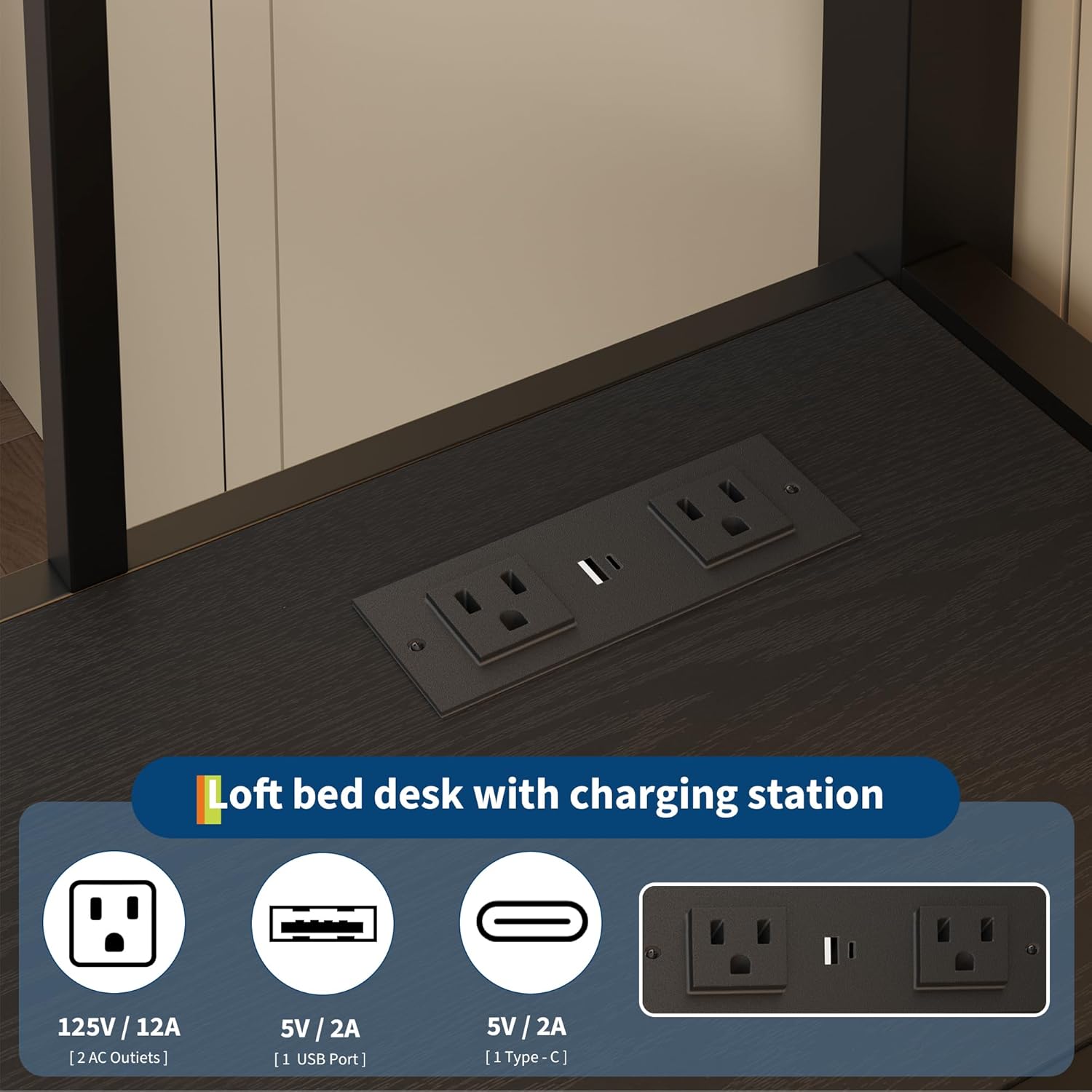
Image Description: A close-up view of the built-in charging station on the desk surface. It clearly shows two standard AC outlets, one USB-A port, and one USB-C port, ready for device connection.
Controlling the RGB LED Lights:
The RGB LED lights offer customizable ambiance for your space. They can be controlled via a button, a mobile application, or a remote control.
- Button Control: Use the inline controller button to cycle through basic colors and effects.
- App Control: Download the designated mobile application (refer to the LED light manual for app name and QR code) to access over 16 million colors, 20+ effects, music sync mode, timing functions, and brightness adjustments.
- Remote Control: Use the provided remote control for convenient access to various light settings, including color changes, brightness, and dynamic modes.

Image Description: An image showcasing the GarveeHome loft bed with its RGB LED lights illuminated. Insets demonstrate the three control methods: a mobile app interface, a physical key control, and icons representing various functions like music mode, timing, and brightness adjustment.
Utilizing Storage:
- Fabric Drawers: The four large fabric drawers (16.7" W x 11" L x 12.5" H) are ideal for storing clothes, toys, books, or personal items. Ensure items are placed evenly to prevent damage to the drawers.
- Open Shelves: The two large open shelves and two corner triangle shelves provide accessible space for displaying decor, books, or frequently used items.

Image Description: A close-up view of the storage unit integrated into the loft bed. It features two tiers of open shelves filled with books and decorative items, and four large fabric drawers pulled out to show their storage capacity for various belongings.
Maintenance
Regular maintenance ensures the longevity and safety of your GarveeHome Twin Loft Bed.
- Cleaning: Wipe down metal surfaces with a soft, damp cloth. Avoid abrasive cleaners or harsh chemicals. For fabric drawers, spot clean with a mild detergent and allow to air dry.
- Hardware Check: Periodically (e.g., every 3-6 months) inspect all bolts, screws, and connections. Re-tighten any loose hardware to maintain structural integrity.
- Anti-Tip Kit: Verify that the anti-tip kit remains securely anchored to the wall and the bed frame.
- Ladder: Ensure ladder steps are clean and free of obstructions. Check for any signs of wear or damage.
- Electrical Components: Keep the charging station and LED light components dry and free from dust. Do not attempt to repair electrical parts yourself.
Troubleshooting
This section addresses common issues you might encounter. For problems not listed here, please contact customer support.
| Problem | Possible Cause | Solution |
|---|---|---|
| Bed feels wobbly or unstable. | Loose hardware; Anti-tip kit not installed or loose. | Check and re-tighten all bolts and screws. Ensure the anti-tip kit is correctly installed and securely fastened to the wall. |
| Charging station not working. | Not plugged into wall outlet; Power switch off; Device cable faulty. | Verify the charging station's power cord is securely plugged into a live wall outlet. Check if there's a power switch on the unit. Try a different device cable. |
| LED lights not turning on or changing colors. | Power connection loose; Controller malfunction; Remote battery dead. | Check the power connection to the LED strip and controller. Ensure the remote control has working batteries. Try controlling via the app or inline button. |
| Fabric drawers are difficult to open/close. | Overloaded; Misaligned in frame. | Reduce the weight or volume of items in the drawer. Ensure the drawer is correctly seated within its frame. |
Specifications
- Model: FSJAGHLBDLD2508250i
- Brand: GarveeHome
- Type: Twin Loft Bed with Desk and Storage
- Color: Modern Black
- Product Dimensions (L x W x H): 77.9" x 41.3" x 72.1"
- Weight Limit: 350 Pounds
- Item Weight: 111 Pounds
- Material: Heavy-Duty Metal (Steel)
- Mattress Requirement: Twin size, no box spring needed
- Charging Station: 2 AC Outlets (125V/12A), 1 USB Port (5V/2A), 1 Type-C Port (5V/2A)
- Storage Drawers: 4 Fabric Drawers (approx. 16.7" W x 11" L x 12.5" H each)
- LED Lighting: RGB, App/Button/Remote Control, 16+ Million Colors, 20+ Effects
- UPC: 199641336200
Warranty Information
The GarveeHome Twin Loft Bed comes with a Limited Warranty. For specific details regarding coverage, duration, and claims process, please refer to the warranty card included with your product or contact GarveeHome customer support. This warranty typically covers manufacturing defects under normal use.
Customer Support
If you have any questions, require assistance with assembly, or encounter any issues with your GarveeHome Twin Loft Bed, please do not hesitate to contact our customer support team.
- Contact Method: Refer to the contact information provided on the packaging or the GarveeHome official website.
- Response Time: Our expert team aims to provide responsive support, typically answering questions within 24 hours.
- Online Resources: Visit the GarveeHome Store on Amazon for additional product information and support.
Ask a question about this manual
Ask about setup, troubleshooting, compatibility, parts, safety, or missing instructions. Manuals+ will review the question and use this page’s manual context to help answer it.