
1. Introduction
This manual provides detailed instructions for the installation, operation, and maintenance of your ANJIELO SMART WiFi Video Intercom System Doorbell. This system includes two outdoor doorbell units with 1080P cameras and two 7-inch indoor touch screen monitors, designed for apartment and multi-unit dwellings. It offers secure access control with multiple unlocking methods and remote monitoring capabilities via a mobile application.
2. Package Contents
Please verify that all items are present in your package:
- 2 x Outdoor Doorbell Units (1080P Camera)
- 2 x Indoor Touch Screen Monitors (7-inch)
- 2 x Rain Covers for Outdoor Units
- 2 x 3m 4-Core Wiring Cables (for doorbell to monitor connection)
- 2 x 1.2m External Power Supplies (for monitors)
- 5 x IC Cards (for unlocking)
- Mounting Screws and Anchors
- User Manual
3. Product Overview
3.1 Outdoor Doorbell Unit
The outdoor doorbell unit features a 1080P camera with a 148° wide-angle lens and built-in infrared LEDs for night vision. It includes a keypad for password entry, an RFID card reader, a fingerprint sensor, a call button, a microphone, and a speaker for two-way audio. The unit is designed for surface mounting and comes with a rain cover for protection.

This detailed diagram provides the dimensions and identifies key components of the outdoor doorbell unit. Labels point to the waterproof cover, microphone, camera lens, IR sensor, password keypad, RFID card reader area, speaker, call button, and fingerprint sensor. Dimensions are provided as 135mm height, 91mm width, and 31mm depth (43mm with cover).
3.2 Indoor Touch Screen Monitor
The indoor monitor is a 7-inch TFT-LCD touch screen with a resolution of 1024 x 680. It supports hands-free operation and connects to your home WiFi network for mobile app integration. The monitor allows adjustment of volume and color, and features 7-chord melody rings. It is designed for surface mounting.

This image displays the main screen of the indoor monitor, featuring icons for various functions: Setting, Monitoring, Intercall, Recording, At home, and Standby. Below the main interface, three scenarios illustrate how the system responds to a visitor's call: 'At home' (monitor rings, app receives push, outdoor doorbell prompts message if unanswered), 'Message' (visitor prompted to leave message, app receives push), and 'Mute' (no ringtones, app receives push).
4. Installation
4.1 Wiring
The indoor monitor and outdoor doorbell units require a wired connection using a 4-core cable. A 3-meter 4-core cable is provided for each doorbell for basic installation. You can extend the distance using additional 4-core wiring if needed. The main monitor connects to your home WiFi network for mobile app functionality.
4.2 Mounting
Both the outdoor doorbell units and indoor monitors are designed for surface mounting. Use the provided screws and anchors to securely attach the units to a suitable wall surface. Ensure the outdoor unit is protected by its rain cover and positioned for optimal camera view.
5. Operating Instructions
5.1 Two-Way Audio Communication
When a visitor presses the doorbell, the indoor monitor will ring and display the camera feed. You can then speak to the visitor directly through the monitor. The system's built-in microphone and speaker enable clear two-way communication. If connected to WiFi, you will also receive notifications on your mobile phone via the TUYA app, allowing you to view, listen, and communicate with visitors remotely.

This image demonstrates the two-way audio feature, allowing direct communication with visitors. A person is shown speaking into the indoor monitor, which displays a delivery person. Text bubbles indicate a conversation: 'Have your package.' and 'Put it on the doorstep.'

This image demonstrates the ability to see, talk, and listen to visitors at the door. A person is shown pressing the doorbell button, and a smartphone screen displays a live view of the visitor, along with text bubbles indicating a conversation: 'Hi, I'm here' and 'OK, wait a minute.' This illustrates remote communication via the mobile app.
5.2 Unlocking Methods
The system supports five methods for unlocking connected 12V electronic locks (lock not included):
- Password: Enter a pre-set password on the outdoor unit's keypad.
- Fingerprint: Use a registered fingerprint on the outdoor unit's sensor.
- IC Card: Tap a registered IC card on the outdoor unit's reader.
- Monitor: Unlock directly from the indoor touch screen monitor.
- TUYA App: Unlock remotely using the TUYA app on your smartphone.
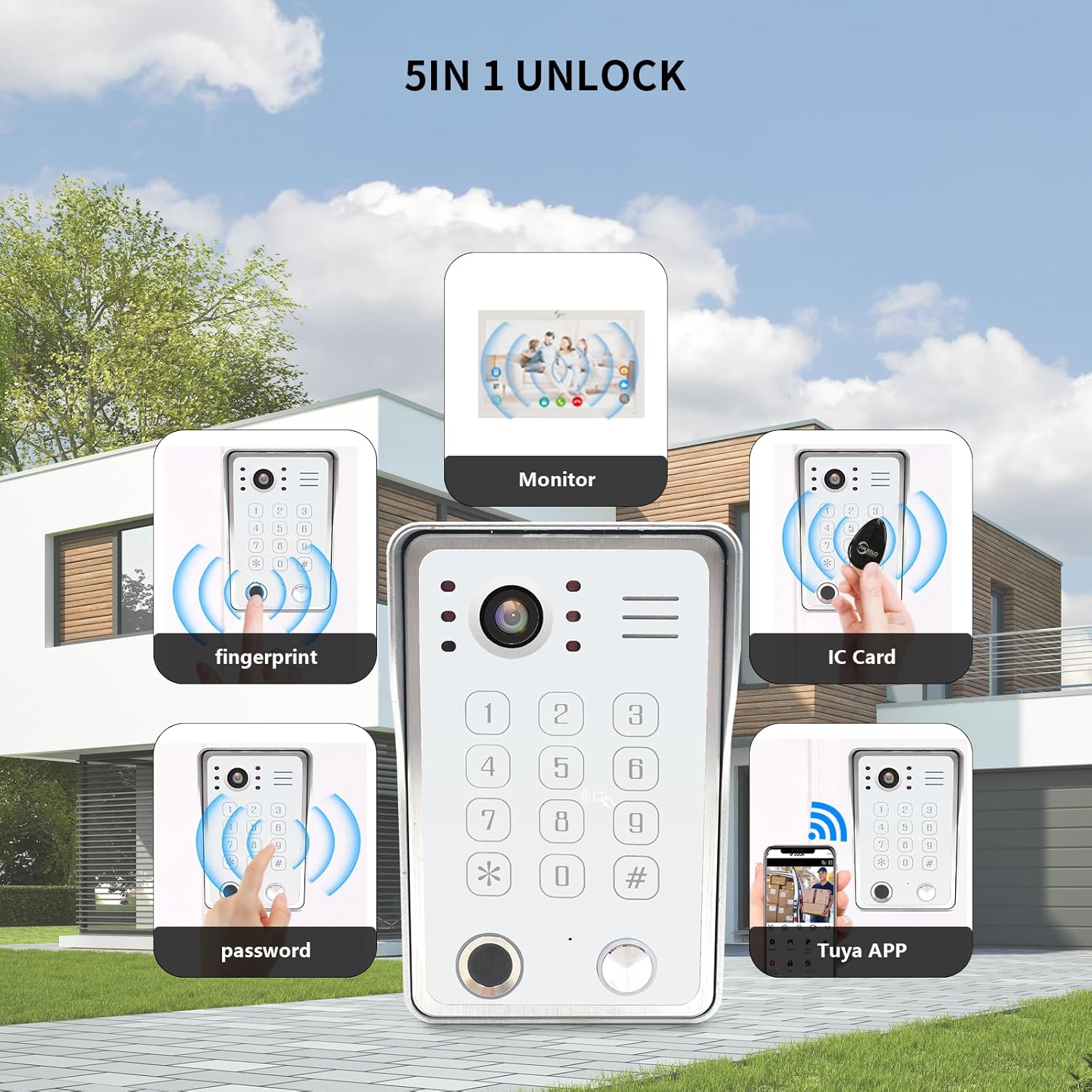
This image highlights the five different unlocking methods available with the ANJIELO SMART video intercom system. The central outdoor doorbell unit is surrounded by five smaller images, each representing an unlock method: fingerprint, password, IC card, unlocking via the indoor monitor, and unlocking through the Tuya App on a smartphone.
5.3 Motion Detection
The doorbell camera is equipped with advanced motion detection. When motion is detected within its range, the indoor monitor will automatically light up and begin recording. You will also receive instant notifications via the TUYA app on your phone, ensuring you are aware of any activity at your door.

This image shows the motion detection feature in action. An outdoor doorbell unit is depicted, and a person is shown in the detection zone. A smartphone screen displays a 'TUYASMART Detected movement' notification, indicating that the system alerts the user via the app when motion is detected.
5.4 Night Vision
The outdoor doorbell camera includes built-in infrared (IR) LEDs, providing clear visibility even in low-light or complete darkness. This ensures continuous monitoring and identification of visitors at any time.

This image illustrates the 1080P HD camera and night vision capabilities of the outdoor doorbell unit. It shows a split view of a house, with one side depicting a clear daytime image and the other showing a clear night-time image, highlighting the infrared night vision functionality. The doorbell unit itself is visible in the foreground, indicating a 148-degree wide-angle view.
6. Maintenance
To ensure optimal performance and longevity of your ANJIELO SMART video intercom system, follow these maintenance guidelines:
- Cleaning: Regularly wipe the camera lens and monitor screen with a soft, dry cloth to remove dust and smudges. Avoid using abrasive cleaners or solvents.
- Weather Protection: The outdoor unit has an IP65 waterproof rating, providing protection against dust and water splashes. Ensure the rain cover is properly installed.
- Wiring Inspection: Periodically check all wired connections for any signs of wear or damage.
- Software Updates: Keep the TUYA app updated to the latest version for new features and security enhancements.

This image emphasizes the IP65 waterproof rating of the outdoor doorbell unit. The doorbell is shown mounted outdoors, with rain effects illustrating its resistance to water and dust. The background shows an outdoor setting, reinforcing its suitability for various weather conditions.
7. Troubleshooting
If you encounter issues with your system, refer to the following common troubleshooting steps:
- No Power: Ensure all power adapters are securely connected and receiving power from the outlet. Check circuit breakers if necessary.
- No Video/Audio: Verify that the 4-core wiring between the doorbell and monitor is correctly connected and undamaged. Restart both units.
- No App Notifications: Check your mobile device's internet connection and ensure the TUYA app has necessary permissions (notifications, background data). Confirm the monitor is connected to your home WiFi.
- Unlock Failure: Re-register fingerprints, IC cards, or passwords if they are not working. Ensure the electronic lock is properly connected and powered.
- Poor Image Quality: Clean the camera lens. Ensure adequate lighting for the outdoor unit, especially at night (night vision should activate automatically).
If problems persist, please contact customer support.
8. Specifications
| Component | Feature | Specification |
|---|---|---|
| Outdoor Doorbell Unit | Camera Sensor | 1/2.7 CMOS |
| Definition | 1080P | |
| Lens | 3.2mm | |
| View Angle | 148° | |
| Night Vision LEDs | IR LEDs (120°) | |
| Power Consumption | 200mA max | |
| Operating Temperature | -40℃ ~ +50℃ | |
| Installation | Surface Mount | |
| Dimensions (L x W x H) | 137mm x 85.5mm x 23.5mm (without cover) | |
| Indoor Touch Monitor | Screen | 7 inch TFT-LCD Touch Screen |
| Resolution | 1024 x 680 | |
| Ringtone | 7-chord melody rings | |
| Adjustable Features | Volume, Color | |
| Connection Way | 4-wires, WiFi TUYA solution | |
| Panel Material | Acrylic/ABS cover | |
| Input Voltage | AC 100-240V 50/60Hz | |
| Working Voltage | DC 12V, 2A | |
| Dimensions (L x W x H) | 198mm x 130mm x 21mm (7.8 x 5.1 x 0.8 inches) | |
| General | Model Number | 64218-W+67010W-US |
| Connectivity Technology | Wired (doorbell to monitor), WiFi (monitor to app) | |
| Power Source | Corded Electric | |
| Item Weight | 14.4 ounces (per unit, approximate) | |
| Product Dimensions | 7 x 5 x 3 inches (overall package, approximate) |
9. Warranty and Support
For warranty information or technical support, please refer to the documentation included with your purchase or contact ANJIELO SMART customer service through the retailer where the product was purchased. Please have your model number (64218-W+67010W-US) and purchase date available when contacting support.