
Introduction
Thank you for choosing the PRSCFUM Q90 Bluetooth Shower Speaker. This portable, waterproof speaker is designed to provide high-quality audio with dynamic lighting and convenient features for various environments, including bathrooms, parties, and outdoor activities. Please read this manual carefully to ensure proper use and optimal performance of your device.
What's in the Box
- 1x PRSCFUM Q90 Bluetooth Shower Speaker
- 1x Type-C Charging Cable
- 1x User Manual

Product Overview and Controls
The PRSCFUM Q90 speaker features an intuitive control panel for easy operation. Familiarize yourself with the buttons and their functions:
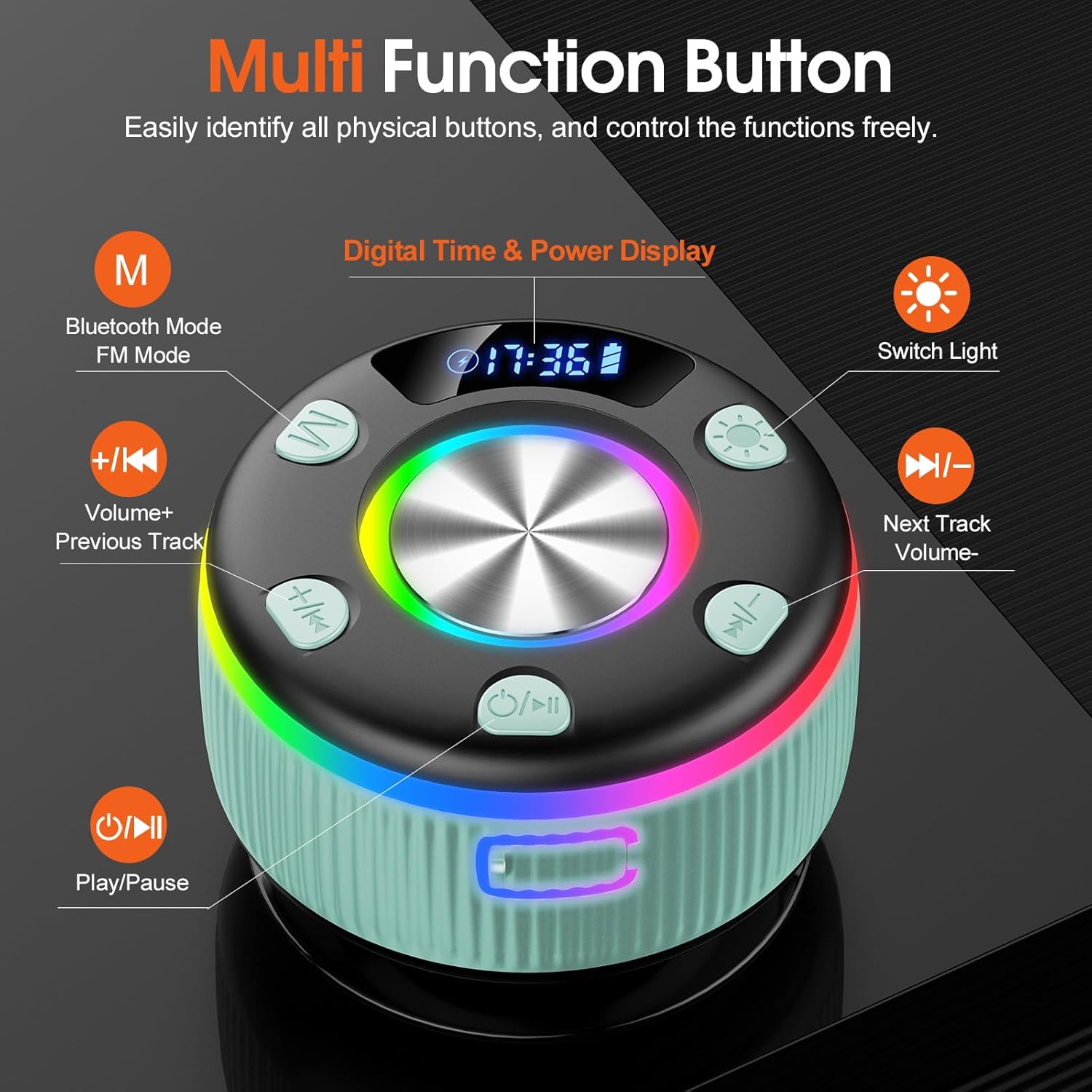
- M Button: Switches between Bluetooth Mode and FM Mode.
- +/- K Button: Volume Up / Previous Track. Press briefly for previous track, press and hold for volume up.
- -/K Button: Volume Down / Next Track. Press briefly for next track, press and hold for volume down.
- Light Button: Switches the RGB light modes.
- Power/Play/Pause Button: Powers the device on/off, plays, or pauses audio.
- Digital Time & Power Display: Shows current time and battery level.
Setup
Charging the Speaker
Before first use, fully charge the speaker. Connect the provided Type-C charging cable to the speaker's charging port and a suitable USB power adapter (not included). The digital display will indicate charging status. A full charge takes approximately 1.5 hours and provides 7-8 hours of continuous playback at 40% volume.

Power On/Off
To power on the speaker, press and hold the Power/Play/Pause button until the lights illuminate and you hear an audible prompt. To power off, press and hold the same button until the lights turn off.
Bluetooth Pairing
- Ensure the speaker is powered on and in Bluetooth mode (indicated by a flashing Bluetooth icon on the display).
- On your mobile device (smartphone, tablet, etc.), enable Bluetooth and search for available devices.
- Select "Q90" from the list of devices.
- Once connected, the speaker will emit a confirmation sound, and the Bluetooth icon on the display will stop flashing.
The speaker utilizes Bluetooth 5.3 technology for stable and efficient connections up to 49 feet.

True Wireless Stereo (TWS) Pairing
For an enhanced audio experience, you can pair two PRSCFUM Q90 speakers together to create a stereo sound system.
- First, ensure both speakers are fully charged and powered off.
- Delete any previous pairing records for "Q90" from your phone's Bluetooth settings.
- Power on both speakers.
- On one of the speakers, press and hold the "M" button for 5 seconds to enter interconnect mode. The speakers will attempt to pair with each other.
- Once successfully paired, one speaker will act as the left channel and the other as the right channel.
- Reopen your phone's Bluetooth settings and search for "Q90" to connect to the combined stereo system.

Suction Cup Installation
The speaker comes with a detachable suction cup for easy mounting on smooth surfaces like bathroom tiles, mirrors, or glass. Ensure the surface is clean and dry before attaching the suction cup for optimal adhesion. Press firmly to secure.

Operating Instructions
Music Playback
- Play/Pause: Press the Power/Play/Pause button once.
- Volume Up: Press and hold the "+/- K" button.
- Volume Down: Press and hold the "-/K" button.
- Next Track: Press the "-/K" button once.
- Previous Track: Press the "+/- K" button once.
Hands-Free Calling
The built-in microphone allows for hands-free calls when connected to your smartphone via Bluetooth.
- Answer Call: Press the Power/Play/Pause button once when a call comes in.
- End Call: Press the Power/Play/Pause button once during a call.
- Reject Call: Press and hold the Power/Play/Pause button for 2 seconds.

RGB Light Show
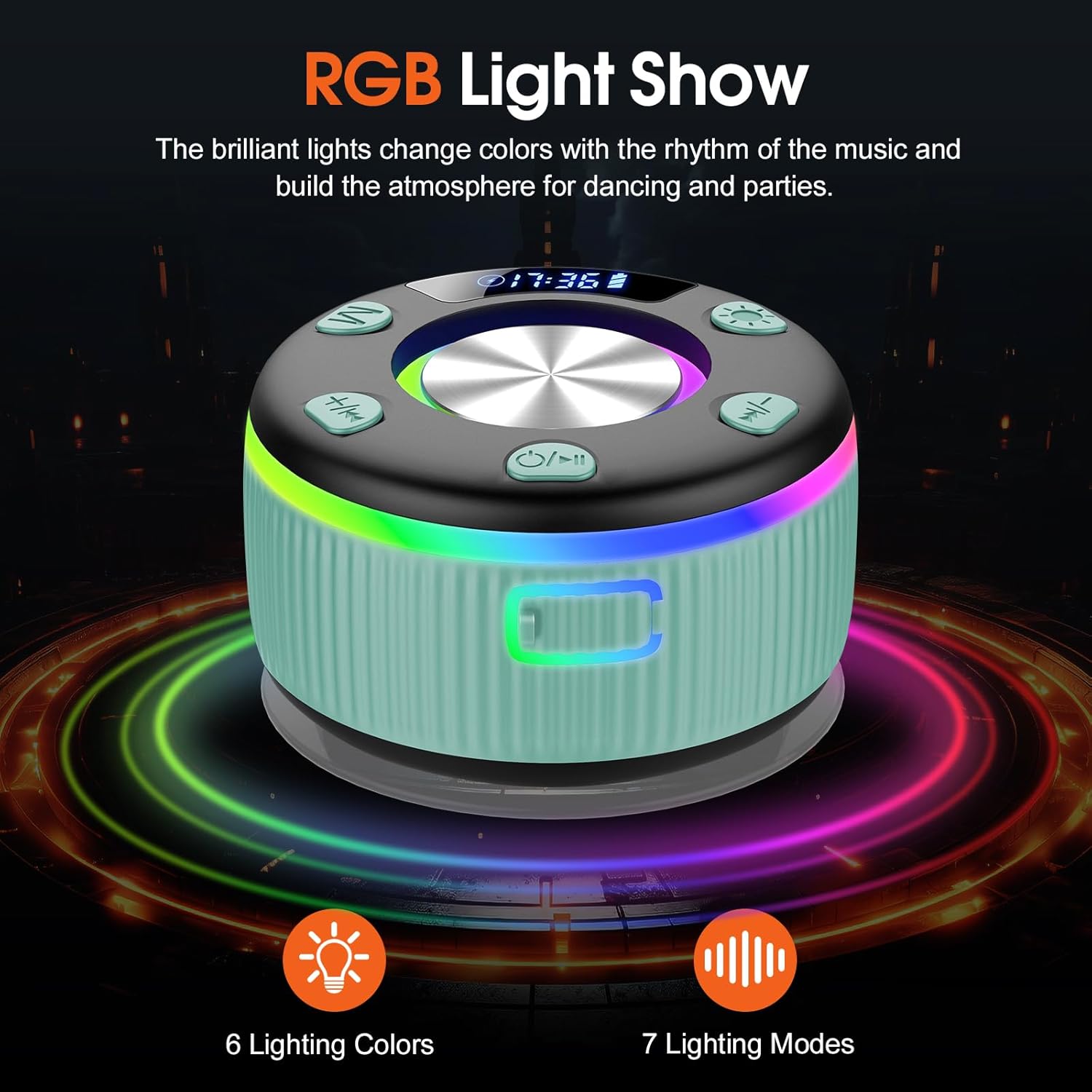
The speaker features 7 lighting modes and 6 vibrant colors that can sync with the music beat. Press the Light button to cycle through the different lighting effects or to turn them off.
Time Display
The integrated digital display shows the current time. This feature is active when the speaker is powered on.

FM Radio
To activate FM radio mode, press the "M" button until the display shows FM frequency. Use the "+/- K" and "-/K" buttons to tune to different stations. Press and hold these buttons for automatic station scanning.
Maintenance
The PRSCFUM Q90 speaker is IP7 waterproof certified, offering protection against water immersion. To maintain its performance and longevity:
- Ensure the charging port cover is securely closed when using the speaker near water.
- Clean the speaker with a soft, damp cloth. Do not use abrasive cleaners or solvents.
- Avoid exposing the speaker to extreme temperatures or direct sunlight for extended periods.
- Store the speaker in a cool, dry place when not in use.
Troubleshooting
| Problem | Solution |
|---|---|
| Speaker does not power on. | Ensure the speaker is charged. Connect to a power source using the Type-C cable. |
| Cannot pair via Bluetooth. | Ensure the speaker is in Bluetooth pairing mode (flashing Bluetooth icon). Turn off and on your device's Bluetooth. Forget "Q90" from your device's Bluetooth list and try pairing again. Ensure the speaker is within 49 feet of your device. |
| No sound or low volume. | Increase the volume on both the speaker and your connected device. Ensure the speaker is not muted. |
| TWS pairing fails. | Ensure both speakers are powered off and any previous "Q90" pairings are removed from your phone. Follow the TWS pairing steps precisely. |
| Lights do not change. | Press the Light button to cycle through modes. If unresponsive, power cycle the speaker. |
Specifications
| Feature | Detail |
|---|---|
| Model Name | Q90 |
| Bluetooth Version | 5.3 |
| Wireless Range | Up to 15 meters (49 feet) |
| Water Resistance | IP7 Waterproof |
| Speaker Output Power | 20 Watts |
| Battery Capacity | 1000 mAh |
| Charging Time | Approx. 1.5 hours |
| Playtime | 7-8 hours (at 40% volume) |
| Speaker Size | 88 mm |
| Audio Driver Size | 40 mm (Woofer/Tweeter/Subwoofer) |
| Signal-to-Noise Ratio | 83 dB |
| Special Features | Built-in Microphone, Digital Display, RGB LED Light, Portable, Stereo Pairing (TWS) |
| Product Dimensions | 5"D x 5"W x 5"H |
| Item Weight | 10.8 ounces |
Warranty and Support
The PRSCFUM Q90 Bluetooth Shower Speaker comes with a limited warranty. For detailed warranty information, product support, or service inquiries, please refer to the contact information provided with your purchase or visit the official PRSCFUM website.