
1. Introduction
The NAVRUF 7-Inch Car GPS Navigator (Model 7077) is designed to provide clear, reliable, and efficient navigation for various vehicles, including cars, trucks, and RVs. Featuring a bright 7-inch HD touchscreen and pre-loaded 2025 North American maps, this device ensures you stay on track with turn-by-turn voice guidance, lane assistance, and real-time safety alerts. Enjoy free lifetime map updates to keep your routes current without additional costs.
Video 1: URFRU GPS Navigator - Easy to use. Your driving partner. This video provides a general overview of the GPS navigator's features and ease of use.
Video 2: Great GPS system with huge 7 inch screen. This video highlights the large screen and its benefits for navigation.
Video 3: This has been a commute-saver and road trip-rockstar - I couldn't be more thrilled! This video showcases the GPS as a reliable tool for daily commutes and long trips.
2. What's in the Box
Upon opening your NAVRUF 7-Inch Car GPS Navigator package, you will find the following components:
- 1 x 7" Touch Screen GPS Navigation Unit
- 1 x Car Bracket (Suction Cup Mount)
- 1 x Car Charger
- 1 x MINI USB cable
- 1 x User Manual
- 1 x Sunshade Mount

Image 1: All components included in the NAVRUF 7-Inch Car GPS Navigator package.
3. Product Overview
The NAVRUF GPS Navigator features a responsive touchscreen and intuitive interface designed for ease of use. Key features include:
- 7-Inch HD Touchscreen: Bright and clear display for optimal visibility.
- Voice Turn-by-Turn Guidance: Audible directions in multiple languages.
- Lane Assistance: Visual cues for correct lane usage.
- Safety Alerts: Warnings for speed cameras, red lights, and school zones.
- Pre-loaded 2025 Maps: Detailed maps of North America with free lifetime updates.
- Multiple Vehicle Modes: Optimized routing for cars, trucks, and RVs.
- FM Transmitter: Transfers GPS audio to your vehicle's speakers.
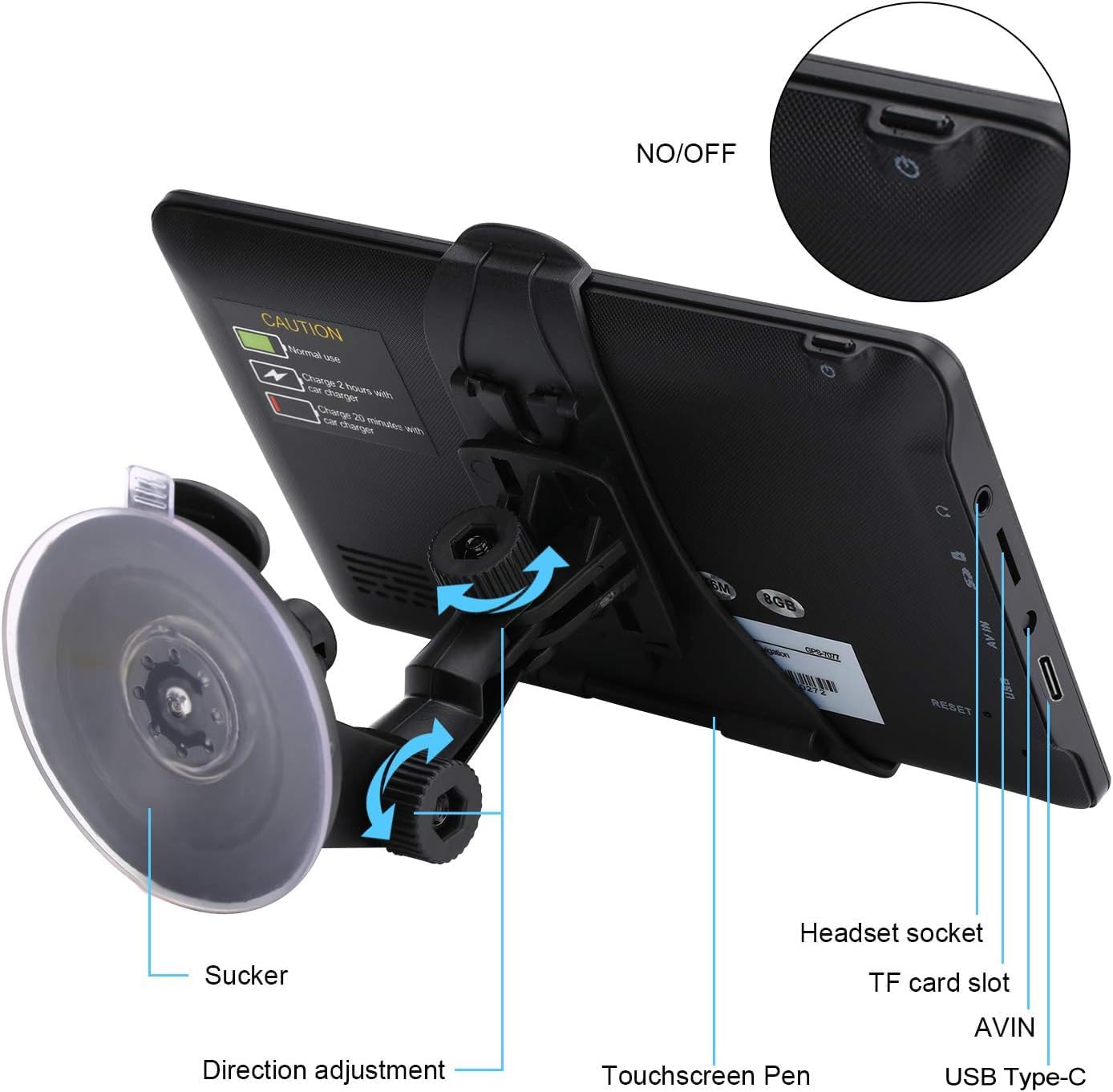
Image 2: Detailed view of the GPS unit's ports and controls.

Image 3: GPS screen displaying navigation and key feature icons.
4. Setup
4.1 Mounting the Device
- Attach the car bracket (suction cup mount) to the back of the GPS unit. Ensure it clicks securely into place.
- Clean the desired mounting surface (windshield or dashboard) thoroughly.
- Press the suction cup firmly against the surface and engage the locking lever to secure it.
- Adjust the angle of the GPS unit for optimal viewing without obstructing your driving view.
- Alternatively, use the sunshade mount by clipping it to your vehicle's sun visor.
4.2 Powering On and Initial Charge
- Connect the MINI USB cable to the GPS unit and the car charger.
- Plug the car charger into your vehicle's 12V power outlet.
- Press and hold the power button on the GPS unit to turn it on.
- Allow the device to charge fully before its first use.

Image 4: Visual guide for installing the GPS unit and mount.
5. Operating the NAVRUF GPS Navigator
5.1 Basic Navigation
- From the main menu, tap 'Navigation'.
- Select 'Destination' to enter your desired location. You can search by address, postcode, coordinates, or points of interest (POI).
- Confirm your destination, and the device will calculate the route.
- Follow the voice prompts and on-screen directions for turn-by-turn guidance.
5.2 Route Planning and Vehicle Profiles
- The device offers 4 route options: Fast, Green, Short, and Easy. Select the one that best suits your needs.
- Set your vehicle type (Car, Truck, RV, etc.) in the settings to ensure the most appropriate route is calculated, considering vehicle-specific restrictions like height or weight.
5.3 Safety Features
- Speed Camera Alerts: Receive intelligent alerts for upcoming speed cameras.
- Red Light Warnings: Get audible warnings for red light cameras.
- Lane Assistant: Clearly indicates the correct lane for upcoming turns and exits.
- Voice Guidance: Keeps your eyes on the road by providing spoken directions.
5.4 FM Transmitter Function
The built-in FM transmitter allows you to transfer the GPS voice instructions to your vehicle's FM radio. To use this feature:
- Go to the 'FM' option in the main menu or settings.
- Select an unused FM frequency on your GPS unit.
- Tune your vehicle's FM radio to the same frequency.
- GPS voice guidance will now play through your car speakers.

Image 5: FM Transmitter settings and voice announcement feature.

Image 6: Different vehicle modes supported by the GPS navigator.
6. Maintenance
- Cleaning: Use a soft, dry cloth to clean the screen and exterior of the device. Avoid abrasive cleaners or solvents.
- Map Updates: Regularly check for and install free lifetime map updates to ensure the most accurate and up-to-date navigation data. Contact NAVRUF support for instructions on how to update maps.
- Storage: When not in use, store the GPS unit in a cool, dry place away from direct sunlight and extreme temperatures.
- Battery Care: To prolong battery life, avoid fully discharging the battery frequently. Charge the device regularly.
7. Troubleshooting
- Device not turning on: Ensure the device is fully charged. Connect it to the car charger and try again. If the issue persists, check the charging cable and car charger for damage.
- No GPS signal: Ensure the device has a clear view of the sky. Move away from tall buildings or dense tree cover. Allow a few minutes for the device to acquire satellite signals.
- Inaccurate directions: Verify that the maps are up to date. Perform a map update if necessary. Check your selected vehicle profile to ensure it matches your current vehicle.
- Touchscreen unresponsive: Restart the device. If the problem continues, ensure the screen is clean and free of debris.
- Voice guidance issues: Check the volume settings on the device and your vehicle's audio system if using the FM transmitter. Ensure the FM transmitter frequency is correctly set and matched.
8. Specifications
| Feature | Detail |
|---|---|
| Model Number | 7077 |
| Display Size | 7 Inches |
| Item Weight | 1.25 pounds |
| Product Dimensions | 5.8 x 3 x 8.2 inches |
| Batteries | 1 9V battery required (included) |
| Battery Life | 6.01 Hours |
| Voice Command | Touchscreen |
| Connectivity Technology | USB |
| Map Type | North America (2025) |
| Special Features | Lane Assist, Text-to-Speech, Touchscreen |
| Mounting Type | Suction Cup Mount, Sunshade Mount |
9. Warranty & Support
The NAVRUF 7-Inch Car GPS Navigator comes with a 2-year warranty. For warranty claims, technical support, or assistance with map updates, please contact NAVRUF customer service through the retailer where the product was purchased or visit the official NAVRUF website for support contact information.
For lifetime free map updates, please feel free to contact us to update.


