
1. Introduction
Thank you for choosing the KTENTITO 4D Music Rhythm Massage Chair G9. This advanced massage chair is designed to provide a comprehensive and personalized massage experience, integrating innovative features such as 4D massage rollers, an extended SL-track, zero gravity recline, music rhythm synchronization, and AI voice control. Please read this manual thoroughly before use to ensure proper operation, maintenance, and safety.
2. Safety Information
WARNING: To reduce the risk of electric shock, burns, fire, or injury, read all instructions before using this appliance.
- Maximum Weight Recommendation: This massage chair is designed to support a maximum user weight of 300 pounds (136 kg). Exceeding this limit may cause damage to the chair or injury to the user.
- Medical Conditions: Consult a physician before using this product if you have any medical conditions, including but not limited to heart disease, high blood pressure, diabetes, osteoporosis, or if you are pregnant.
- Children and Pets: Keep children and pets away from the massage chair, especially during operation. This appliance is not intended for use by persons with reduced physical, sensory, or mental capabilities unless supervised.
- Power Supply: Ensure the power outlet matches the voltage specified on the product label. Do not operate the chair with a damaged cord or plug.
- Environment: Use the chair indoors in a dry environment. Avoid exposure to water or high humidity.
- Maintenance: Do not attempt to repair or disassemble the chair yourself. Contact qualified service personnel for any repairs.
3. Product Features Overview
The KTENTITO G9 massage chair offers a range of advanced features for a personalized relaxation experience:
- 4D Music Rhythm Massage: Synchronizes 4D rollers and vibrations with music via Bluetooth for an enhanced sensory experience.
- 55-inch SL-Track: Provides comprehensive massage coverage from neck to thighs, following the natural curve of your spine.
- Zero Gravity Recline: Distributes body weight evenly to reduce spinal pressure and muscle tension.
- Ultra-Fast Smart Body Scan: Automatically detects shoulder position and adjusts massage for a personalized fit.
- Heat Therapy: Features a magnetic knee-heating blanket, lumbar, and calf heating for soothing warmth.
- Full Body Airbags: Adjustable intensity airbags for shoulders, arms, calves, and feet.
- Triple-Speed Foot Rollers: Provides rejuvenating deep-tissue foot massage.
- AI Voice Control: Hands-free operation using voice commands.
- Integrated Convenience: Includes a 360° phone holder, Bluetooth joystick, wireless charging pad, USB, and Type-C ports.

Figure 3.1: Massage Chair Dimensions and User Recommendations. Recommended user height < 6.2 ft, weight < 300 lbs.

Figure 3.2: All-in-One Smart Massage Chair Features.
4. Setup
The KTENTITO G9 Massage Chair comes pre-assembled, requiring no complex setup. Simply unbox and position the chair in your desired location.
4.1 Unboxing and Placement
- Carefully remove the chair from its packaging.
- Ensure the doorway width is at least 31 inches (79 cm) for easy movement.
- Place the chair on a flat, stable surface. Ensure there is sufficient space around the chair for recline and movement.
- Connect the power cord to a suitable electrical outlet.

Figure 4.1: Moving the Massage Chair. The chair features built-in wheels for easier relocation.
4.2 Moving the Chair
To move the chair, tilt it backward onto its built-in wheels and carefully roll it to the new location. Ensure the power is disconnected before moving.
Video 4.1: Demonstrates the movement of the massage chair using its built-in wheels.
5. Operating Instructions
The KTENTITO G9 offers multiple ways to control your massage experience, including a touchscreen panel, shortcut keys, and AI voice commands.
5.1 Power On/Off
Press the power button on the control panel or use the AI voice command "Hello Zeena, Power On" to turn on the chair. Press again or say "Hello Zeena, Power Off" to turn off.
5.2 Smart Body Scan
Upon powering on, the chair will perform an ultra-fast body scan to detect your shoulder position and customize the massage rollers to your body shape. This ensures a personalized and effective massage.

Figure 5.1: Ultra-Fast Auto Body Scan for personalized massage.
5.3 Zero Gravity Recline
Activate the Zero Gravity mode with a dedicated button on the control panel or via AI voice command. This position elevates your legs above your heart, distributing your body weight evenly and reducing spinal pressure.

Figure 5.2: Zero Gravity Recline and 55-inch SL-Track for full body coverage.
5.4 Massage Programs and Techniques
The chair offers 16 auto massage modes and 6 expert massage techniques:
- Auto Modes: Power, Calm, Sleep Sonic Massage, Queen Slimming, Shoulder & Neck, Waist & Back Care, Enjoying Sleep, Thai Massage, Chinese Health Care, Traditional, Gentle, Sports Recovery, Deep Relief, Work Stress, Music Linkage (Powerful, Relaxing, Sleep, Bluetooth).
- Techniques: Kneading, Shiatsu, Tapping, Knocking, Scraping, Tuina.
Select your desired program or technique using the LED backlit touchscreen control panel or LCD shortcut keys.
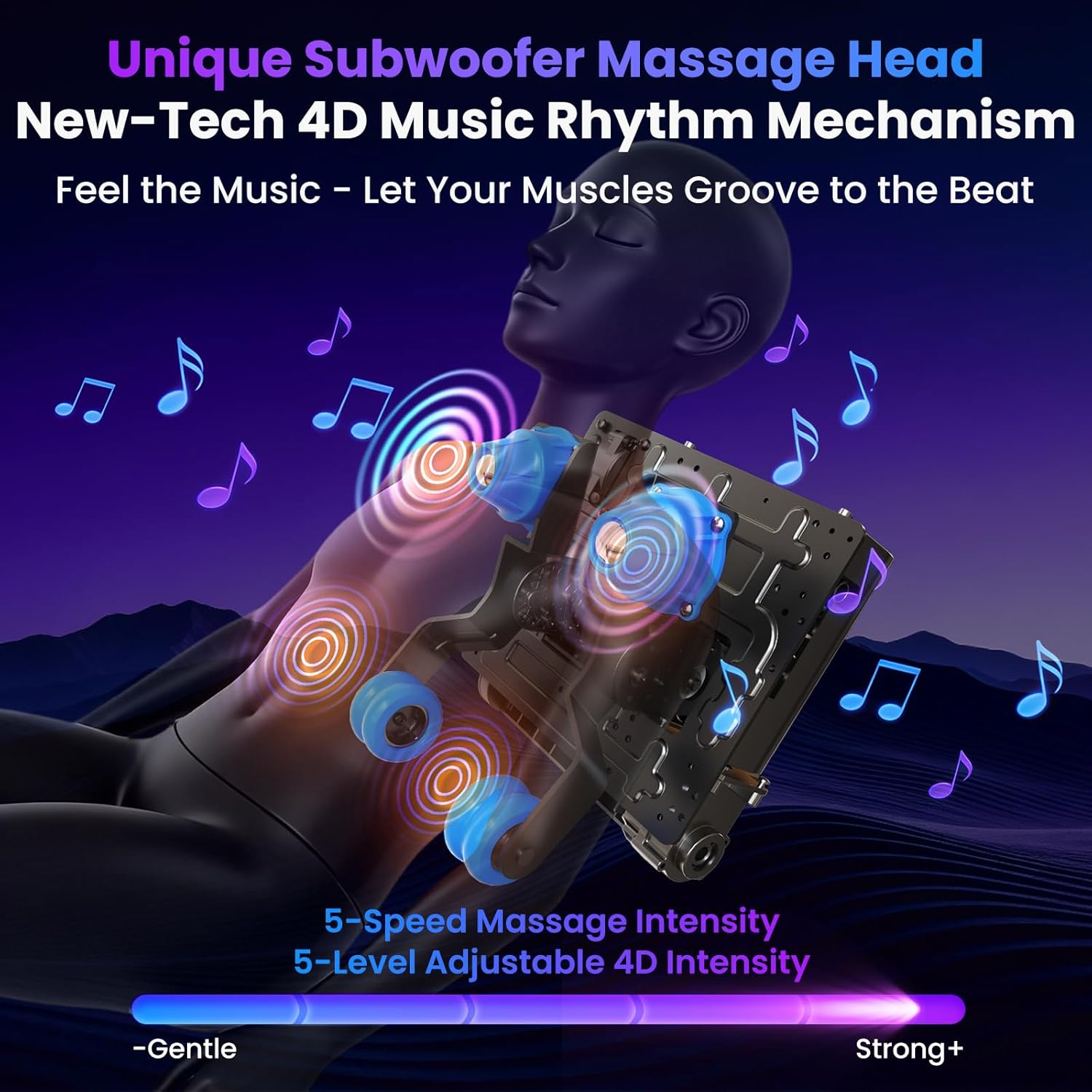
Figure 5.3: Intelligent Operation with Touchscreen and Shortcut Keys.
5.5 Music Rhythm Massage
Connect your device via Bluetooth to the chair's Hi-Fi speakers. The 4D rollers and vibrations will synchronize with the beat of your music, enhancing the massage experience. Choose from built-in sonic modes like Power, Calm, or Sleep Sonic Massage.

Figure 5.4: Unique Subwoofer Massage Head and 4D Music Rhythm Mechanism.
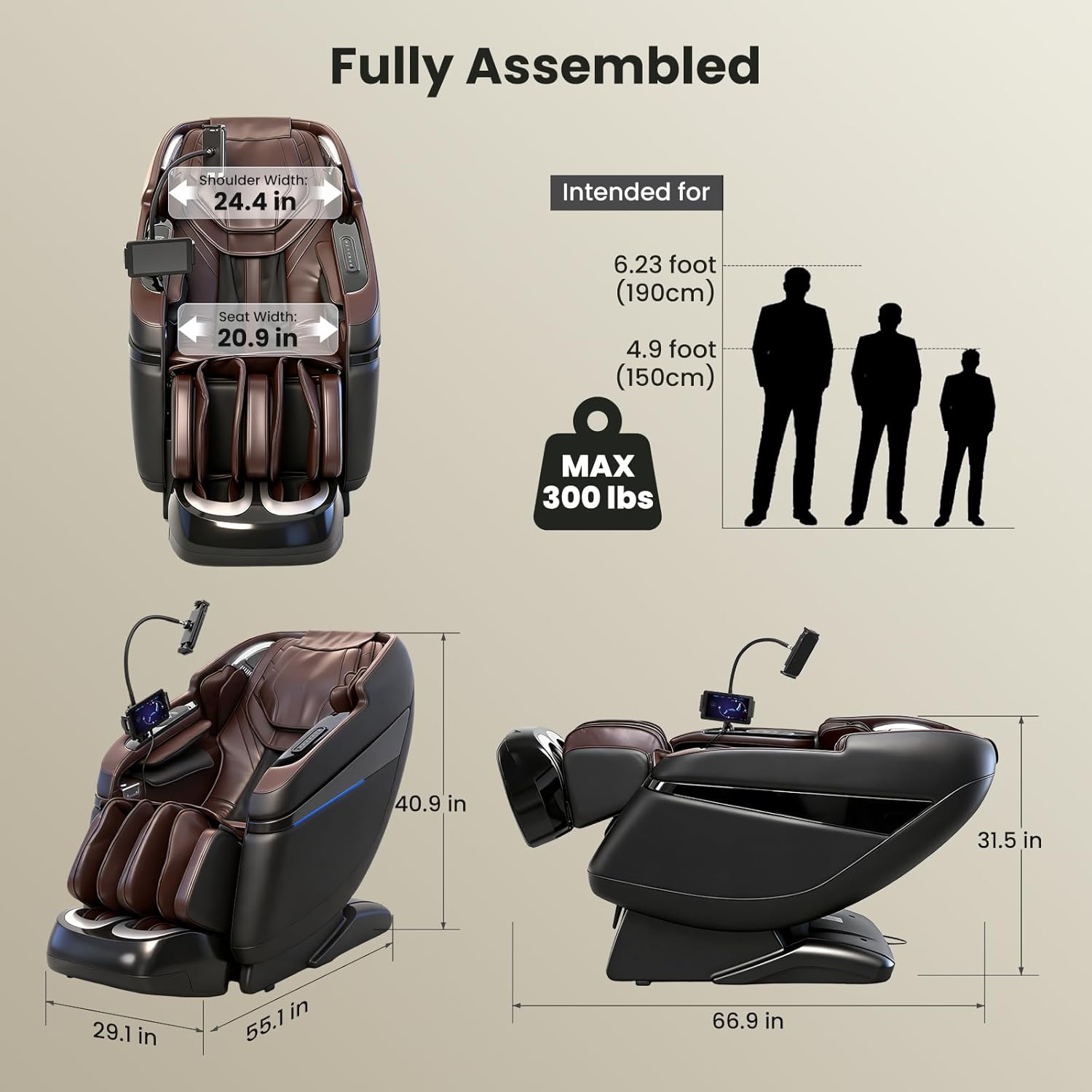
Figure 5.5: Sync with Music Massage in Rhythm.

Figure 5.6: Bluetooth Music & 3 Built-In Sonic Wave Massage Modes.

Figure 5.7: Sleep Sonic Mode for deep, restorative slumber.
5.6 Heat Therapy
Activate the heating functions for your knees, lumbar, and calves via the control panel. The magnetic knee-heating blanket provides soothing warmth to relax muscles and promote circulation.
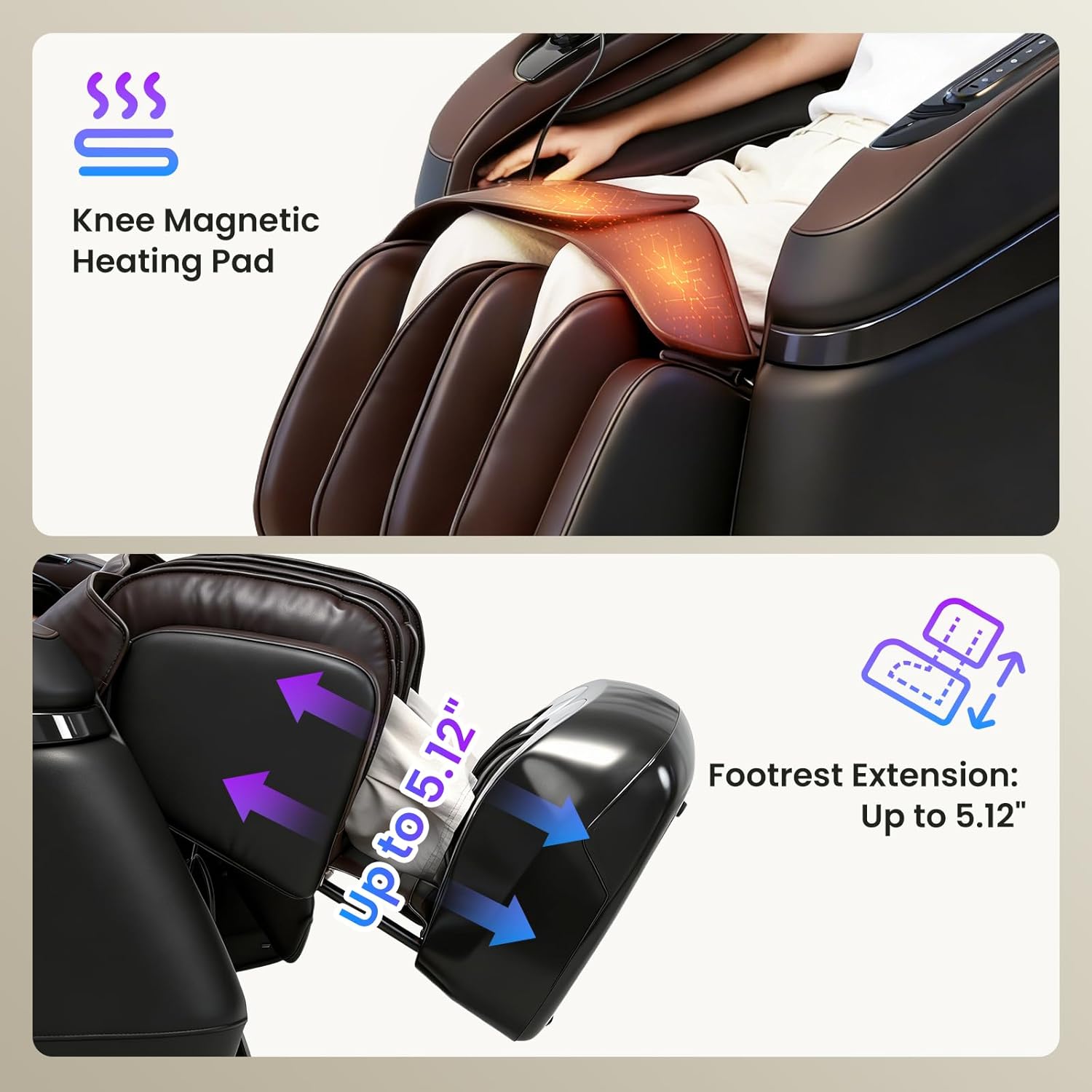
Figure 5.8: Magnetic Knee Heating Pad and Waist Heating.
5.7 Airbag Massage
The chair features full-body airbags in the shoulders, arms, calves, and feet. Adjust the intensity of the compression massage to your preference using the control panel.

Figure 5.9: Full-Body Air Compression Massage.
5.8 Foot Rollers and Footrest Extension
The footrest includes triple-speed foot rollers for a deep-tissue foot massage. The footrest can also extend up to 4 inches (10 cm) to accommodate users of different heights.
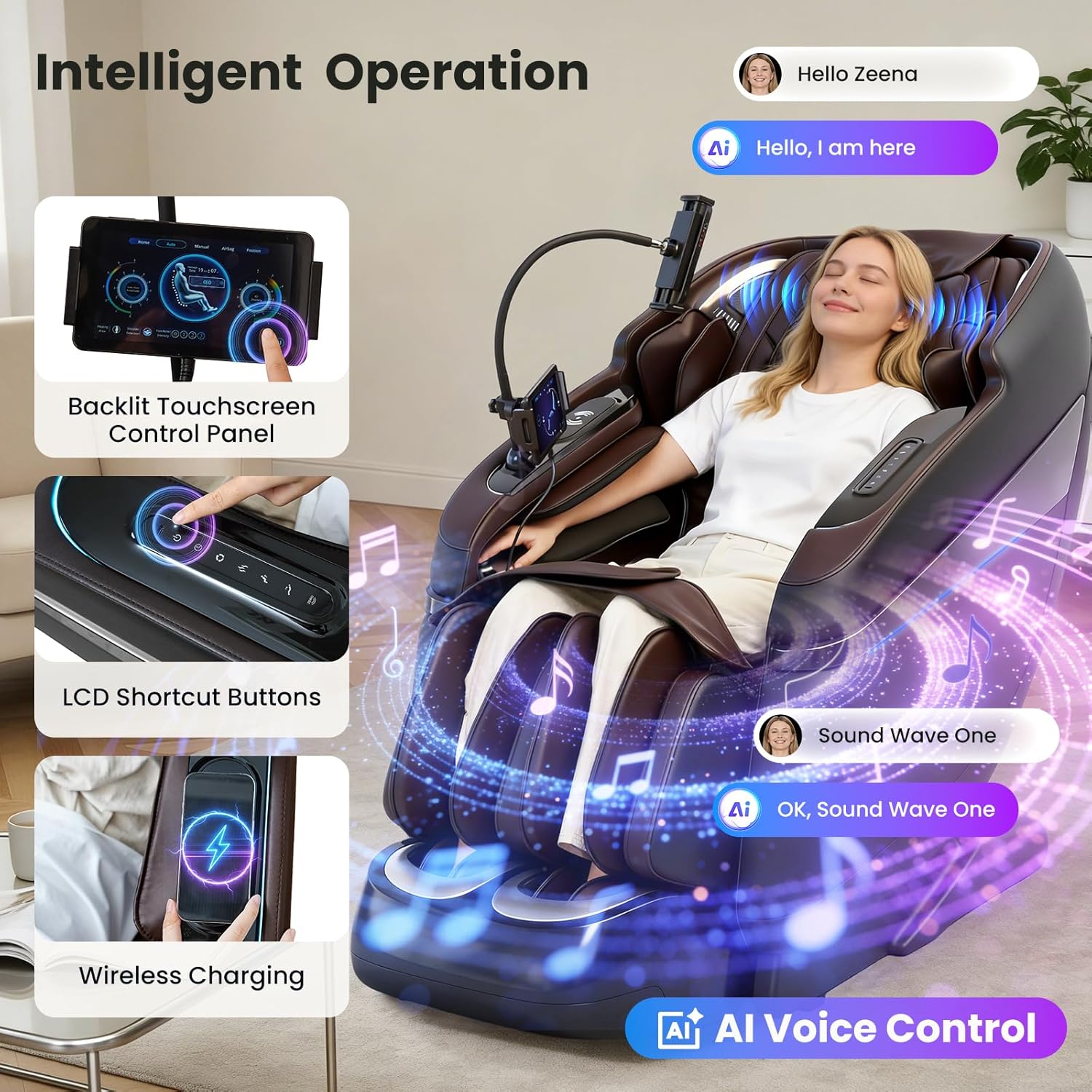
Figure 5.10: Footrest Extension for varied user heights.
5.9 AI Voice Control
Activate AI voice control by saying "Hello Zeena." You can then issue commands such as "Power On," "Zero Gravity On," "Sound Wave One," "Music Add," and more to control various functions hands-free.
5.10 Integrated Convenience Features
- 360° Phone Holder: Securely holds your smartphone for entertainment during massage.
- Bluetooth Joystick: Allows one-finger control for scrolling screens, adjusting volume, and play/pause functions on your connected device.
- Wireless Charging Pad: Conveniently charge compatible devices by placing them on the pad.
- USB and Type-C Ports: Additional charging options for your electronic devices.
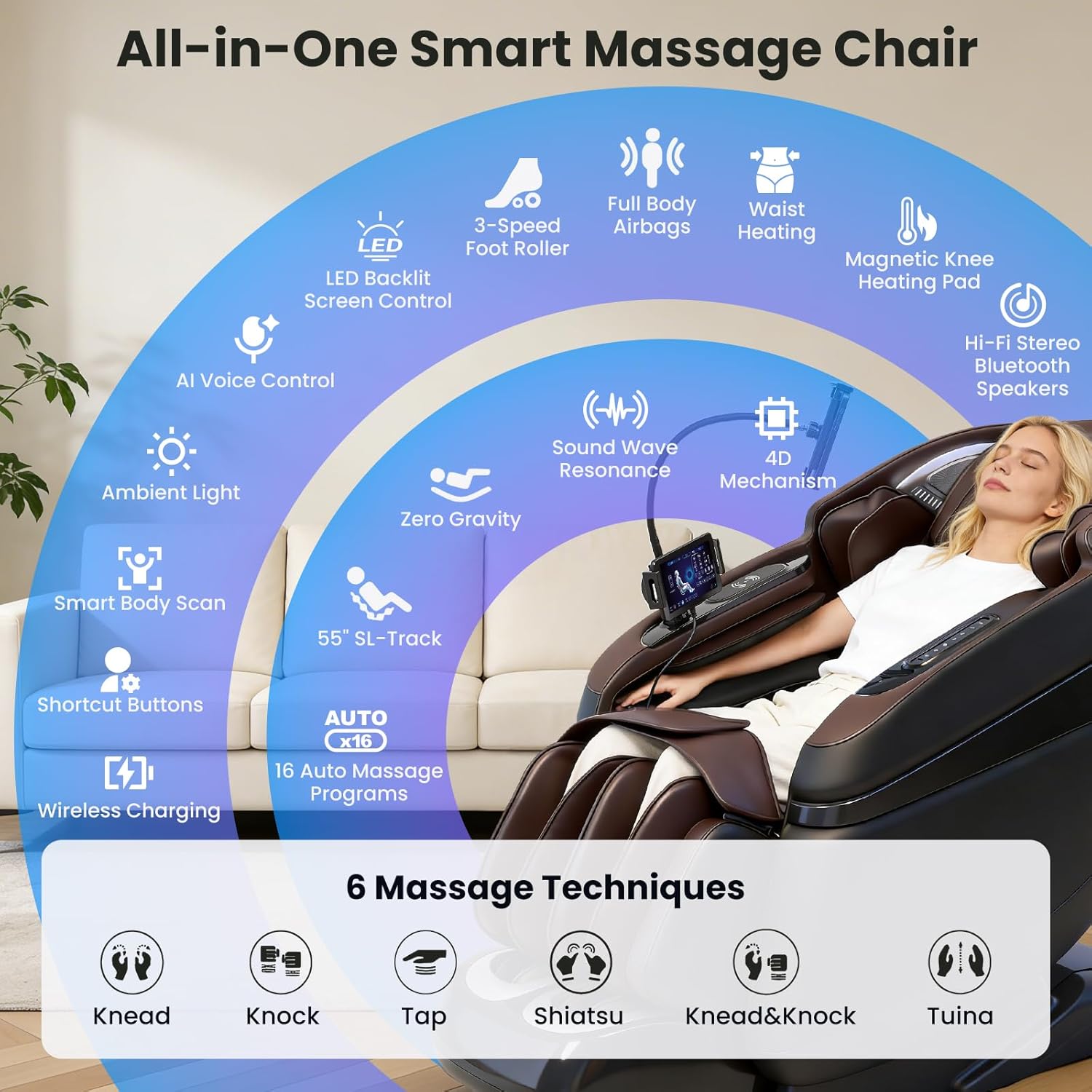
Figure 5.11: Phone Holder, Bluetooth Joystick, and Charging Options.
6. Maintenance
Proper maintenance ensures the longevity and optimal performance of your massage chair.
- Cleaning: Wipe clean the faux leather surfaces with a soft, damp cloth. Avoid using harsh chemicals, abrasive cleaners, or solvents, as these can damage the material.
- Dusting: Regularly dust the chair to prevent accumulation, especially in crevices.
- Storage: If storing the chair for an extended period, ensure it is clean, dry, and covered to protect it from dust and direct sunlight.
- Power Cord: Periodically inspect the power cord for any signs of damage. If damaged, contact customer support immediately.
7. Troubleshooting
If you encounter any issues with your massage chair, refer to the following common troubleshooting steps:
| Problem | Possible Cause | Solution |
|---|---|---|
| Chair does not power on. | Power cord not properly connected; Power outlet malfunction; Main power switch off. | Check power cord connection; Try a different outlet; Ensure main power switch is on. |
| Massage rollers are not moving. | Program not selected; Body scan incomplete; Safety feature activated. | Select a massage program; Ensure body scan completes; Check for obstructions. |
| No heat from heating elements. | Heating function not activated; Faulty heating element. | Activate heating via control panel; If issue persists, contact support. |
| Airbags are not inflating. | Airbag program not selected; Air pressure setting too low. | Select an airbag program; Adjust air pressure intensity. |
| Bluetooth audio not connecting. | Bluetooth not enabled on device; Chair not in pairing mode; Device too far. | Enable Bluetooth on your device; Ensure chair is discoverable; Move device closer. |
| AI Voice Control not responding. | Microphone muted; Incorrect command; Background noise. | Ensure microphone is active; Use precise commands; Reduce ambient noise. |
If the problem persists after attempting these solutions, please contact customer support.
8. Specifications
| Feature | Detail |
|---|---|
| Brand | KTENTITO |
| Model Name | G9 |
| Color | Black |
| Material | Faux Leather, Sponge (Fill Material) |
| Product Dimensions (D x W x H) | 55.12" x 29.13" x 40.94" (140cm x 74cm x 104cm) |
| Item Weight | 160.1 Pounds (72.6 kg) |
| Maximum Weight Recommendation | 300 Pounds (136 kg) |
| Massage Track | 55-inch SL-Track |
| Massage Mechanism | 4D Bionic Rollers |
| Heating Functions | Magnetic Knee Pad, Lumbar, Calf |
| Airbag System | Full Body (Shoulders, Arms, Calves, Feet) |
| Foot Rollers | Triple-Speed |
| Control Interface | LED Backlit Touchscreen, LCD Shortcut Keys, AI Voice Control |
| Connectivity | Bluetooth (for music sync), Wireless Charging, USB, Type-C |
| Assembly Required | No (comes pre-assembled) |
9. Warranty and Support
Your KTENTITO 4D Music Rhythm Massage Chair G9 is covered by a manufacturer's warranty. Please refer to the warranty card included with your purchase for specific terms and conditions, including coverage duration and claim procedures.
For technical assistance, troubleshooting beyond this manual, or warranty claims, please contact KTENTITO customer support through the following channels:
- Website: Visit the official KTENTITO website for support resources and contact information.
- Email: [Insert Customer Support Email Here]
- Phone: [Insert Customer Support Phone Number Here]
Please have your product model number (G9) and proof of purchase ready when contacting support.