
Introduction
This manual provides instructions for the setup, operation, and maintenance of your PZL Replacement Remote Control, specifically designed for the Magnavox MM442 3-Piece CD Shelf System Home Stereo System. Please read this manual thoroughly before using the remote control to ensure proper functionality and to maximize your user experience.
Package Contents
- 1 x PZL Replacement Remote Control
Setup
Installing Batteries
The remote control requires two CR2025 3V Lithium button batteries (not included). Follow these steps to install them:
- Locate the battery compartment on the back of the remote control.
- Gently push the release tab and slide the battery cover open.
- Insert the two CR2025 batteries according to the polarity indicators (+ and -) inside the compartment. Ensure the positive (+) side faces upwards.
- Slide the battery cover back into place until it clicks securely.

Image: Back of the remote control with the battery compartment open, indicating CR2025 battery installation.
Once batteries are installed, the remote control is ready for use. No programming or pairing is required.
Operating Instructions
Basic Functions
The PZL Replacement Remote Control utilizes infrared technology to communicate with your Magnavox MM442 system. Ensure a clear line of sight between the remote control and the stereo system's infrared receiver for optimal performance. The effective control distance is over 26 feet (8 meters) with an angle of more than 120 degrees.
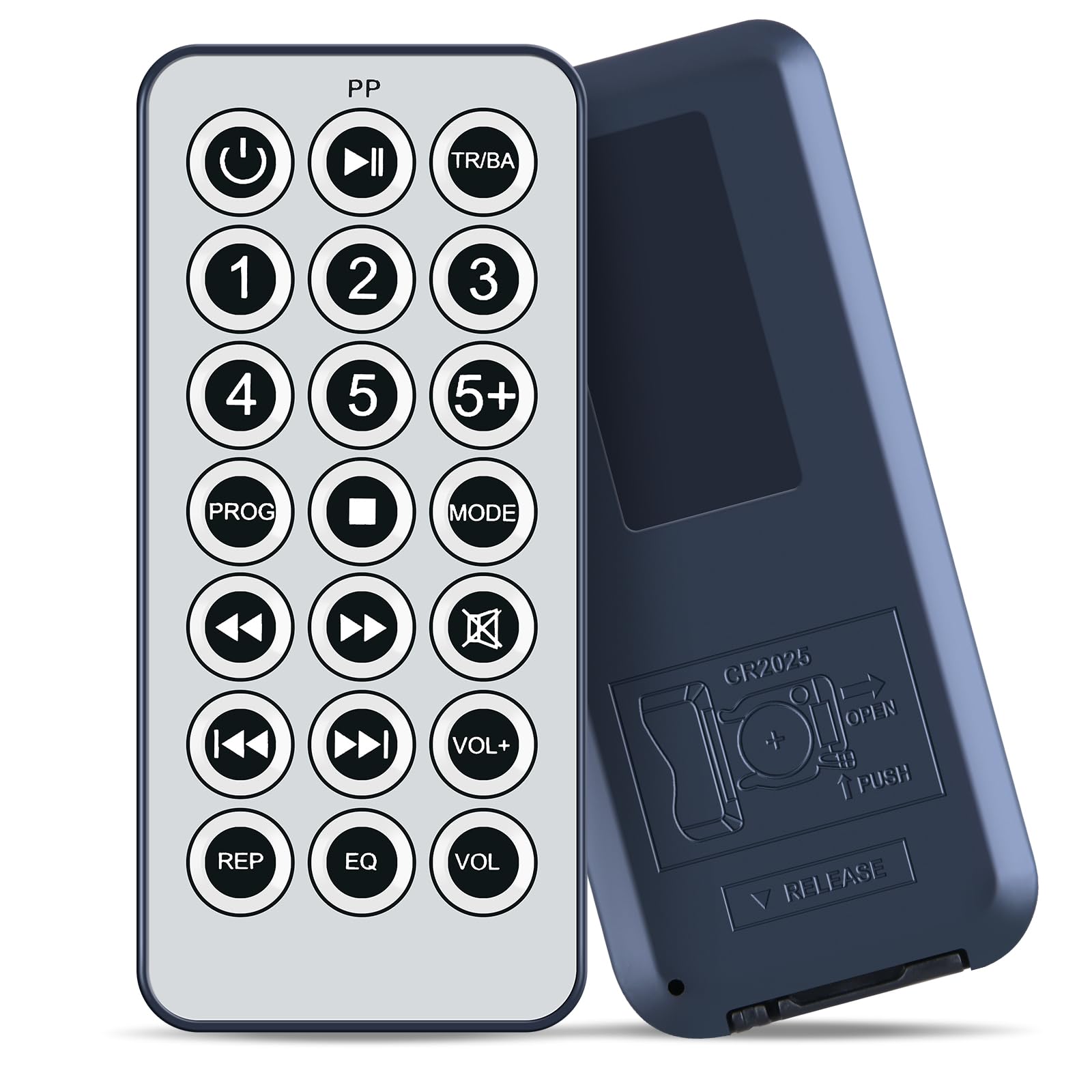
Image: Remote control in use, demonstrating its long-distance infrared capability.
Button Functions
Refer to the image below for the layout of the remote control buttons and their corresponding functions:

Image: Front view of the remote control displaying all buttons and their labels, including overall dimensions.
- Power (⏻): Turns the stereo system on or off.
- Play/Pause (⏸️/⏸️): Starts or pauses playback.
- Stop (⏹️): Stops playback.
- TR/BA: Function for track or bass adjustment (specific to MM442 system).
- Number Buttons (1-5, 5+): Direct track selection or input selection.
- PROG (Program): Used for programming CD tracks.
- MODE: Cycles through different playback modes (e.g., repeat, shuffle).
- Navigation Arrows (◀️, ▶️, ▲️, ▼️): Navigate menus or adjust settings.
- Skip/Search (⏮️, ⏭️): Skips tracks or fast forwards/rewinds.
- Mute (🔇): Mutes or unmutes the audio.
- VOL+ / VOL-: Increases or decreases the volume.
- REP (Repeat): Repeats the current track or entire disc.
- EQ (Equalizer): Adjusts sound equalizer settings.
- VOL: Volume control (may be redundant with VOL+/-, depending on system).
Maintenance
To ensure the longevity and proper functioning of your remote control, follow these maintenance guidelines:
- Cleaning: Use a soft, dry cloth to clean the remote control. Do not use liquid cleaners or abrasive materials, as they may damage the surface or internal components.
- Battery Replacement: Replace batteries promptly when the remote control becomes unresponsive or its range decreases. Always use new CR2025 batteries.
- Storage: Store the remote control in a cool, dry place away from direct sunlight and extreme temperatures. If not used for an extended period, remove the batteries to prevent leakage.
- Avoid Drops: Protect the remote control from drops and impacts, which can damage its internal circuitry.
Troubleshooting
If you experience issues with your remote control, try the following troubleshooting steps:
- Remote Not Responding: Ensure the batteries are correctly installed with the correct polarity. Replace old batteries with new ones.
- Limited Range or Intermittent Functionality: Check for any obstructions between the remote control and the stereo system's infrared receiver. Ensure you are within the effective operating range (approximately 26 feet).
- Specific Buttons Not Working: Clean the remote control surface, especially around the unresponsive buttons, to remove any dirt or debris that might be interfering.
- System Not Powering On/Off: Confirm that the stereo system itself is plugged in and receiving power.
If these steps do not resolve the issue, please contact customer support for further assistance.
Specifications
| Feature | Detail |
|---|---|
| Brand | PZL |
| Compatible Devices | Magnavox MM442 3-Piece CD Shelf System Home Stereo System |
| Connectivity Technology | Infrared (IR) |
| Max Number of Supported Devices | 1 |
| Special Feature | Ergonomic design |
| Color | Black |
| Item Weight | 1.92 ounces (approx. 54 grams) |
| Package Dimensions | 1.5 x 1 x 0.6 inches (approx. 3.8 x 2.5 x 1.5 cm) |
| Batteries Required | 2 x CR2025 (not included) |
Warranty and Support
PZL is committed to providing quality products and customer satisfaction. If you have any questions regarding your PZL Replacement Remote Control or encounter any issues that cannot be resolved using the troubleshooting guide, please contact our customer service. We aim to provide timely service within 24 hours for all inquiries.
Please retain your purchase receipt as proof of purchase for any warranty claims or support requests.