
SakerPlus CP100441
SakerPlus Electric Aquarium Gravel Cleaner (Model CP100441) User Manual
Comprehensive instructions for setting up, operating, maintaining, and troubleshooting your SakerPlus Electric Aquarium Gravel Cleaner.
Product Overview
The SakerPlus Electric Aquarium Gravel Cleaner is a multi-functional device designed to simplify aquarium maintenance. It combines six essential functions: water changing, gravel cleaning, debris removal, water filtration, showering, and flow control. This manual provides detailed instructions for its safe and effective use.

Image 1: The SakerPlus Electric Aquarium Gravel Cleaner, showing the main pump unit, telescopic tube, and a flexible hose.
Package Contents
Before assembly, ensure all components are present and undamaged. The package typically includes:
- Main pump unit
- Telescopic tube
- Water outlet hose
- Gravel cleaning nozzle
- Filter bag
- Shower head attachment
- Flow control valve
- Power adapter
- Other connectors and accessories

Image 2: All included components of the SakerPlus Electric Aquarium Gravel Cleaner laid out, including the main unit, various nozzles, hoses, and attachments.
Setup and Assembly
- Connect the Telescopic Tube: Attach the telescopic tube to the main pump unit. Ensure it clicks securely into place. Adjust the length of the tube according to your aquarium's depth by twisting and extending/retracting, then locking it.
- Attach Desired Nozzle: For gravel cleaning, attach the gravel cleaning nozzle to the bottom of the pump unit. For water changing, attach the water outlet hose to the designated port.
- Install Filter Bag: If using for filtration or debris removal, ensure the filter bag is properly installed on the pump unit's intake.
- Position in Aquarium: Carefully place the assembled cleaner into your aquarium. Ensure the pump unit is fully submerged if using for water circulation or gravel cleaning.
- Connect Power: Plug the power adapter into a suitable electrical outlet. Ensure your hands are dry before handling electrical connections.
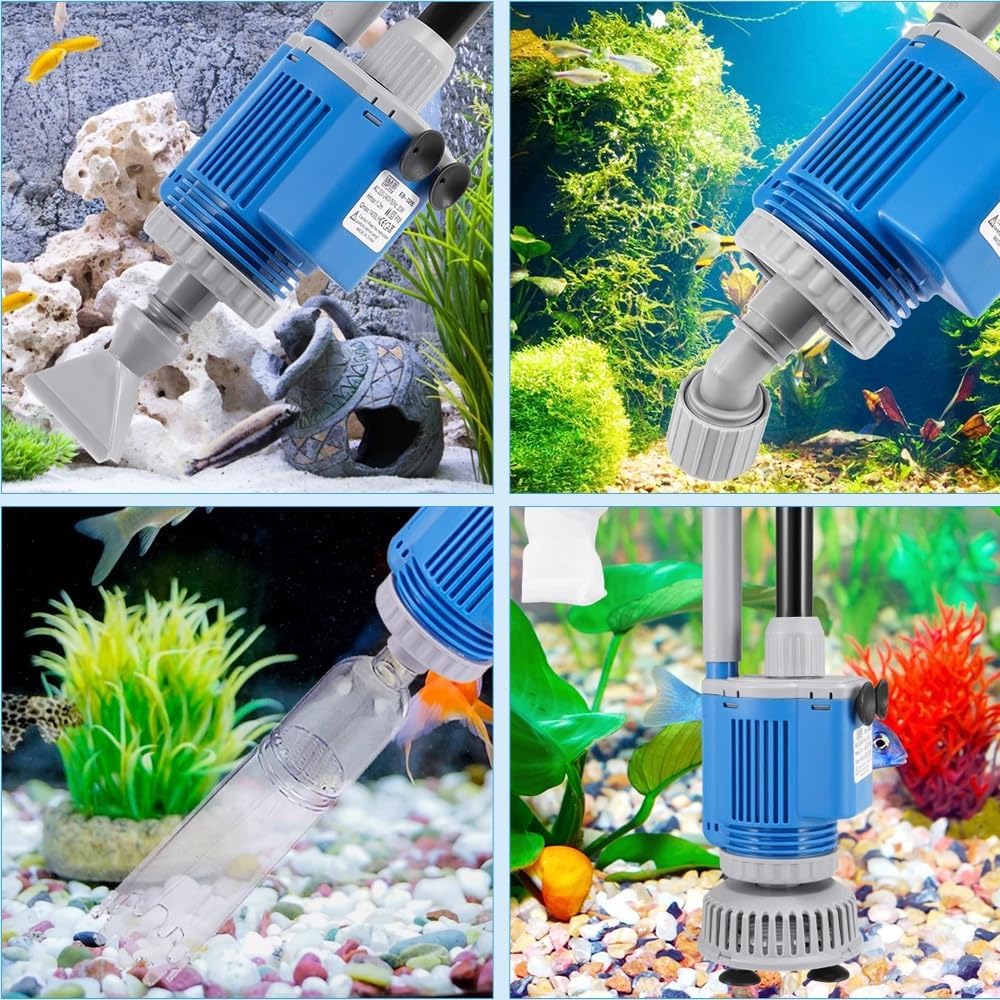
Image 3: A close-up view of the SakerPlus Electric Aquarium Gravel Cleaner showing its various components and how they connect, illustrating the assembly process.
Operating Instructions
The SakerPlus cleaner offers multiple functions. Select the appropriate setup for your task.
1. Gravel Cleaning and Debris Removal
- Attach the gravel cleaning nozzle and filter bag.
- Submerge the pump unit and nozzle into the gravel.
- Turn on the device. The strong suction will lift gravel, allowing debris to be trapped in the filter bag while clean gravel falls back down.
- Move the nozzle slowly across the aquarium substrate to clean thoroughly.

Image 4: The SakerPlus cleaner in action, demonstrating its gravel cleaning capability by siphoning debris from the substrate while leaving the gravel behind.
2. Water Changing
- Attach the water outlet hose to the pump unit and direct the other end into a bucket or drain.
- Submerge the pump unit in the aquarium water.
- Turn on the device. The pump will begin to drain water from the aquarium.
- Use the adjustable flow control valve to manage the water flow rate.
- Monitor the water level to avoid draining too much water.

Image 5: A comparison image showing traditional manual water changing versus using the SakerPlus Electric Aquarium Gravel Cleaner for efficient water removal.
3. Water Filtration and Showering
- For water filtration, ensure the filter bag is clean and properly installed. The pump will circulate water through the filter bag, removing suspended particles.
- For showering, attach the shower head attachment to the water outlet. This can be used to gently aerate the water or rinse decorations.
Maintenance
Regular maintenance ensures optimal performance and longevity of your SakerPlus cleaner.
- Clean Filter Bag: After each use, remove and thoroughly rinse the filter bag under clean running water. Replace if heavily soiled or damaged.
- Rinse Components: Disassemble the telescopic tube and nozzles. Rinse all parts with clean water to remove any residue or debris.
- Check for Clogs: Periodically inspect the pump intake and impeller for any blockages from large debris. Clear any obstructions carefully.
- Storage: Store the cleaner in a clean, dry place away from direct sunlight when not in use.
Troubleshooting
| Problem | Possible Cause | Solution |
|---|---|---|
| No Power / Not Turning On |
|
|
| Low Suction Power |
|
|
| Water Leaking |
|
|
Specifications (Model CP100441)
- Brand: SakerPlus
- Model Name: CP100441
- Item Weight: 1.87 pounds
- Item Package Dimensions L x W x H: 14.96 x 5.91 x 3.35 inches
- Pump Power: 28W
- Flow Rate: 2000L/H
- Specific Uses: Indoor aquarium maintenance
- Included Components: Aquarium Gravel Cleaner (main unit and accessories)
Warranty and Support
The SakerPlus Electric Aquarium Gravel Cleaner (Model CP100441) comes with a 3-year warranty covering manufacturing defects. For technical assistance, troubleshooting, or warranty claims, please contact SakerPlus customer support. Professional technical support is available 24/7.
For further assistance, please visit the SakerPlus Store on Amazon.
Ask a question about this manual
Ask about setup, troubleshooting, compatibility, parts, safety, or missing instructions. Manuals+ will review the question and use this page’s manual context to help answer it.