
1. Product Overview
The EOQIFJM MF-X51 Portable Water Quality Tester is a versatile 5-in-1 device designed for accurate measurement of pH, EC (Electrical Conductivity), TDS (Total Dissolved Solids), Salinity, and Temperature. It features a highly sensitive probe with automatic temperature compensation and a high-contrast VA display for easy reading.

Image: The EOQIFJM MF-X51 Portable Water Quality Tester, showing its compact design and display.

Image: Diagram illustrating the 5-in-1 capabilities of the MF-X51 meter: pH, EC, TDS, Salt, and Temperature measurement.
2. Package Contents
Upon opening the package, please verify that all the following items are included:
- 1 x Water Quality Tester (MF-X51)
- 1 x User Manual (this document)
- 3 x pH Calibration Powder (for pH 4.00, 6.86, and 9.18)

Image: Contents of the MF-X51 package, including the tester, user manual, and pH calibration powders.
3. Setup and Battery Installation
The MF-X51 tester is powered by 4 x 1.5V LR44 button cells. These batteries are included and pre-installed. If replacement is needed:
- Locate the battery compartment at the top of the device.
- Unscrew the battery compartment cap.
- Insert four LR44 button cells, ensuring correct polarity (+/-).
- Securely screw the cap back on to maintain the IP67 waterproof rating.
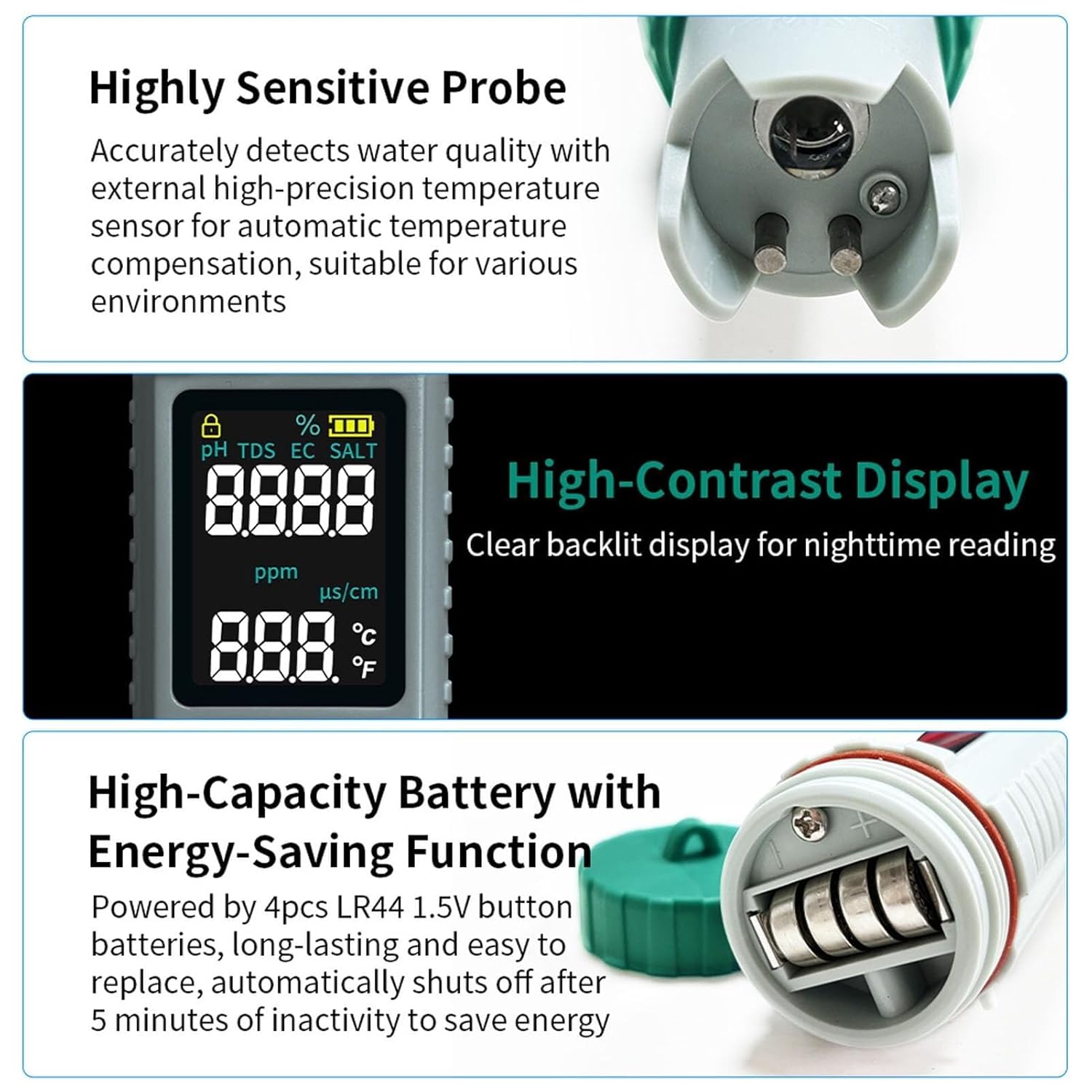
Image: Close-up view of the MF-X51's highly sensitive probe, high-contrast display, and the battery compartment with LR44 batteries.
4. Operating Instructions
Follow these steps for accurate measurements:
- Power On: Gently rotate to open the protective cap. Press the ON/OFF button to power on the device. The screen will display pH/Temp.
- Immersion: Immerse the test pen electrode into the solution to be tested. The solution level should not exceed the immersion line. Stir gently and wait briefly until the reading stabilizes, then record the value.
- Switching Temperature Units: Press and hold the HOLD/TEMP button to switch between temperature mode and read temperature value in Celsius or Fahrenheit.
- Switching Measurement Modes: Press the MODE/CAL button to switch between pH, EC, TDS, and SALT modes.

Image: Illustration of the MF-X51 display after powering on, showing pH and temperature readings.

Image: Chart showing the TDS reference range and corresponding water quality interpretations.

Image: Chart illustrating the pH level scale from 0-14.00pH, indicating acidity and alkalinity.

Image: Diagram explaining the automatic temperature compensation feature of the MF-X51, which ensures accuracy across different temperatures.
5. Calibration
Regular calibration ensures the accuracy of your MF-X51 tester. pH calibration is crucial and powder is provided.
pH Calibration:
- Prepare the pH buffer solutions using the provided powders (pH 4.00, pH 6.86, pH 9.18) according to their instructions.
- Immerse the electrode in the first pH buffer solution (e.g., pH 6.86).
- Press and hold the MODE/CAL button for 3 seconds. The screen will flash for 3 seconds indicating successful calibration.
- Rinse the electrode with distilled water and dry it gently.
- Repeat the process for other pH buffer solutions (e.g., pH 4.00 and pH 9.18) as needed for higher accuracy across the range.
Image: Visual guide for the pH calibration process, showing the display after successful calibration at pH 4.00, 6.86, and 9.18.
6. Maintenance
- Electrode Cleaning: After each use, rinse the electrode thoroughly with distilled water to prevent contamination and ensure accurate readings.
- Storage: Always replace the protective cap after use. Store the tester in a cool, dry place. Do not store the electrode dry; keep it moist with a few drops of storage solution or distilled water in the cap.
- Battery Replacement: Replace batteries when the display becomes dim or the device fails to power on.
- Automatic Shut-off: The device features an energy-saving function that automatically shuts off after 5 minutes of inactivity.
7. Troubleshooting
| Problem | Possible Cause | Solution |
|---|---|---|
| Inaccurate readings | Electrode is dirty or dry; Calibration is needed; Battery low. | Clean the electrode; Perform calibration; Replace batteries. |
| Device does not power on | Batteries are dead or incorrectly installed. | Check battery polarity; Replace batteries. |
| Display is dim | Low battery. | Replace batteries. |
| Readings fluctuate excessively | Insufficient immersion; Air bubbles on electrode; Contaminated sample. | Ensure proper immersion; Gently tap to remove bubbles; Use a clean sample. |
8. Specifications

Image: Detailed diagram of the MF-X51 highlighting its components and key specifications.
| Parameter | Value |
|---|---|
| Model | MF-X51 |
| pH Range | 0-14.00 pH |
| EC Range | 0-10000 µs/cm, 10-400 mS/cm (Effective range 1-200 mS/cm) |
| TDS Range | 0-10000 ppm, 10-200 ppt (Effective range 1-100 ppt) |
| Salinity Range | 0-10000 ppm, 10-200 ppt (0.1%-25%) |
| Temperature Range | 0-60°C / 32-140°F |
| Accuracy | ±2% F.S. |
| Waterproof Rating | IP67 |
| Display | VA screen |
| Battery | 4 x 1.5V LR44 button cells |
| Auto Sleep | 5 minutes |
| Net Weight | 109g |
| Dimensions | Φ40*118.25mm |
9. Warranty and Support
For warranty information and technical support, please refer to the contact details provided by your retailer or visit the official EOQIFJM website. Keep your purchase receipt as proof of purchase.