
1. Introduction
This manual provides detailed instructions for the assembly, operation, and maintenance of your Haewon Vanity Desk. Please read all instructions carefully before assembly and use to ensure safe and proper functionality. Keep this manual for future reference.

Image 1.1: The Haewon Vanity Desk, featuring an LED mirror, multiple drawers, and a matching stool.
2. Safety Information
- Ensure all parts are present and undamaged before beginning assembly.
- Assemble the unit on a soft, clean surface to prevent scratches.
- Do not overtighten screws during assembly to avoid damaging the material.
- Keep small parts away from children to prevent choking hazards.
- Only use the provided power cord and ensure it is properly connected to a suitable power outlet.
- Do not expose the electrical components (mirror lights, power outlet) to water or excessive moisture.
- Avoid placing heavy objects on the desk or shelves that exceed their weight capacity.
3. Assembly Instructions
The Haewon Vanity Desk requires assembly. Each part is clearly labeled, and step-by-step instructions are included in the packaging. For optimal assembly, it is recommended to have two people. Please follow the provided graphical instructions carefully.
- Unpack all components and verify against the parts list.
- Identify all hardware and tools required for assembly.
- Follow the numbered steps in the instruction manual to connect the desk frame, drawers, and mirror unit.
- Securely attach the LED mirror to the desk structure.
- Assemble the accompanying stool.
- Once assembled, ensure all connections are tight and the desk is stable before use.
4. Operating Instructions
4.1 LED Mirror Operation
The integrated LED mirror features three color modes and adjustable brightness to suit various lighting needs.
- Power On/Off: Locate the touch sensor on the mirror surface. Tap once to turn the lights on or off.
- Change Color Mode: With the lights on, tap the touch sensor repeatedly to cycle through the three color modes: Cold White, Warm White, and Warm Yellow.
- Adjust Brightness: To adjust brightness, press and hold the touch sensor. The brightness will gradually increase or decrease. Release the sensor when the desired brightness level is reached.

Image 4.1: Diagram illustrating the three color modes (Cold White, Warm White, Warm Yellow) and brightness adjustment for the LED mirror.

Image 4.2: The vanity desk with its LED mirror illuminated, showcasing its functionality.
4.2 Power Outlet Usage
The vanity desk is equipped with a built-in power outlet for convenient charging of devices and powering styling tools.
- The power outlet includes 1 AC outlet (120V/12A) and 2 USB ports (5V/2A).
- Connect the vanity desk's power cord to a standard wall outlet.
- Plug in your electronic devices or styling tools into the AC outlet or USB ports as needed.
- Ensure devices are compatible with the provided voltage and current specifications.

Image 4.3: Close-up view of the built-in power outlet, showing the AC and USB ports for charging and powering devices.
5. Storage Features
The Haewon Vanity Desk offers ample storage solutions to keep your essentials organized.
- Spacious Drawers: Two large drawers are located beneath the main tabletop, ideal for storing larger items like hair tools or makeup palettes.
- Tabletop Drawers: Two smaller, convenient drawers are positioned on the tabletop, perfect for smaller cosmetics, jewelry, or accessories.
- Open Display Shelf: An open shelf provides space for decorative items or frequently used products.
- Hidden Storage Stool: The accompanying stool features a lift-top design, revealing a hidden compartment for additional storage of small items.
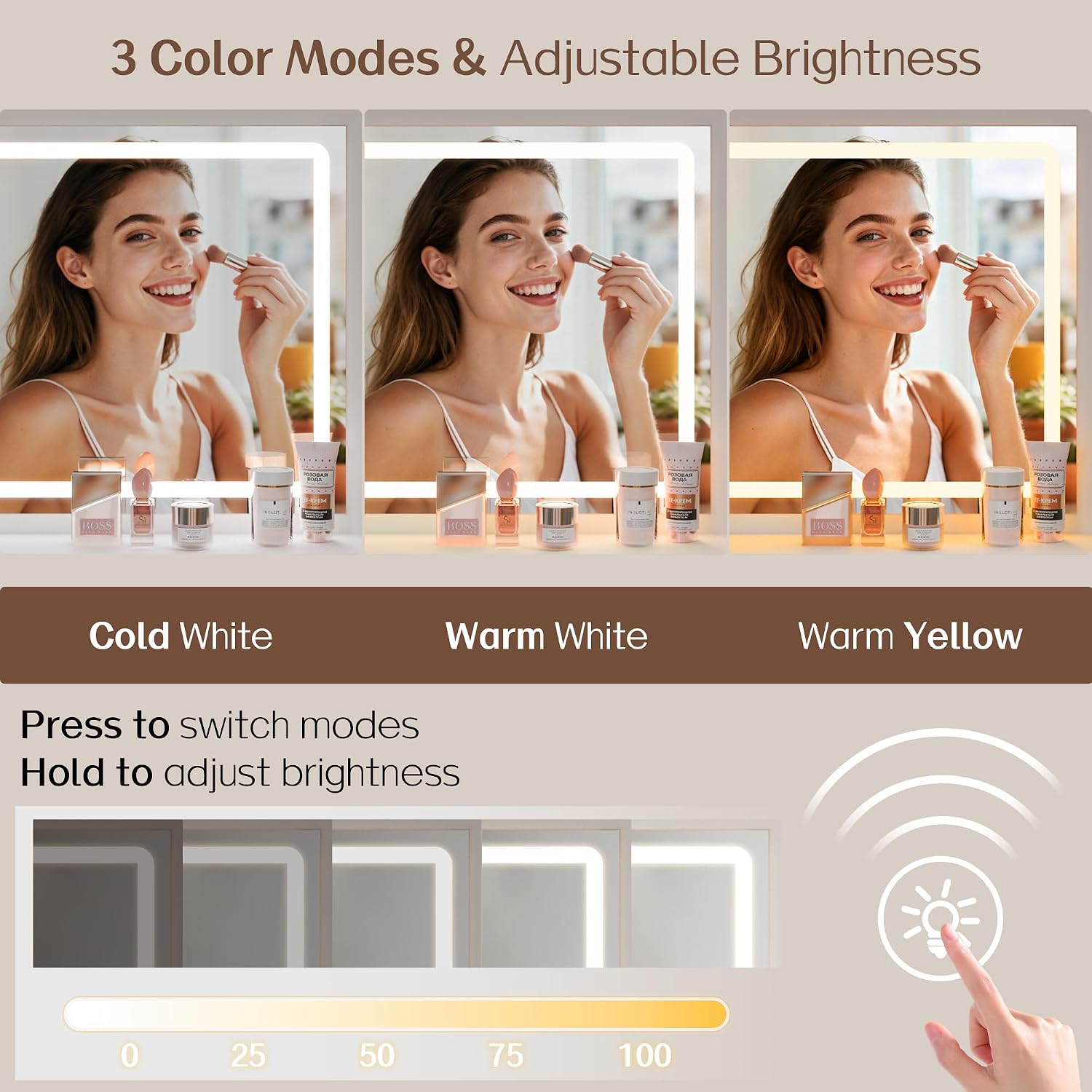
Image 5.1: View of the vanity desk with drawers open, demonstrating the ample storage space for cosmetics and accessories.

Image 5.2: The vanity stool with its top lifted, revealing a hidden storage compartment for personal items.
6. Maintenance
To ensure the longevity and appearance of your Haewon Vanity Desk, follow these maintenance guidelines:
- Cleaning: Wipe surfaces with a soft, damp cloth. Avoid abrasive cleaners or harsh chemicals that may damage the finish.
- Mirror Care: Clean the mirror surface with a glass cleaner and a lint-free cloth. Do not spray cleaner directly onto the mirror to prevent liquid from seeping into the LED components.
- Spills: Immediately wipe up any spills to prevent staining or damage to the engineered wood.
- Hardware: Periodically check and tighten all screws and fasteners to maintain stability.
- Placement: Avoid placing the desk in direct sunlight or near heat sources to prevent warping or discoloration.
7. Troubleshooting
If you encounter any issues with your vanity desk, refer to the following common solutions:
- LED Mirror Not Lighting Up:
- Ensure the power cord is securely plugged into both the desk and a working wall outlet.
- Check if the wall outlet is functional by plugging in another device.
- Verify that the touch sensor is clean and unobstructed.
- Power Outlet Not Working:
- Confirm the main power cord is properly connected.
- Test the AC outlet and USB ports with different devices to rule out device-specific issues.
- Desk Feels Unstable:
- Recheck all assembly screws and tighten any that are loose.
- Ensure the desk is placed on a flat, even surface.
- Drawers Not Sliding Smoothly:
- Check for any obstructions in the drawer slides.
- Ensure the drawer slides are properly aligned and installed according to the assembly instructions.
If problems persist, please contact customer support for further assistance.
8. Specifications
| Feature | Specification |
|---|---|
| Brand | Haewon |
| Model Number | vanity desk |
| Material | Engineered Wood |
| Product Dimensions (D x W x H) | 14.95" x 31.51" x 55.11" |
| Item Weight | 42 pounds |
| LED Mirror Light Modes | 3 (Cold White, Warm White, Warm Yellow) |
| Power Outlet | 1 AC Outlet (120V/12A), 2 USB Ports (5V/2A) |
| Assembly Required | Yes |

Image 8.1: Detailed dimensions diagram of the Haewon Vanity Desk and its accompanying stool.
9. Warranty and Support
For any questions, concerns, or assistance with your Haewon Vanity Desk, please contact Haewon customer support. Refer to your purchase documentation for specific warranty details and contact information. Our team is ready to help ensure your satisfaction.
You can typically find support contact information on the manufacturer's website or through the retailer where the product was purchased.