
Nafnti BIRD-V8-1.2L
Nafnti Smart Bird Feeder (Model BIRD-V8-1.2L) Instruction Manual
Your Guide to Smart Birdwatching
1. Introduction
Thank you for choosing the Nafnti Smart Bird Feeder. This advanced device combines a traditional bird feeder with a high-definition camera, AI bird identification, and smart connectivity to bring the wonders of nature directly to your smartphone. Enjoy real-time birdwatching, capture stunning photos and videos, and learn about the diverse bird species visiting your backyard.

Image 1: The Nafnti Smart Bird Feeder, showcasing its integrated camera and solar panel.
2. Safety Information
- Ensure the feeder is securely mounted to prevent it from falling and causing injury or damage.
- Keep the device away from open flames or extreme heat sources.
- Do not attempt to disassemble or modify the device, as this may void the warranty and pose safety risks.
- Use only the provided charging cable or a certified equivalent for USB charging.
- Keep small parts out of reach of children to prevent choking hazards.
- Regularly inspect the feeder for any damage or wear and tear.
3. Setup Guide
3.1 Unboxing and Components
Before assembly, ensure all components are present:
- Nafnti Smart Bird Feeder main unit
- Integrated 2K Camera
- Solar Panel (built-in to roof)
- Mounting Kit (screws, wall anchors, strap)
- Perch/Feeding Tray
- Hummingbird Feeder / Water Container
- USB Charging Cable
- Instruction Manual
3.2 Initial Camera Setup & Charging
- Carefully remove the camera module from the feeder housing.
- Connect the camera to the provided USB charging cable and charge it fully (approximately 4 hours for initial charge).
- While charging, download the companion app by scanning the QR code in the manual or on the product packaging.
- Follow the in-app instructions to pair the camera with your smartphone and connect it to your 2.4GHz or 5GHz Wi-Fi network.
- Once charged and connected, reinsert the camera module securely into its designated slot within the feeder.
3.3 Assembly of Feeder Components
- Attach the perch/feeding tray to the bottom of the main feeder unit using the provided screws.
- If desired, attach the hummingbird feeder or water container to the designated slots on the perch.

Image 2: Removable camera, perch, and optional hummingbird/water feeder attachments.
3.4 Filling the Feeder
- Lift the solar panel roof to access the seed reservoir.
- Pour your preferred birdseed into the reservoir. The wide opening facilitates easy refilling without spillage.
- Close the solar panel roof securely.

Image 3: Demonstrating the easy refilling process of the bird feeder.
3.5 Mounting Options
The Nafnti Smart Bird Feeder offers flexible mounting options:
- Wall Mount: Use the provided template to mark drill holes. Secure the mounting bracket to a wall using screws and anchors. Hang the feeder onto the bracket.
- Pole Mount: Attach the mounting bracket to a 1-inch diameter pole using the provided clamps. Secure the feeder onto the bracket.
- Tree Mount: Use the long strap to secure the feeder directly to a tree trunk or sturdy branch.
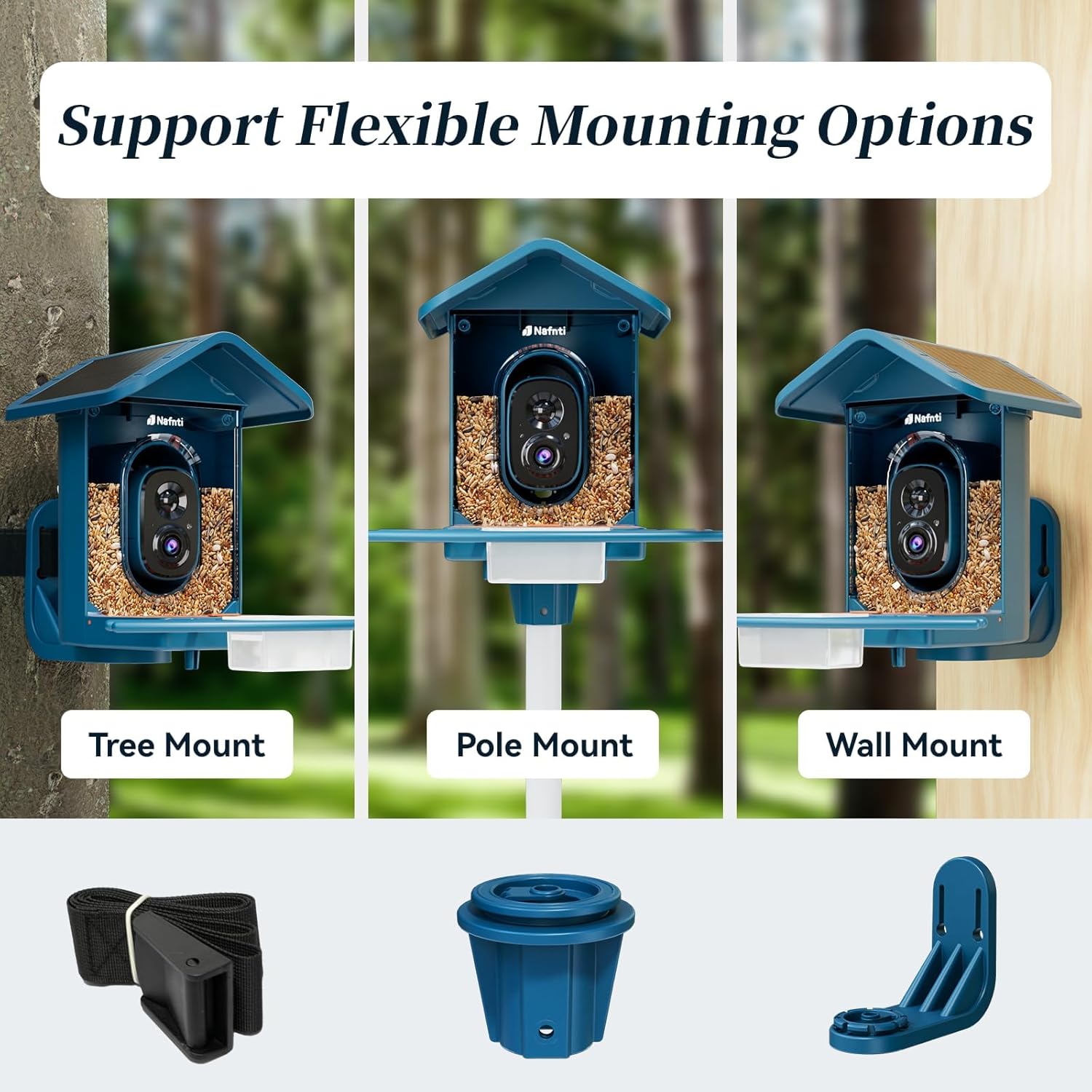
Image 4: Visual guide for tree, pole, and wall mounting configurations.
Video 1: Official Nafnti video demonstrating the assembly and installation process of the bird feeder camera.
4. Operating Instructions
4.1 App Features Overview
The Nafnti app provides comprehensive control and viewing options for your smart bird feeder:
- 2K Live View: Access a real-time, high-definition video stream from your feeder anytime, anywhere.
- Color Night Vision: The camera provides clear, vivid images and videos even in low-light conditions.
- AI Bird Identification: The advanced AI can identify over 10,000 bird species, providing details about each visitor. (30-day free trial, subscription required thereafter).
- Instant Notifications: Receive real-time alerts on your smartphone when a bird is detected, complete with a quick preview.
- Two-Way Audio: Listen to bird sounds or use the push-to-talk feature to speak through the feeder.
- Video Recording & Playback: Automatically records bird visits. View past events through the app.
- Photo Capture: Take high-resolution photos of your feathered friends.
- Sharing: Easily share captured photos and videos with family and friends via social media. Supports simultaneous viewing on up to 4 devices.
- Squirrel Deterrence: Activate an alarm or light from the app to deter unwanted visitors like squirrels.

Image 5: Screenshot of the app displaying AI bird identification for a Red Cardinal.
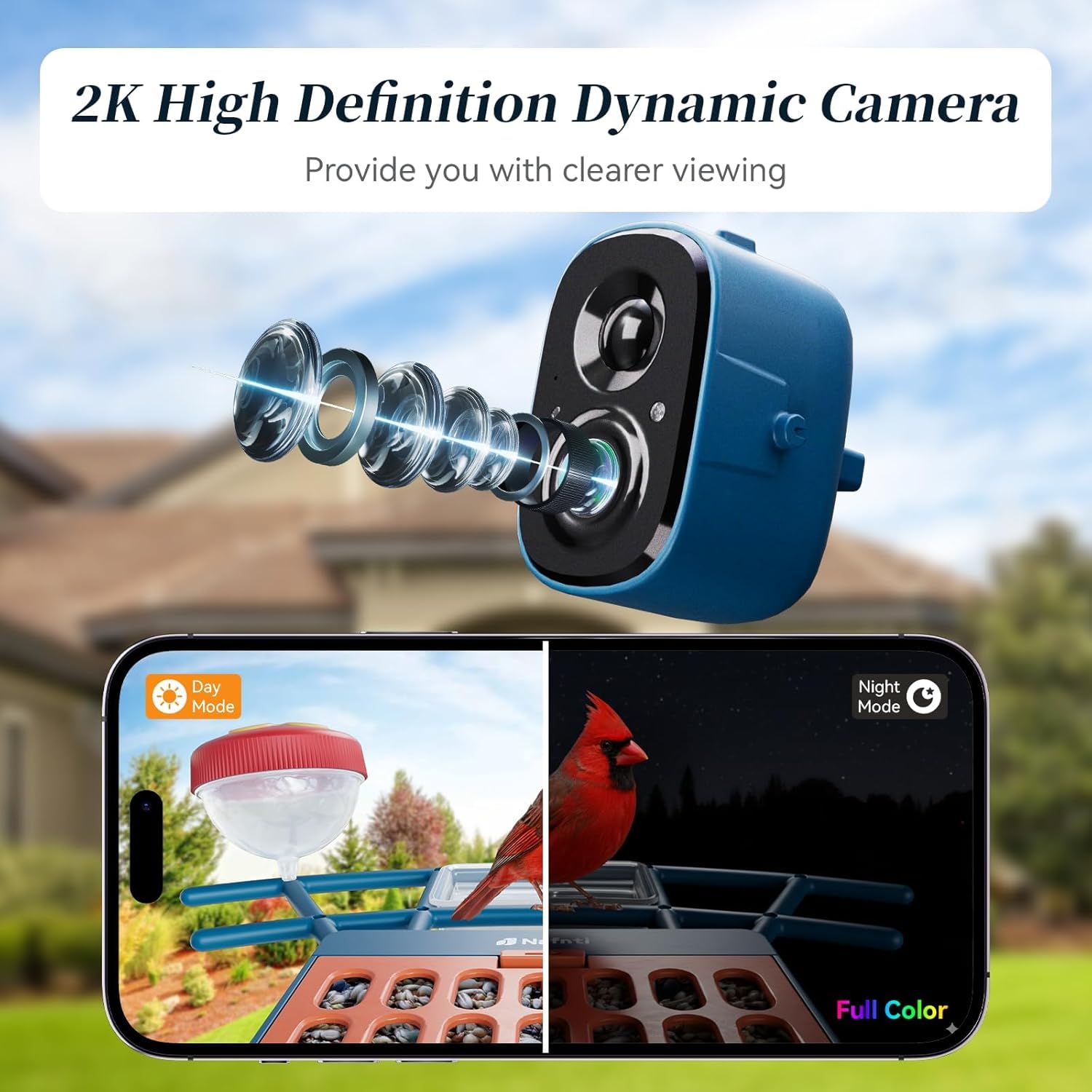
Image 6: Illustration of the 2K high-definition dynamic camera with day and color night vision.
4.2 Storage Options
Your Nafnti Smart Bird Feeder supports two storage methods:
- TF Card: Insert a TF card (max 256GB, not included) into the camera module for local storage of recordings.
- Cloud Storage: Enjoy 3 days of free cloud storage. After the trial, monthly or annual subscription plans are available for extended cloud storage.
5. Maintenance
5.1 Cleaning the Feeder
Regular cleaning is essential for bird health and feeder longevity:
- Remove the camera module before cleaning.
- Empty any remaining birdseed.
- Wash the feeder thoroughly with warm, soapy water. Rinse completely and allow to air dry before refilling.
- Clean the camera lens gently with a soft, dry cloth.
Image 7: Illustration of the easy cleaning process for the bird feeder.
5.2 Charging
The feeder is designed for continuous power:
- Solar Charging: The built-in 3W solar panel continuously charges the 5200mAh battery during daylight hours. Ensure the solar panel receives adequate direct sunlight for optimal performance.
- USB Charging: If prolonged cloudy weather occurs, or for initial charging, the camera can be charged via the USB port using the provided cable.

Image 8: Visual representation of solar panel charging and the USB charging port on the camera.
6. Troubleshooting
| Issue | Possible Cause | Solution |
|---|---|---|
| Cannot connect to Wi-Fi | Incorrect Wi-Fi password; Feeder too far from router; Router not supporting 2.4GHz/5GHz. | Verify password; Move feeder closer to router; Ensure router supports dual-band Wi-Fi. |
| Poor video quality | Weak Wi-Fi signal; Dirty camera lens; Direct sunlight glare. | Improve Wi-Fi signal; Clean lens; Adjust feeder position to avoid direct glare. |
| Battery not charging | Insufficient sunlight; Damaged solar panel/cable. | Relocate feeder to a sunnier spot; Check connections; Charge via USB if necessary. |
| No bird detection/notifications | Motion detection sensitivity too low; Obstruction in camera view. | Adjust motion detection sensitivity in app; Clear any obstructions. |
7. Specifications
- Brand: Nafnti
- Model: BIRD-V8-1.2L
- Target Species: Birds
- Material: Acrylonitrile Butadiene Styrene (ABS)
- Special Features: Built-In Camera, Easy-Refill Top, Long Lasting, Rust Resistant, Squirrel Proof
- Mounting Type: Hanging Mount (via strap), Wall Mount, Pole Mount
- Product Dimensions: 12.99"L x 11.42"W x 9.84"H
- Power Source: Solar Powered (3W built-in solar panel)
- Battery: 5200mAh Lithium Ion (included)
- Capacity: 1.2 Liters (seed)
- Connectivity: 2.4GHz & 5GHz Dual Band Wi-Fi
- Camera Resolution: 2K Live View
- Night Vision: Color Night Vision
- AI Identification: 10,000+ bird species
8. Warranty and Support
For warranty information and customer support, please refer to the contact details provided on the product packaging or visit the official Nafnti website. Keep your purchase receipt for warranty claims.