
1. Introduction
This manual provides instructions for the XHGTJK Universal Replacement Remote Control. This remote is designed to be compatible with various Kenwood audio systems, including models KRF-V5100D, KRF-V5090D, KRF-V6090, KRF-V6100D, RC-R0517, KRF-V5200D, KRF-V6300D, KRF-V6200D, KRF-V7200D-S, and RC-R0518. It operates using infrared (IR) technology and requires no programming or pairing for initial use.
2. Setup
2.1 Battery Installation
The remote control requires two (2) AAA batteries (not included). Follow these steps to install the batteries:
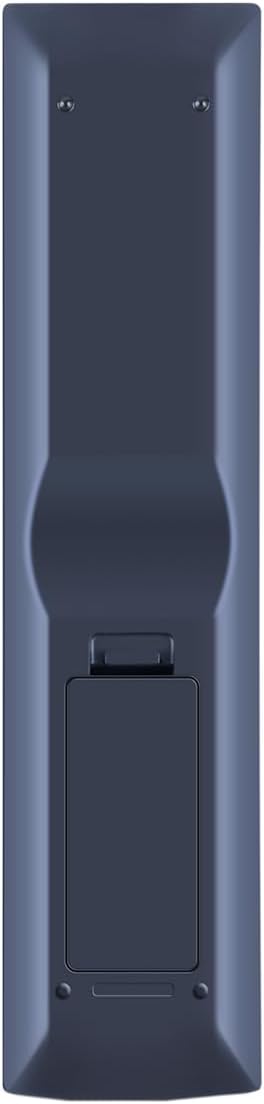
- Locate the battery compartment on the back of the remote control.
- Press down on the latch and slide the battery cover downwards to open it.
- Insert two AAA batteries, ensuring the positive (+) and negative (-) terminals align correctly with the markings inside the compartment.
- Slide the battery cover back into place until it clicks securely.
Once batteries are installed, the remote is ready for use. No programming or pairing is required.
3. Operating Instructions
This replacement remote control functions as an infrared (IR) device. For optimal performance, ensure a clear line of sight between the remote control and your Kenwood audio system. Point the remote directly at the system's IR receiver.
3.1 Basic Functions
While this remote is designed to operate the main functions of compatible Kenwood units, it may not support every feature available on the original remote control. Key functions include:
- Power On/Off: Use the POWER button to turn the system on or off.
- Input Selection: Buttons like DVD, VIDEO, CD, TUNER, HDMI 1, HDMI 2, and AUX allow you to switch between different audio/video sources.
- Volume Control: Use the VOLUME + and VOLUME - buttons to adjust the sound level. The MUTE button silences the audio.
- Navigation: The central directional pad (UP, DOWN, LEFT, RIGHT) and ENTER button are used for menu navigation and selection.
- Playback Controls: Buttons such as PLAY/PAUSE, STOP, FAST FORWARD, and REWIND are available for media playback.
- Numeric Keypad: Use the number buttons (0-9, +10) for direct track selection or input.

4. Maintenance
4.1 Battery Replacement
Replace batteries when the remote control's response becomes sluggish or stops working. Always replace both batteries at the same time with new AAA batteries. Do not mix old and new batteries, or different types of batteries.
4.2 Cleaning
To clean the remote control, wipe it with a soft, dry cloth. Do not use liquid cleaners, sprays, or abrasive materials, as these can damage the remote's surface or internal components.
4.3 Storage
If the remote control will not be used for an extended period, remove the batteries to prevent leakage and potential damage to the device.
5. Troubleshooting
- Remote not responding:
- Check if the batteries are inserted correctly with the correct polarity.
- Replace old batteries with new AAA batteries.
- Ensure there is a clear line of sight between the remote control and the Kenwood audio system's IR receiver. Remove any obstructions.
- Confirm that the remote control is compatible with your specific Kenwood model. Refer to the compatibility list in the Introduction.
- Some functions do not work:
- This replacement remote may not support all advanced or specific functions of your original Kenwood remote. It is designed for main operational features.
If troubleshooting steps do not resolve the issue, please contact customer support for further assistance.
6. Specifications
| Brand | XHGTJK |
| Special Feature | No Programming Required |
| Color | Black |
| Max Number of Supported Devices | 1 |
| Compatible Devices | Kenwood KRF-V5100D, KRF-V5090D, KRF-V6090, KRF-V6100D, RC-R0517, KRF-V5200D, KRF-V6300D, KRF-V6200D, KRF-V7200D-S, RC-R0518 |
| Connectivity Technology | Infrared (IR) |
| Controller Type | Button Control |
| Maximum Range | 10 Feet (approx. 3 meters) |
| Number of Batteries Required | 2 AAA batteries |
7. Warranty Information
This XHGTJK remote control comes with a 6-month warranty from the date of purchase. This warranty covers manufacturing defects. It does not cover damage caused by misuse, accidents, unauthorized modifications, or normal wear and tear. Please retain your proof of purchase for warranty claims.
8. Customer Support
For any questions, concerns, or technical assistance regarding your XHGTJK Universal Remote Control, please contact our customer support. We are committed to providing satisfactory solutions for any issues you may encounter.