
1. Introduction
Welcome to the world of Delta Q espresso. This manual provides essential information for the safe and efficient use of your new Delta Q Quick Espresso Capsule Machine. Please read all instructions carefully before first use and keep this manual for future reference.
The Delta Q Quick is a compact and user-friendly espresso machine designed exclusively for Delta Q capsules, ensuring a consistent and high-quality coffee experience.
2. Important Safety Information
Always follow basic safety precautions when using electrical appliances to reduce the risk of fire, electric shock, and injury to persons.
- Read all instructions before operating the machine.
- Do not immerse the machine, power cord, or plug in water or other liquids.
- This appliance is for household use only. Do not use outdoors.
- Unplug from outlet when not in use and before cleaning. Allow to cool before putting on or taking off parts, and before cleaning the appliance.
- Do not operate any appliance with a damaged cord or plug, or after the appliance malfunctions or has been damaged in any manner.
- Close supervision is necessary when any appliance is used by or near children.
- Use only Delta Q capsules with this machine. Using incompatible capsules may damage the machine and void the warranty.
3. Product Overview
Familiarize yourself with the components of your Delta Q Quick machine.

Figure 3.1: Front view of the Delta Q Quick Espresso Capsule Machine.

Figure 3.2: Back view showing the removable water tank.
Components:
- Water Tank: Removable, 0.8-liter capacity.
- Capsule Compartment: For inserting Delta Q capsules.
- Used Capsule Container: Collects up to 10 used capsules.
- Drip Tray: Removable for easy cleaning.
- Espresso Button: For brewing a short, strong espresso.
- Long Coffee Button: For brewing a longer, Americano-style coffee.
- LED Indicator: Shows machine status (heating, ready, low water).
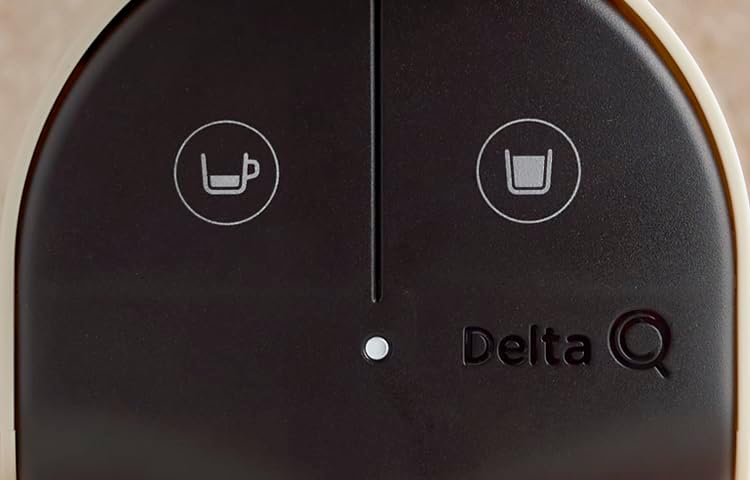
Figure 3.3: Close-up of the control panel buttons.
4. Setup and First Use
4.1 Unpacking
- Remove all packaging materials from the machine.
- Place the machine on a stable, flat surface away from heat sources.
4.2 Initial Cleaning and Priming
Before first use, or if the machine has not been used for a long period, it is essential to clean and prime the system.
- Remove the water tank and rinse it thoroughly with fresh water.
- Fill the water tank with fresh, clean water up to the MAX mark. It is recommended to use mineral water.
- Place a large mug or container under the coffee extraction nozzle.
- Plug the machine into a power outlet. The LED light will illuminate.
- Press both the Espresso and Long Coffee buttons simultaneously until the machine starts the cleaning process. This process takes approximately 3 minutes.
- Once complete, the cleaning process will stop automatically. The machine will then start to heat up, and the LED button will flash for approximately 35 seconds.
- When the LED stops flashing and remains solid, the machine is ready to use.
Video 4.1: Delta Quick Initialization Process. This video demonstrates the initial setup and cleaning procedure for the Delta Q Quick machine.
5. Operating Instructions
5.1 Brewing Espresso or Coffee
- Ensure the water tank is filled with fresh water and the machine is heated (LED solid).
- Lift the lever to open the capsule compartment.
- Insert a Delta Q capsule into the compartment.
- Close the lever firmly.
- Place a cup on the drip tray under the extraction nozzle. For larger cups, the drip tray can be swung to the side or removed.
- Press either the Espresso Button (left) for a short, strong coffee or the Long Coffee Button (right) for a longer drink.
- The machine will automatically stop when the programmed volume is reached.
- After brewing, lift the lever to eject the used capsule into the internal container.

Figure 5.1: Brewing an espresso with a Delta Q capsule.
5.2 Customizing Drink Volume
The Delta Q Quick allows you to program your preferred drink volume for both espresso and long coffee.
- Insert a Delta Q capsule and place a cup under the nozzle.
- Press and hold the desired button (Espresso or Long Coffee).
- Release the button when your cup contains the desired amount of coffee. The machine will remember this setting for future brews using that button.
6. Maintenance and Cleaning
Regular cleaning ensures optimal performance and longevity of your machine.
6.1 Daily Cleaning
- Used Capsule Container: Empty and rinse the used capsule container daily. It holds up to 10 capsules.
- Drip Tray: Empty and clean the drip tray regularly to prevent overflow.
- Water Tank: Rinse the water tank with fresh water daily and refill.
- Exterior: Wipe the exterior of the machine with a soft, damp cloth. Do not use abrasive cleaners or solvents.
6.2 Descaling
Over time, mineral deposits can build up in your machine, affecting performance. Descale your machine every 3-6 months, or more frequently if you have hard water.
- Consult the Delta Q website or contact customer support for recommended descaling solutions and detailed instructions.
- Always follow the descaling solution manufacturer's instructions carefully.
- After descaling, run several cycles with fresh water to thoroughly rinse the machine.
7. Troubleshooting
If you encounter issues with your Delta Q Quick machine, refer to the following common problems and solutions:
| Problem | Possible Cause | Solution |
|---|---|---|
| Machine does not turn on. | No power supply. | Check if the power cord is securely plugged into the machine and a working electrical outlet. |
| No coffee is dispensed or very little coffee. | Water tank empty; machine not primed; clogged nozzle; capsule not inserted correctly. | Fill water tank. Perform initial cleaning/priming process. Clean the nozzle. Ensure capsule is correctly seated and lever is fully closed. |
| Coffee is cold. | Machine not fully heated. | Wait for the LED indicator to stop flashing and remain solid before brewing. |
| Water leaks from the machine. | Water tank not properly seated; damaged water tank. | Ensure the water tank is correctly and securely placed. Inspect for cracks; replace if damaged. |
| LED indicator flashes rapidly. | Low water level or descaling required. | Refill water tank. If problem persists, consider descaling the machine. |
If the problem persists after attempting these solutions, please contact Delta Q customer support.
8. Specifications
Technical details for your Delta Q Quick Espresso Capsule Machine.

Figure 8.1: Delta Q Quick Espresso Machine dimensions.
| Feature | Detail |
|---|---|
| Brand | Delta Q |
| Model Name | Quick |
| Model Number | 012720 |
| Color | Antracite |
| Capacity | 0.8 Liters (Water Tank) |
| Product Dimensions (D x W x H) | 15" x 7.4" x 12" |
| Item Weight | 3.82 Kilograms |
| Special Feature | Programmable Drink Sizes |
| Coffee Maker Type | Espresso Machine |
| Operation Mode | Fully Automatic |
| Coffee Input Type | Delta Q Capsules Only |
| Energy Efficiency | A++ Rating |
| Included Components | Filter |
9. Warranty and Support
Your Delta Q Quick Espresso Capsule Machine is covered by a manufacturer's warranty. Please refer to the warranty card included with your purchase for specific terms and conditions.
For technical assistance, troubleshooting beyond this manual, or to inquire about replacement parts, please contact Delta Q customer support through their official website or the contact information provided in your product packaging.