
1. Product Overview
The SUPCASE Unicorn Beetle Pro Series case for Samsung Galaxy S25 FE is engineered for heavy-duty protection, combining a robust design with practical features to safeguard your device against daily wear and tear, drops, and impacts.
Key Features:
- Military-Grade Protection: Constructed from multi-layered TPU and Polycarbonate materials, tested for drops up to 20 feet.
- Built-in Screen Protector: Integrated screen protector guards against scratches without compromising touch sensitivity.
- Built-in Kickstand: Supports both portrait and landscape hands-free viewing.
- Rotatable Belt-Clip Holster: Detachable holster for convenient carrying and easy access.
- Precise Cutouts: Ensures full access to ports, buttons, and camera.
Product Components:

Image 1.1: Exploded view showing the three layers of the SUPCASE Unicorn Beetle Pro case: front cover with built-in screen protector, back cover with dual-layer hybrid PC and TPU bumper, and the holster with belt-clip.
Video 1.1: A brief product overview demonstrating the key features and design of the case.
2. Compatibility
This SUPCASE Unicorn Beetle Pro Series case is specifically designed for the Samsung Galaxy S25 FE (2025) model only. It is not compatible with other Samsung Galaxy models, including the Galaxy S25 or Galaxy S25 Ultra.
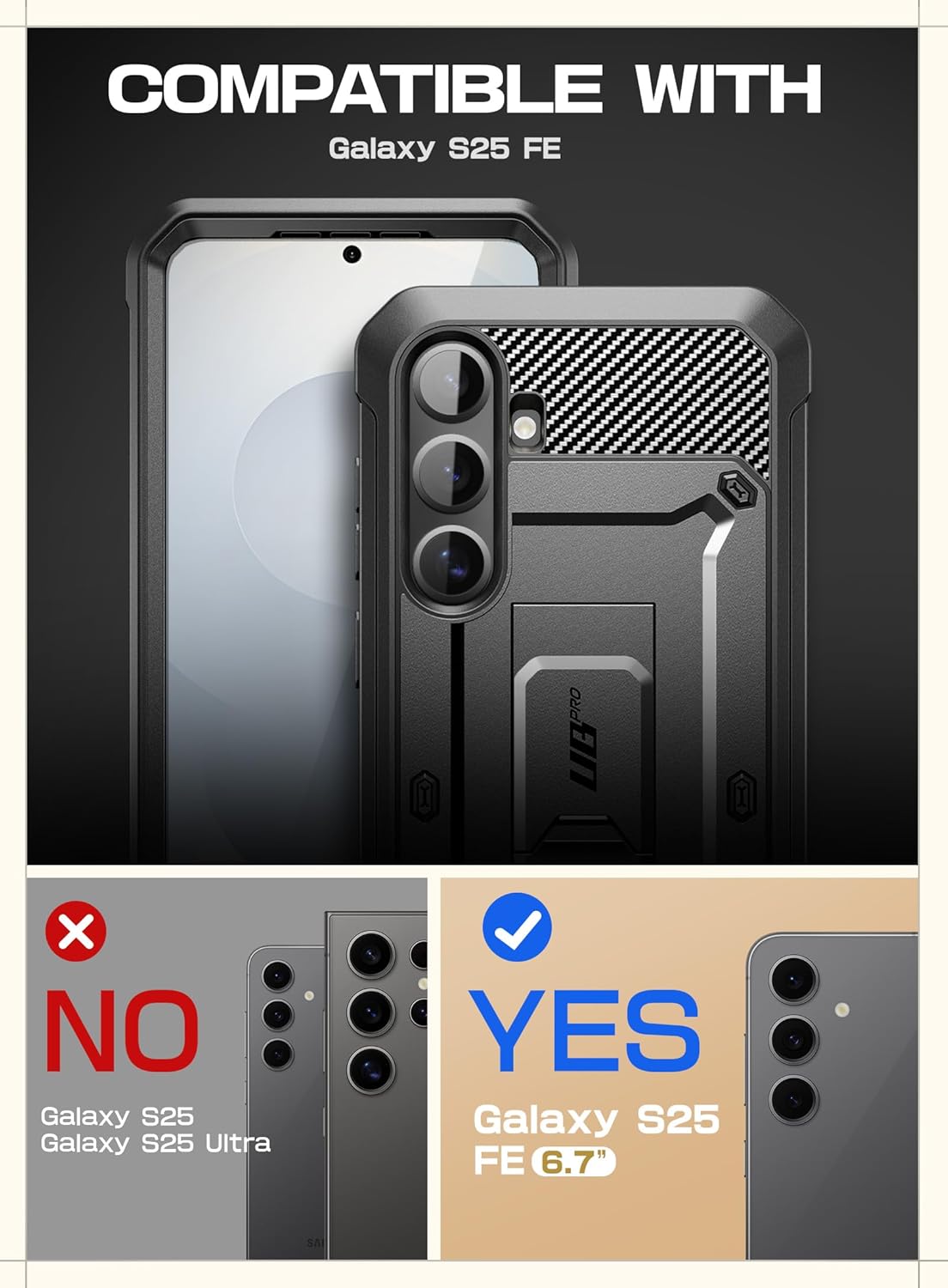
Image 2.1: Graphic illustrating the case's compatibility, clearly indicating it is designed exclusively for the Samsung Galaxy S25 FE (6.7 inch) and not other S25 models.
3. Installation Guide
Follow these steps carefully to ensure proper installation of your SUPCASE Unicorn Beetle Pro case for maximum protection.
Step-by-Step Installation:
- Separate the Case Components: Carefully pry apart the front frame (with the built-in screen protector) from the back case. Look for a small notch or opening point, usually at the bottom corner, to begin separating the two pieces.
- Prepare Your Device: Ensure your Samsung Galaxy S25 FE is clean and free of dust, smudges, or debris. Use a microfiber cloth to wipe the screen and back of the phone.
- Install Phone into Front Frame: Align your Samsung Galaxy S25 FE with the front frame, ensuring all buttons and ports match the cutouts. Gently press the phone into the front frame until it sits securely.
- Assemble the Case: With the phone secured in the front frame, align the top edge of the front frame with the top edge of the back case. Snap the two pieces together, working your way around the edges, ensuring all clips are securely fastened. Verify there are no gaps between the front and back pieces.
- Test Fingerprint Sensor: If you use the in-display fingerprint sensor, it is recommended to re-register your fingerprints after installing the case to ensure optimal performance.
Video 3.1: Visual guide demonstrating the step-by-step installation process of the case onto the Samsung Galaxy S25 FE.
4. Operating Instructions
Using the Built-in Kickstand:
The integrated kickstand allows for convenient hands-free viewing. To deploy, locate the kickstand on the back of the case and gently pull it outwards until it locks into place. It supports both vertical (portrait) and horizontal (landscape) orientations for versatile media consumption or video calls.

Image 4.1: The case's built-in kickstand is shown extended, allowing the Samsung Galaxy S25 FE to stand independently for hands-free viewing.
Using the Rotatable Belt-Clip Holster:
The detachable holster provides a secure and accessible way to carry your device. To attach your cased phone to the holster, slide the phone into the holster until it clicks securely. The belt clip can rotate 360 degrees, allowing you to position your phone vertically or horizontally on your belt or bag strap for optimal comfort and access.

Image 4.2: A person is shown wearing the rotatable belt-clip holster with the cased Samsung Galaxy S25 FE attached, demonstrating its convenient carrying functionality.
Screen Protector Functionality:
The built-in screen protector is designed to maintain the original touch sensitivity of your Samsung Galaxy S25 FE. For optimal performance of the in-display fingerprint sensor, ensure your fingerprints are re-registered after the case installation.
Video 4.3: A detailed demonstration of the case's features, including the kickstand and overall design elements.
5. Care and Maintenance
To ensure the longevity and effectiveness of your SUPCASE Unicorn Beetle Pro case, follow these care instructions:
- Cleaning: Regularly clean your case with a soft, damp cloth. Avoid using harsh chemicals or abrasive cleaners, as these can damage the case materials or the built-in screen protector.
- Inspection: Periodically inspect the case for any signs of wear, cracks, or damage. If significant damage is observed, consider replacing the case to maintain optimal protection for your device.
- Avoid Extreme Conditions: While the case offers robust protection, prolonged exposure to extreme temperatures or direct sunlight may affect its material integrity over time.
6. Troubleshooting
Common Issues and Solutions:
- Screen Protector Bubbles: If air bubbles appear under the built-in screen protector after installation, gently press them towards the nearest edge with a soft cloth or a credit card (wrapped in cloth) to push the air out. Ensure the screen is completely clean before installation to prevent dust-induced bubbles.
- Fingerprint Sensor Sensitivity: If the in-display fingerprint sensor is less responsive, try re-registering your fingerprints with the case installed. Ensure your finger is clean and dry when registering and using the sensor.
- Difficulty with Buttons: If the case buttons feel stiff, ensure the phone is correctly seated within the case and all edges are snapped together properly. The buttons may soften slightly with regular use.
7. Product Specifications
| Feature | Specification |
|---|---|
| Brand | SUPCASE |
| Model Number | Unicorn Beetle PRO |
| Compatible Phone Models | Samsung Galaxy S25 FE |
| Material | Polycarbonate, TPU |
| Color | Black |
| Item Weight | 1 ounces |
| Product Dimensions | 7.09 x 4.01 x 1.52 inches |
| Special Features | Built-in Kickstand, Built-in Screen Protector, Rotatable Holster |
8. Warranty and Support
SUPCASE products are designed for durability and performance. For specific warranty information regarding your Unicorn Beetle Pro case, please refer to the product packaging or visit the official SUPCASE website. If you encounter any issues or require assistance, please contact SUPCASE customer support through their website or the contact information provided with your purchase.
For additional support and product registration, visit: SUPCASE Store on Amazon