
1. Introduction
Thank you for choosing the ZYHKON SU9 Sleep Earbuds. These earbuds are designed to provide comfort and high-quality audio, especially for sleep, with features like an ergonomic design, smart touchscreen control, and a dedicated sleep mode. Please read this manual carefully to ensure proper use and optimal performance.
2. Package Contents
Verify that all items listed below are included in your package:
- ZYHKON SU9 Sleep Earbuds (L/R) x 2
- Portable Charging Case x 1
- USB-C Charging Cable x 1
- User Manual x 1
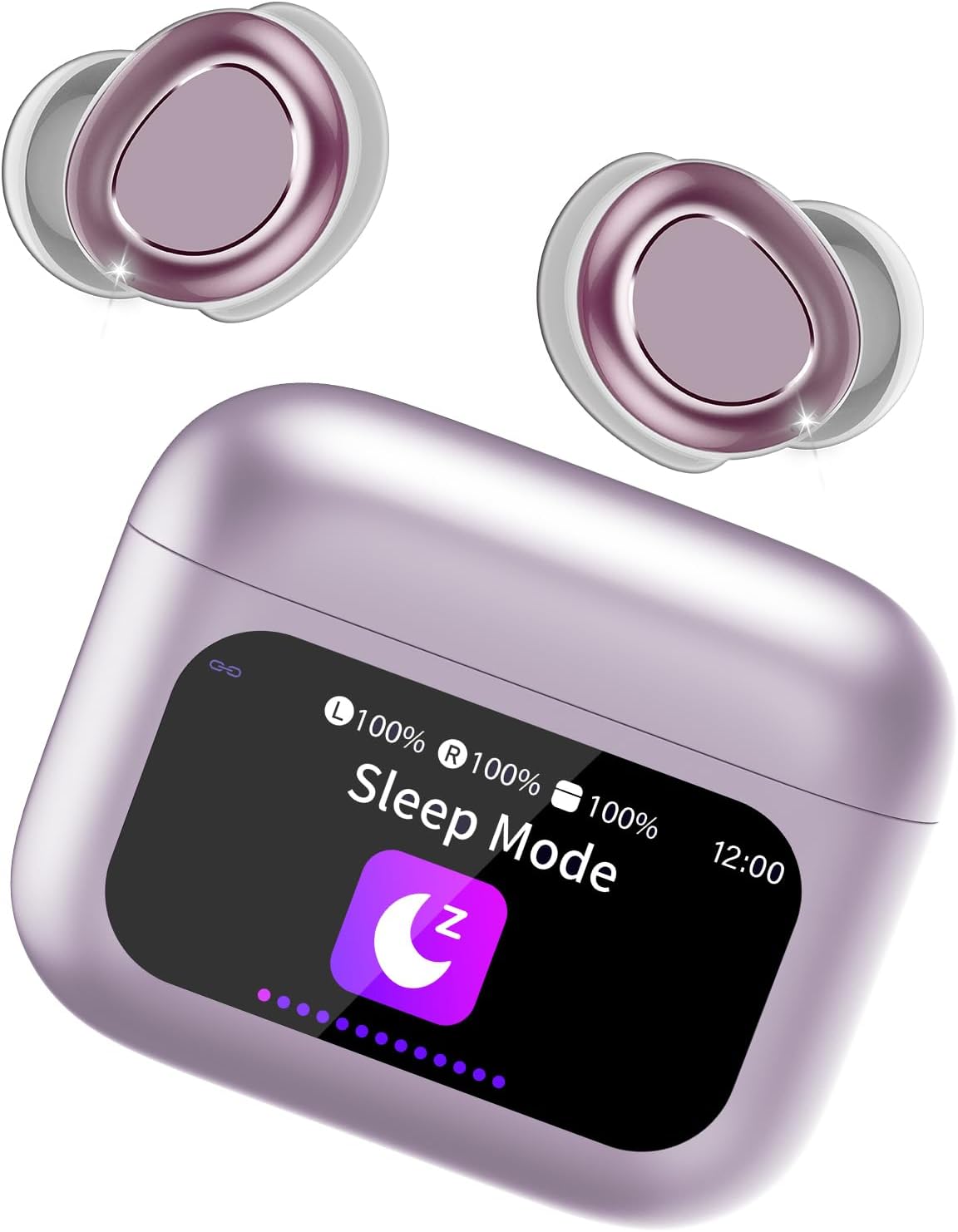
Image: ZYHKON SU9 Sleep Earbuds and their charging case. The earbuds are shown in a light purple color, designed for a comfortable in-ear fit. The charging case features a smart touchscreen display showing battery levels, time, and a 'Sleep Mode' icon.
3. Setup Guide
3.1 Initial Charging
- Open the charging case and place both earbuds inside.
- Connect the provided USB-C cable to the charging port on the case and plug the other end into a compatible USB power source.
- The touchscreen display on the charging case will indicate the charging status. Ensure both earbuds and the case are fully charged before first use.
3.2 Bluetooth Pairing
- Ensure the earbuds are in the charging case and the case lid is open.
- On your device (smartphone, tablet, etc.), navigate to the Bluetooth settings.
- Search for new devices and select "ZYHKON SU9" from the list.
- Once connected, the earbuds will automatically pair with this device in the future when taken out of the case.
3.3 Ergonomic Fit
The ZYHKON SU9 earbuds feature an ultra-light, polished design (3.0 grams per ear) for comfortable wear, even for side sleepers. Gently insert each earbud into your ear canal and rotate slightly until a secure and comfortable fit is achieved. A proper fit is crucial for optimal sound quality and noise reduction.
4. Operating Instructions
4.1 Smart Touchscreen Control (Charging Case)
The charging case features a full-color LED touchscreen for intuitive control. You can access various functions directly from the case:
- Music Playback: Play/pause music, adjust volume, switch tracks.
- Call Management: Answer or end calls.
- Sleep Mode Activation: Enable or disable sleep mode.
- Settings: Access 7 language options, adjust wallpaper, and brightness.
- Find My Earphone: Locate misplaced earbuds.
- EQ Modes: Select from 5 available EQ modes (e.g., Normal, Rock, Pop, Classic, Jazz).
4.2 Earbud Touch Control
The earbuds themselves also feature touch controls for common functions:
- Single Tap: Play/Pause music, Answer/End call.
- Double Tap (Left Earbud): Previous track.
- Double Tap (Right Earbud): Next track.
- Triple Tap (Left Earbud): Volume Down.
- Triple Tap (Right Earbud): Volume Up.
- Long Press (2 seconds): Activate voice assistant, Reject call.
4.3 Sleep Mode
Activate Sleep Mode via the charging case touchscreen. In Sleep Mode, low-battery and shutdown alarms are disabled to prevent disturbances during sleep.
Video: An overview of the ZYHKON SU9 Sleep Earbuds. It highlights features such as noise reduction, ultralight ergonomic design for comfort, smart touch controls on the earbuds, 6-8 hours of battery life per charge, and the comprehensive smart touchscreen interface on the charging case for various settings and controls. The video concludes by showing how the earbuds can help users fall asleep quickly.
5. Maintenance
5.1 Cleaning
- Regularly clean the earbuds and charging case with a soft, dry, lint-free cloth.
- Do not use abrasive cleaners, alcohol, or chemical solvents.
- Ensure charging contacts on both earbuds and case are free from dust and debris.
5.2 Storage
When not in use, store the earbuds in their charging case to protect them and keep them charged. Avoid extreme temperatures and direct sunlight.
6. Troubleshooting
- Earbuds not pairing: Ensure both earbuds are charged and in the case. Turn off and on your device's Bluetooth, then try pairing again.
- One earbud not working: Place both earbuds back in the case, close the lid, wait a few seconds, then open and try again. Check battery levels.
- Poor sound quality: Ensure earbuds are properly seated in your ears. Check for debris in the earbud nozzles.
- Touch controls unresponsive: Ensure your fingers are clean and dry. Try restarting the earbuds by placing them in the case.
- Battery alerts in Sleep Mode: Verify that Sleep Mode is correctly activated via the charging case touchscreen.
- Factory Reset: If issues persist, perform a factory reset using the option available on the charging case touchscreen.
7. Specifications
| Model Name | SU9 |
| Brand | ZYHKON |
| Connectivity Technology | Wireless (Bluetooth 5.4) |
| Earpiece Shape | In Ear |
| Control Method | Touch |
| Audio Driver Type | Dynamic Driver |
| Special Features | Sleep Mode, Smart Touchscreen Control |
| Item Weight | 3.2 ounces |
| Batteries | 1 AA batteries required (included) (Note: This likely refers to the charging case's internal battery, not standard AA cells.) |
8. Warranty and Support
ZYHKON products are designed and manufactured to the highest quality standards. For information regarding warranty coverage, technical support, or service inquiries, please refer to the warranty card included in your package or contact ZYHKON customer service through the retailer's platform where the product was purchased.
Please retain your proof of purchase for warranty claims.