
Introduction
Welcome to your new cabirty HS4W-A2R 4-Wheel Mobility Scooter. This manual provides essential information for safe operation, maintenance, and troubleshooting. Please read this manual thoroughly before operating the scooter to ensure proper use and to maximize your safety and the longevity of the product.
Important Safety Guidelines
Your safety is paramount. Adhere to the following guidelines:
- Always read the entire user manual before operating the scooter.
- Ensure the battery is fully charged before initial use and whenever the charge is low.
- Familiarize yourself with all controls and features before driving.
- Adjust the seat, handlebars, and other components for a comfortable and secure riding position.
- Always fasten the seat belt securely before starting the scooter.
- Follow all local traffic rules and regulations when operating the scooter in public areas.
- Do not exceed the maximum weight capacity of 500 lbs (226 kg).
- Avoid operating the scooter under the influence of alcohol or medication that impairs judgment.
- Exercise caution on uneven terrain, slopes, and near obstacles.
- Perform regular checks on tires, brakes, and battery connections.
Unpacking and Initial Setup
Follow these steps to prepare your scooter for its first use:
- Carefully unpack all components of the mobility scooter from its packaging.
- Assemble any parts that are not pre-attached, following the assembly instructions provided separately or within this manual.
- Locate the charging port and fully charge the battery before the first operation. This typically takes 6-8 hours.
- Familiarize yourself with the location and function of all controls, including the ignition, throttle, and brakes.
- Adjust the seat height, backrest, and armrests to your preferred comfortable position.
- Ensure the safety belt is easily accessible and can be fastened securely.

Components Overview
Understanding the different parts of your scooter is crucial for safe and effective operation.
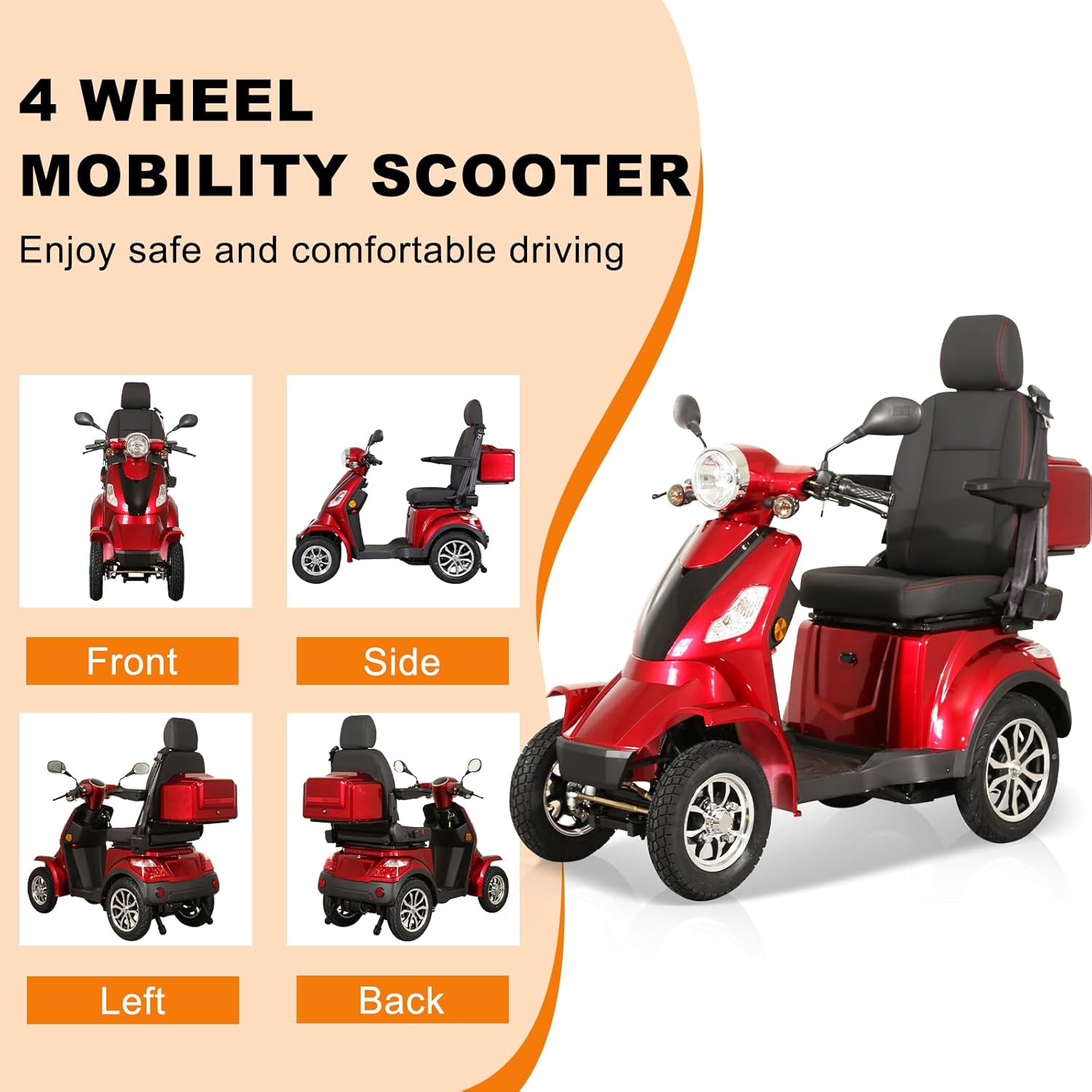

Key components include:
- Handlebar: For steering and control.
- Seat: Adjustable for comfort, with folding armrests and a safety belt.
- Wheels: Four wheels for stability, with 8-inch front and 10-inch rear tires.
- Lighting System: Headlight, turn signals, and brake lights for visibility.
- Storage: Front compartment, rear trunk, and under-seat storage for personal items.
- Brakes: Disc brake (front) and Drum brake (rear) for reliable stopping power.
- Suspension: Two rear shock absorbers for a comfortable ride.
- Anti-Tipping Device: Rear anti-tipping wheels for enhanced safety.
Control Introduction
The control panel provides access to all operational functions of your scooter. Familiarize yourself with each control before driving.

- LED Screen: Displays speed, battery level, and other important indicators.
- Lighting Control: Activates position lights, tail lights, and instrument lights.
- Light Switch On: Turns on the main headlight.
- Horn: Activates the horn for signaling.
- Brake Levers: Located on both sides of the handlebar for stopping.
- Reverse and Gear Position: Controls forward and reverse movement.
- Ignition Key: Used to turn the scooter on and off.
- Ready to Shift: Button to engage the drive system after turning the ignition key.
- Speed Switch: Adjusts the maximum speed setting of the scooter.
Operating Your Mobility Scooter
Starting the Scooter
- Ensure you are seated comfortably and the seat belt is fastened.
- Insert the ignition key and turn it to the 'ON' position.
- Press the 'Ready' button (if applicable) to engage the motor.
Driving
- Gently twist the rotary throttle to accelerate. Release the throttle to slow down.
- Use the brake levers to apply the brakes smoothly.
- Adjust your speed using the speed switch according to the terrain and your comfort level.
- Always be aware of your surroundings, pedestrians, and other vehicles.
Terrain Navigation
The cabirty HS4W-A2R is designed to handle various terrains, providing a smooth and comfortable ride.


Storage Features
The scooter offers convenient storage options for your personal belongings.
- Front Compartment: Includes a cup holder and space for small personal items.
- Rear Trunk: Provides larger storage space for bigger objects.
- Under-Seat Storage: Additional discreet storage space.
Care and Maintenance
Regular maintenance ensures the longevity and optimal performance of your mobility scooter.
- Battery Care: Always charge the battery fully after each use. Avoid completely draining the battery. Store the scooter with a charged battery if not in use for extended periods.
- Cleaning: Wipe down the scooter regularly with a damp cloth. Avoid using harsh chemicals or abrasive cleaners. Do not spray water directly onto electrical components.
- Tire Pressure: Check tire pressure periodically and inflate to the recommended PSI as indicated on the tires.
- Brake Inspection: Regularly check the brake levers and cables for proper function and wear. Adjust or replace as needed by a qualified technician.
- General Inspection: Periodically inspect all nuts, bolts, and fasteners to ensure they are tight. Check for any signs of wear or damage to the frame, seat, and other components.
- Storage: Store the scooter in a dry, cool place away from direct sunlight and extreme temperatures.
Troubleshooting
This section addresses common issues you might encounter with your mobility scooter.
| Problem | Possible Cause | Solution |
|---|---|---|
| Scooter does not turn on. | Battery is discharged; Ignition key not fully inserted/turned; 'Ready' button not pressed. | Charge the battery; Ensure key is fully turned; Press the 'Ready' button. |
| Reduced speed or power. | Low battery charge; Overloaded scooter; Speed setting too low. | Recharge battery; Reduce load; Adjust speed switch to a higher setting. |
| Brakes feel loose or ineffective. | Brake cables need adjustment; Worn brake pads. | Have brakes inspected and adjusted by a qualified technician. |
| Unusual noises during operation. | Loose components; Motor issue; Wheel bearing issue. | Inspect for loose parts and tighten; Contact customer support for further assistance. |
Technical Specifications
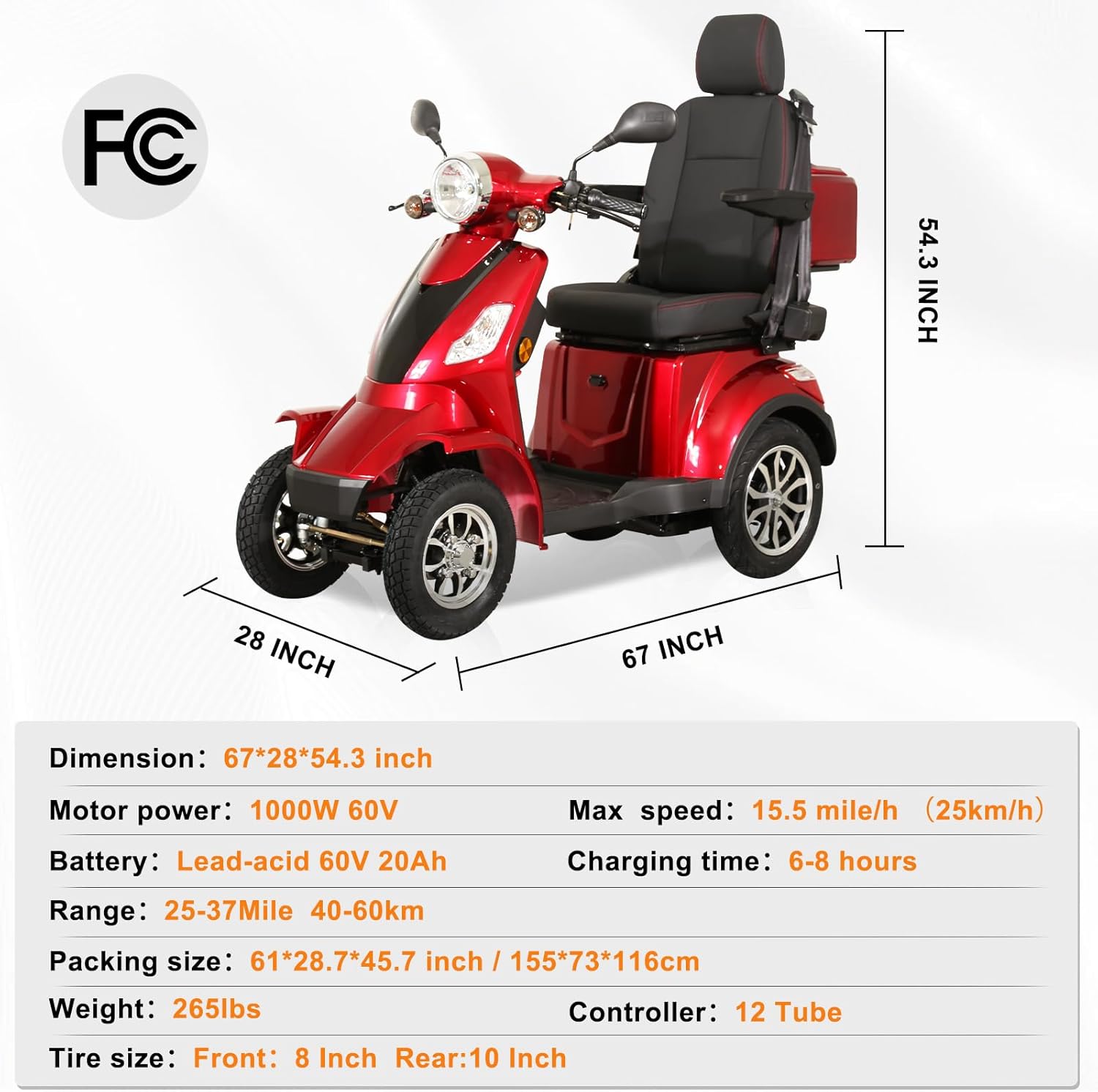
Detailed specifications for the cabirty HS4W-A2R Mobility Scooter:

| Feature | Detail |
|---|---|
| Model Number | HS4W-A2R |
| Product Dimensions (L x W x H) | 59.06 x 27.56 x 40.16 inches (150 x 70 x 102 cm) |
| Product Weight | 275.58 Pounds (125 kg) |
| Weight Capacity | 500 LBS (226 kg) |
| Motor Power | 1000W 60V |
| Battery Type | Lead-acid 60V 20Ah |
| Max Speed | Up to 15.5 mph (25 km/h) |
| Range per Charge | 35-40 miles (56-64 km) |
| Charging Time | 6-8 hours |
| Climbing Capacity | Up to 20 degrees |
| Tire Size | Front: 8 Inch, Rear: 10 Inch |
| Material | Metal |
Warranty and Support
Your cabirty Mobility Scooter HS4W-A2R comes with a 1-year warranty service, covering manufacturing defects. Please note that this warranty excludes batteries.
For any questions regarding your purchase, technical assistance, or warranty claims, please contact cabirty customer support. You can also visit the official cabirty store for more information and products:
Visit the cabirty Store on Amazon
Please retain your proof of purchase for warranty purposes.