1. Introduction
This manual provides essential information for the safe and efficient operation of your Y&H MPPT 80 Amp Solar Charge Controller. This advanced controller utilizes Maximum Power Point Tracking (MPPT) technology to optimize solar energy harvesting, offering up to 99% tracking efficiency. It is designed for 12V, 24V, 36V, and 48V systems and is compatible with various battery types, including AGM, Gel, and Lithium batteries. Please read this manual thoroughly before installation and use.
2. Safety Information
- Ensure all wiring is correctly connected with proper polarity to prevent damage to the controller and connected devices.
- Always disconnect the solar panel and battery power before installing or adjusting the controller.
- Install the controller in a well-ventilated area, away from flammable gases and liquids.
- Do not disassemble or attempt to repair the controller yourself. Contact qualified personnel for service.
- Wear appropriate personal protective equipment, including eye protection, during installation.
- The controller can generate high voltages. Exercise extreme caution.
3. Product Overview
The Y&H MPPT 80 Amp Solar Charge Controller is designed for robust and efficient solar power management. Key features include:
- High-Efficiency MPPT Technology: Up to 99% tracking efficiency, significantly more efficient than traditional PWM controllers.
- Smart System Compatibility: Automatic recognition for 12V, 24V, 36V, and 48V battery systems.
- Versatile Battery Support: Compatible with AGM, Gel, and Lithium (LiFePO4/Li NiCoMn)O2 batteries.
- Comprehensive Protection: Built-in safeguards against overcharge, over-discharge, overload, short circuit, reverse polarity, and over-temperature (IP30 rated for -20°C to +55°C environments).
- Intuitive LCD Display: Provides real-time system status and allows for easy adjustment of settings.
- Smart Load Management: Features 20 Amp discharge capacity with four load control modes: Manual, Light Control, Light Control + Timer, and Reverse Control.
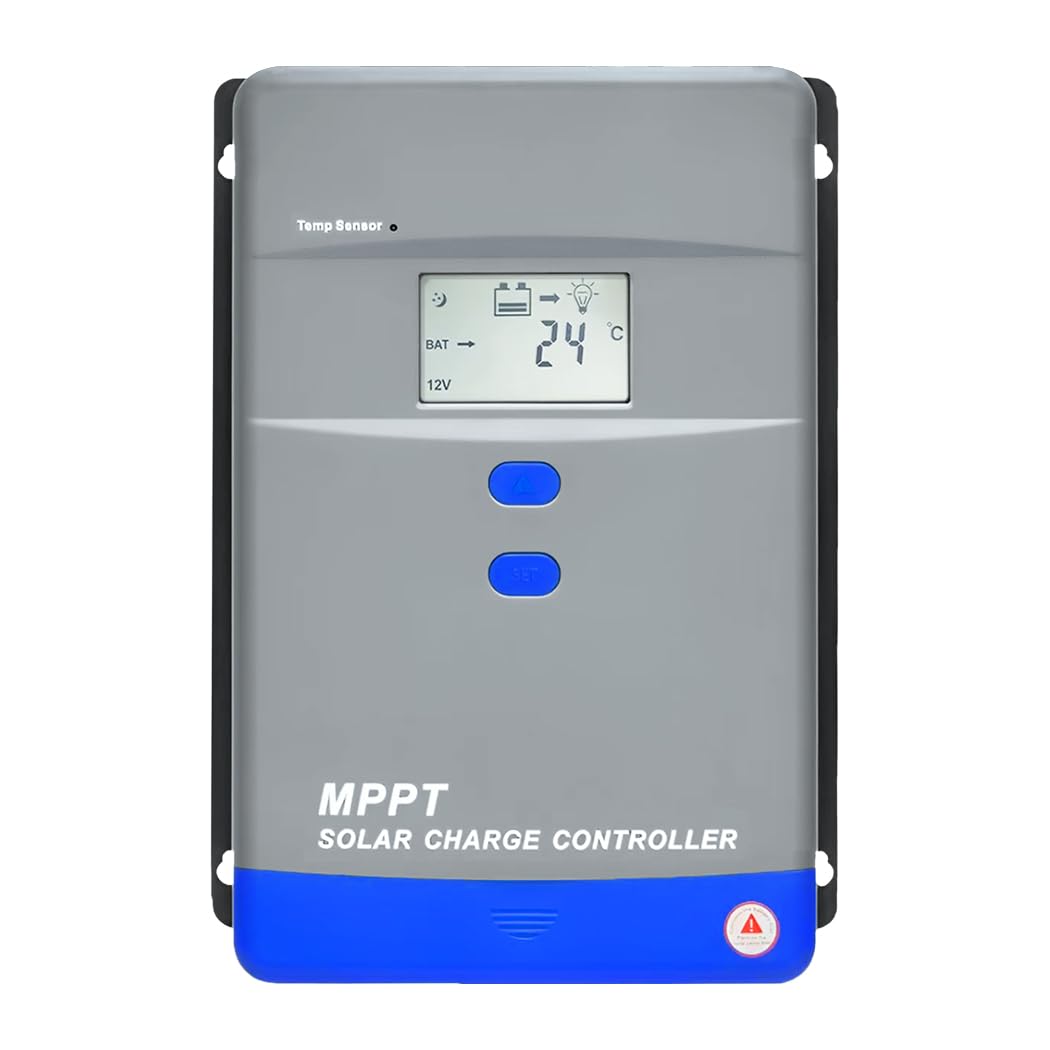
Component Identification


4. Setup and Installation
Follow these steps for proper installation of the solar charge controller:
- Mounting: Choose a cool, dry, and well-ventilated location. Mount the controller vertically on a wall or suitable surface, ensuring adequate clearance around the unit for airflow, especially around the heat sink.
- Battery Connection: Connect the battery to the controller's battery terminals first. Ensure correct polarity (+ to + and - to -). The controller will automatically detect the battery voltage.
- Solar Panel Connection: Connect the solar panels to the controller's PV input terminals. Again, observe correct polarity. The controller will begin charging the battery.
- Load Connection: Connect your DC loads to the controller's load terminals. Ensure the total current draw of your loads does not exceed the controller's rated load current (20A).
- Verify Connections: Double-check all connections for tightness and correct polarity before powering on the system.
Important: Always connect the battery first and disconnect the solar panel first when disassembling the system.
5. Operating Instructions
LCD Display and Navigation
The LCD screen displays real-time system parameters such as battery voltage, charging current, discharge current, battery temperature, and load status. Use the two blue buttons below the screen to navigate through the display menus and adjust settings.
- Up Button: Used to scroll through display screens or increase values during setting adjustments.
- Down Button: Used to scroll through display screens or decrease values during setting adjustments.
- Long Press (Up/Down): Enters or exits setting modes.
Battery Type Selection
The controller supports various battery types. It is crucial to select the correct battery type for optimal charging and battery longevity.
- Long press the 'Up' button to enter the battery type setting menu.
- Use the 'Up' or 'Down' buttons to select your battery type (e.g., GEL, AGM, FLOODED, LITHIUM).
- Long press the 'Up' button again to confirm and exit the setting.
Load Control Modes
The controller offers four load control modes:
- Manual Mode: Load is turned on/off manually via the controller buttons.
- Light Control Mode: Load turns on automatically at dusk and off at dawn.
- Light Control + Timer Mode: Load turns on at dusk and stays on for a set number of hours.
- Reverse Control Mode: Load turns off at dusk and on at dawn (e.g., for security lights).
Refer to the on-screen menu for detailed adjustment of timer settings in Light Control + Timer mode.
6. Maintenance
Regular maintenance ensures optimal performance and longevity of your solar charge controller:
- Check Connections: Periodically inspect all wiring connections for tightness and corrosion. Tighten any loose connections.
- Clean the Controller: Keep the controller clean and free from dust and debris. Use a dry cloth to wipe the exterior. Ensure the cooling fan and heat sink fins are not obstructed.
- Monitor Performance: Regularly check the LCD display for normal operation and system parameters. Note any unusual readings.
- Battery Inspection: Inspect batteries for any signs of damage, swelling, or leakage. Ensure battery terminals are clean.
7. Troubleshooting
| Problem | Possible Cause | Solution |
|---|---|---|
| No display on LCD | Battery not connected or low voltage | Check battery connections and ensure battery voltage is above minimum operating voltage. |
| Battery not charging | Solar panel not connected, low sunlight, or faulty panel/wiring | Check solar panel connections, ensure adequate sunlight, and inspect panel/wiring for damage. |
| Load not working | Load disconnected, overload, or incorrect load control mode | Check load connections, reduce load, or adjust load control mode settings. |
| Over-temperature alarm | Poor ventilation or high ambient temperature | Ensure proper ventilation around the controller. Relocate if ambient temperature is consistently too high. |
8. Specifications
| Feature | Specification |
|---|---|
| Model Number | ME8048-SA |
| Brand | Y&H |
| Max PV Input Power (12V) | 1040W |
| Max PV Input Power (24V) | 2080W |
| Max PV Input Power (36V) | 3102W |
| Max PV Input Power (48V) | 4160W |
| Max PV Input Voltage | 150V |
| System Voltage | 12V/24V/36V/48V Auto |
| Max Charge Current | 80 Amp |
| Max Load Discharge Current | 20 Amp |
| Tracking Efficiency | Up to 99% |
| Battery Compatibility | AGM, Gel, Flooded, Lithium (LiFePO4/Li NiCoMn)O2 |
| Operating Temperature | -20°C to +55°C |
| Protection Rating | IP30 |
| Product Dimensions | 26 x 19 x 11 cm |
| Item Weight | 2.36 kg |
| UPC | 704334626942 |
9. Warranty and Support
Y&H provides professional and prompt technical assistance. If you have any questions or require support, please contact our team. We aim to respond with a solution within 24 hours.
For warranty information, please refer to the documentation included with your purchase or contact the seller directly.


