
Introduction
Thank you for choosing the AlevaHive Guardian Angel Figurine Lights. This beautifully crafted figurine serves as a symbol of love and remembrance, featuring a graceful guardian angel surrounded by delicate branches and leaves that emit a warm, soothing glow. This manual provides essential information for the safe and effective use of your figurine.

Image: The AlevaHive Guardian Angel Figurine, illuminated.
Package Contents
Please ensure all items are present and in good condition upon opening the package:
- 1 x Guardian Angel Figurine with integrated LED lights
- 1 x Remote Control
Note: 3 x AA batteries for the figurine and 1 x CR2025 button cell battery for the remote control are not included and must be purchased separately.
Specifications
| Brand | AlevaHive |
| Model | Guardian Angel Figurine Lights |
| Material | High-Quality Resin |
| Color | White |
| Dimensions (L x W x H) | Approximately 0.1"L x 0.1"W x 0.1"H (7.87 inches / 20cm height) |
| Item Weight | 1.6 ounces |
| Power Source | 3 x AA Batteries (not included) |
| Remote Control Battery | 1 x CR2025 Button Cell Battery (not included) |
Setup
1. Battery Installation for Figurine
- Locate the battery compartment at the bottom of the figurine.
- Open the battery compartment cover.
- Insert 3 x AA batteries, ensuring correct polarity (+/-).
- Close the battery compartment cover securely.
2. Battery Installation for Remote Control
- Locate the battery tray on the side or back of the remote control.
- Pull out the battery tray.
- Insert 1 x CR2025 button cell battery with the positive (+) side facing up.
- Push the battery tray back into the remote control until it clicks into place.
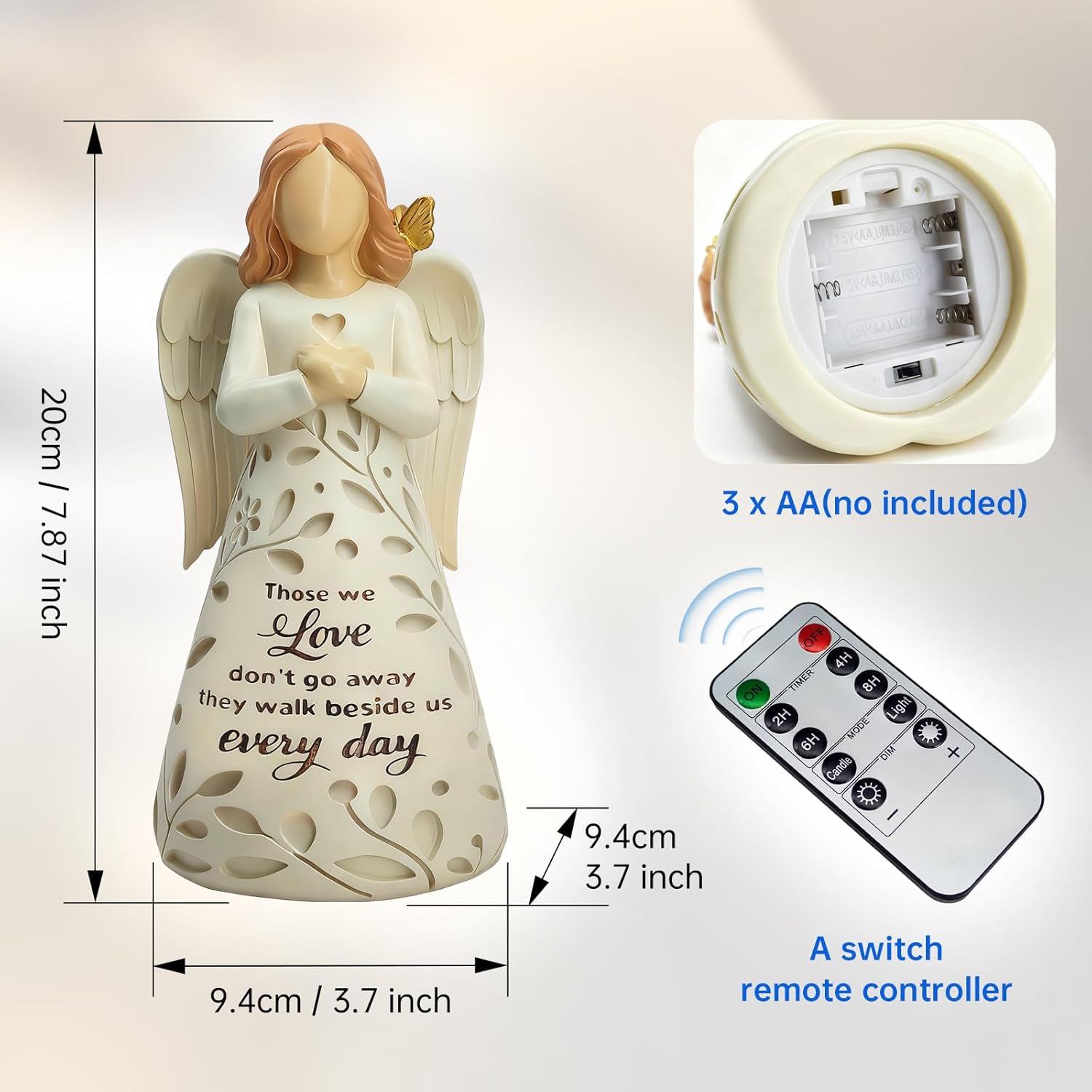
Image: Detailed view of the figurine's battery compartment and the remote control.
Operating Instructions
The figurine's light is controlled by the included remote control. Ensure the figurine's power switch (located near the battery compartment) is in the 'ON' position for remote functionality.
Remote Control Functions:
- ON/OFF: Press the ON button to turn the light on, and the OFF button to turn it off.
- Brightness Adjustment: Use the + and - buttons to cycle through three brightness levels.
- Timer Settings: Select a timer option (2H, 4H, 6H, 8H) to automatically turn off the light after the specified duration. The light will turn on at the same time each day and stay on for the set duration.
- MODE: Cycles through different lighting modes (e.g., steady glow, gentle flicker).
- LIGHT: Activates the steady glow mode.
- CANDLE: Activates a flickering candle-like effect.

Image: Close-up of the figurine highlighting the three brightness options and the butterfly detail.

Image: The Guardian Angel Figurine illuminated, with the remote control in view.
Video Demonstration: Remote Control Functions
Video: A demonstration of the remote control functions for the Guardian Angel Figurine Lights.
Maintenance
- Cleaning: To clean the figurine, gently wipe it with a soft, dry cloth. Avoid using abrasive cleaners or harsh chemicals, as these may damage the resin finish.
- Battery Replacement: Replace batteries when the light dims or the remote control becomes unresponsive. Always use new batteries of the specified type (3x AA for figurine, 1x CR2025 for remote).
- Storage: When not in use for extended periods, remove the batteries from both the figurine and the remote control to prevent leakage. Store the figurine in a cool, dry place away from direct sunlight.
Troubleshooting
| Problem | Possible Cause | Solution |
|---|---|---|
| Figurine light does not turn on. | 1. Batteries are dead or incorrectly inserted. 2. Figurine's power switch is OFF. 3. Remote control battery is dead. | 1. Replace batteries and ensure correct polarity. 2. Ensure the power switch at the bottom of the figurine is ON. 3. Replace the remote control battery. |
| Remote control is unresponsive. | 1. Remote control battery is dead or incorrectly inserted. 2. Obstruction between remote and figurine. 3. Figurine's power switch is OFF. | 1. Replace the remote control battery and check polarity. 2. Ensure a clear line of sight between the remote and the figurine. 3. Ensure the power switch at the bottom of the figurine is ON. |
| Light is dim or flickers. | Batteries in the figurine are low. | Replace the 3 x AA batteries in the figurine. |
Safety Information
- This product is intended for indoor use only.
- Keep out of reach of small children and pets.
- Do not mix old and new batteries, or different types of batteries.
- Dispose of used batteries responsibly according to local regulations.
- Do not expose the figurine to extreme temperatures or direct sunlight for prolonged periods, as this may cause discoloration or damage.
- Avoid dropping the figurine, as it is made of resin and can break.
Warranty and Support
AlevaHive products are manufactured with quality and customer satisfaction in mind. While specific warranty details are not provided in this manual, if you encounter any issues or have questions regarding your Guardian Angel Figurine Lights, please contact the seller or AlevaHive customer support through the platform where you purchased the product. Please retain your proof of purchase for any warranty claims.