
Lian Li SP1000P
Lian Li SP1000P Platinum 1000W SFX Power Supply User Manual
Model: SP1000P | Brand: Lian Li
1. Safety Information
Please read these safety instructions carefully before installing or using your power supply unit (PSU). Failure to follow these instructions may result in electric shock, fire, or damage to the product and connected devices.
- Do not open the PSU casing. High voltages are present inside, and there are no user-serviceable parts. Opening the casing will void the warranty.
- Do not insert any objects into the fan grille or ventilation openings.
- Do not block the ventilation openings of the PSU. Ensure adequate airflow for proper cooling.
- Do not operate the PSU in high humidity, extreme temperatures, or in environments with excessive dust.
- Ensure the PSU is connected to a properly grounded power outlet.
- Always disconnect the power cable from the wall outlet before installing, removing, or servicing the PSU or any other computer components.
- Use only the modular cables provided with this PSU. Using incompatible cables may cause damage.
- Ensure all connectors are fully seated and secured before powering on the system. Pay special attention to the 12V-2x6 connector for graphics cards.
2. Package Contents
Verify that all items are present in your package:
- Lian Li SP1000P Platinum 1000W SFX Power Supply Unit
- Modular Cable Set (including 12V-2x6 connector)
- SFX-to-ATX Mounting Bracket
- AC Power Cord
- Internal Power Switch Cable (for hidden PSU installations)
- Mounting Screws
- Cable Ties
- User Manual
Video: Unboxing the Lian Li SP Platinum PSU. This video demonstrates the contents of the package, including the power supply unit, modular cables, and accessories.
3. Product Overview
The Lian Li SP1000P is a high-performance SFX form factor power supply designed for compact and standard PC builds. It features Platinum efficiency, fully modular cables, and advanced cooling for stable and quiet operation.
3.1 Key Features
- SFX Form Factor: Compact dimensions (125mm W x 63.5mm H x 100mm D) ideal for small-form-factor cases.
- 80 Plus Platinum Certified: Up to 92% efficiency for reduced heat, lower noise, and energy savings.
- ATX 3.1 & PCIe 5.1 Compliant: Equipped with 12V-2x6 connectors for next-generation graphics cards.
- Fully Modular Cables: Flexible, braided DC cables for easy routing and improved airflow.
- Smart Cooling: Fanless mode under 40% load for silent operation, with fan engagement only when needed.
- Premium Components: Built with 100% Japanese 105°C-rated capacitors for superior durability and stable performance.
- SFX-to-ATX Bracket: Included for versatile installation in both SFX and standard ATX cases.
3.2 Dimensions and Compatibility

Image: The Lian Li SP1000P SFX Power Supply showing its compact dimensions (125mm W x 63.5mm H x 100mm D). This compact size makes it suitable for small-form-factor cases.
The compact SFX footprint (125 x 63.5 x 100 mm) ensures compatibility with small-form-factor cases. The included SFX-to-ATX bracket extends its compatibility to mid-tower and full-tower builds, offering flexible installation options.

Image: Illustration of the included SFX-to-ATX bracket and how the SFX PSU can be installed in both compact SFX and standard ATX cases.
4. Setup and Installation
Follow these steps to properly install your Lian Li SP1000P Power Supply Unit.
4.1 PSU Installation
- Prepare your case: If installing in an ATX case, attach the provided SFX-to-ATX bracket to the PSU using the included screws.
- Mount the PSU: Secure the PSU (with or without the bracket) into the designated power supply bay in your computer case using the appropriate mounting screws.
- Connect the AC Power Cord: Plug the internal power switch cable into the PSU's AC inlet. If your PSU is hidden, use the provided internal power switch cable to extend the power switch functionality.
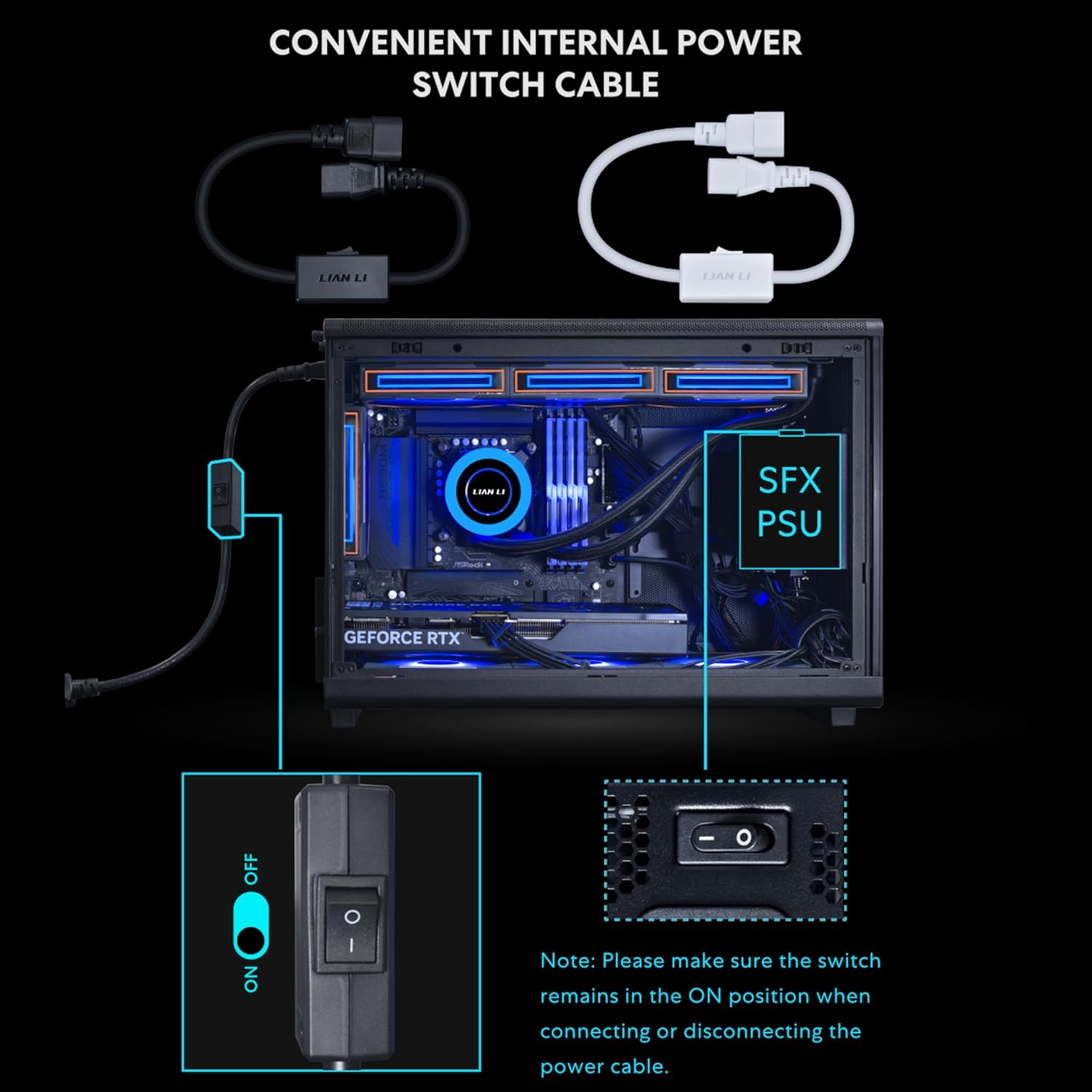
Image: The convenient internal power switch cable, which allows you to easily cut power even when the PSU is hidden inside the chassis. Ensure the switch is in the ON position when connecting or disconnecting the power cable.
Video: Demonstration of the SFX ATX Bracket Installation for the SP Platinum Power Supply. This video guides you through the process of mounting the PSU using the bracket.
4.2 Cable Connections
The SP1000P features fully modular, braided cables for optimal cable management and airflow.
- Motherboard Power: Connect the 24-pin ATX cable to your motherboard.
- CPU Power: Connect the 4+4 pin EPS/CPU cables to your motherboard's CPU power connectors. High-end motherboards may require two such connectors.
- Graphics Card Power (PCIe): Use the 12V-2x6 connector for compatible graphics cards. Ensure the blue-marked connector is fully inserted until it disappears into the socket for a secure connection. For other graphics cards, use the 6+2 pin PCIe cables.
- Peripherals: Connect SATA cables for storage drives and other peripherals.

Image: Close-up of the braided modular cables, highlighting their flexibility for easy routing and clean builds.
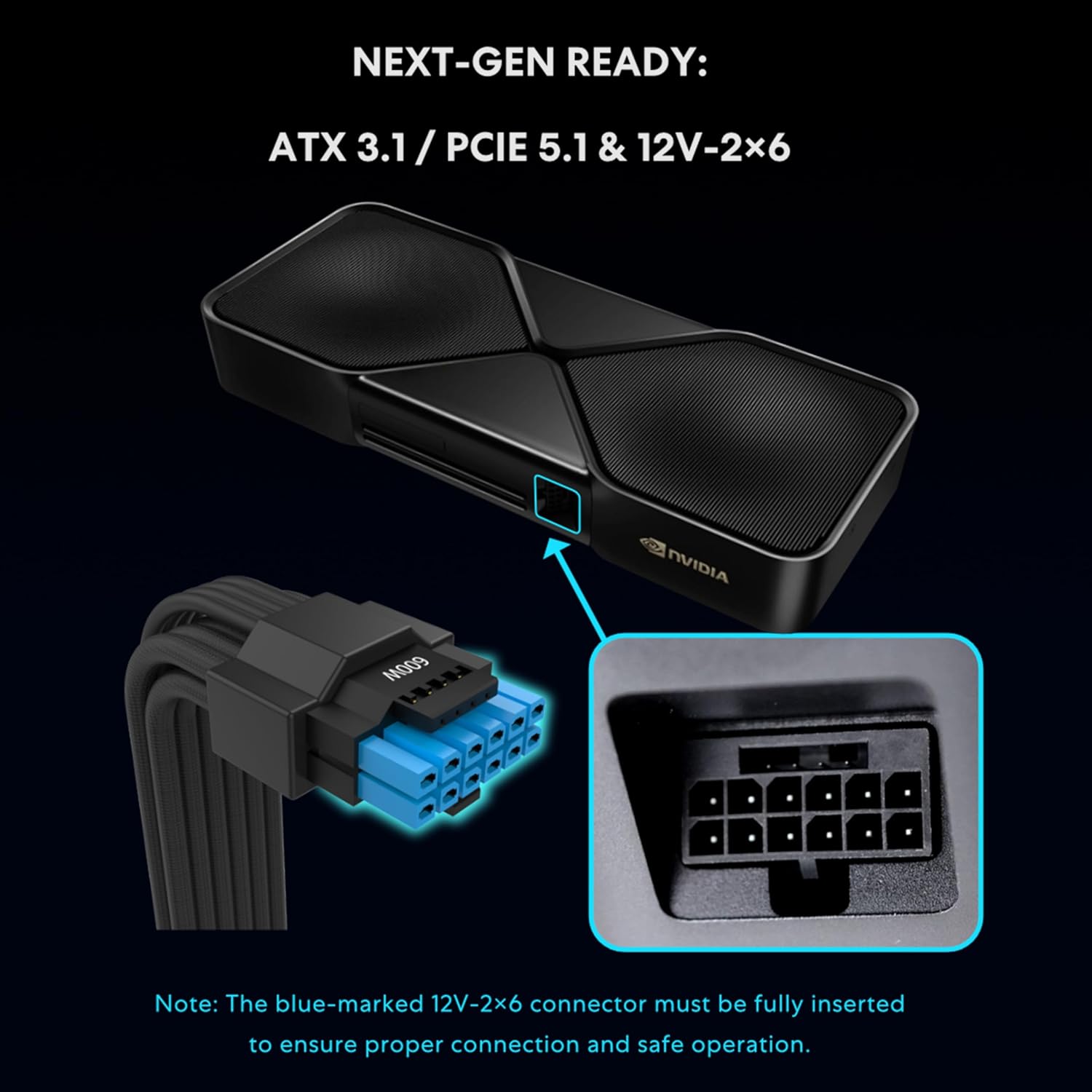
Image: Detail of the 12V-2x6 connector, emphasizing the importance of full insertion for proper connection and safe operation.

Image: A table detailing the comprehensive cable connectivity options for the SP Platinum series, including motherboard, CPU, PCIe, 12V-2x6, SATA, and SATA-PATA connectors.
5. Operating Instructions
5.1 Smart Cooling Feature
The SP1000P features a smart cooling system with a zero-RPM mode. The fan remains off for silent operation when the system load is at or below 40%. As performance demands increase and the load exceeds 40%, the fan will automatically ramp up to maintain optimal temperatures and ensure long-term reliability.

Image: The Lian Li SP1000P power supply highlighting its smart cooling feature, which allows for silent operation at low loads.

Image: Graph illustrating the acoustic noise levels and fan speed relative to power output for both SP1000P and SP850P models, demonstrating the zero-RPM mode at lower loads.
5.2 Power On/Off
After all components are securely connected, connect the main AC power cord to the PSU and a wall outlet. Use the external power switch on the PSU (or the internal power switch cable if used) to turn the unit on or off. Always ensure the system is properly shut down before disconnecting power.
6. Specifications
| Feature | Detail |
|---|---|
| Model Name | SP1000P.B |
| Brand | Lian Li |
| Form Factor | SFX |
| Output Wattage | 1000W |
| Efficiency Certification | 80 PLUS Platinum |
| ATX Version | ATX 3.1 |
| PCIe Version | PCIe 5.1 (with 12V-2x6 connector) |
| Capacitors | 100% Japanese 105°C |
| Cooling Method | Air (Smart Cooling with Zero-RPM mode) |
| Fan Count | 1 |
| Dimensions (L x W x H) | 4.92 x 2.5 x 3.94 inches (125mm x 63.5mm x 100mm) |
| Input Voltage | 120 Volts (AC) |
| Protection Features | OPP/NLP/OVP/OCP/UCP/OTP/LVP/SIP (Over Power, No Load, Over Voltage, Over Current, Under Current, Over Temperature, Low Voltage, Short Circuit Protection) |

Image: A comprehensive specifications table for the Lian Li SP Platinum series, including details on models, dimensions, output, efficiency, and protection features.
7. Maintenance
Proper maintenance ensures the longevity and optimal performance of your PSU.
- Dust Cleaning: Periodically clean dust from the PSU's fan grille and ventilation openings using compressed air. Ensure the system is powered off and unplugged before cleaning.
- Cable Management: Regularly check cable connections to ensure they are secure and not obstructing airflow.
- Environmental Conditions: Operate the PSU in a well-ventilated area, away from direct sunlight, heat sources, and excessive moisture.
8. Troubleshooting
If you encounter issues with your PSU, refer to the following common troubleshooting steps:
- No Power:
- Ensure the AC power cord is securely plugged into both the PSU and the wall outlet.
- Check if the power switch on the PSU (or the internal power switch cable) is in the "ON" position.
- Verify that the wall outlet is functional by plugging in another device.
- Confirm all modular cables are correctly and fully seated into the PSU and corresponding components.
- System Instability/Crashes:
- Ensure your PSU wattage is sufficient for all your components, especially the graphics card.
- Check for loose cable connections, particularly the 12V-2x6 connector for high-power GPUs.
- Monitor system temperatures to ensure proper cooling.
- Unusual Noise:
- The PSU fan operates in a zero-RPM mode at low loads. If the system load is high, fan noise is normal.
- If you hear unusual grinding or rattling, ensure no cables are obstructing the fan.
- Coil whine can occur in some PSUs under certain loads. While generally harmless, if excessive, contact support.
If problems persist after following these steps, please contact Lian Li customer support.
9. Warranty and Support
The Lian Li SP1000P Platinum Power Supply comes with a 10-year warranty from the date of purchase, covering defects in materials and workmanship under normal use. This warranty ensures long-term reliability and peace of mind.
For technical support, warranty claims, or further assistance, please visit the official Lian Li website or contact their customer service department. Keep your proof of purchase for warranty validation.
Lian Li Official Website: www.lian-li.com
Related Documents - SP1000P
 |
LIAN LI SP0850P/SP1000P Power Supply User Manual User manual for the LIAN LI SP0850P and SP1000P power supply units (PSUs), covering contents, warranty, technical specifications, installation, cable explanations, and safety warnings. |
 |
Lian Li Q58 Computer Case User Manual and Specifications Comprehensive guide to the Lian Li Q58 computer case, detailing SFX and ATX PSU modes, hardware compatibility, appearance styles, and installation instructions for various components like SSDs, fans, and radiators. |
 |
Lian Li EDGE Series 1000W/1300W/850W ATX 3.1 Power Supply User Manual Comprehensive user manual for Lian Li EDGE series ATX 3.1 power supply units, including models EDGE1000, EDGE1300, and EDGE850. Details specifications, package contents, installation guidance, and safety information. |
 |
LIAN LI G50 RS1200-1000GB(W) 12V-2x6 Connector Installation Guide Instructions for installing the LIAN LI G50 RS1200-1000GB(W) with its 12V-2x6 connector, emphasizing the dual-color housing for secure connection. |
 |
LIAN LI LANCOOL 216 Case Components and Installation Guide Comprehensive guide detailing the components, hardware list, and installation procedures for the LIAN LI LANCOOL 216 computer case, covering fan and radiator mounting, motherboard installation, graphics card installation, and cable management. |
 |
Lian Li Lancool 215 PC Case Installation Guide Detailed installation guide for the Lian Li Lancool 215 PC case. Learn how to install components, manage cables, mount fans and radiators, and understand hardware clearance. Features multilingual support and clear, step-by-step instructions for building your PC. |
Ask a question about this manual
Ask about setup, troubleshooting, compatibility, parts, safety, or missing instructions. Manuals+ will review the question and use this page’s manual context to help answer it.