
Introduction
This manual provides detailed instructions for the installation, operation, and maintenance of your WENTER USB to HDMI Adapter. Please read this manual thoroughly before using the product to ensure proper functionality and to avoid any issues.
Product Overview

Image: The WENTER USB to HDMI Adapter, showcasing its main features: support for 1080P resolution, compatibility with Windows and Mac operating systems, and USB 3.0/2.0 support.
The WENTER USB to HDMI Adapter converts a USB 3.0 signal from your computer into a high-definition HDMI output, enabling connection to HDTVs, monitors, or projectors. It supports simultaneous audio and video transmission and offers both mirror and extend display modes.

Image: The WENTER USB to HDMI Adapter, a compact grey device with a USB 3.0 connector on one end and an HDMI port on the other.
Key Features:
- High-Definition Performance: Supports 1080p resolution (1920x1080) at 60Hz via a high-speed USB 3.0 interface. Compatible with 3D content.
- Audio and Video Transmission: Delivers simultaneous audio and video output through the HDMI connection.
- Display Modes: Supports both screen mirroring and display extending modes for versatile use.
- Easy Installation: Features a pre-installed driver for a straightforward setup process.
- Wide Compatibility: Compatible with Windows 10, 8.1, 8, 7, XP, and Mac OS.

Image: An internal view of the adapter, highlighting its performance chip designed for stable, high-definition output.
Setup Instructions
Follow these steps to install and set up your WENTER USB to HDMI Adapter:
- Connect the Adapter: Plug the USB 3.0 end of the adapter into an available USB 3.0 port on your computer.
- Driver Installation: The adapter comes with a pre-installed driver. Upon connecting, an automated setup prompt should appear.
- Step 1: Before installation, add the driver to your security software's 'allow list' if prompted. This ensures smooth installation.
- Step 2: Open the device named "USBDISPLAY" on your computer (it may appear as a virtual drive).
- Step 3: Choose the appropriate driver for your operating system (Mac OS or Windows) and follow the on-screen instructions to complete the installation.
- Connect to Display: Connect an HDMI cable from the adapter's HDMI port to your HDTV, monitor, or projector.
- Verify Connection: Your display should now detect the new connection. If not, check your display's input source settings.
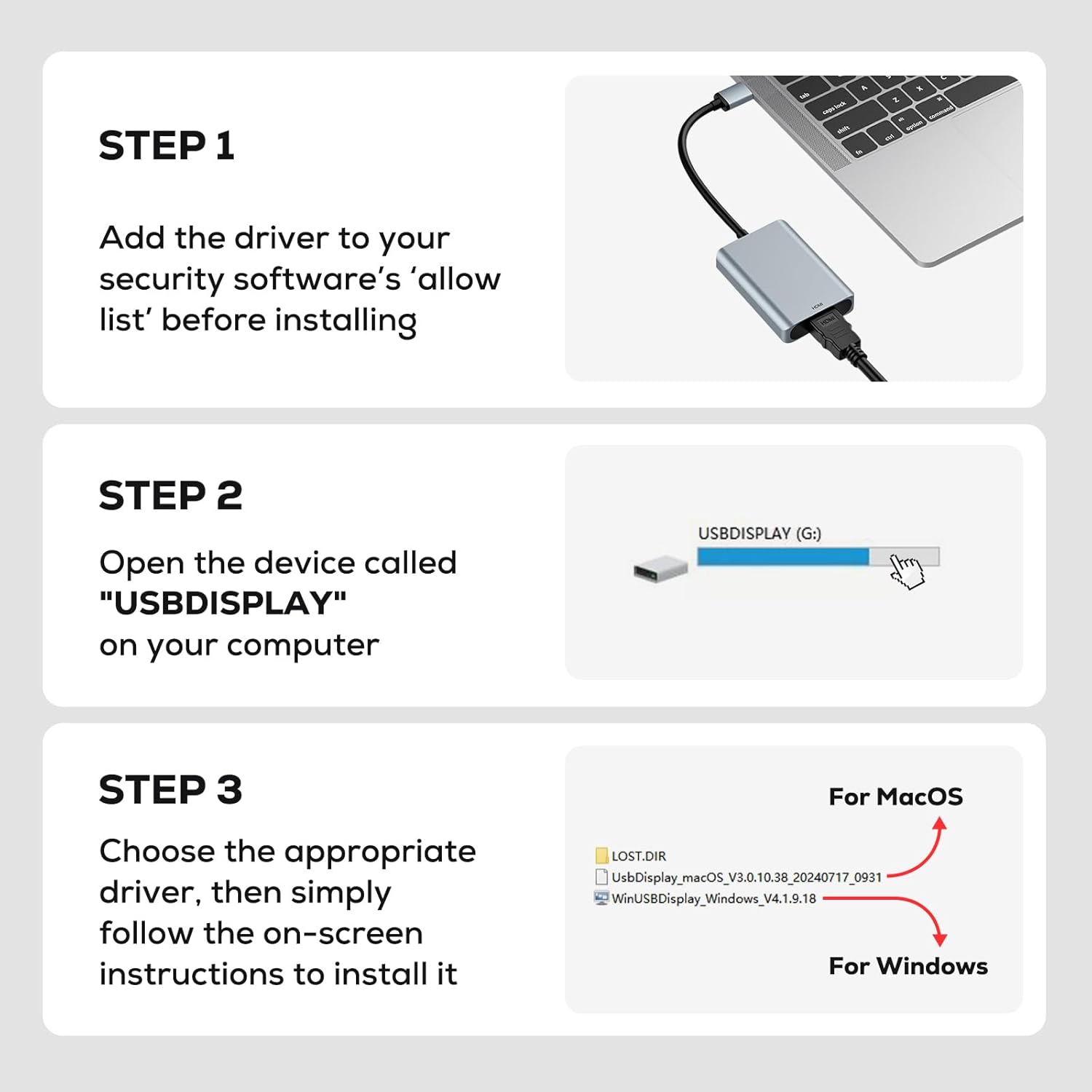
Image: Visual guide showing the three steps for driver installation: adding to allow list, opening "USBDISPLAY", and selecting the correct OS driver.
System Compatibility:
- Windows: 10, 8.1, 8, 7, XP (32-bit only for XP).
- Mac OS.
- Note: Linux and 64-bit editions of Windows XP are not supported.

Image: A diagram illustrating the universal compatibility of the adapter with various operating systems (Windows, Mac OS) and devices (Desktop, Laptop, HDTV, Monitor, Projector).
Operating Instructions
The adapter supports two primary display modes:
- Extend Mode: Displays different content on each screen, allowing for multitasking and an expanded workspace.
- Mirror Mode: Duplicates your computer's screen onto the external display, ideal for presentations or sharing content.
On Windows, you can easily switch between these modes using the "Win + P" shortcut.

Image: A visual comparison of Extend Mode, where a laptop and external monitor show different content, and Mirror Mode, where both display the same content.
Audio Output:
The adapter supports simultaneous digital audio and video transmission. Ensure your display device (TV, monitor with speakers) is configured to receive audio via HDMI.

Image: A laptop connected to a large television screen via the adapter, demonstrating simultaneous audio and video output for an immersive viewing experience.
Typical Applications:
The WENTER USB to HDMI Adapter is suitable for various scenarios:
- Home Theater: Enjoy films and media on a larger screen.
- Conferences/Presentations: Share your screen easily in meetings.
- Gaming: Experience games on a bigger display.
- Work/Productivity: Expand your workspace for efficient multitasking.

Image: A collage depicting various applications of the adapter, including home theater, business conferences, gaming, and stock trading, showcasing its versatility.

Image: A family enjoying a film on a large screen, demonstrating the adapter's use for home entertainment, supporting 1080P@60Hz, 720P@60Hz, and 480P@60Hz resolutions.
Maintenance
To ensure the longevity and optimal performance of your WENTER USB to HDMI Adapter, follow these maintenance guidelines:
- Cleaning: Use a soft, dry cloth to clean the adapter. Avoid liquid cleaners or abrasive materials.
- Storage: Store the adapter in a cool, dry place away from direct sunlight and extreme temperatures.
- Handling: Avoid bending or twisting the cable excessively. Do not apply undue force when connecting or disconnecting the adapter.
- Heat Dissipation: The adapter features an aluminum casing for efficient heat dissipation. Ensure it is not covered during operation to allow proper airflow.

Image: An illustration of the adapter's aluminum material, indicating its role in effective heat dissipation to maintain performance.
Troubleshooting
If you encounter issues with your WENTER USB to HDMI Adapter, refer to the following common problems and solutions:
| Problem | Possible Cause / Solution |
|---|---|
| No display on external monitor. |
|
| No audio output. |
|
| Driver installation issues. |
|
| Poor video quality or flickering. |
|
Specifications
| Feature | Detail |
|---|---|
| Model Number | B0FN6W5S7G |
| Brand | WENTER |
| Connector Type | USB 3.0 (Input), HDMI (Output) |
| Max Resolution | 1920x1080 (1080p) at 60Hz |
| Color | Grey |
| Compatible Devices | Laptops, Desktops |
| Operating System Compatibility | Windows 10 / 8.1 / 8 / 7 / XP (32-bit), Mac OS |
| Audio Support | Yes, simultaneous with video |
| Material | Aluminum (for heat dissipation) |
| Manufacturer | Wenter |

Image: An illustration highlighting the USB 3.0 interface, which offers 10 times faster data transfer (5Gbps) compared to USB 2.0 (480Mbps), crucial for high-definition video.
Warranty and Support
The WENTER USB to HDMI Adapter comes with a 12-month warranty from the date of purchase.
For technical support, warranty claims, or any questions regarding your product, please visit the official WENTER store or contact customer service through your purchase platform.