
1. Introduction
The LIGHTEU GLEDOPTO GL-C-017WL-D is an advanced WLED Digital LED Controller designed for addressable LED strips. Featuring an ESP32 chip and four independent outputs, this controller allows for versatile lighting effects, including segmented control and music synchronization via its integrated microphone. It supports a wide range of digital LED ICs and offers flexible power input from DC 5-24V.

Image 1.1: Overview of the GL-C-017WL-D controller highlighting its key features: 15A fuse, audio-reactive microphone, segmental control, and Type-C UART download port.
2. Safety Instructions
- Ensure the power supply voltage matches the controller's specified input range (DC 5-24V). Incorrect voltage can damage the device.
- Do not exceed the maximum total current of 15A or 10A per channel. Overloading can cause overheating and damage.
- Disconnect power before making any wiring connections or disconnections.
- Install the controller in a dry environment, away from moisture and extreme temperatures. The operating temperature range is -20°C to +45°C.
- This device is rated IP20, meaning it is not protected against water. Avoid exposure to liquids.
- Keep out of reach of children.
3. Package Contents
Verify that all items are present in the package:
- 1x LIGHTEU GLEDOPTO GL-C-017WL-D WLED Digital LED Controller
- 1x User Manual (this document)
4. Product Features
- Flexible Power Input: Supports DC 5-24V, compatible with 5V, 12V, and 24V addressable LED strips.
- Four Independent Outputs: Enables segmental control for multi-zone lighting effects.
- ESP32-Based & WLED Compatible: Supports dynamic effects, music synchronization, scene control, and app configuration.
- Integrated Microphone: Allows for sound-reactive lighting effects.
- Wide IC Compatibility: Works with WS2811, WS2812B, WS2813, WS2815, SK6812, SM16703P, TM1814, and other digital LED pixel ICs.
- Easy Installation: Quick connect terminals for straightforward wiring.
- Multiple Control Methods: Convenient configuration via web interface, dedicated app, or browser.

Image 4.1: The controller supports a wide range of addressable LED strip types.
5. Setup
5.1. Wiring Instructions
The controller features quick-connect terminals for easy wiring. Ensure correct polarity and secure connections for stable operation.

Image 5.1: Steps for connecting wires to the quick connect port.
Follow the wiring diagrams below based on the number of LED strips you are connecting. Each output (GPIO1, GPIO2, GPIO4, GPIO16) can control an independent strip.

Image 5.2: Wiring diagrams for connecting one to four LED strips.
5.2. Initial WLED Configuration
After initial power-up or a reset, the controller will create a Wi-Fi access point. Connect to this network using a smartphone or computer and navigate to the WLED web interface (usually 192.168.4.1) to configure your Wi-Fi network and LED strip settings.
5.3. Microphone Configuration
For the microphone function to work correctly, specific parameters need to be configured in the WLED interface, especially after a reset. This setting applies to firmware version 0.14 and later.
- Microphone type: Generic I2S
- I2S SD pin: 26
- I2S WS pin: 5
- I2S SCK pin: 21
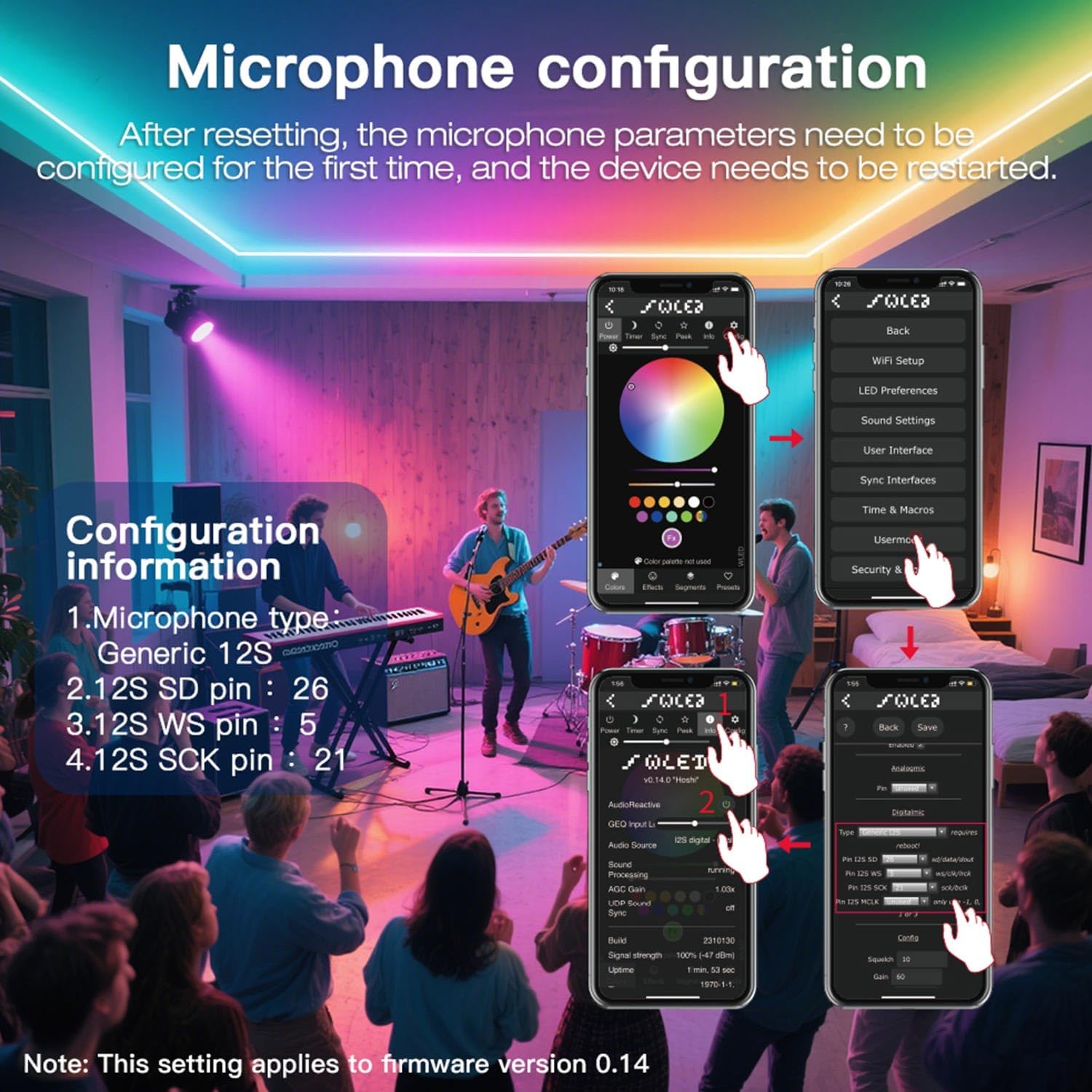
Image 5.3: WLED app interface for microphone configuration.
6. Operating the Controller
6.1. Segmented Color Control
The GL-C-017WL-D allows you to personalize each strip segment to display different colors and effects. This is managed through the WLED application or web interface.
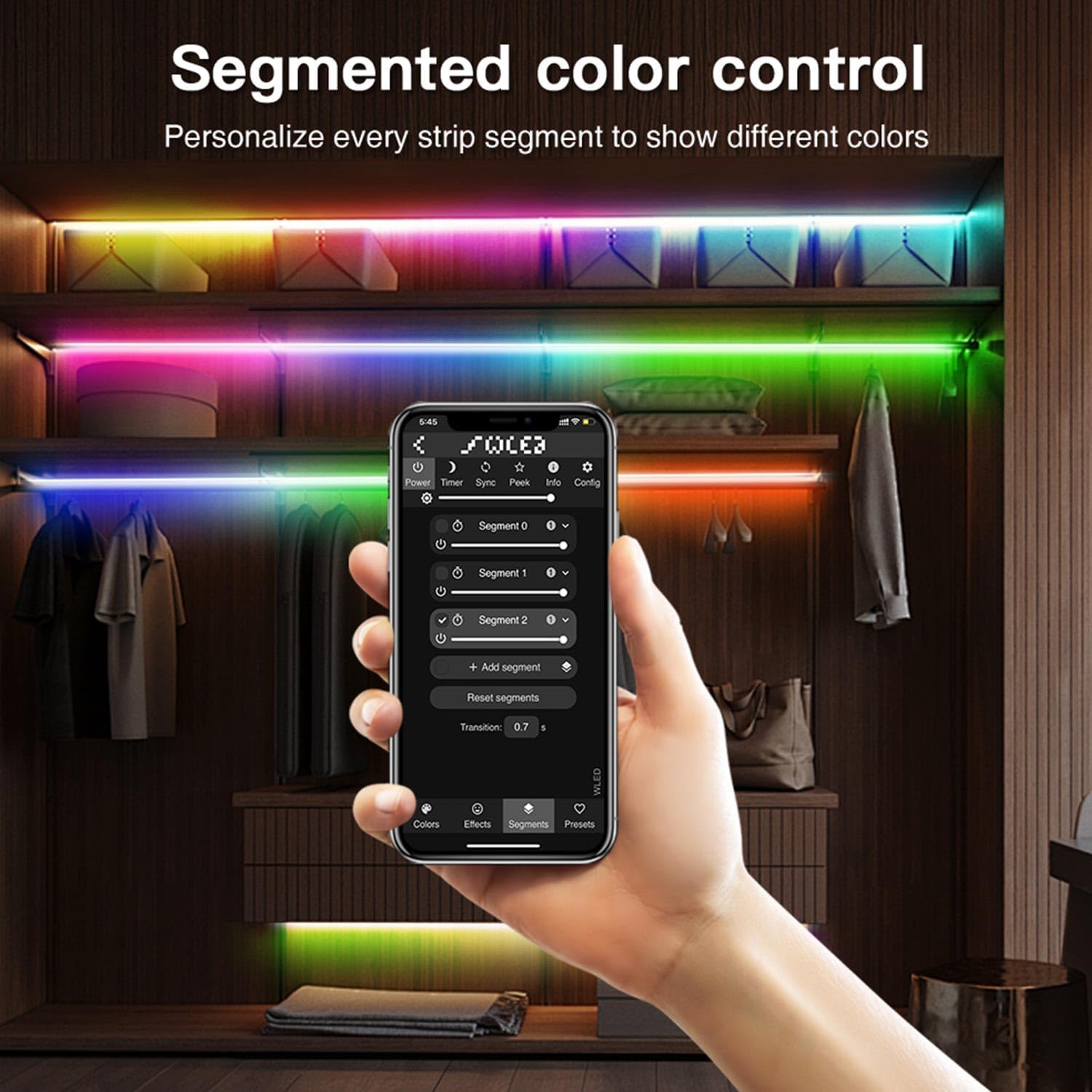
Image 6.1: WLED app interface for segmented color control.
6.2. Microphone Function (Audio Reactive)
The integrated microphone enables the LED strips to react to music and sounds, creating dynamic lighting effects. Ensure the microphone is configured as described in Section 5.3.

Image 6.2: The controller's microphone function allows lights to react to music.
6.3. App and Web Interface Control
Control and configure your LED strips using the WLED application available for smartphones or by accessing the controller's web interface through any standard browser connected to the same Wi-Fi network.
7. Maintenance
- Keep the controller clean and free from dust. Use a dry, soft cloth for cleaning.
- Do not use harsh chemicals or abrasive cleaners.
- Regularly check wiring connections to ensure they are secure.
- Ensure adequate ventilation around the controller to prevent overheating.
- Periodically check for WLED firmware updates to benefit from new features and improvements.
8. Troubleshooting
| Problem | Possible Cause | Solution |
|---|---|---|
| LEDs do not light up. | Incorrect wiring, no power, faulty LED strip, incorrect WLED settings. | Check power supply and connections. Verify LED strip functionality. Review WLED settings for correct LED type and pin assignment. |
| Controller not connecting to Wi-Fi. | Incorrect Wi-Fi credentials, out of range, network issues. | Ensure correct Wi-Fi SSID and password. Move controller closer to router. Try resetting the controller and reconfiguring Wi-Fi. |
| Microphone function not working. | Incorrect microphone configuration in WLED. | Refer to Section 5.3 for correct microphone settings (I2S SD pin, WS pin, SCK pin). Restart the device after configuration. |
| LEDs display incorrect colors or erratic behavior. | Incorrect LED type selected in WLED, data line interference, power issues. | Verify the LED strip IC type in WLED settings. Ensure proper grounding and sufficient power supply. |
9. Specifications
| Parameter | Value |
|---|---|
| Model Number | GL-C-017WL-D |
| Input Voltage | DC 5-24 V |
| Max Output Current (per channel) | 10 A |
| Max Total Current | 15 A |
| Max Power | 360 Watts (at 24V) |
| Supported LED ICs | WS2811, WS2812B, WS2813, WS2815, SK6812, SM16703P, TM1814, etc. |
| Max Number of LEDs | Up to 800 LEDs |
| Connectivity Protocol | Wi-Fi |
| Control Method | Application, Web Interface |
| Operating Temperature | -20 °C to +45 °C |
| Dimensions (L x W x H) | 108 x 45 x 18 mm (approx. 11 x 6 x 2 cm) |
| Weight | 60 grams |
| Material | Metal |
| IP Rating | IP20 |
| Compliance | CE |
10. Warranty and Support
For warranty information and technical support, please refer to the documentation provided with your purchase or contact your retailer. Specific warranty terms may vary by region and retailer.