
1. Introduction
This manual provides essential information for the proper setup, operation, and maintenance of your Anne Klein Connect It Stellar Smartwatch Set. This smartwatch combines elegant design with advanced technology, featuring an AMOLED high-definition display and a comprehensive suite of features to support your daily activities and wellness goals.

Figure 1: Anne Klein Connect It Stellar Smartwatch with gold mesh band.
2. Setup
2.1 Unboxing and Initial Charge
Upon unboxing, ensure all components are present: the smartwatch, magnetic rapid charging cable, one metal mesh watch band, and one silicone watch band. Before first use, fully charge the smartwatch using the provided magnetic charging cable. Connect the cable to a USB power source.

Figure 2: Rear view of the smartwatch, highlighting the magnetic charging contacts and heart rate sensor.
2.2 App Installation and Pairing
- Download the free Anne Klein Connect It mobile app from the App Store (iOS 9.0+) or Google Play Store (Android 5.0+).
- Enable Bluetooth on your smartphone.
- Open the Anne Klein Connect It app and follow the on-screen instructions to pair your smartwatch. Ensure the smartwatch is sufficiently charged.
Video 1: Official product video demonstrating the Anne Klein Connect It Stellar Smartwatch Set features and connectivity.
2.3 Changing Watch Bands
The smartwatch comes with two interchangeable bands: a metal mesh band and a silicone band. To change the band, locate the quick-release pins on the underside of the watch where the band connects to the watch case. Slide the pin to detach the current band and attach the desired band by aligning the pins with the holes on the watch case and releasing them.
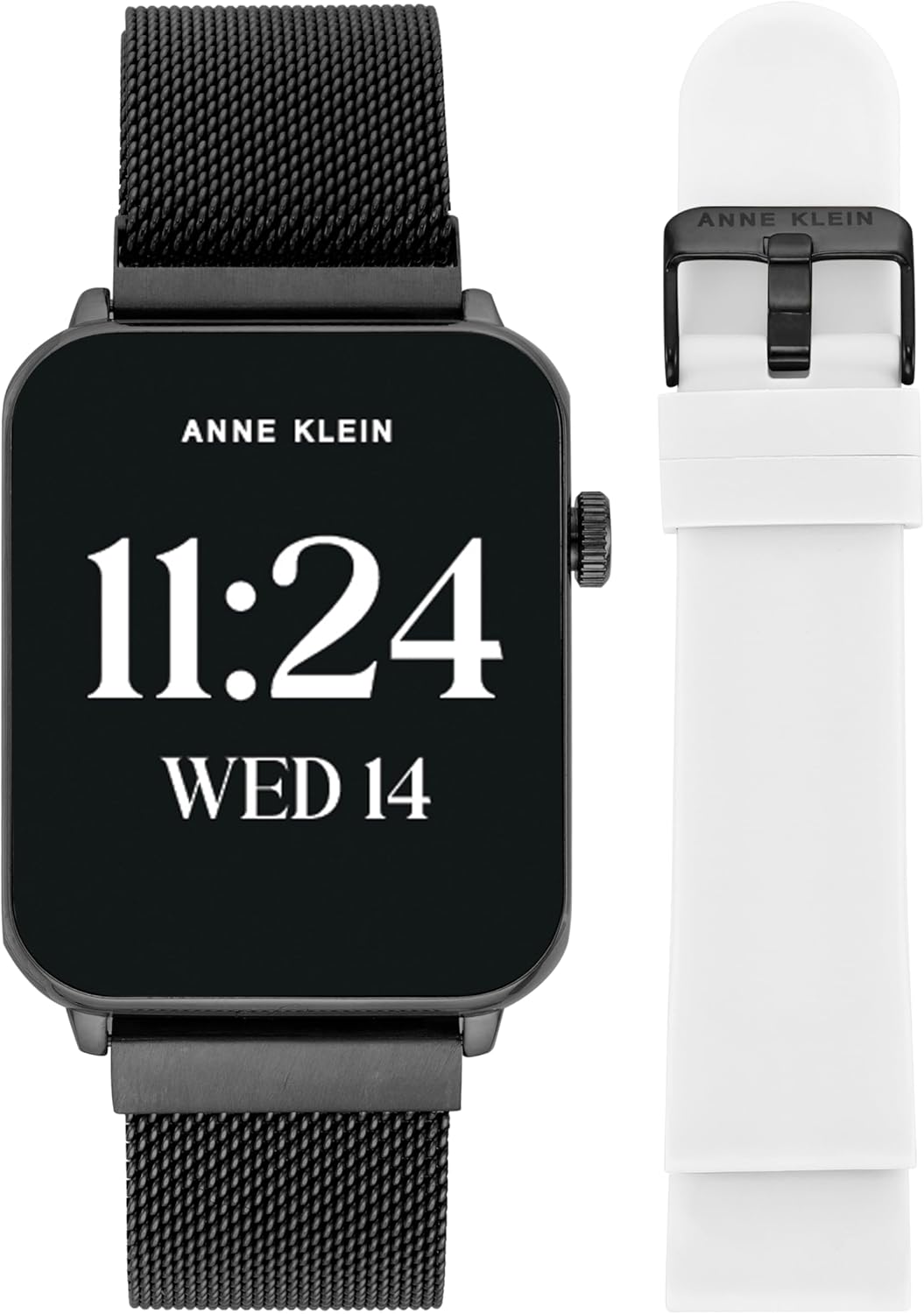
Figure 3: Anne Klein Connect It Stellar Smartwatch shown with a black silicone band, illustrating band interchangeability.
3. Operating Instructions
3.1 Basic Navigation
- Touchscreen: Swipe left, right, up, or down to navigate through menus and features. Tap to select.
- Side Button/Crown: Press to wake the screen, return to the home screen, or access the app menu. Rotate for scrolling.
- Always-On Display: The AMOLED display supports an always-on feature, allowing you to view time and basic information without activating the screen.
3.2 Customizing Watch Faces
Customize your smartwatch's appearance by selecting from a variety of pre-installed watch faces or create your own using the Anne Klein Connect It app. This allows for personalization to match your style or display preferred information.
3.3 Communication Features
- Calls: Make and receive Bluetooth calls directly from your wrist. Access call history and frequent contacts.
- Notifications: Receive message notifications from your smartphone, including text messages and alerts from social media applications.
- Voice Assistant: Utilize the integrated voice assistant for hands-free commands and information retrieval.
3.4 Health and Fitness Tracking
The smartwatch is equipped with various sensors to monitor your health and track your fitness activities.

Figure 4: Smartwatch interface showing various health monitoring features.
- Heart Rate Monitor: Continuously tracks your heart rate throughout the day.
- Blood Oxygen (SpO2): Measures blood oxygen levels.
- Sleep Analysis: Monitors sleep patterns and quality.
- Step Counter: Tracks daily steps taken and distance covered.
- Calorie Tracker: Estimates calories burned based on activity.
- Menstrual Cycle Tracker: Provides women's reproductive health tracking.
- Stress Monitoring: Helps track stress levels.
- Hydration Reminders: Prompts you to stay hydrated.
- Sport Modes: Over 100 sport modes including walking, running, swimming, hiking, cycling, yoga, pilates, dance, core training, and cooldown exercises for accurate activity recording.
3.5 Additional Features
- Music Control: Control music playback on your connected smartphone.
- Weather Updates: Get real-time weather information.
- GPS Connection: Connects to your phone's GPS for activity mapping.
- Camera Control: Remotely control your smartphone's camera.
- Alarms: Set alarms and reminders.
- Dual Time Zones: Display multiple time zones simultaneously.
4. Maintenance
4.1 Charging
Charge the smartwatch using the provided magnetic rapid charging cable. A full charge provides up to four days of battery life, depending on usage. Ensure the charging contacts on the watch and cable are clean and dry before charging.
4.2 Water Resistance
The smartwatch has an IP68 water resistance rating, meaning it is protected against dust and can withstand immersion in water up to 1.5 meters for 30 minutes. However, it is not recommended for use in hot water (e.g., saunas, hot tubs) or seawater, as this can compromise the seals and functionality.
4.3 Cleaning
Wipe the smartwatch and bands with a soft, damp cloth. Avoid using harsh chemicals or abrasive materials that could damage the finish or sensors. Ensure the device is completely dry before charging or prolonged storage.
5. Troubleshooting
- Watch not turning on: Ensure the watch is fully charged. Long press the side button to power on.
- Connectivity issues: Check that Bluetooth is enabled on your smartphone and the Anne Klein Connect It app is open. Try restarting both the watch and your phone.
- Inaccurate readings: Ensure the watch is worn snugly on your wrist, but not too tight. Clean the sensors on the back of the watch.
- Notifications not appearing: Verify notification permissions are granted to the Anne Klein Connect It app in your phone's settings.
6. Specifications
| Feature | Detail |
|---|---|
| Model Number | AK/9005BKGPRD |
| Display | AMOLED High-Definition Touchscreen |
| App Compatibility | Anne Klein Connect It app (Android 5.0+, iOS 9.0+) |
| Connectivity | Bluetooth 5.0, USB 5 connection (for charging) |
| Battery Life | Up to 4 days (usage dependent) |
| Water Resistance | IP68 (not for hot water or seawater) |
| Health Monitoring | Heart rate, blood oxygen, calories, sleep, menstrual cycle, stress, hydration reminders |
| Fitness Tracking | Step counter, 100+ sport modes |
| Band Length | 8 inches |
| Case Width | 35mm |
| Band Width | 22mm |
| Item Weight | 10.4 ounces |
| Package Dimensions | 6.25 x 4 x 1.25 inches |
| Included Accessories | Magnetic rapid charging cable, 1 metal mesh band, 1 silicone band |
7. Warranty and Support
For warranty information and customer support, please refer to the documentation included with your purchase or visit the official Anne Klein website. Keep your proof of purchase for any warranty claims.