
1. Introduction
The Y&H 80A MPPT Solar Charge Controller is an advanced device designed to efficiently manage power flow from solar panels to batteries. Utilizing Maximum Power Point Tracking (MPPT) technology, it optimizes energy harvesting, ensuring your battery system charges effectively. This controller is compatible with 12V, 24V, 36V, and 48V battery systems and supports various battery types including AGM, Gel, Lithium, and LiFePO4. It features a clear LCD display for real-time data monitoring and multiple protection functions for safe and reliable operation.
2. Safety Instructions
- High Voltage Warning: Solar panels can generate high voltages. Exercise extreme caution during installation and wiring to avoid electrical shock.
- Proper Wiring: Ensure all wiring connections are secure and correct according to the diagrams provided. Incorrect wiring can damage the controller, battery, or solar panels.
- Battery Safety: Always connect the battery to the controller first before connecting solar panels. Disconnect solar panels first, then the battery, when uninstalling.
- Ventilation: Install the controller in a well-ventilated area to prevent overheating. Avoid direct sunlight, high temperatures, and locations where water can enter the controller.
- Battery Compatibility: Ensure the controller settings match your battery type (AGM, Gel, Lithium, LiFePO4) to prevent overcharging or undercharging.
- Professional Installation: If you are unsure about any part of the installation process, consult a qualified electrician or solar professional.
3. Product Overview
The Y&H 80A MPPT Solar Charge Controller integrates advanced features for optimal solar power management:
- Advanced MPPT Technology: Achieves up to 99% tracking efficiency and 98% conversion efficiency, maximizing power output from solar panels.
- User-Friendly LCD Display: Provides real-time data and allows easy navigation for settings adjustment.
- Multi-Battery Support: Compatible with Gel, Sealed, Lead-Acid, Lithium (LiFePO4/Li(NiCoMn)O2) batteries, with customizable charging parameters.
- Comprehensive Protection: Built-in safeguards against overvoltage, overdischarge, reverse polarity, overcurrent, and over-temperature.
- Intelligent Load Control: Offers four working modes for flexible load management.
Controller Components
The controller features a robust design with key internal and external components:

Figure 3.1: Front view of the Y&H MPPT Solar Charge Controller. It features a gray casing with a blue base, an LCD screen displaying battery voltage and temperature, and two blue control buttons (Menu and Set).

Figure 3.2: Back view of the Y&H MPPT Solar Charge Controller. This image highlights the cooling fan and the heat sink fins at the bottom, designed for efficient heat dissipation.

Figure 3.3: Internal components of the Y&H MPPT Solar Charge Controller. The image shows the PCB power board, large capacitors, large inductors, a cooling fan, a temperature probe, and the display control board, all contributing to the controller's functionality.
4. Setup and Installation
4.1 Installation Environment
The controller should be installed in a well-ventilated area, away from direct sunlight, high temperatures, and moisture. Ensure adequate clearance around the unit for proper airflow and heat dissipation.
4.2 Wiring Sequence
Follow the correct wiring sequence to prevent damage to the controller and connected components:
- Connect Battery: First, connect the battery to the controller's battery terminals. Ensure correct polarity (positive to positive, negative to negative).
- Connect Solar Panels: Next, connect the solar panels to the controller's PV terminals. Verify correct polarity.
- Connect Load (Optional): If using the load output, connect your DC load to the controller's load terminals.
Figure 4.1: Wiring steps for the Y&H MPPT Solar Charge Controller. This diagram illustrates the sequence: first connect the battery, then the solar panels, ensuring all breakers are closed before powering on the controller and initiating charging.
4.3 Battery Type Selection
The controller supports various battery types. It is crucial to select the correct battery type in the controller settings to ensure proper charging and prolong battery life. Refer to the operating instructions for how to adjust this setting.
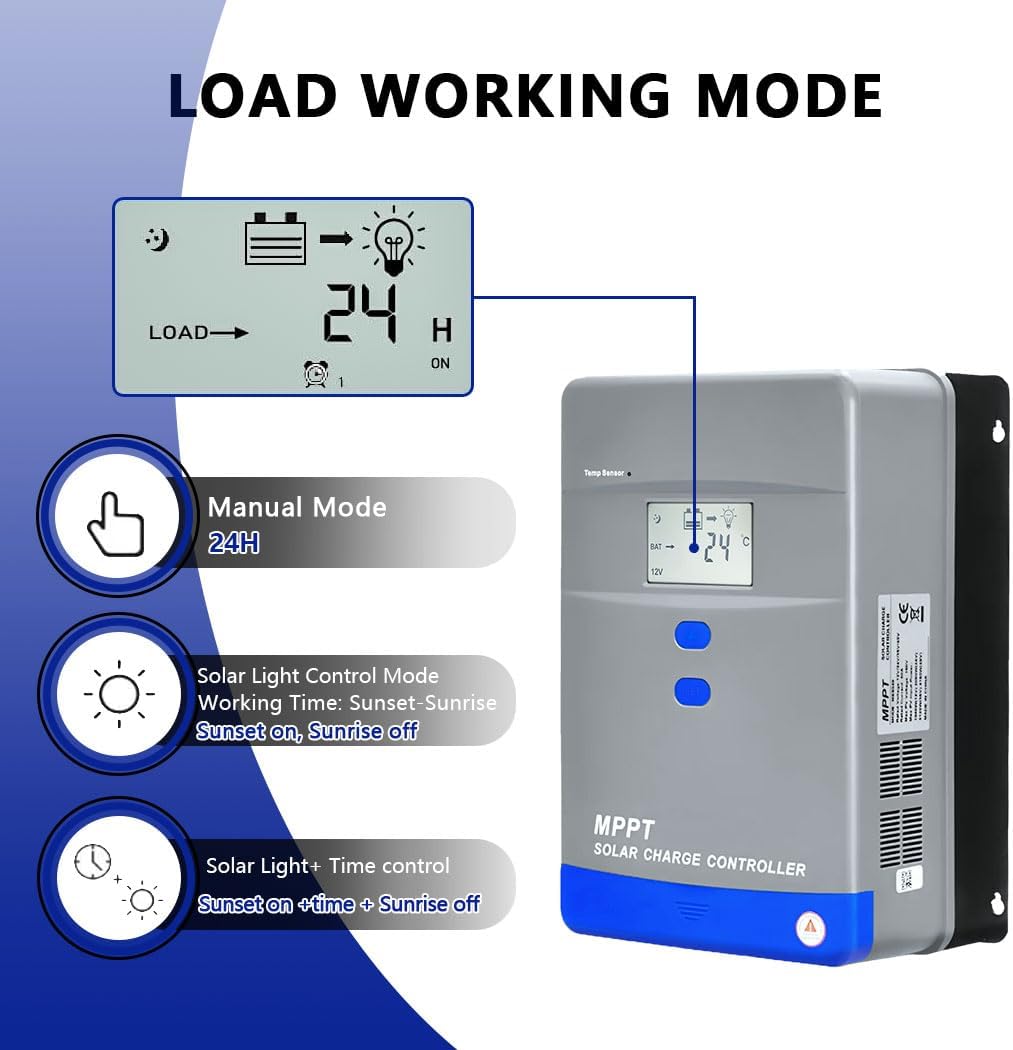
Figure 4.2: Advanced MPPT technology illustration. The image shows the controller connected to solar panels and a battery, with icons representing various supported battery types: FLD, SLD, GEL, LI (Lithium), and AGM, indicating broad compatibility.
5. Operating Instructions
5.1 LCD Display and Navigation
The LCD display provides real-time information about the system status. Use the Menu and Set buttons to navigate through parameters and adjust settings.

Figure 5.1: LCD display navigation. This graphic illustrates how to use the Menu and Set buttons to cycle through various display screens, showing parameters like battery voltage and load settings.
5.2 Load Working Modes
The controller offers four distinct load working modes to suit different application needs:
- Manual Mode (24H): The load output is continuously on for 24 hours.
- Solar Light Control Mode: The load turns on at sunset and turns off at sunrise.
- Solar Light + Time Control Mode: The load turns on at sunset and stays on for a set duration (e.g., 1-23 hours), then turns off.
- Reverse Control Mode: (Not explicitly detailed in provided data, but typically involves load being off during daylight and on at night, or vice-versa based on specific settings).
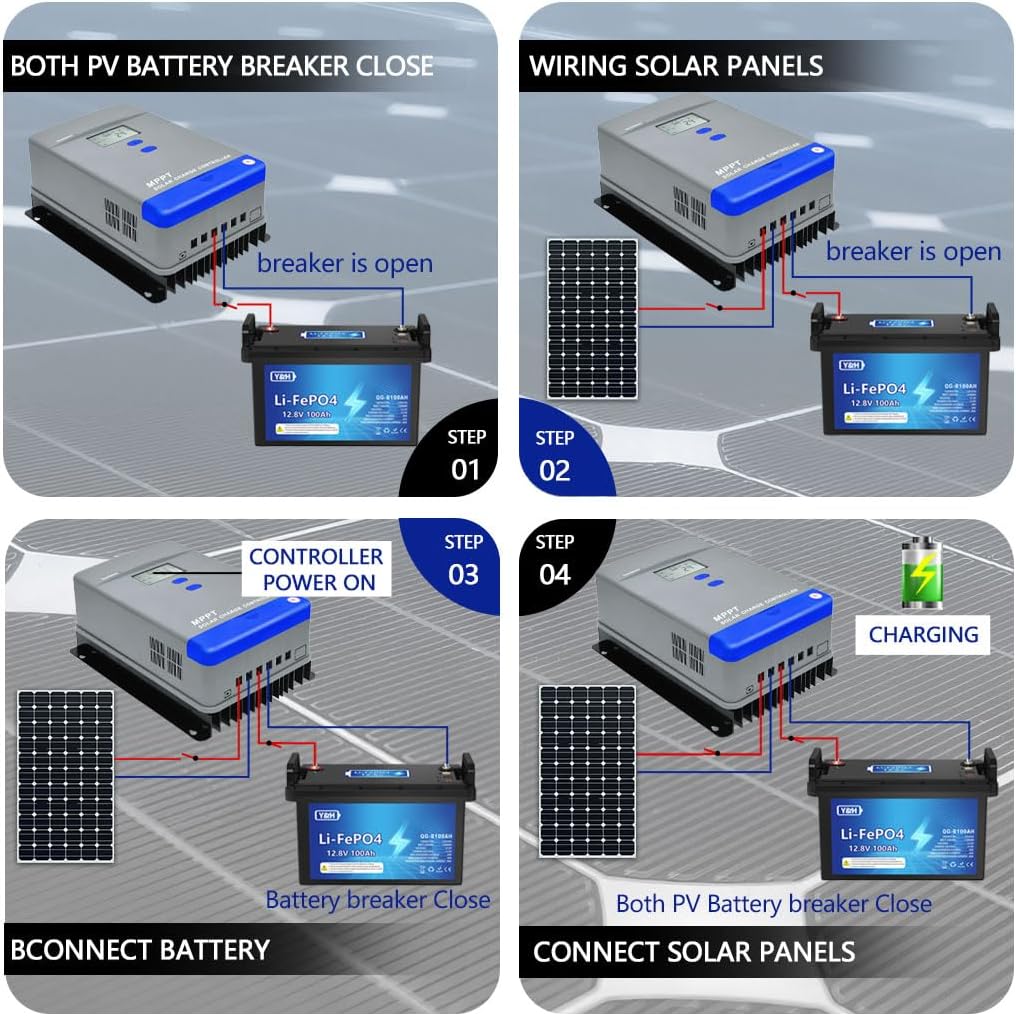
Figure 5.2: Load working modes. This image displays the LCD screen showing load status and icons for Manual Mode (24H), Solar Light Control Mode (sunset on, sunrise off), and Solar Light + Time Control Mode (sunset on + time, sunrise off).
6. Maintenance
Regular maintenance ensures the longevity and optimal performance of your solar charge controller:
- Inspect Connections: Periodically check all wiring connections for tightness and corrosion. Loose connections can cause power loss or overheating.
- Clean Controller: Keep the controller clean and free from dust and debris. Use a dry cloth to wipe the exterior. Ensure ventilation openings are not blocked.
- Check Battery Health: Monitor your battery's voltage and overall health. Ensure it is not overcharged or undercharged, which can indicate incorrect settings or a faulty battery.
- Environmental Check: Ensure the installation environment remains within the recommended temperature range and free from excessive moisture.
7. Troubleshooting
If you encounter issues with your Y&H MPPT Solar Charge Controller, consider the following common troubleshooting steps:
- No Display/Power: Check battery connections and ensure the battery has sufficient charge. Verify all fuses and circuit breakers are intact.
- No Charging: Ensure solar panels are connected correctly and receiving adequate sunlight. Check PV input voltage on the display. Verify battery type settings are correct.
- Low Charging Current: This could be due to insufficient sunlight, dirty solar panels, or incorrect panel configuration. Check for shading on panels.
- Load Not Working: Check load connections and ensure the load is not exceeding the controller's rated output. Verify the load working mode settings.
- Overheating: Ensure the controller is installed in a well-ventilated area and that the cooling fins are not obstructed. Reduce load if consistently overheating.
- Error Codes: If the LCD displays an error code, refer to the specific error code section in the full manual (if available) or contact customer support.

Figure 7.1: Multi-protection functions. This graphic highlights the various safety features of the controller, such as protection against photovoltaic input overcurrent, photovoltaic array short circuit, reversed photovoltaic polarity, overvoltage for batteries, overdischarge for batteries, and over-temperature.
8. Specifications
| Feature | Specification |
|---|---|
| Model | MPPT-80A |
| System Rated Voltage | 12V/24V/36V/48V Auto work |
| Max PV Open Circuit Voltage (Voc) | <150V |
| Max PV Input Power (12V System) | 1040W |
| Max PV Input Power (24V System) | 2080W |
| Max PV Input Power (36V System) | 3102W |
| Max PV Input Power (48V System) | 4160W |
| Rated Charge Current | 80A |
| Battery Type Support | User default, Lead-Acid (Sealed, Gel, Flooded), Lithium (LiFePO4, Li(NiCoMn)O2) |
| Discharge Current | 20A |
| Tracking Efficiency | Up to 99% |
| Conversion Efficiency | Up to 98% |
| Dimensions (L x W x H) | 19 cm x 13 cm x 6 cm |
| Weight | 2.45 kg |
| Material | Metal |
| Display Type | LCD |
| Protection Class | IP30 |
| Operating Temperature | -20 °C to +55 °C |

Figure 8.1: System specifications. This diagram provides key technical details including system rated voltage (12V/24V/36V/48V Auto work), maximum open voltage of PV (<150V), supported battery types, maximum PV power for different battery voltages, and the charging mode (MPPT).
9. Warranty and Support
For warranty information and customer support, please refer to the product packaging or contact Y&H directly through their official website or the retailer where the product was purchased. Keep your purchase receipt as proof of purchase for any warranty claims.


