
1. Introduction
Thank you for purchasing the Manora NS25309-CL LED Nightstand with Charging Station. This modern bedside table is designed to enhance your bedroom or living space with convenient features such as integrated LED lighting, a built-in charging station, and ample storage. This manual provides essential information for safe assembly, operation, and maintenance of your new nightstand.
2. Safety Information
Please read all safety warnings and instructions carefully before assembly and use.
- Two-Person Assembly: Assembly may require two people. Always lift with your knees, not your back, to prevent injury.
- Tipping Hazard: This table may tip if not properly anchored to the wall. For safety, always follow the assembly instructions carefully and anchor the table to the wall to prevent tipping.
- Electrical Safety: Ensure the charging station is connected to a properly grounded electrical outlet. Do not overload the outlets. Keep liquids away from the charging station to prevent electrical shock.
- Weight Capacity: Do not exceed the maximum weight recommendation of 100 pounds (45 kg) for the tabletop.
- Children and Pets: Keep small parts and packaging materials away from children and pets during assembly.
3. Package Contents
Before beginning assembly, verify that all parts and hardware are present. If any items are missing or damaged, please contact customer support.
- Nightstand Components (panels, drawers, hardware)
- LED Light Strip
- Remote Control for LED Light
- Built-in Charging Station (with power cord)
- Assembly Guide
- Installation Tools (e.g., hex key, screwdriver)
4. Specifications
| Brand | Manora |
| Model Name | NS25309-CL |
| Product Dimensions (D x W x H) | 13.7" x 17.7" x 24.4" (34.8 cm x 45 cm x 62 cm) |
| Item Weight | 32 Pounds (14.5 kg) |
| Maximum Weight Recommendation | 100 Pounds (45 kg) |
| Color | White |
| Material | Engineered Wood |
| Number of Storage Compartments | 3 (1 sliding top, 2 drawers) |
| Charging Station | 2 AC Outlets (125V/12A), 2 USB Ports (5V/2A), 4.9-foot power cord |
| Special Features | LED Light with Remote Control, Sliding Top, Charging Station |

Image: Detailed dimensions of the Manora NS25309-CL nightstand, including the main unit (17.7"W x 13.8"D x 24.4"H), the top sliding drawer (14.8"W x 11.8"D x 1.7"H), and the lower drawers (14.8"W x 11.8"D x 3.9"H).
5. Setup and Assembly
Your Manora nightstand comes with a comprehensive assembly guide and all necessary installation tools. Please follow the step-by-step instructions provided in the included physical guide for proper and safe assembly.
- Unpack Components: Carefully unpack all parts and hardware. Refer to the parts list in your assembly guide to ensure everything is present and undamaged.
- Prepare Workspace: Choose a clean, flat, and spacious area for assembly. Lay down a blanket or cardboard to protect the floor and furniture components.
- Follow Assembly Guide: Refer to the detailed diagrams and instructions in the provided assembly guide. Use the recommended tools (e.g., screwdriver, hex key, wrench) as indicated.
- Wall Anchoring: For enhanced stability and safety, especially in homes with children or pets, it is highly recommended to anchor the nightstand to the wall using the provided anti-tip kit. Follow the specific instructions in the assembly guide for this step.
- Install LED Light and Charging Station: Integrate the LED light strip and charging station according to the assembly guide. Ensure all electrical connections are secure.
If you encounter any difficulties during assembly, please refer to the troubleshooting section or contact customer support.
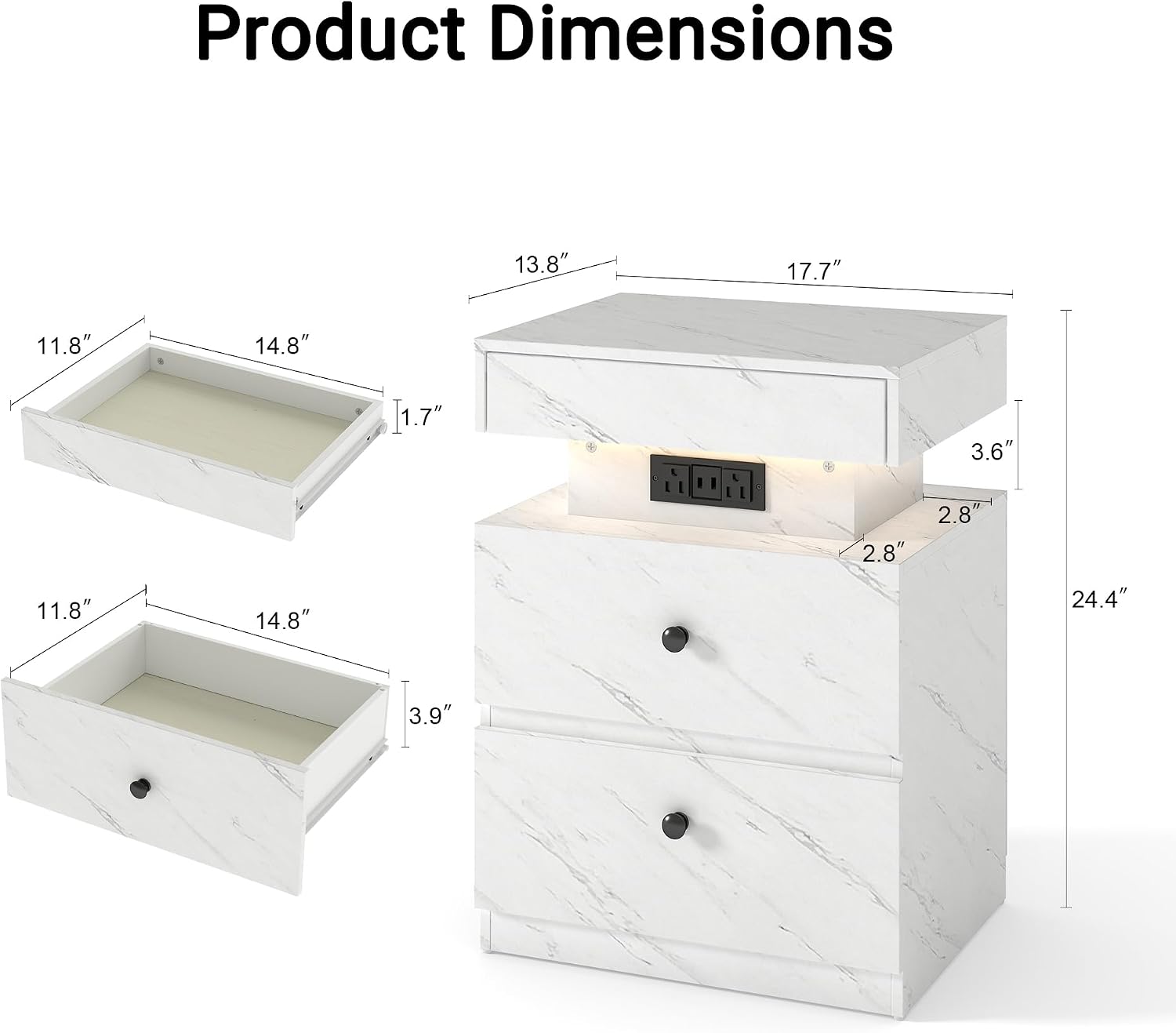
Image: Close-up views highlighting key features: (1) Open storage area with LED lighting and remote control, (2) Metal drawer handle, and (3) Scratch-resistant floor pads on the base of the nightstand.
6. Operating Instructions
6.1. LED Light Operation
The integrated LED light strip provides customizable ambient lighting. Use the included remote control to adjust settings.
- Power On/Off: Press the power button on the remote to turn the LED light on or off.
- Brightness Adjustment: Press and hold the brightness buttons (usually marked with '+' and '-') for stepless dimming or brightening.
- Color Selection: Choose from three tunable light colors: Warm Light, Mixed Light, and White Light, using the corresponding buttons on the remote.
- Timer Settings: The remote may include timer functions to automatically turn off the light after a set period. Refer to the remote's specific instructions for details.

Image: Diagram illustrating the remote control functions for the LED light. It shows how to press and hold for stepless dimming/brightening and the three tunable color options: Warm Light, Mixed Light, and White Light.

Image: A visual guide to the LED nightstand's remote control, demonstrating how to adjust brightness (stepless dimming) and select between Warm Light, Mixed Light, and White Light settings.
6.2. Charging Station Usage
The built-in charging station provides convenient power access for your electronic devices.
- Connect to Power: Plug the nightstand's 4.9-foot power cord into a standard 120V AC wall outlet.
- AC Outlets: Use the two 125V/12A AC outlets to power lamps, laptops, or other small appliances.
- USB Ports: Use the two 5V/2A USB ports to charge smartphones, tablets, and other USB-powered devices.
- Safety: Avoid spilling liquids near the charging station. Do not attempt to disassemble or modify the charging unit.

Image: A close-up view of the nightstand's convenient charging station, showing two AC outlets and two USB ports in use, with a 4.9-foot power cord. A smartphone is shown charging wirelessly on the tabletop.

Image: Diagram detailing the specifications of the convenient charging station, including the 4.9-foot power cord, two 125V/12A AC outlets, and two 5V/2A USB ports.
6.3. Storage Compartments
The nightstand features three storage compartments to help keep your space organized.
- Sliding Top Compartment: A discreet pull-out compartment located directly under the tabletop, ideal for small, frequently used items or valuables.
- Two Smooth-Gliding Drawers: Two spacious drawers below the charging station provide ample space for books, personal items, and other bedside essentials.

Image: An overhead view of the Manora NS25309-CL nightstand with its three storage compartments open, showcasing the top sliding compartment and the two lower drawers filled with various items like jewelry, cables, and cosmetics.

Image: A diagram illustrating the ample drawer storage of the nightstand, emphasizing that three drawers provide sufficient space for organizing items.
7. Maintenance
Proper care will ensure the longevity and appearance of your Manora nightstand.
- Cleaning: Wipe the surface with a soft, damp cloth. Avoid using harsh chemicals, abrasive cleaners, or polishes that may damage the finish.
- Spills: Clean up spills immediately to prevent staining, especially on the white surface.
- Dusting: Regularly dust the nightstand with a dry, soft cloth.
- Drawer Maintenance: Periodically check drawer slides for smooth operation. If drawers become stiff, a small amount of silicone lubricant can be applied to the slides.
- Electrical Components: Ensure the charging station and LED light connections remain secure. Do not attempt to clean electrical components with liquids.
8. Troubleshooting
If you encounter issues with your nightstand, refer to the following common problems and solutions.
- LED Light Not Working:
- Check if the power cord is securely plugged into the wall outlet and the nightstand.
- Ensure the LED light strip is properly connected to its power source within the nightstand.
- Verify the remote control has working batteries and is pointed directly at the LED receiver.
- Try unplugging and replugging the nightstand to reset the power.
- Charging Station Not Providing Power:
- Confirm the nightstand's main power cord is fully plugged into a functional wall outlet.
- Test the wall outlet with another device to ensure it has power.
- Check if the charging station unit is securely connected internally (refer to assembly guide).
- Avoid overloading the outlets; try charging fewer devices.
- Drawers Are Sticking or Not Closing Smoothly:
- Ensure the drawer slides are properly aligned and free of obstructions.
- Check that the drawer contents are not interfering with the closing mechanism.
- Verify that all assembly hardware for the drawers and slides is tightened correctly.
- Nightstand Feels Unstable:
- Ensure all assembly screws and fasteners are tightened.
- Confirm the nightstand is placed on a level surface.
- If not already done, install the anti-tip wall anchoring kit as per the assembly guide.
If these steps do not resolve the issue, please contact Manora customer support.
9. Warranty and Customer Support
Manora is committed to providing high-quality products. While specific warranty details are not provided in this manual, please retain your proof of purchase for any warranty claims.
For assistance with assembly, missing parts, product defects, or any other inquiries, please contact Manora customer support. You can typically find contact information on the packaging, your purchase receipt, or by visiting the official Manora store on Amazon or their website.
Manora Furniture Customer Service:
- Refer to your purchase documentation for direct contact methods.
- Visit the Manora Store on Amazon for more information.