Introduction
Welcome to the user manual for your SWOFY D08 Android 13 MP3 Player. This device is designed to provide a versatile and high-quality portable audio and video experience. Featuring an Android 13 operating system, Bluetooth 5.0, dual-band Wi-Fi, and a 4-inch touchscreen, the D08 allows you to enjoy music, videos, and various applications with ease. Please read this manual carefully to ensure proper setup, operation, and maintenance of your device.
Package Contents
Before you begin, please verify that all items are present in your package:
- SWOFY D08 MP3 Player (160GB)
- USB Type-C Cable
- Wired Earbuds
- User Manual
Device Overview
Familiarize yourself with the physical components of your SWOFY D08 MP3 Player.

Image: Front and side view of the SWOFY D08 MP3 Player, showcasing its 4-inch touchscreen and physical buttons.
- 4-inch HD Touchscreen: Main interface for interaction.
- Power Button: Located on the side, used to power on/off and wake/sleep the device.
- Volume Buttons: Adjust audio output level.
- USB-C Port: For charging and data transfer.
- 3.5mm Headphone Jack: For wired audio output.
- MicroSD Card Slot: For expandable storage.
- Built-in Speaker: For audio playback without headphones.
Setup
1. Charging the Device
Before first use, fully charge your SWOFY D08 MP3 Player. Connect the provided USB Type-C cable to the device's USB-C port and the other end to a USB power adapter (not included) or a computer's USB port. The battery indicator on the screen will show charging status.

Image: The SWOFY D08 MP3 Player displaying a 100% battery charge icon, indicating a full charge. The image also highlights the 2000mAh battery capacity and estimated usage times: 60 hours standby, 20 hours music, 6 hours video, and 3-4 hours charging time.
- A full charge typically takes 3-4 hours.
- The 2000mAh battery provides up to 35 hours of continuous music playback or 10 hours of 1080p video viewing.
2. Powering On/Off
- To Power On: Press and hold the Power button on the side of the device until the screen lights up.
- To Power Off: Press and hold the Power button, then select "Power off" from the options on the screen.
- To Sleep/Wake: Briefly press the Power button to put the device into sleep mode or wake it up.
3. Initial Setup and Wi-Fi Connection
Upon first power-on, follow the on-screen prompts to complete the initial setup, including language selection and Wi-Fi connection.
- From the home screen, tap the "Settings" icon.
- Select "Network & internet".
- Toggle Wi-Fi to "On".
- Select your desired Wi-Fi network from the list.
- Enter the network password if prompted, then tap "Connect".

Image: The SWOFY D08 MP3 Player's home screen, displaying a grid of application icons including Spotify, Pandora, Audible, FM Radio, Play Store, and Chrome, illustrating the Android 13 OS interface.
4. Expanding Storage with a MicroSD Card
The device comes with 32GB internal storage and a 128GB microSD card. You can expand storage further up to 1TB using an additional microSD card.
- Locate the microSD card slot on the side of the device.
- Gently insert the microSD card into the slot until it clicks into place. Ensure the card is oriented correctly.
- To remove, gently push the card inward until it springs out.
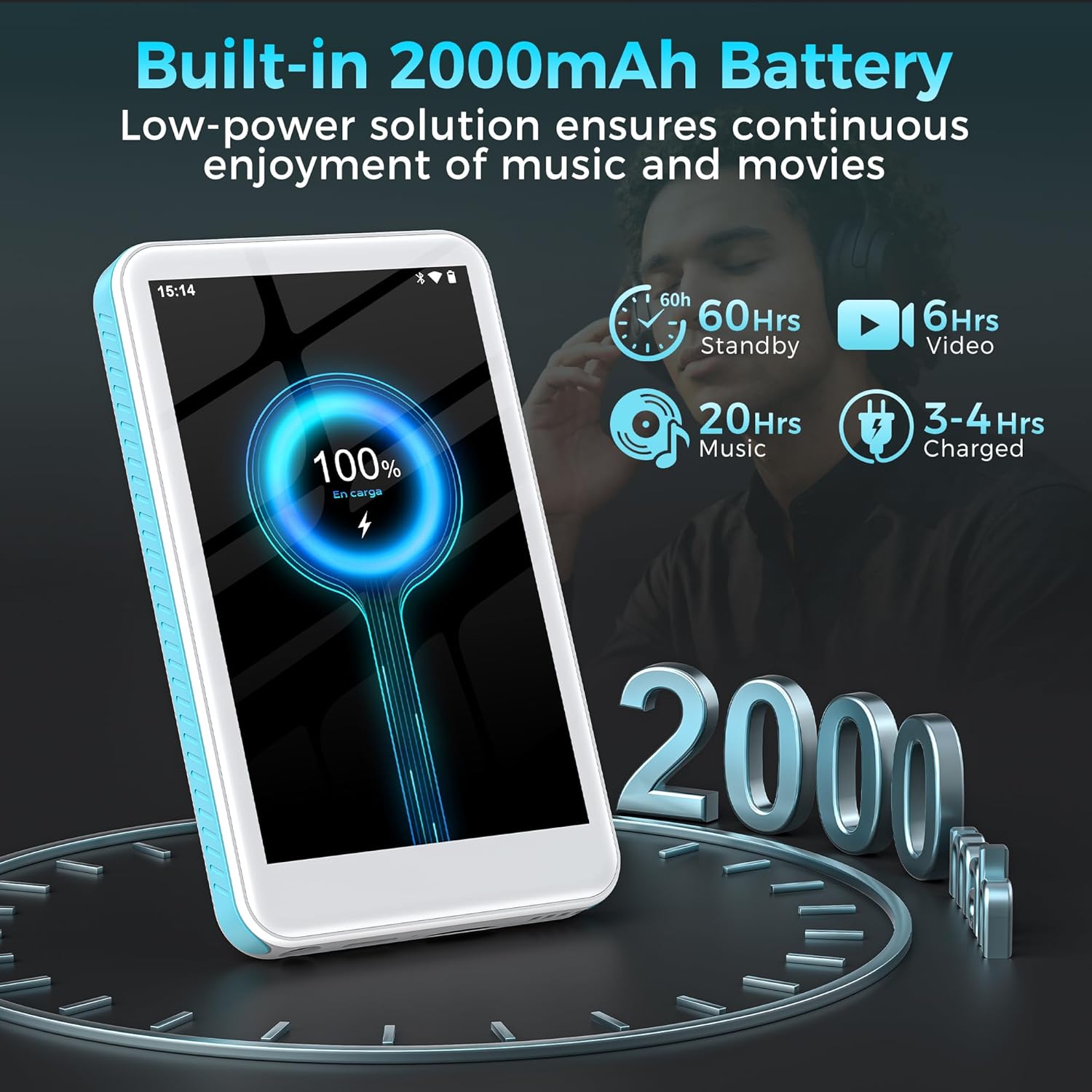
Image: The SWOFY D08 MP3 Player with a 1TB microSD card being inserted into its slot, illustrating the device's expandable storage capability. The image also highlights the 160GB total storage capacity.
Operating Instructions
1. Navigating the Interface
The SWOFY D08 uses an Android 13 operating system with a 4-inch touchscreen. Swipe left/right to navigate between home screens, tap icons to open apps, and swipe down from the top for quick settings and notifications.
2. Music Playback
The device supports various audio formats including MP3, FLAC, WAV, AAC, APE, DSD, M4A, and OGG. Use the pre-installed music player app or download your preferred streaming apps from the Play Store.
- Adding Music: Connect the player to your computer using the USB-C cable. The player will appear as a removable storage device. Drag and drop your music files into the "Music" folder.
- Playing Music: Open the music player app. You can browse music by artist, album, genre, or create custom playlists.
- Equalizer: Access the built-in equalizer within the music app settings to customize bass and treble levels.

Image: The SWOFY D08 MP3 Player displaying a music playback screen with album art, song title "Crazy Dream", and playback controls. This illustrates the user interface for audio playback.
3. Video Playback
The D08 supports 1080p HD video playback and is compatible with formats such as RM, AVI, RMVB, FLV, MP4, DAT, MKV, MPG, MOV, and TS. Use the pre-installed video player app.
- Adding Videos: Connect the player to your computer and transfer video files to the "Videos" folder.
- Playing Videos: Open the video player app and select your desired video.

Image: The SWOFY D08 MP3 Player displaying a video playback screen with a high-definition image from a movie, highlighting its 1080p HD video capabilities and 4.0-inch IPS screen.
4. Bluetooth Connectivity
Connect your D08 to Bluetooth headphones, speakers, or car stereos using Bluetooth 5.0 for wireless audio.
- Ensure Bluetooth is enabled on your D08 (Settings > Connected devices > Bluetooth).
- Put your Bluetooth accessory into pairing mode.
- On the D08, tap "Pair new device" and select your accessory from the list.
- Confirm pairing if prompted.

Image: The SWOFY D08 MP3 Player displaying a music playback screen with icons indicating Bluetooth connectivity to headphones, a portable speaker, and a car audio system, demonstrating its versatile wireless pairing capabilities.
5. Other Features
- FM Radio: Access the FM Radio app to listen to local radio stations.
- Voice Recorder: Use the built-in voice recorder for memos or lectures.
- E-book Reader: Read e-books using compatible apps.
- Play Store: Download and install additional applications like Spotify, Pandora, Audible, and more.
Maintenance
1. Cleaning Your Device
- Use a soft, lint-free cloth to clean the screen and body of the player.
- Avoid using abrasive cleaners, alcohol, or solvents, as these can damage the finish.
- Keep ports free of dust and debris.
2. Battery Care
- To prolong battery life, avoid exposing the device to extreme temperatures (hot or cold).
- Do not allow the battery to fully discharge frequently. Charge it when the battery level is low.
- If storing the device for an extended period, charge it to about 50% before storage.
3. Software Updates
Periodically check for software updates to ensure optimal performance and access to new features. Go to Settings > System > System update.
Troubleshooting
Device Will Not Turn On
- Ensure the device is sufficiently charged. Connect it to a power source and wait a few minutes before attempting to power on.
- Press and hold the Power button for at least 10-15 seconds to perform a forced restart.
Cannot Connect to Wi-Fi or Bluetooth
- Ensure Wi-Fi/Bluetooth is enabled in Settings.
- Restart the device and your router/Bluetooth accessory.
- For Wi-Fi, verify the password. For Bluetooth, ensure the accessory is in pairing mode and within range.
- Forget the network/device and try reconnecting.
Audio/Video Playback Issues
- Check the file format compatibility (refer to Specifications section).
- Ensure the volume is not muted or set too low.
- Try playing a different file to determine if the issue is with a specific file.
- If using headphones, ensure they are properly connected or paired.
Device is Slow or Unresponsive
- Close unnecessary background applications.
- Clear cache for frequently used apps (Settings > Apps > [App Name] > Storage & cache > Clear cache).
- Restart the device.
- If issues persist, consider a factory reset (Note: This will erase all data. Back up important files first. Settings > System > Reset options > Erase all data (factory reset)).
Specifications
| Model Name | D08 |
| Operating System | Android 13 |
| Processor | 8-core 2.0GHz |
| RAM | 3GB |
| Internal Storage | 32GB (with included 128GB microSD card for 160GB total) |
| Expandable Storage | Up to 1TB via MicroSD card |
| Battery | 2000mAh Lithium Polymer |
| Display | 4-inch HD Touchscreen, 480*800P Resolution, IPS |
| Connectivity | Bluetooth 5.0, Dual-Band Wi-Fi, USB-C |
| Audio Formats | MP3, FLAC, WAV, AAC, APE, DSD, M4A, OGG |
| Video Formats | RM, AVI, RMVB, FLV, MP4, DAT, MKV, MPG, MOV, TS |
| Special Features | Built-In Speaker, Equalizer, FM Radio, Voice Recorder, E-book Reader, Play Store support |
| Dimensions | 5.83 x 5.83 x 0.75 inches |
| Weight | 7.4 ounces |
Warranty and Support
Your SWOFY D08 MP3 Player comes with a standard manufacturer's warranty. Please refer to the warranty card included in your package for specific terms and conditions. For technical support, troubleshooting assistance, or warranty claims, please contact SWOFY customer service through the retailer where you purchased the product or visit the official SWOFY website.
For additional resources and frequently asked questions, you may visit the SWOFY Store on Amazon.
Important Safety Information
- Do not disassemble, repair, or modify the device yourself.
- Avoid exposing the device to water, moisture, or extreme temperatures.
- Use only approved chargers and accessories.
- Dispose of the device and its battery responsibly according to local regulations.


