
1. Introduction
This instruction manual provides essential information for the safe and efficient operation of your VEVOR 2.2 kW Variable Frequency Drive (VFD). This VFD is designed to convert single-phase AC 220-240V input into three-phase AC 220-240V output, enabling precise speed control for various industrial motors. Please read this manual thoroughly before installation and operation to ensure proper use and to prevent damage or injury.

Image: A general view of the VEVOR 2.2 kW Variable Frequency Drive (VFD), showcasing its compact design and control panel.
2. Safety Instructions
WARNING: Improper installation or operation can lead to serious injury or property damage. Always follow these safety guidelines.
- Ensure power is disconnected before any wiring or maintenance.
- The VFD must be properly grounded to prevent electrical shock.
- Do not connect U/V/W output directly to AC power supply; this will damage the inverter.
- Install the inverter in a non-flammable, dry environment, free from explosive gases.
- Only qualified professionals should perform wiring and installation.
- Do not open the VFD casing; internal components are under high pressure and can cause injury.
- The VFD features a 10-layer protection system, including overcurrent, overload, overvoltage, phase loss, and short circuit protection. However, these are supplementary and do not replace safe operating practices.

Image: Diagram illustrating the VEVOR VFD's comprehensive safety protections, including overcurrent, overload, overvoltage, short circuit, and phase loss protection.
3. Product Overview
The VEVOR 2.2 kW VFD is a robust and efficient solution for controlling the speed of three-phase motors. It offers stable performance, energy efficiency, and a user-friendly interface.
Key Features:
- Power Output: 2.2 kW (3 HP), 10 A.
- Input: Single-phase AC 220-240 V, 50/60 Hz.
- Output: Three-phase AC 220-240 V, 0-400 Hz.
- Control: Soft start and stop for smooth motor operation.
- Protection: 10-layer system including overcurrent, overload, overvoltage, phase loss, and short circuit protection.
- Cooling: Powerful fan and multi-hole design for efficient heat dissipation and quiet operation.
- User Interface: Intuitive control panel with a 5-digit LED display, speed adjustment knob, and removable panel for remote operation (20 cm cable).
- Durability: High-quality circuit control board and high-temperature resistant plastic casing.
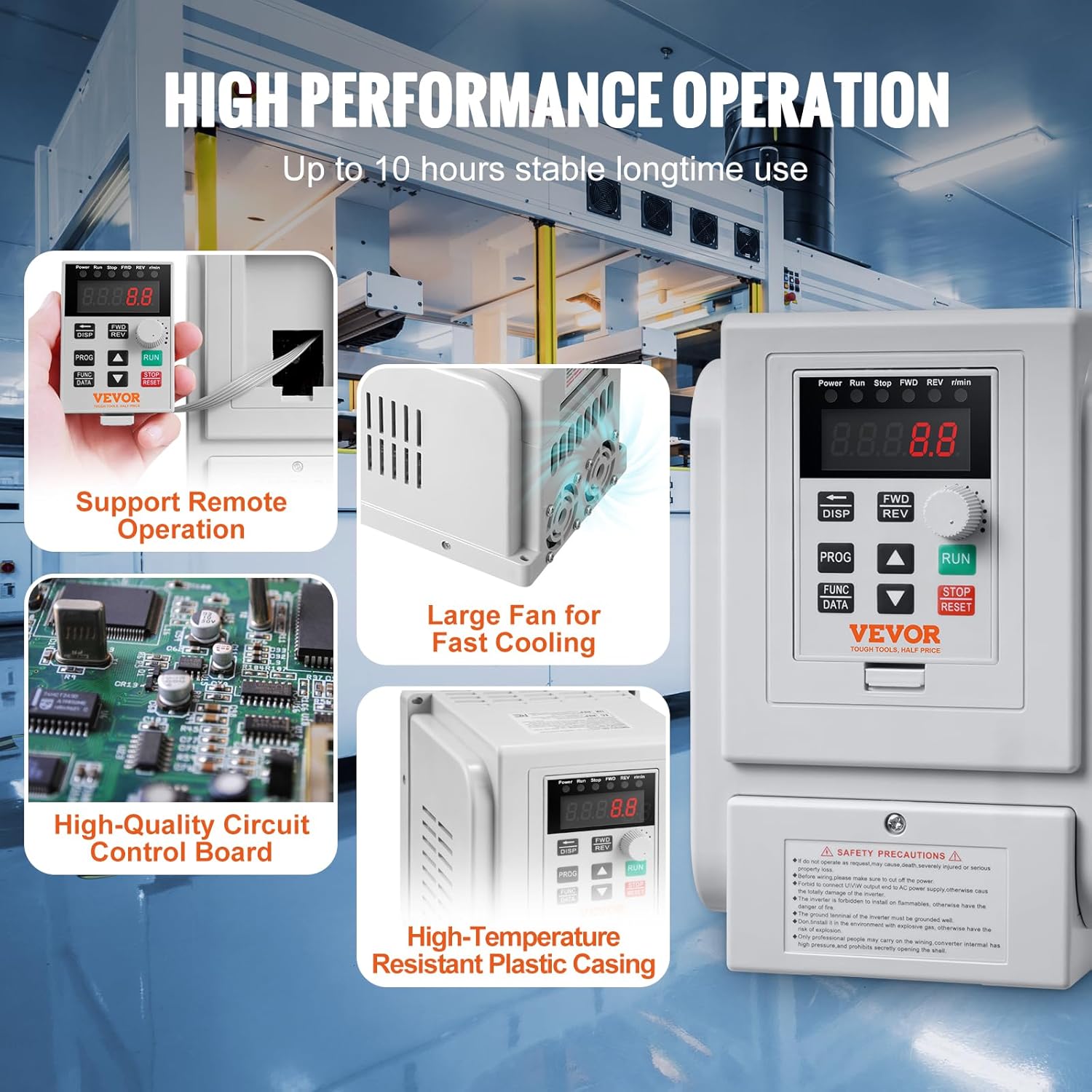
Image: Detailed view of the VEVOR VFD highlighting its high-performance features, including support for remote operation, a large cooling fan for rapid heat dissipation, a high-quality circuit control board, and a high-temperature resistant plastic casing.
4. Setup and Installation
4.1 Wiring Diagram
Refer to the following diagram for correct wiring. Ensure all connections are secure and comply with local electrical codes.

Image: Wiring diagram showing single-phase AC 220-240V input connected to terminals L and N, and three-phase AC 220-240V output connected to motor terminals U, V, W. Grounding terminal (GND) is also indicated.
4.2 Terminal Connections
| Terminal Label | Function Description |
|---|---|
| L, N | Single phase AC 220V input terminal |
| U, V, W | Output terminal connect to three phase motor |
| GND | Grounding terminal |
Important: Ensure the motor's wiring configuration is set for 220V three-phase operation if it is a dual-voltage motor (e.g., 220V/380V).
5. Operating Instructions
5.1 Control Panel Overview
The VFD features an intuitive control panel for easy operation and parameter adjustment.

Image: Detailed view of the VEVOR VFD control panel, showing the 5-digit LED display, status indicators, speed adjustment knob, and function keys (DISP, FWD/REV, PROG, FUNC/DATA, RUN, STOP/RESET).
- Status Indicator: Displays current operating status (Power, Run, Stop, FWD, REV, r/min).
- 5-Digit LED Display Screen: Shows frequency, speed, and parameter values.
- Speed Adjustment Knob: Used to adjust the output frequency/motor speed.
- RUN Button: Starts the inverter output.
- STOP/RESET Button: Stops the inverter output or resets fault conditions.
- FWD/REV Key: Toggles between forward and reverse rotation.
- DISP Button: Shifts between programming modes or jog mode in normal operation.
- PROG Button: Used for selecting programming mode or programming.
- FUNC/DATA Button: Used for setting function data.
- Up/Down Arrows: For navigating menus and adjusting values.
5.2 Basic Operation
- Power On: Connect the VFD to the power supply. The LED display will light up.
- Set Frequency: Rotate the Speed Adjustment Knob to set the desired output frequency (0-400 Hz).
- Start Motor: Press the RUN button to start the motor. The motor will accelerate to the set frequency.
- Change Direction: Press the FWD/REV key to switch between forward and reverse rotation.
- Stop Motor: Press the STOP/RESET button to stop the motor.
- Reset Fault: If a fault occurs, the VFD will display an error code. Press STOP/RESET to clear the fault after addressing the issue.
5.3 Parameter Settings
Detailed parameter settings are crucial for optimizing VFD performance for specific applications. Refer to the comprehensive user guide (if provided separately) for advanced parameter configurations. Basic parameters typically include:
- Maximum Output Frequency
- Acceleration/Deceleration Time
- Motor Rated Frequency
- Motor Rated Voltage
- Motor Rated Current
Use the PROG and FUNC/DATA buttons along with the Up/Down arrows to navigate and modify parameters.
6. Maintenance
Regular maintenance ensures the longevity and reliable operation of your VFD.
- Cleaning: Keep the VFD clean and free from dust and debris. Use a soft, dry cloth. Do not use liquid cleaners.
- Ventilation: Ensure the cooling fan and ventilation holes are unobstructed for proper heat dissipation.
- Connections: Periodically check all wiring connections for tightness and signs of corrosion.
- Environment: Maintain the operating environment within specified temperature and humidity ranges.
- Inspection: Inspect the VFD for any physical damage or unusual noises during operation.
7. Troubleshooting
If you encounter issues with your VFD, refer to the following common problems and solutions. For persistent issues, contact VEVOR customer support.
| Problem | Possible Cause | Solution |
|---|---|---|
| VFD does not power on | No power supply; loose connections; internal fault | Check power input; verify wiring; contact support |
| Motor does not start | Incorrect wiring; VFD in stop mode; fault condition; incorrect parameters | Verify motor and VFD wiring; press RUN; check for error codes and reset; review parameter settings |
| Motor runs erratically or at wrong speed | Incorrect frequency setting; motor parameters mismatch; unstable power supply | Adjust speed knob; verify motor parameters (rated frequency, voltage); ensure stable input power |
| VFD displays error code | Overcurrent, overvoltage, overload, phase loss, etc. | Refer to the VFD's specific error code list (if available in full manual); address the underlying cause (e.g., reduce load, check wiring); press STOP/RESET to clear |
| Overheating | Blocked ventilation; excessive ambient temperature; continuous heavy load | Clear obstructions from fan/vents; ensure adequate airflow; reduce load or operating time; consider a VFD with higher capacity if consistently overloaded |
8. Specifications
Detailed technical specifications for the VEVOR 2.2 kW Variable Frequency Drive.

Image: VEVOR VFD showing physical dimensions and key technical specifications such as model number, horsepower, power, current, input/output voltage, input/output frequency, operating temperature, and net weight.
| Parameter | Value |
|---|---|
| Model Number | AT1-2200X |
| Horsepower | 3 HP |
| Power | 2.2 kW |
| Current | 10 A |
| Input Voltage | AC 220-240 V Single Phase |
| Output Voltage | AC 220-240 V Three Phase |
| Input Frequency | 50 / 60 Hz |
| Output Frequency | 0-400 Hz |
| Operating Temperature | 10°C - 40°C (50°F - 104°F) |
| Net Weight | 1.2 kg (2.6 lbs) ± 3% |
| Dimensions (L x W x H) | 126 x 125 x 186 mm (4.9 x 5 x 7.3 inches) |
| Material | Aluminium (internal components), High-temperature resistant plastic (casing) |
| Display Type | LED |
9. Warranty and Support
For warranty information, technical support, or service inquiries, please contact VEVOR customer service. Keep your purchase receipt and product model number handy when contacting support.
You can typically find support contact details on the official VEVOR website or through your purchase platform.


