
1. Introduction
The Jabees HearLink is a versatile 3-in-1 hearing enhancement device designed to improve sound clarity and facilitate communication. It functions as a wireless remote microphone, an audio transmitter, and a two-way communication device. This manual provides detailed instructions for its setup, operation, and maintenance.
Key Features:
- 3-in-1 Functionality: Operates as a personal amplifier, TV audio transmitter, and remote microphone.
- Enhanced Hearing Support: Ideal for individuals with Microtia, Atresia, Glue Ear, or mild hearing challenges.
- Wireless Audio Streaming: Transmits sound from various sources (TVs, gym equipment, in-flight entertainment) to Bluetooth headphones or bone conduction headsets.
- Portable Design: Compact, lightweight, and features a clip-on design for versatile use in classrooms, conferences, restaurants, and home environments.
- Clear, Low-Latency Sound: Utilizes aptX technology for high-quality audio without feedback or high-pitched noise.
- Long Battery Life: Provides up to 8 hours of continuous use on a single charge.

Figure 1.1: The Jabees HearLink device illustrating its 3-in-1 capabilities for streaming, amplifying, and communicating.

Figure 1.2: Visual representation of HearLink's three primary functions: personal amplification, TV audio transmission, and remote microphone use.
Figure 1.3: HearLink is designed to benefit individuals with various hearing challenges and professionals in different settings.
Figure 1.4: HearLink offers an affordable and versatile alternative to traditional BAHA devices.
2. Product Overview
Familiarize yourself with the components and controls of your Jabees HearLink device.
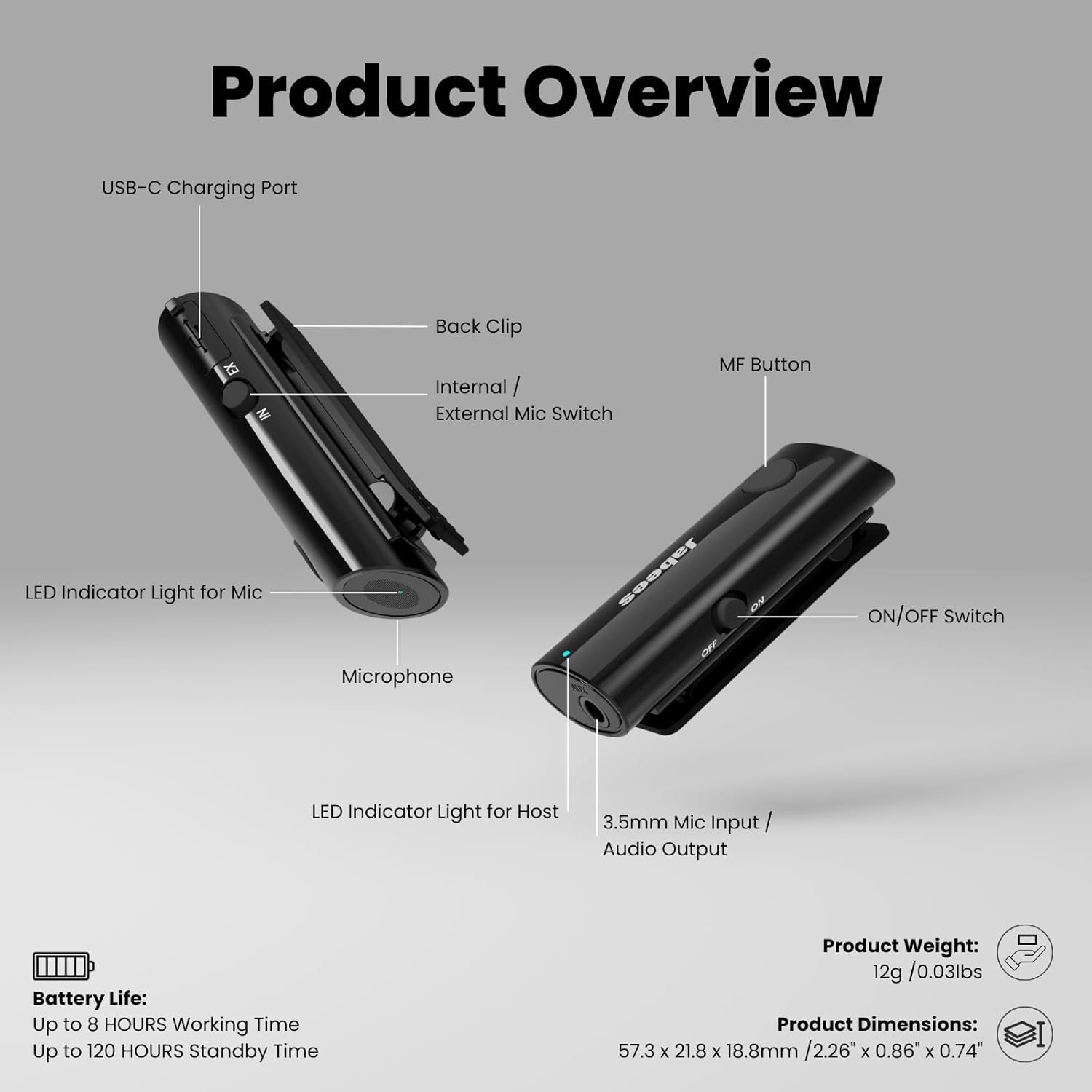
Figure 2.1: Detailed view of the Jabees HearLink device highlighting its various ports and controls.
- USB-C Charging Port: For charging the device.
- Back Clip: Allows for easy attachment to clothing or surfaces.
- Internal/External Mic Switch: Toggles between the built-in microphone and an external microphone.
- MF Button (Multi-Function Button): Used for power, pairing, and other controls.
- LED Indicator Light for Mic: Shows the status of the microphone.
- Microphone: Built-in microphone for capturing sound.
- LED Indicator Light for Host: Shows the device's connection status.
- 3.5mm Mic Input / Audio Output: For connecting external microphones or audio devices.
- ON/OFF Switch: Powers the device on or off.

Figure 2.2: The compact size of the HearLink device, designed for portability.
3. Setup
3.1 Charging the HearLink Kit
Before first use, fully charge your HearLink device. The charging time is approximately 2 hours.
- Locate the USB-C charging port on the HearLink device.
- Connect the provided USB-C charging cable to the port.
- Plug the other end of the cable into a compatible USB power source.
- The LED indicator will show charging status (e.g., red while charging, off or blue when fully charged).
Video 3.1: Instructions on how to charge the Jabees HearLink device. The video demonstrates connecting the USB-C cable to the device and observing the charging indicator light.
3.2 Powering On the HearLink Kit
To power on your HearLink device:
- Locate the ON/OFF switch on the side of the device.
- Slide the switch to the "ON" position.
- The LED indicator light will flash, indicating the device is powered on and ready for pairing.
Video 3.2: A short guide demonstrating how to power on the Jabees HearLink device by using the ON/OFF switch.
3.3 Pairing with Bluetooth Headphones (e.g., AirPods, Bone Conduction Headphones)
The HearLink device can connect to various Bluetooth headphones for audio transmission and reception.
General Bluetooth Pairing:
- Ensure your HearLink device is powered on.
- Press and hold the Multi-Function (MF) button on the HearLink for approximately 3 seconds until the LED flashes red and white, indicating pairing mode.
- Put your Bluetooth headphones into pairing mode (refer to your headphone's manual for specific instructions).
- The HearLink will automatically connect to the headphones. A solid green light on the HearLink indicates a successful connection.
Video 3.3: A comprehensive video demonstrating the general process of connecting the Jabees HearLink to Bluetooth headphones.
Pairing with AirPods:
- Before starting, ensure your AirPods are disconnected from all other devices (e.g., iPhone, iPad, Mac) by selecting "Forget This Device" in Bluetooth settings.
- Take the AirPods out of their charging case. They will automatically enter pairing mode.
- Power on your HearLink device.
- Press and hold the MF button on the HearLink for 3 seconds until the LED flashes red and white, indicating pairing mode.
- HearLink will automatically connect to the AirPods within a minute. The LED indicator turns solid green when paired.
Video 3.4: Step-by-step guide on how to connect your Jabees HearLink with Apple AirPods for seamless audio.
Figure 3.1: Simplified setup steps for using HearLink as a wireless microphone or an audio transmitter.
4. Operating Modes
The Jabees HearLink offers three primary operating modes to suit various hearing and communication needs.
4.1 Wireless Remote Microphone
Use HearLink to amplify voices and sounds from a distance, transmitting them directly to your connected Bluetooth headphones. This mode is ideal for lectures, group discussions, or noisy environments.
- Ensure HearLink is paired with your headphones.
- Set the Internal/External Mic Switch to "IN" for the built-in microphone or connect an external lavalier microphone to the 3.5mm input and set the switch to "EX".
- Clip the HearLink to the speaker's clothing or place it near the sound source.

Figure 4.1: HearLink functioning as a remote microphone in a restaurant, enhancing conversation clarity.
Figure 4.2: HearLink supporting an external lavalier microphone for improved audio clarity.
4.2 Audio Transmitter
Connect HearLink to audio sources like TVs, computers, or in-flight entertainment systems to wirelessly stream audio to your Bluetooth headphones.
- Ensure HearLink is paired with your headphones.
- Connect the HearLink to the audio source using a 3.5mm audio cable.
- If transmitting stereo sound, double-press the MF button to enable A2DP mode.

Figure 4.3: HearLink used as a TV audio transmitter, allowing users to listen wirelessly.
4.3 Two-Way Communication
When used as a remote microphone, the HearLink also enables two-way communication, allowing the wearer of the headphones to speak and be heard clearly by the person wearing the HearLink.
Figure 4.4: Illustrates diverse applications of the HearLink device for communication and audio streaming.
5. Maintenance
5.1 Battery Life and Charging
The HearLink device provides up to 8 hours of working time and up to 120 hours of standby time on a full charge. Recharge the device when the LED indicator shows low battery (e.g., flashing red).
- Charging Time: Approximately 2 hours.
- Battery Type: Lithium Ion (1 A battery included).

Figure 5.1: The HearLink device offers up to 8 hours of continuous use.
5.2 Cleaning and Storage
- Wipe the device with a soft, dry cloth. Avoid using harsh chemicals or abrasive materials.
- Store the HearLink in a cool, dry place away from direct sunlight and extreme temperatures.
6. Troubleshooting
If you encounter issues with your HearLink device, try the following troubleshooting steps:
6.1 Factory Reset
A factory reset can resolve many common issues by restoring the device to its original settings.
- Ensure the HearLink device is powered off.
- Press and hold the Multi-Function (MF) button for approximately 10 seconds until the LED indicator flashes rapidly, then turns off.
- Release the button. The device is now reset. You will need to re-pair it with your headphones.
Video 6.1: Instructions on how to perform a factory reset on your Jabees HearLink device.
6.2 Connection Issues
- Ensure both HearLink and your headphones are fully charged.
- Verify that both devices are in pairing mode.
- Move the devices closer to each other to ensure they are within Bluetooth range.
- If previously paired, try "forgetting" the HearLink from your headphone's Bluetooth settings and re-pairing.
7. Specifications
| Feature | Detail |
|---|---|
| Model Name | HearLink |
| Model Number | 41059BLK |
| Connectivity Technology | AUX, Bluetooth |
| Wireless Communication Technology | Bluetooth |
| Bluetooth Version | 5.2 |
| Battery Life | 8 Hours |
| Charging Time | 2 Hours |
| Battery Type | Lithium Ion (1 A battery included) |
| Headphones Jack | 3.5 mm Jack |
| Material | Acrylonitrile Butadiene Styrene (ABS) |
| Item Weight | 0.48 ounces |
| Product Dimensions | 2.27 x 0.86 x 0.67 inches |
| Control Type | Button Control |
| Noise Control | Environmental Noise Cancellation |
| Special Feature | Bluetooth Transmitter Receiver, Lapel Clip, Built-In Microphone, Low Latency, Quick Pairing Mode, TV Transmitter, Hearing Amplifiers |
8. Warranty and Support
For warranty information and customer support, please refer to the official Jabees website or contact their customer service directly. Keep your purchase receipt for warranty claims.
Manufacturer: FreeTek International Co.,Ltd.
Date First Available: July 25, 2019