
1. Introduction
Thank you for choosing the DWVO Lift Up Storage Bed Frame. This queen-size bed frame is designed to provide both comfort and functionality, featuring a convenient lift-up storage mechanism, an integrated LED-lighted headboard with a charging station, and a sturdy wooden slat support system. This manual provides essential information for safe assembly, operation, maintenance, and troubleshooting to ensure optimal use of your new bed frame.

2. Safety Instructions
Please read and understand all safety instructions before assembly and use. Failure to follow these instructions may result in injury or damage to the product.
- Assembly: Always assemble the bed frame on a soft, clean surface to prevent scratches. Ensure all parts are present and undamaged before beginning assembly. Two adults are recommended for assembly.
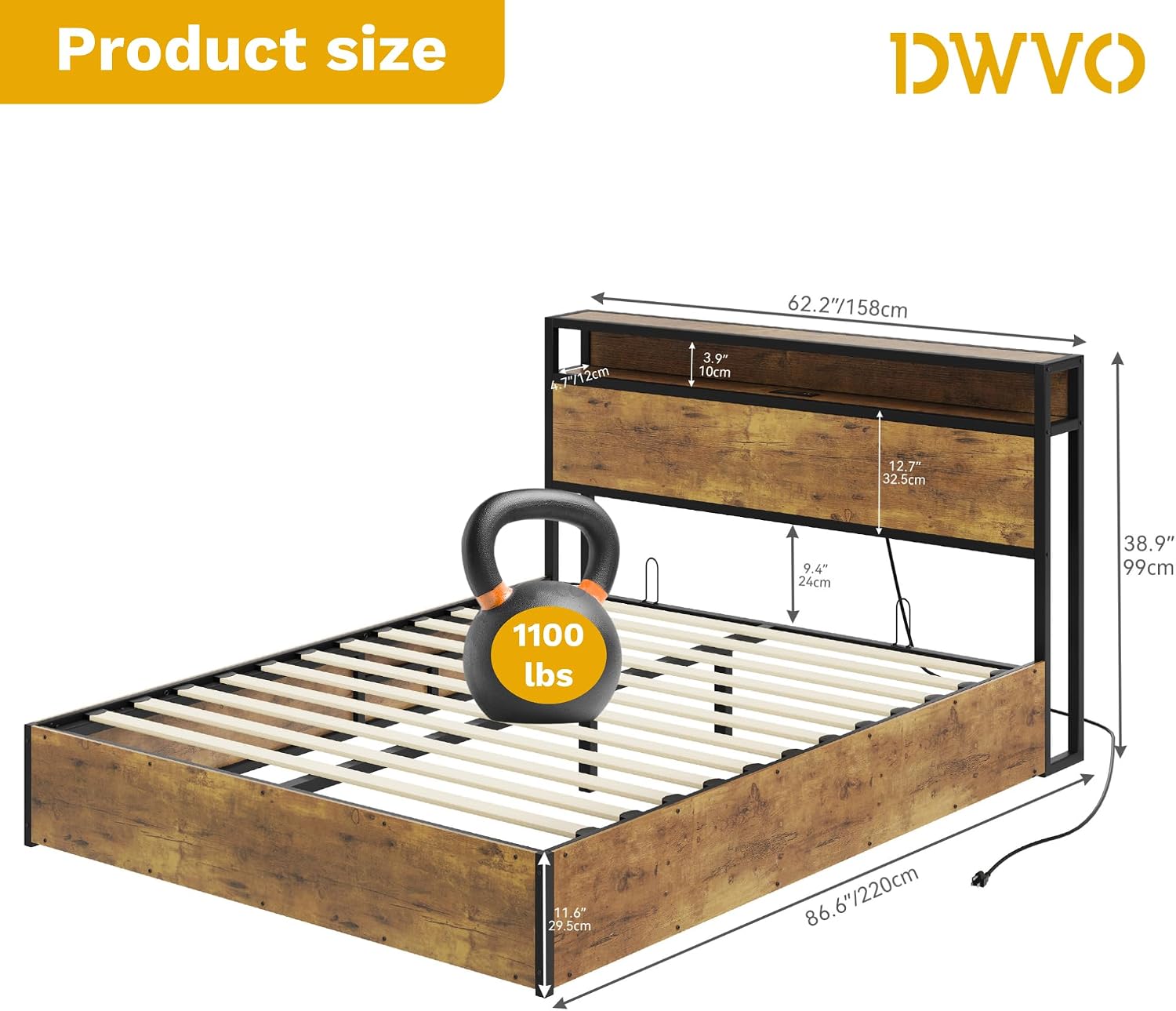
- Weight Capacity: Do not exceed the maximum weight capacity of 1100 lbs (500 kg) for the bed frame. The lifting mechanism has a maximum lifting capacity of 99 lbs (45 kg) when raising the mattress platform.
- Electrical Safety: The charging station and LED lighting require an electrical connection. Ensure the power cord is not pinched or damaged. Do not overload the outlets. Keep liquids away from electrical components.
- Lift-Up Mechanism: Exercise caution when lifting and lowering the mattress platform. Keep hands and fingers clear of moving parts. Ensure the platform is fully secured in the open position before accessing the storage area. Do not allow children to operate the lift mechanism unsupervised.
- Maintenance: Regularly check all bolts and screws to ensure they remain tight. Do not use abrasive cleaners or harsh chemicals on any part of the bed frame.
3. Package Contents
Before beginning assembly, verify that all components listed below are present and undamaged. If any parts are missing or damaged, please contact customer support.
- Headboard with integrated LED lighting and charging station
- Bed frame side rails and footboard
- Metal support frame for mattress platform
- Wooden slats (quantity as per Queen size)
- Lifting mechanism components
- Hardware pack (screws, bolts, washers, Allen wrench)
- Remote control for LED lights
- Installation Manual
4. Specifications
| Feature | Detail |
|---|---|
| Model Number | MADWVkxT80 |
| Size | Queen |
| Overall Dimensions (L x W x H) | Approximately 86.6" x 62.2" x 38.9" (220cm x 158cm x 99cm) |
| Color | Rustic Brown |
| Finish Type | Varnished |
| Item Weight | 110.67 lbs (50.2 kg) |
| Maximum Bed Frame Weight Capacity | 1100 lbs (500 kg) |
| Maximum Lifting Capacity (Mattress Platform) | 99 lbs (45 kg) |
| Charging Station | 2 AC Outlets (125V/12A), 2 USB Ports (5V/2A), 6.56 ft Power Cord |
| LED Lighting | 16 Million Colors, Remote & App Control, Music Sync, Timing Function |
| Assembly Required | Yes |
5. Setup and Assembly
Assembly of the DWVO Lift Up Storage Bed Frame requires careful attention to detail. Please refer to the separate Installation Manual included in your package for step-by-step instructions, diagrams, and a complete list of hardware. The following provides a general overview:
- Preparation: Clear a spacious area for assembly. Lay out all parts and hardware, comparing them against the parts list in the manual.
- Frame Assembly: Begin by assembling the main bed frame structure, including the side rails, footboard, and headboard. Ensure all connections are secure but do not fully tighten bolts until instructed.
- Lifting Mechanism Installation: Carefully attach the lifting mechanism to the bed frame according to the manual's instructions. This step is crucial for safe operation of the storage feature.
- Slat Installation: Install the wooden slats onto the bed frame. The design includes EVA bars to reduce noise, ensuring a sound sleep environment.
- Headboard Features: Connect the power cord for the LED lighting and charging station. Position the headboard against a wall or in its final location.
- Final Tightening: Once all components are in place and aligned, fully tighten all bolts and screws.

6. Operating Instructions
6.1. Lift-Up Storage Mechanism
The bed frame features a hydraulic lift mechanism for easy access to under-bed storage. Ensure no items are obstructing the lifting path before operation.
- To Lift: From the foot of the bed, firmly grasp the handle or edge of the mattress platform. With a controlled motion, lift the platform upwards. The hydraulic pistons will assist in raising and holding the platform in the open position.
- To Lower: Gently pull the mattress platform downwards. The hydraulic pistons will provide resistance, allowing for a smooth and controlled descent. Ensure the platform is fully lowered and latched before placing weight on the bed.
Important: The lifting mechanism is designed to support the weight of a mattress up to 99 lbs (45 kg). Do not attempt to lift the platform with excessive weight on the mattress.


6.2. LED Lighting System
The integrated LED lighting in the headboard offers customizable ambiance. It can be controlled via the included remote control or a dedicated smartphone application.
- Remote Control: Use the provided remote to power the lights on/off, change colors (16 million options), adjust brightness, select dynamic modes, and set timing functions.
- Smartphone App: Download the recommended app (refer to the Installation Manual for QR code or app name). Pair your device with the bed frame's LED system via Bluetooth. The app offers advanced controls, including music synchronization, custom color creation, and scheduling.


6.3. Charging Station
The headboard includes a built-in charging station for your electronic devices.
- AC Outlets: Two standard 125V/12A AC outlets are provided for powering larger devices like laptops or lamps.
- USB Ports: Two 5V/2A USB ports are available for charging smartphones, tablets, and other USB-powered devices.
- Power Connection: Ensure the bed frame's main power cord (6.56 ft) is securely plugged into a functional wall outlet.

7. Maintenance
Regular maintenance will help prolong the life and appearance of your bed frame.
- Cleaning: Wipe down wooden and metal surfaces with a soft, damp cloth. Avoid using harsh chemicals, abrasive cleaners, or polishes that may damage the finish.
- Fasteners: Periodically check all bolts, screws, and connections to ensure they are tight. Re-tighten if necessary to maintain stability and prevent squeaking.
- Electrical Components: Keep the charging station and LED light area free of dust. Ensure the power cord is not damaged or frayed.
- Lifting Mechanism: The hydraulic pistons are generally maintenance-free. Do not attempt to lubricate or disassemble them.
8. Troubleshooting
If you encounter any issues with your DWVO bed frame, refer to the following common problems and solutions:
| Problem | Possible Cause | Solution |
|---|---|---|
| Bed frame is wobbly or squeaks. | Loose fasteners. Uneven floor. | Check and tighten all bolts and screws. Ensure the bed is on a level surface. |
| LED lights are not turning on. | Power cord unplugged. Remote battery dead. App not connected. | Ensure the bed frame's power cord is plugged in. Check remote battery. Re-pair the app via Bluetooth. |
| Charging station (AC/USB) not working. | Power cord unplugged. Device not properly connected. | Verify the bed frame's power cord is plugged in. Ensure devices are securely connected to the outlets/ports. |
| Mattress platform is difficult to lift or won't stay up. | Too much weight on the mattress. Hydraulic pistons not installed correctly or damaged. | Reduce the weight on the mattress. Review the Installation Manual for correct hydraulic piston assembly. If damaged, contact support. |
9. Warranty and Customer Support
Your DWVO Lift Up Storage Bed Frame is covered by a manufacturer's warranty. Please refer to your purchase documentation or contact the retailer for specific warranty terms and conditions.
For technical assistance, missing parts, or any other inquiries, please contact DWVO customer support through the retailer's platform or the contact information provided in your purchase details. When contacting support, please have your model number (MADWVkxT80) and purchase date readily available.