
Acmefun B0FMY3XJC8
Saker Wireless Charging Rotating Car Mount User Manual
Brand: Acmefun | Model: B0FMY3XJC8
1. Product Overview
The Saker Wireless Charging Rotating Car Mount is designed to provide a secure and convenient solution for holding and charging your smartphone in your vehicle. Featuring a 15W fast wireless charging capability, auto-clamping mechanism, and 90-degree rotation, it ensures your device is powered and accessible for navigation or calls.
Key features include:
- Fast 15W Charging: Dual-coil design for efficient wireless power delivery.
- Auto-Open & Secure Clamping: Smart sensor for instant opening and powerful grip, accommodating various phone sizes, including large foldables.
- Seamless Viewing Rotation: Effortless 90° rotation for switching between portrait and landscape modes.
- Rock-Solid Stability: Advanced anti-shake technology to secure your phone on bumpy roads.
- Universal Foldable Phone Ready: Wide clamping range specifically engineered for modern foldable smartphones.
2. Package Contents
Please verify that all items are present in the package:
- High Intelligent Mobile Phone/Pad Holder
- Tail clip (Air Vent Clamp)
- Data cable (USB-C)
- Instruction manual (this document)

Image: Components included in the package, showing the main holder, tail clip, and data cable.
3. Setup and Installation
Follow these steps to install your car mount:
- Attach the Tail Clip: Securely attach the tail clip (air vent clamp) to the back of the main holder unit. Ensure it clicks into place.
- Mount to Air Vent: Carefully insert the assembled mount into a suitable air vent in your vehicle. Ensure the mount is stable and does not obstruct your view or vehicle controls. The triangular support base helps distribute weight and prevent damage to vent blades.

Image: Illustration of the triangular support base designed to provide stability and protect air vent blades during installation.
- Connect Power: Connect the provided USB data cable to the mount's power input port and plug the other end into a USB car charger (not included) or a compatible USB port in your vehicle. For optimal 15W fast charging, use a Quick Charge 3.0 compatible car charger.
4. Operating Instructions
Operating your Saker Wireless Charging Car Mount is straightforward:
- Placing Your Phone: When the mount is powered on, the clamping arms will automatically open. Gently place your smartphone into the mount. The smart sensor will detect the phone and automatically clamp it securely. The clamping range extends up to 188mm, accommodating various phone sizes, including large foldable devices.
- Wireless Charging: Once your phone is securely clamped, wireless charging will begin automatically if your phone supports wireless charging. The mount features a dual-coil design for efficient 15W fast charging. An indicator light on the mount will typically illuminate to confirm charging is active.

Image: The mount actively charging a phone, illustrating the 15W stable high-power output.

Image: A visual representation of the charging status, indicated by a green lightning bolt icon.
- Rotating the Phone: The mount allows for a seamless 90-degree rotation. Simply rotate the phone and mount assembly to switch between portrait and landscape viewing orientations as needed for navigation, video playback, or calls.
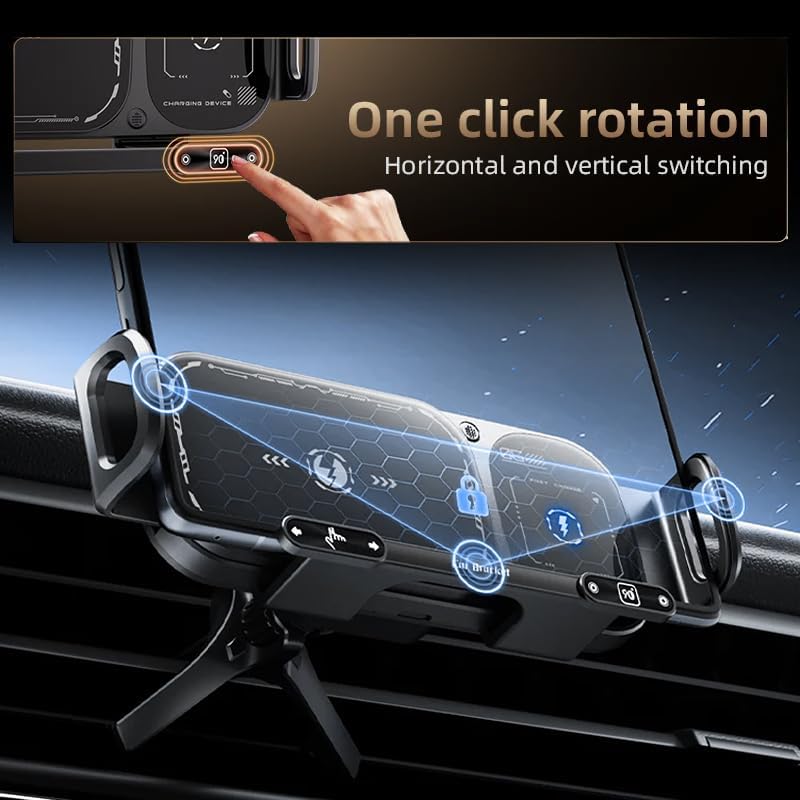
Image: Demonstrates the one-click rotation feature for easy switching between horizontal and vertical phone orientations.

Image: Illustrates the 90-degree rotation feature of the mount, allowing for easy adjustment of the phone's viewing angle.
- Removing Your Phone: To remove your phone, gently touch the release area on the mount (refer to product diagrams for exact location). The clamping arms will open, allowing you to safely retrieve your device.
The mount is designed with an advanced anti-shake technology to ensure your phone remains firmly in place even on rough roads, sharp turns, or during sudden stops.

Image: Shows the mount's compatibility with a wide range of smartphones, including foldable models.
5. Maintenance
To ensure the longevity and optimal performance of your car mount:
- Cleaning: Wipe the surface of the mount with a soft, dry, or slightly damp cloth. Do not use abrasive cleaners, solvents, or harsh chemicals, as these can damage the finish or internal components.
- Avoid Obstruction: Ensure the clamping arms and sensors are free from dust or debris that could impede their operation.
- Temperature Control: The mount features a chip for controlling temperature to prevent overheating during charging. However, avoid exposing the device to extreme temperatures for prolonged periods.

Image: An internal diagram illustrating the temperature control chip, ensuring the phone does not overheat during charging.
6. Troubleshooting
If you encounter issues with your Saker Wireless Charging Car Mount, refer to the following common problems and solutions:
- Mount Not Powering On:
- Ensure the USB data cable is securely connected to both the mount and a working power source (car charger/USB port).
- Verify that your car's power outlet (e.g., cigarette lighter) is functioning.
- Wireless Charging Not Working:
- Confirm your smartphone supports wireless charging.
- Ensure your phone is centered on the charging pad of the mount.
- Remove any thick phone cases or metallic objects between the phone and the mount, as these can interfere with wireless charging.
- Check if the power source provides sufficient output (e.g., a QC 3.0 car charger for 15W fast charging).
- Clamping Arms Not Opening/Closing:
- Ensure the mount is powered on.
- Check for any obstructions or debris in the clamping mechanism.
- Gently touch the sensor area to trigger the opening/closing mechanism.
- Mount is Unstable:
- Ensure the tail clip is fully inserted into the air vent and the vent blades are not loose.
- Verify that the triangular support base is resting securely against the dashboard or a stable surface.
7. Specifications
| Feature | Detail |
|---|---|
| Brand | Acmefun |
| Model | B0FMY3XJC8 |
| Wireless Charging Output | 15W Max |
| Rotation | 90° (Horizontal/Vertical) |
| Clamping Range | Up to 188mm (suitable for foldable phones) |
| Mounting Type | Car Vent Mount |
| Connectivity | USB |
| Special Features | Auto-clamping, Anti-shake, Temperature Control Chip |
| Item Weight | 12 ounces |
| Package Dimensions | 7.52 x 4.13 x 3.07 inches |
8. Warranty and Support
For warranty information or technical support, please refer to the contact details provided with your purchase or visit the official Acmefun website. Keep your purchase receipt as proof of purchase for any warranty claims.