
1. Introduction and Overview
This manual provides detailed instructions for the safe and efficient operation of your VEDO Phoenix 10-in-1 Turntable. This versatile audio system integrates a 3-speed vinyl player, CD player, cassette player, FM radio, Bluetooth 5.0 connectivity, and USB/SD MP3 recording capabilities. Please read this manual thoroughly before use and retain it for future reference.
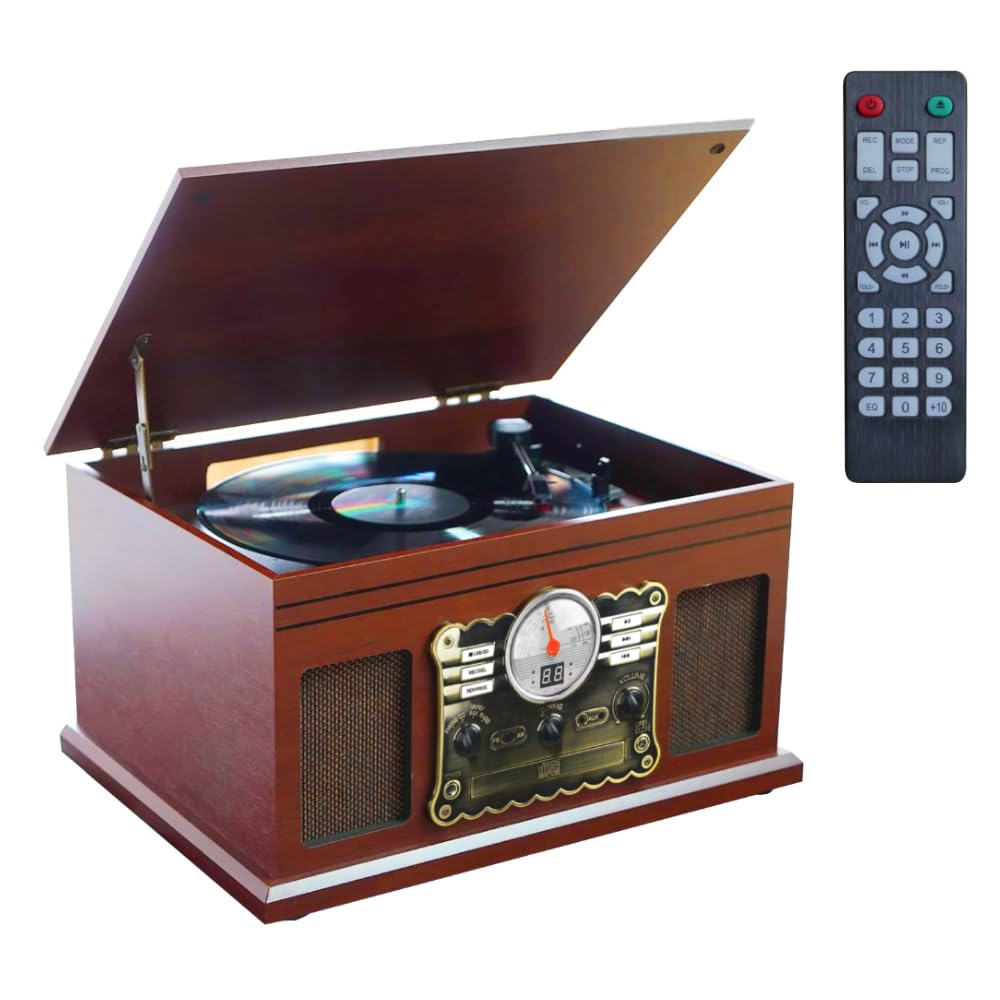
Figure 1.1: VEDO Phoenix 10-in-1 Turntable - Front View
The VEDO Phoenix features a classic mahogany wood finish and built-in stereo speakers (2x5W). It is designed for comprehensive audio playback and recording.
Video 1.1: Overview of the VEDO Phoenix 10-in-1 Turntable features and design.
2. Setup
- Unpacking: Carefully remove the unit from its packaging. Retain all packaging materials for future transport or storage.
- Placement: Place the turntable on a stable, level surface away from direct sunlight, heat sources, and excessive dust or moisture. Ensure adequate ventilation around the unit.
- Power Connection: Connect the power adapter to the DC IN jack on the rear of the unit and then plug it into a suitable 110V/220V AC power outlet.
- Speaker Connection (Optional): For external audio output, connect RCA cables (included) from the LINE OUT jacks on the rear of the unit to an external amplifier or powered speakers.
- Antenna: Extend the FM antenna for optimal radio reception.

Figure 2.1: Proper placement of the VEDO Phoenix Turntable.
3. Operating Instructions
3.1 Turntable Operation
- Power On: Turn the unit ON using the power button.
- Select Mode: Set the function selector to "PHONO".
- Place Record: Open the dust cover and place a vinyl record on the turntable platter.
- Select Speed: Choose the appropriate speed (33 1/3, 45, or 78 RPM) using the speed selector switch. Use the included 45 RPM adapter for 7-inch records with large center holes.
- Start Playback: Gently lift the tone arm and position the stylus over the desired track on the record. Lower the tone arm slowly onto the record.
- Auto-Stop Feature: The turntable features an auto-stop function that automatically stops the platter when the record finishes playing, protecting your vinyls.

Figure 3.1: Placing a vinyl record on the turntable.
3.2 CD Player Operation
- Select Mode: Set the function selector to "CD".
- Insert CD: Gently insert a CD into the CD slot. The unit will automatically load the CD and begin playback.
- Controls: Use the Play/Pause, Skip Forward, and Skip Backward buttons to control playback.

Figure 3.2: Inserting a CD into the player.
3.3 Cassette Player Operation
- Select Mode: Set the function selector to "TAPE".
- Insert Cassette: Insert a cassette tape into the cassette slot.
- Playback: The unit will begin playback. The auto-reverse feature will automatically switch sides when one side finishes.
- Controls: Use the Play, Fast Forward, Rewind, and Stop buttons to control playback.
3.4 FM Radio Operation
- Select Mode: Set the function selector to "RADIO".
- Tune Station: Use the tuning knob to select your desired FM radio station. The LED display will show the frequency.
- Reception: Adjust the FM antenna for optimal signal reception.
3.5 Bluetooth Operation
- Select Mode: Set the function selector to "BLUETOOTH". The unit will enter pairing mode, indicated by a flashing Bluetooth indicator.
- Pair Device: On your mobile device (smartphone, tablet), enable Bluetooth and search for "VEDO Phoenix". Select it to pair.
- Playback: Once paired, you can stream audio from your device to the VEDO Phoenix.

Figure 3.3: Bluetooth connectivity for wireless audio streaming.
3.6 USB/SD MP3 Recording and Playback
- Insert Media: Insert a USB drive or SD card into the corresponding slot.
- Playback: Set the function selector to "USB/SD" to play MP3 files stored on the media.
- Recording: To record from Vinyl, CD, or Cassette to MP3:
- Select the source mode (PHONO, CD, or TAPE).
- Start playback of the source audio.
- Press the "RECORD" button (refer to unit controls for exact button). The unit will begin recording the audio to the inserted USB drive or SD card in MP3 format.
- Press "STOP" to end the recording.

Figure 3.4: USB and SD card slots for MP3 recording and playback.
4. Maintenance
- Cleaning: Wipe the unit with a soft, dry cloth. Do not use abrasive cleaners or solvents.
- Dust Cover: Keep the dust cover closed when not in use to protect the turntable and stylus.
- Stylus Care: Clean the stylus regularly with a soft brush designed for turntable styli. Replace the stylus when signs of wear are visible to prevent damage to your records.
- Record Care: Keep records clean and free of dust. Store them vertically in their sleeves.
5. Troubleshooting
| Problem | Possible Cause | Solution |
|---|---|---|
| No power | Power cord not connected; Power outlet faulty | Ensure power cord is securely connected; Try a different outlet. |
| No sound | Volume too low; Incorrect mode selected; External speakers not connected/powered | Increase volume; Select correct function mode; Check external speaker connections and power. |
| Turntable not spinning | Belt dislodged; Auto-stop engaged | Check and re-seat the drive belt; Ensure tone arm is placed on the record. |
| Poor radio reception | Antenna not extended; Weak signal | Fully extend the FM antenna; Reposition the unit for better reception. |
| Bluetooth connection unstable | Device too far; Interference | Move device closer to the unit (within 10 meters); Reduce interference from other wireless devices. |
6. Specifications
- Brand: VEDO
- Model: Phoenix
- Turntable Speeds: 33 1/3, 45, 78 RPM
- Connectivity: Bluetooth 5.0, AUX In, RCA Line Out, USB, SD Card
- Media Playback: Vinyl records, CDs, Cassette tapes, MP3 (USB/SD)
- Recording: LP/CD/Cassette to MP3 (USB/SD)
- Radio: FM Digital Radio
- Speakers: Built-in Stereo Speakers (2x5W)
- Material: Mahogany Wood
- Item Weight: 4800 Grams
- Dimensions (L x W x H): 45 cm x 42 cm x 32 cm
- Power Source: 110V/220V AC
- Special Features: Belt-Drive System, Diamond Stylus, Auto-Stop Turntable, Auto-Reverse Cassette, Remote Control
7. Warranty and Support
The VEDO Phoenix 10-in-1 Turntable comes with a 2-year warranty against manufacturing defects. For technical support or warranty claims, please contact VEDO customer service through the platform of purchase or refer to the contact information provided in your purchase documentation.


