1. Introduction
This manual provides essential information for the safe and efficient operation of your VEVOR 48V 100Ah LiFePO4 Lithium Battery. This high-performance battery features a 51.2V nominal voltage, 5.12kWh capacity, and is designed for various applications including off-grid solar systems, home energy storage, RV power supply, and backup power solutions. It incorporates Bluetooth connectivity for real-time monitoring via a mobile app and an integrated LCD display for direct status checks. Please read this manual thoroughly before installation and use.
2. Safety Instructions
Adhering to these safety guidelines is crucial for preventing injury and damage to the battery.
- General Handling: Do not drop, puncture, or crush the battery. Avoid exposing it to extreme mechanical shock.
- Temperature: Operate and store the battery within the specified temperature range (Operating Temperature: 77°F/25°C). Avoid direct sunlight or extreme heat sources.
- Water Exposure: Keep the battery away from water, moisture, and corrosive substances. Do not immerse the battery in any liquid.
- Short Circuits: Prevent short circuits by ensuring proper terminal connections and avoiding contact between positive and negative terminals with conductive materials.
- Charging: Use only compatible chargers designed for LiFePO4 batteries. Do not overcharge or discharge beyond recommended limits.
- Ventilation: Ensure adequate ventilation around the battery during operation and charging to dissipate heat.
- Disassembly: Do not attempt to disassemble, modify, or repair the battery. Internal components are not user-serviceable and doing so voids the warranty and poses safety risks.
- Children and Pets: Keep the battery out of reach of children and pets.
- Emergency: In case of fire, use a Class D fire extinguisher. For electrolyte leakage, avoid contact and ventilate the area.
3. Product Overview
3.1 Key Features
- High Capacity LiFePO4 Cells: Built with Grade A LiFePO4 cells, offering a 100Ah capacity, 51.2V nominal voltage, and a 1C discharge rate.
- Advanced Monitoring: Features an integrated LCD display and Bluetooth connectivity for real-time monitoring of cell voltage, temperature, and capacity via a dedicated mobile application.
- Communication Interfaces: Equipped with RS232, RS485, and CAN communication ports for seamless integration with various systems and upper computer systems.
- Scalable Design: Supports parallel connection of up to 16 units for increased capacity and vertical stacking of up to 8 units for space efficiency, achieving up to 81.92kWh.
- Integrated BMS Protection: A smart 100A Battery Management System (BMS) provides comprehensive protection against overcharge, overdischarge, overcurrent, and short circuits, ensuring battery longevity and safety.
- Long Cycle Life: Designed for over 6000 charge/discharge cycles, minimizing replacement costs and offering extended reliability.
- Versatile Applications: Ideal for home energy storage, solar energy systems, RV power supplies, and various backup power needs.
3.2 Components
The VEVOR 48V 100Ah LiFePO4 Lithium Battery includes the following main components: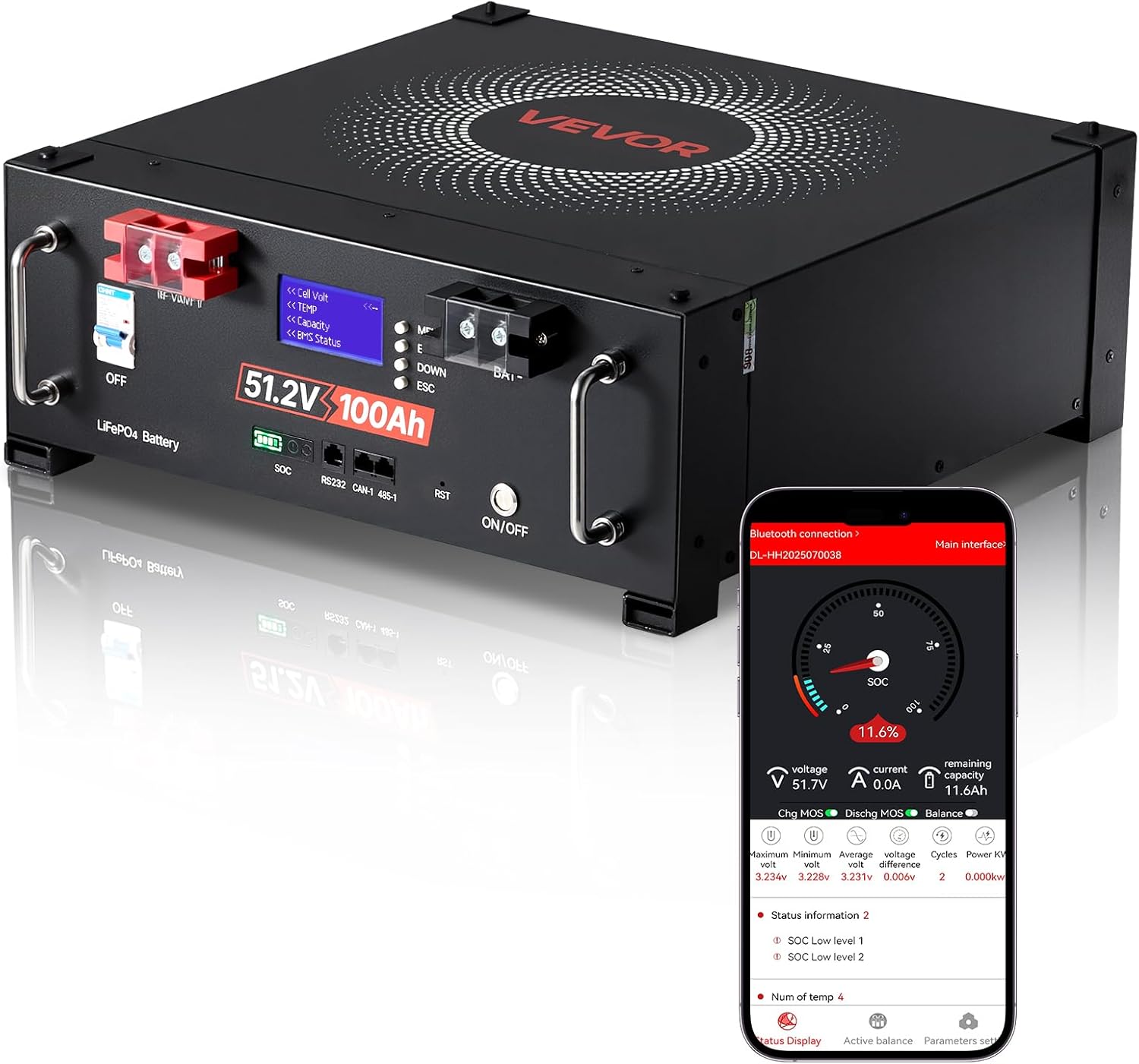
- Battery Unit: The main LiFePO4 battery module.
- LCD Display: Front-mounted screen for real-time battery status.
- ON/OFF Switch: Main power control for the battery.
- Positive (+) and Negative (-) Terminals: For power connections.
- Communication Ports: RS232, RS485, CAN for external system integration.
- Mounting Brackets: For secure installation.
- RS485 Cable: For parallel communication.
- Screws: For mounting and connections.

4. Setup and Installation
4.1 Unpacking and Inspection
- Carefully remove the battery and all accessories from the packaging.
- Inspect the battery for any visible damage during transit. If damage is found, contact VEVOR customer support immediately.
- Verify that all listed accessories are present: 1x CDNJA485 Parallel RS485 Cable, 4x Mounting Brackets, 8x Screws, 1x User Manual.
4.2 Placement
Choose a dry, well-ventilated location away from direct sunlight, heat sources, and flammable materials. The battery is designed for ground mounting. Ensure the surface is stable and can support the battery's weight (92.6 lbs / 42.0 kg).
4.3 Electrical Connections
Before making any connections, ensure the battery's ON/OFF switch is in the 'OFF' position.
- Single Battery Connection: Connect the positive (+) terminal of the battery to the positive input of your inverter/charger system. Connect the negative (-) terminal of the battery to the negative input of your inverter/charger system. Ensure all connections are tight and secure.
- Parallel Connection (Capacity Expansion): For increased capacity, multiple VEVOR 48V 100Ah LiFePO4 batteries can be connected in parallel. Up to 16 units can be connected in parallel. Use the provided RS485 cable to link the communication ports between batteries for synchronized operation. Ensure all batteries are at a similar state of charge before connecting in parallel.
- Vertical Stacking: The battery supports vertical stacking of up to 8 units using the provided mounting brackets. This design helps save space.

4.4 Communication Interfaces
The battery features RS232, RS485, and CAN ports for integration with external monitoring systems or inverters. Refer to your inverter's manual for specific connection requirements. The RS485 port is typically used for parallel communication between multiple batteries.
5. Operating Instructions
5.1 Powering On/Off
To power on the battery, switch the ON/OFF button to the 'ON' position. To power off, switch it to the 'OFF' position. Always power off the battery before disconnecting any cables.
5.2 LCD Display Monitoring
The integrated LCD display provides real-time information about the battery's status. Information typically includes:
- Pack Voltage (e.g., 49.2V)
- Current (e.g., 0.0A)
- State of Charge (SOC) percentage (e.g., 100.0%)
- Individual Cell Voltages (V01, V02, V03, V04)
- Temperature (TEMP)
- BMS Status and Info

5.3 Bluetooth App Monitoring
Download the VEVOR battery monitoring app from your smartphone's app store. Enable Bluetooth on your device and pair it with the battery. The app provides a comprehensive interface for monitoring and managing your battery, including detailed cell information, historical data, and parameter settings.

5.4 Charging Methods
The VEVOR LiFePO4 battery can be charged using various methods:
- Dedicated LiFePO4 Charger: Connect a compatible 48V LiFePO4 charger to the battery terminals.
- Solar Panels: Integrate with a solar charge controller and solar panel array.
- Generator: Use a generator connected to a compatible charger or inverter system.

6. Maintenance
LiFePO4 batteries require minimal maintenance, but following these guidelines will ensure optimal performance and longevity:
- Regular Inspection: Periodically check the battery terminals for corrosion or loose connections. Clean terminals if necessary.
- Environmental Conditions: Ensure the battery is kept in a clean, dry, and well-ventilated area within its specified operating temperature range.
- Storage: If storing the battery for an extended period, ensure it is charged to approximately 50-70% State of Charge (SOC) and stored in a cool, dry place. Periodically check the SOC and recharge if it drops significantly.
- Software Updates: Check for any available firmware or app updates for the battery's monitoring system to ensure optimal functionality.
7. Troubleshooting
This section addresses common issues you might encounter with your VEVOR LiFePO4 battery.
| Problem | Possible Cause | Solution |
|---|---|---|
| Battery does not power on. | ON/OFF switch is off; Battery is deeply discharged; Internal BMS protection triggered. | Ensure ON/OFF switch is 'ON'. Connect to a compatible charger. If still unresponsive, contact VEVOR support. |
| Low voltage alarm. | Battery is nearing its discharge limit. | Immediately disconnect loads and recharge the battery. |
| Overcurrent protection triggered. | Load current exceeds the battery's maximum discharge current (100A). | Reduce the load or disconnect high-power devices. The BMS will automatically reset after a short period. |
| Bluetooth connection issues. | Bluetooth on phone is off; Battery is out of range; App issue. | Ensure Bluetooth is enabled on your device. Move closer to the battery. Restart the app or your phone. |
| LCD display not working. | Battery is off; Display malfunction. | Ensure the battery is powered on. If the issue persists, contact VEVOR support. |
For issues not covered here or persistent problems, please contact VEVOR customer support.
8. Specifications
Detailed technical specifications for the VEVOR 48V 100Ah LiFePO4 Lithium Battery:
- Model Number: LPS48100 (100Ah LiFePO4 Lithium Battery)
- Brand: VEVOR
- Voltage: DC 51.2V
- Battery Cell Composition: Lithium Iron Phosphate (LiFePO4)
- Battery Capacity: 100 Amp Hours (Ah)
- Energy Capacity: 5.12 kWh
- Discharge Rate: 1C
- Max Charge/Discharge Current: 100A
- Float Charge Voltage: 55.2V
- Cycle Life: > 6000 Cycles
- Operating Temperature: 77°F / 25°C (Optimal)
- Product Dimensions (L x W x H): 19.29 x 18.31 x 7.28 inches (490 x 465 x 185 mm)
- Item Weight: 92.6 pounds (42.0 kg)
- Batteries Required: 1 Lithium Ion battery (included)
- Recommended Uses: Solar Devices, Home Energy Storage, RV Power Supply, Backup Power
9. Warranty and Support
VEVOR is committed to providing high-quality products and customer satisfaction. For warranty information, technical support, or any inquiries regarding your VEVOR 48V 100Ah LiFePO4 Lithium Battery, please contact VEVOR customer service directly. Details can typically be found on the VEVOR official website or through your purchase platform.
Please retain your proof of purchase for warranty claims.


