
OPPO Reno14 F CPH2743
OPPO Reno14 F 5G Smartphone User Manual
Model: Reno14 F (CPH2743)
Introduction
This manual provides essential information for the safe and efficient use of your OPPO Reno14 F 5G smartphone. Please read this manual thoroughly before using the device to ensure optimal performance and longevity.

Image: The OPPO Reno14 F 5G smartphone in Luminous Green, accompanied by its 45W SUPERVOOC charger. This image illustrates the primary device and a key accessory included in the package.
1. Initial Setup
1.1 Unboxing and Components
Carefully unpack your OPPO Reno14 F 5G. The standard package includes:
- OPPO Reno14 F 5G Smartphone
- USB Cable
- SIM Eject Tool
- 45W SUPERVOOC Charger (included)
1.2 Inserting SIM Card and Powering On
- Locate the SIM card tray on the side of the device.
- Insert the SIM eject tool into the small hole next to the tray and press gently until the tray pops out.
- Place your Nano-SIM card(s) into the tray with the gold contacts facing down. Ensure proper orientation.
- Carefully reinsert the tray into the phone.
- Press and hold the Power button (located on the right side) until the OPPO logo appears on the screen.
- Follow the on-screen instructions to complete the initial setup, including language selection, Wi-Fi connection, and Google account setup.
1.3 Initial Charge
It is recommended to fully charge your device before first use. Connect the USB cable to the phone's charging port and the 45W SUPERVOOC charger. Plug the charger into a power outlet. The device supports fast charging.

Image: The OPPO Reno14 F 5G display showing 100% charge with the SUPERVOOC 45W fast charging indicator. This highlights the device's rapid charging capability, achieving a full charge in approximately 79 minutes.
2. Operating Your Device
2.1 Display and Navigation
The OPPO Reno14 F features a 6.57-inch 120Hz AMOLED display. Navigate the interface using touch gestures:
- Tap: Select an item or open an app.
- Swipe: Scroll through screens or lists.
- Pinch: Zoom in or out on images and web pages.
- Long Press: Access contextual menus or move icons.

Image: A close-up of the OPPO Reno14 F 5G's 6.57-inch 120Hz AMOLED display, highlighting its FHD+ resolution and 1.07 billion colors. This image emphasizes the visual quality and responsiveness of the screen.
2.2 Camera Functions
Your device is equipped with an AI Triple Camera system (50+8+2 MP) and a 32 MP selfie camera. The AI features automatically optimize photos for various scenarios.
- Main Camera (50MP): For high-resolution photos.
- Ultra Wide-Angle Camera (8MP): For expansive landscapes and group shots.
- Macro Camera (2MP): For detailed close-up photography.
- Selfie Camera (32MP): Features autofocus for clear self-portraits.

Image: A detailed view of the OPPO Reno14 F 5G's camera module, illustrating the 50MP main sensor, 8MP ultra-wide, 2MP macro, and the 32MP selfie camera. This graphic highlights the AI Portrait Expert capabilities.
2.3 ColorOS 15 Features
The device runs on ColorOS 15, offering intelligent and fluid user experience. Key features include:
- Digital Unlock: Secure and convenient access.
- Universal IR Remote Control: Control compatible home appliances.
- NFC: For contactless payments and data transfer.
- Document Scanning: Integrated tool for digitizing documents.
- AI Identity Selfies: Enhanced selfie features for identification purposes.

Image: A screenshot of the ColorOS 15 interface on the OPPO Reno14 F 5G, showcasing various widgets and app icons. This image demonstrates the intelligent and fluid design of the operating system.
3. Maintenance and Care
3.1 Cleaning Your Device
To clean your smartphone, use a soft, lint-free cloth. Avoid abrasive materials or harsh chemicals. For stubborn smudges, slightly dampen the cloth with water or a screen cleaner specifically designed for electronics.
3.2 Water and Dust Resistance (IP69)
The OPPO Reno14 F 5G is rated IP69 for water and dust resistance. This means it offers superior protection against dust ingress and can withstand high-pressure, high-temperature water jets. However, it is not recommended for prolonged submersion or use in extreme conditions. Damage caused by liquid immersion is not covered under warranty.
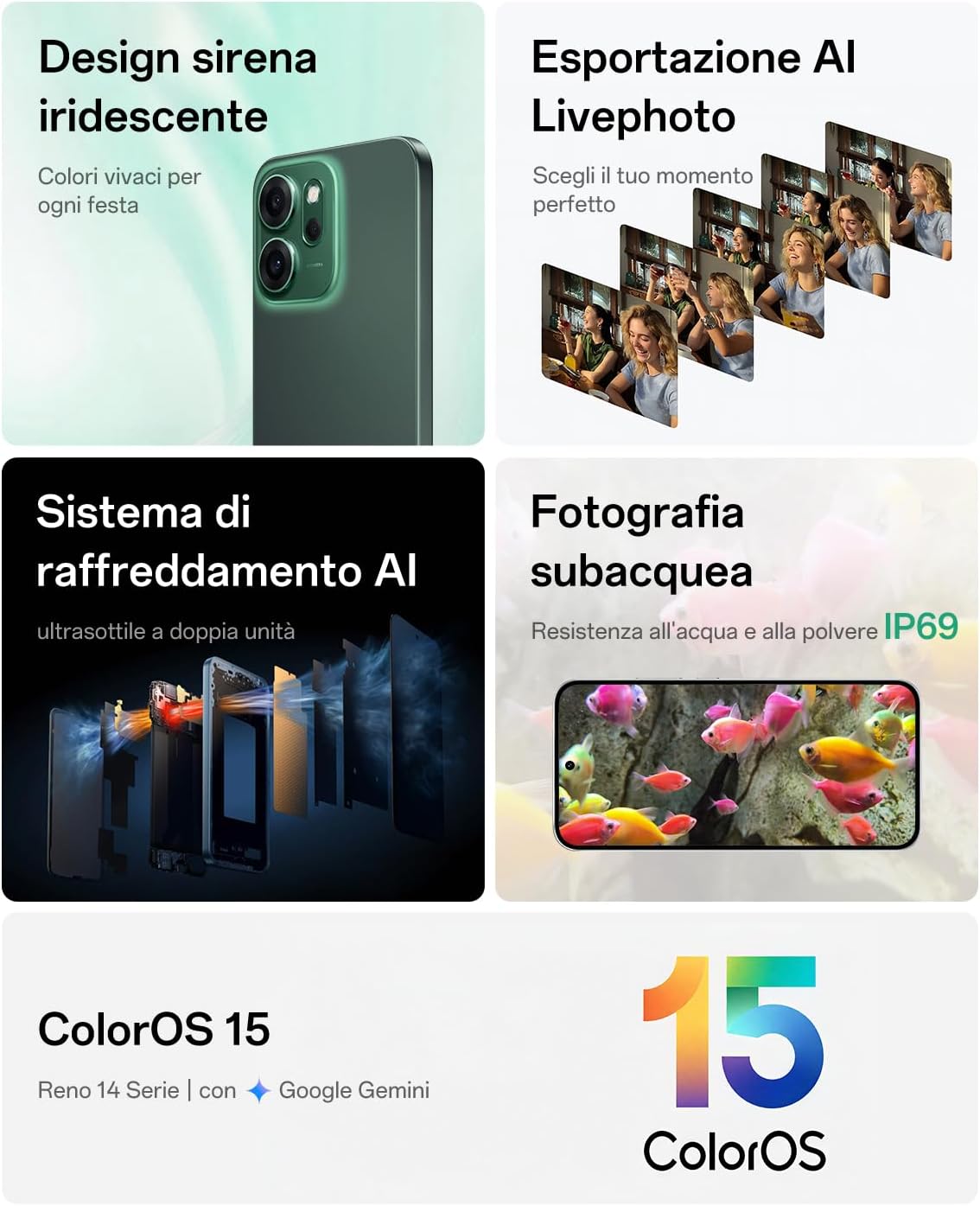
Image: A composite image showcasing various features of the OPPO Reno14 F 5G, including its iridescent design, AI Livephoto export, AI cooling system, and IP69 underwater photography capability. This highlights the device's durability and advanced features.
3.3 Battery Care
To maximize battery lifespan:
- Avoid exposing the device to extreme temperatures.
- Use only the original 45W SUPERVOOC charger and cable.
- Do not let the battery drain completely frequently.
- For long-term storage, charge the battery to about 50% and power off the device.
4. Troubleshooting
4.1 Device Not Powering On
- Ensure the battery is charged. Connect the charger and wait a few minutes before attempting to power on again.
- Press and hold the Power button for at least 10-15 seconds to force a restart.
4.2 Apps Crashing or Freezing
- Close the problematic app and reopen it.
- Clear the app's cache and data in Settings > Apps.
- Ensure the app and your ColorOS are updated to the latest version.
- Restart the device.
4.3 Poor Battery Life
- Check battery usage in Settings to identify power-consuming apps.
- Reduce screen brightness and set a shorter screen timeout.
- Disable unnecessary features like Wi-Fi, Bluetooth, or GPS when not in use.
- Ensure background app refresh is limited for less critical applications.
5. Technical Specifications
| Brand | OPPO |
| Model Name | Reno14 F |
| Model Number | CPH2743 |
| Operating System | Android (ColorOS 15) |
| Processor | Snapdragon 6 Gen 1, 3.45 GHz |
| RAM | 8 GB |
| Internal Storage | 256 GB |
| Display | 6.57-inch AMOLED, 120Hz, 2340x1080 (FHD+) |
| Rear Camera | 50MP Main + 8MP Ultra Wide-Angle + 2MP Macro |
| Front Camera | 32MP with Autofocus |
| Battery Capacity | 6000 mAh |
| Charging | 45W SUPERVOOC Flash Charge |
| Water & Dust Resistance | IP69 |
| Connectivity | 5G, NFC |
| Dimensions (Thickness) | Approx. 7.74 mm |
| Weight | Approx. 180 g |
| Included Components | USB Cable, SIM Eject Tool, 45W SUPERVOOC Charger |

Image: An internal view of the OPPO Reno14 F 5G's components, highlighting the Snapdragon 6 Gen 1 processor, 8GB RAM, and 256GB ROM. This graphic illustrates the performance enhancements, including a 35% increase in CPU and 30% in GPU performance.
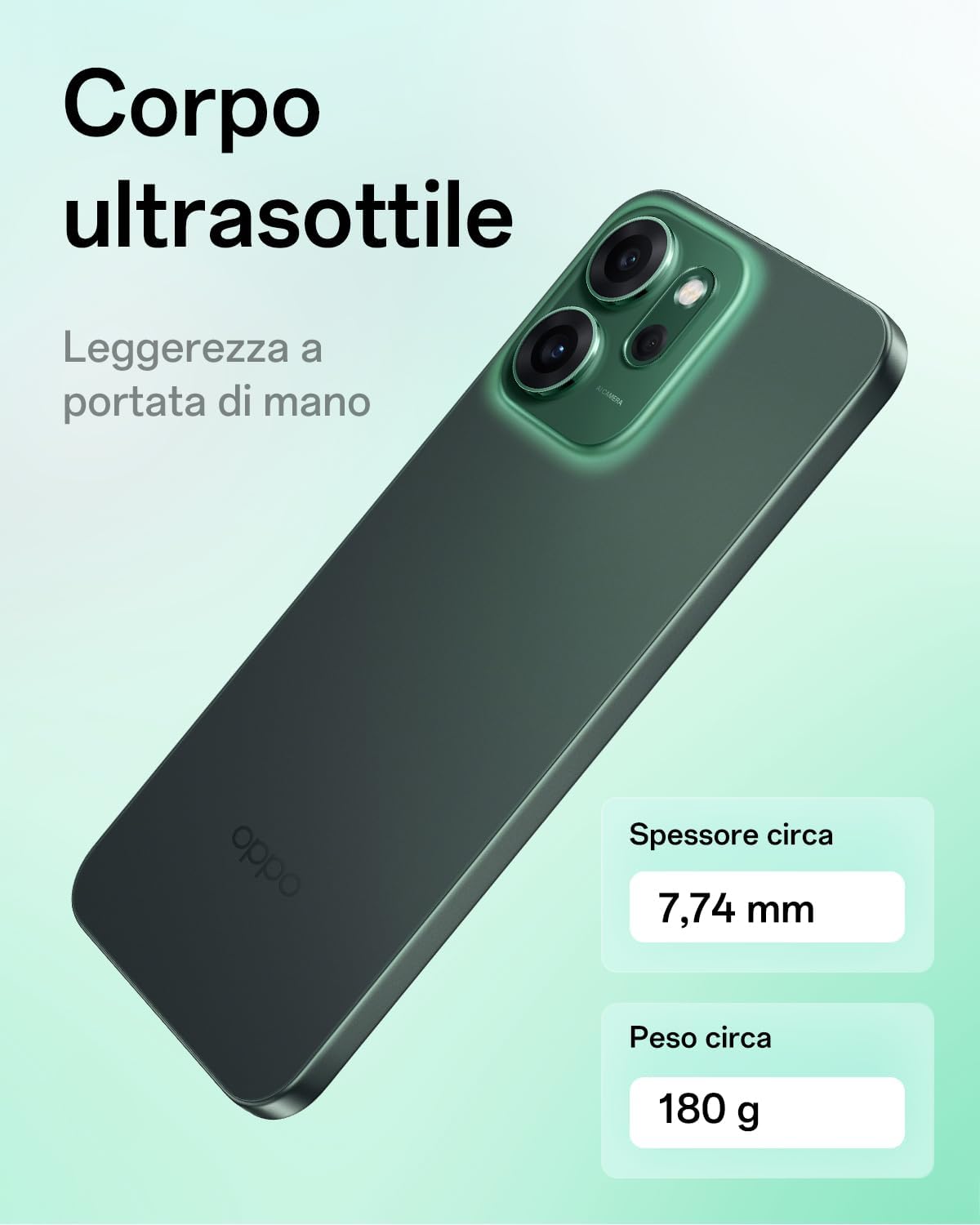
Image: A side profile view of the OPPO Reno14 F 5G, emphasizing its ultra-thin body with a thickness of approximately 7.74 mm and a weight of approximately 180 g. This highlights the device's ergonomic and lightweight design.

Image: The energy efficiency label for the OPPO Reno14 F 5G (CPH2743), showing an 'A' rating and battery life of 63 hours. It also indicates IP68 resistance and durability ratings.
For more details, refer to the official EPREL database: https://eprel.ec.europa.eu/qr/2318911
6. Warranty Information
Your OPPO Reno14 F 5G smartphone comes with a minimum warranty period of 25 months provided by the supplier. This warranty covers manufacturing defects under normal use. Please retain your proof of purchase for warranty claims.
The warranty does not cover damages caused by:
- Accidental damage or misuse.
- Unauthorized repairs or modifications.
- Liquid damage (beyond IP69 rating).
- Normal wear and tear.
For detailed warranty terms and conditions, please refer to the official OPPO support website.
7. Support and Contact
For further assistance, technical support, or service inquiries, please contact OPPO customer support:
- Official Support Website: https://support.oppo.com/
- Email Support: support@oppo.com
- Information on Spare Parts: https://support.oppo.com/en/answer/?aid=2204306
- Repair Instructions for End-Users: https://support.oppo.com/en/answer/?aid=2204306
Please have your device model number (CPH2743) and proof of purchase ready when contacting support.
Ask a question about this manual
Ask about setup, troubleshooting, compatibility, parts, safety, or missing instructions. Manuals+ will review the question and use this page’s manual context to help answer it.