
Walkingpad Pro
Kingsmith WalkingPad Pro Folding Treadmill User Manual
Model: Walkingpad Pro
1. Introduction
Welcome to the user manual for your Kingsmith WalkingPad Pro Folding Treadmill. This manual provides essential information for the safe and effective operation, maintenance, and troubleshooting of your new fitness equipment. Please read this manual thoroughly before initial use and keep it for future reference.
The Kingsmith WalkingPad Pro is designed for home fitness, offering a convenient and space-saving solution for walking and light jogging. Its patented double-fold technology allows for easy storage, while the advanced EVA cushioning system ensures a comfortable workout experience.

Image: A detailed view of the Kingsmith WalkingPad Pro's console and handlebars, showing the integrated display and control elements.
2. Safety Information
To ensure your safety and prolong the life of your treadmill, please adhere to the following guidelines:
- Always consult with a physician before starting any new exercise program.
- Place the treadmill on a flat, stable surface with adequate clearance around it (at least 2 feet behind and 1 foot on each side).
- Keep children and pets away from the treadmill during operation.
- Do not exceed the maximum user weight of 265 pounds (120 kg).
- Wear appropriate athletic footwear.
- Ensure the power cord is not pinched or damaged. Unplug the treadmill when not in use or before cleaning/maintenance.
- Do not operate the treadmill if it is damaged or malfunctioning.
- Use the safety key (if applicable) during operation for emergency stops.
3. Product Components and Features
3.1 Included Components
Your Kingsmith WalkingPad Pro package includes:
- Kingsmith WalkingPad Pro Treadmill
- Power Cord
- User Manual (this document)
3.2 Key Features
- Double-Fold Design: Patented technology for compact storage, ideal for small spaces.
- Fully Assembled: Ready to use right out of the box, no complex assembly required.
- Advanced Cushioning: 4-layer EVA cushioning system for reduced joint impact.
- USB Charging Port: Conveniently charge your devices during workouts.
- Spacious Tread Belt: 18 x 48 inch belt provides ample walking and jogging space.
- LED Display: Integrated display for tracking workout metrics.
- Multiple Programs: Features 4 pre-set workout programs.
4. Setup and Initial Use
The Kingsmith WalkingPad Pro arrives fully assembled. Follow these steps for initial setup:
- Unpack the Treadmill: Carefully remove the treadmill from its packaging.
- Choose a Location: Select a flat, stable surface for the treadmill. Ensure there is enough space around it for safe operation and folding/unfolding.
- Unfold the Treadmill:Gently unfold the treadmill until it is fully extended and locked into the operational position. Ensure all locking mechanisms are securely engaged.

Image: A user demonstrating the folding mechanism of the Kingsmith WalkingPad Pro, highlighting its compact storage capability.
- Connect Power: Plug the power cord into the treadmill's power input, then plug the other end into a grounded electrical outlet.
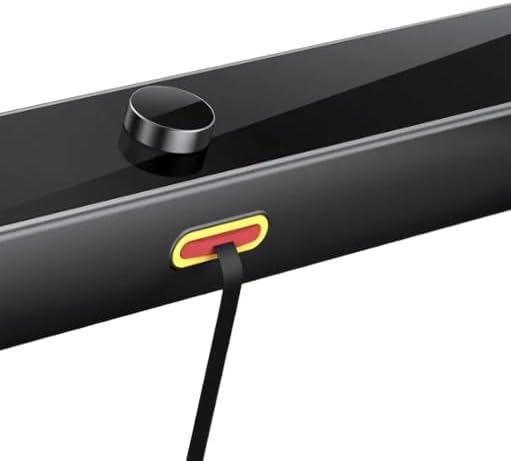
Image: A close-up view of the integrated USB charging port located on the treadmill's console, designed for convenient device charging during workouts.
- Initial Check: Before stepping on, ensure the belt is centered and there are no obstructions.
5. Operating Instructions
5.1 Powering On/Off
To power on the treadmill, press the power button located on the console. The LED display will illuminate. To power off, press and hold the power button, or simply unplug the unit from the wall outlet.
5.2 Adjusting Speed
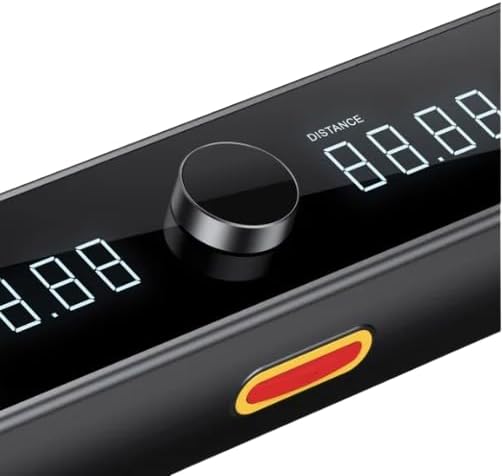
Image: A detailed view of the treadmill's LED display, showing digital readouts for distance and other metrics, alongside the central control knob for speed adjustments.
Use the control knob or designated speed buttons on the console to increase or decrease the belt speed. The maximum speed is 3.7 miles per hour (6 km/h). Adjust speed gradually to maintain control.
5.3 Using the LED Display
The integrated LED display shows various workout metrics, which may include:
- Time elapsed
- Distance covered
- Speed
- Calories burned (estimated)
Refer to the display to monitor your progress during your workout.
5.4 Workout Programs
The WalkingPad Pro features 4 pre-set workout programs. Consult the specific program selection instructions on the console or in the quick start guide for details on how to activate and use these programs.
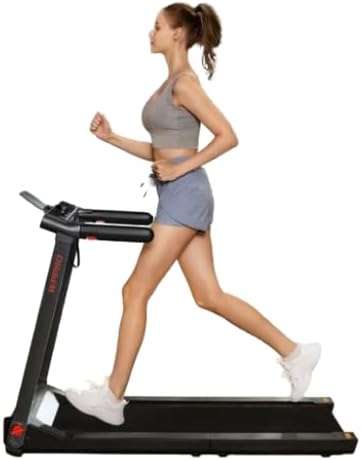
Image: A user actively exercising on the Kingsmith WalkingPad Pro, highlighting the treadmill's operational state and spacious belt for comfortable movement.
6. Maintenance
Regular maintenance ensures the longevity and optimal performance of your treadmill.
- Cleaning: Wipe down the treadmill surfaces with a damp cloth after each use to remove sweat and dust. Do not use abrasive cleaners or solvents.
- Belt Cleaning: Periodically clean under the belt to prevent dust and debris buildup. Unplug the treadmill before cleaning.
- Belt Lubrication: The walking belt requires periodic lubrication to reduce friction and wear. Refer to the quick start guide or manufacturer's instructions for the recommended lubrication schedule and type of lubricant.
- Belt Tension and Alignment: If the belt slips or drifts to one side, it may need adjustment. Consult the quick start guide for instructions on how to adjust belt tension and alignment.
- Storage: When not in use, fold the treadmill for compact storage. Store in a dry, cool place away from direct sunlight.
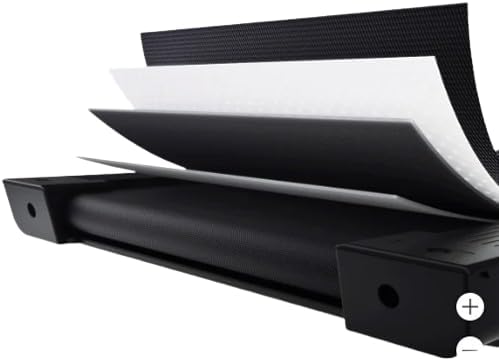
Image: An illustrative cross-section demonstrating the multi-layered EVA cushioning system integrated into the treadmill's deck, designed to provide superior shock absorption and joint protection.
7. Troubleshooting
If you encounter issues with your Kingsmith WalkingPad Pro, try the following troubleshooting steps:
| Problem | Possible Cause | Solution |
|---|---|---|
| Treadmill does not power on. | Power cord not securely plugged in; no power from outlet; power button not pressed. | Ensure power cord is fully inserted. Check outlet with another device. Press power button firmly. |
| Belt stops or slips during use. | Belt tension too loose; belt requires lubrication; motor overload. | Adjust belt tension as per manual. Lubricate the belt. Reduce user weight or speed. |
| Unusual noise from treadmill. | Loose parts; belt friction; motor issue. | Check for loose screws and tighten. Lubricate belt. If noise persists, contact support. |
| Display not working correctly. | Loose connection; electronic malfunction. | Unplug and replug the treadmill. If issue persists, contact support. |
If the problem persists after attempting these solutions, please contact customer support.
8. Specifications
| Attribute | Detail |
|---|---|
| Brand | Kingsmith (Generic) |
| Model Name | Walkingpad Pro |
| Product Dimensions (LxWxH) | 48" x 18" x 5" (Operational) |
| Item Weight | 75 Pounds |
| Material | EVA |
| Maximum Speed | 3.7 Miles per Hour |
| Maximum Weight Recommendation | 265 Pounds |
| Deck Width | 18 Inches |
| Display Type | LED |
| Power Source | Electric |
| Number of Programs | 4 |
| Special Features | Double-fold Technology, EVA Cushioning System, Fully Assembled, USB Charging Port |
9. Warranty and Support
For warranty information and customer support, please refer to the documentation included with your purchase or contact the retailer/manufacturer directly. Keep your proof of purchase for warranty claims.
For technical assistance or service inquiries, please reach out to the Kingsmith customer support team through their official channels.
Ask a question about this manual
Ask about setup, troubleshooting, compatibility, parts, safety, or missing instructions. Manuals+ will review the question and use this page’s manual context to help answer it.