
MEEZAA 150EQ
MEEZAA 150EQ Newtonian Reflector Telescope Instruction Manual
Model: 150EQ
Introduction
This manual provides detailed instructions for the assembly, operation, maintenance, and troubleshooting of your MEEZAA 150EQ Newtonian Reflector Telescope. Please read this manual thoroughly before using your telescope to ensure optimal performance and longevity.
Package Contents
Before assembly, verify that all components are present:
- 1x Stainless Steel Tripod
- 1x Telescope Tube
- 1x Telescope Carrying Bag
- 1x 25mm Eyepiece
- 1x 10mm Eyepiece
- 1x 2X Barlow Lens
- 1x Red Dot Finderscope
- 1x Instruction Manual
- 1x Phone Adapter
- 1x Moon Filter
- 1x Counterweight
- 1x Equatorial Mount
- 1x Latitude Adjustment Screw
- 1x Counterweight Bar
- 2x Slow Motion Cables
- 1x Accessory Tray

Setup and Assembly
Follow these steps to assemble your MEEZAA 150EQ Newtonian Reflector Telescope. Refer to the assembly video for visual guidance.
- 1. Set up the Tripod:
Extend the legs of the stainless steel tripod to a stable position. Ensure all leg locks are securely fastened. The tripod's adjustable height allows for comfortable viewing.

Image: The sturdy stainless steel tripod with adjustable height, providing stable support for the telescope. - 2. Install the Accessory Tray:
Attach the accessory tray to the center brace of the tripod. This tray provides a convenient storage space for eyepieces and other small accessories during observation.
- 3. Mount the Equatorial Mount:
Securely attach the equatorial mount to the top of the tripod. Ensure it is firmly seated and tightened to prevent movement during use.

Image: Close-up of the equatorial mount, highlighting the counterweight, latitude adjustment screw, and slow-motion cables for precise tracking. - 4. Install Latitude Adjustment Screw:
Insert and tighten the latitude adjustment screw into the equatorial mount. This screw allows for fine-tuning the observing angle to match your geographical latitude.
- 5. Attach Counterweight Bar and Counterweight:
Thread the counterweight bar into the equatorial mount and then slide the counterweight onto the bar. Secure the counterweight in place to balance the telescope tube, which is crucial for smooth tracking.
- 6. Install Slow Motion Control Cables:
Attach the slow motion control cables to the appropriate knobs on the equatorial mount. These cables provide precise manual control for tracking celestial objects.
- 7. Mount the Telescope Tube:
Carefully place the telescope tube onto the equatorial mount. Ensure it is securely fastened using the provided clamps or screws. Proper balance is essential for stability.
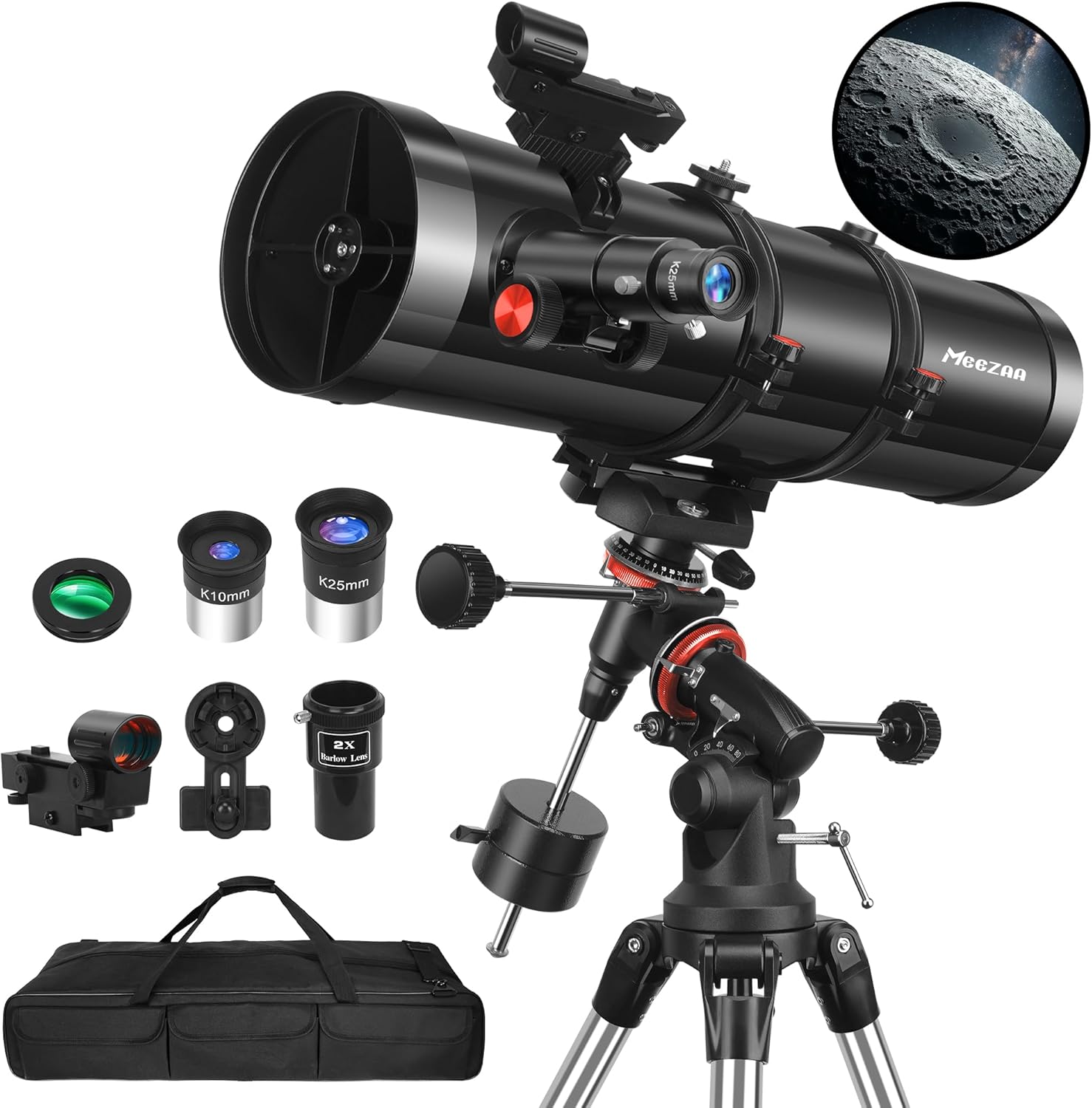
Image: The MEEZAA 150EQ Newtonian Reflector Telescope fully assembled on its equatorial mount and tripod. - 8. Install the Red Dot Finderscope:
Attach the red dot finderscope to its designated bracket on the telescope tube. This accessory aids in quickly locating objects in the night sky before viewing through the main eyepiece.

Image: The red dot finderscope, showing how it helps align the telescope with celestial objects. Note that images in reflector finderscopes may appear upside down. - 9. Insert Eyepiece and Barlow Lens:
Insert your desired eyepiece (25mm or 10mm) directly into the focuser. For higher magnification, first insert the 2X Barlow lens into the focuser, then insert the eyepiece into the Barlow lens. Secure with the thumbscrews.

Image: Visual representation of different magnifications (26X, 52X, 65X, 130X) achieved using the 25mm and 10mm eyepieces, with and without the 2X Barlow lens. - 10. Open the Dust Cover:
Remove the dust cover from the front of the telescope tube before observation.
- 11. Install the Phone Adapter (Optional):
If you wish to capture images or videos with your smartphone, attach the phone adapter to an eyepiece. Secure your phone in the adapter, aligning its camera with the eyepiece lens.

Image: Step-by-step guide on how to install the phone adapter, allowing users to capture photos and videos through the telescope. - 12. Install the Moon Filter (Optional):
For lunar observations, gently screw the moon filter onto the bottom of your chosen eyepiece. This reduces glare and enhances contrast for more comfortable viewing.

Image: The moon filter in use, demonstrating how it reduces glare and improves contrast for lunar observations.
Operating Your Telescope
1. Using the Red Dot Finderscope
The red dot finderscope projects a small red dot onto a glass screen, which helps you quickly point the main telescope at your desired object. Align the finderscope with the main telescope during daylight hours by pointing the main telescope at a distant, stationary object (e.g., a distant tree or building). Adjust the finderscope's alignment screws until the red dot is centered on the same object that is in the center of your main telescope's view.
2. Focusing
Once an object is centered in your eyepiece, slowly turn the focuser knob until the image appears sharp and clear. Different eyepieces and atmospheric conditions may require refocusing.
3. Magnification
Your telescope comes with 25mm and 10mm eyepieces, and a 2X Barlow lens. To calculate magnification, divide the telescope's focal length (650mm) by the eyepiece's focal length. The 2X Barlow lens doubles the magnification of any eyepiece it is used with.
- 25mm Eyepiece: 650mm / 25mm = 26X magnification
- 10mm Eyepiece: 650mm / 10mm = 65X magnification
- 25mm Eyepiece with 2X Barlow: 26X * 2 = 52X magnification
- 10mm Eyepiece with 2X Barlow: 65X * 2 = 130X magnification
Start with the lowest magnification (25mm eyepiece) to locate objects, then switch to higher magnifications for more detailed views.
4. Tracking Celestial Objects with the Equatorial Mount
The equatorial mount is designed to track celestial objects as they move across the sky due to Earth's rotation. After aligning the mount with the celestial pole (Polaris in the Northern Hemisphere), you can use the slow-motion controls to smoothly follow objects with a single adjustment, keeping them centered in your eyepiece.
5. Using the Moon Filter
The included moon filter reduces the brightness of the moon, making it more comfortable to observe and revealing finer surface details that might otherwise be washed out by glare.
Maintenance
- Cleaning Lenses: Use a soft brush to remove dust. For smudges, use a specialized lens cleaning solution and a microfiber cloth. Avoid touching optical surfaces with bare hands.
- Storage: Store the telescope in a dry, dust-free environment. Use the provided dust covers for the main objective lens and eyepieces. The carrying bag is ideal for transport and storage.
- Mechanical Parts: Periodically check all screws and fasteners to ensure they are tight. Do not over-tighten.
Troubleshooting
- Q: What weather is suitable for observing with a telescope?
- A: Ideal conditions include clear skies with few or no clouds, calm air to prevent telescope shaking and reduce atmospheric turbulence, low humidity for improved clarity, and minimal light pollution. Choose locations away from city lights for the best experience.
- Q: Can I see planets with my telescope?
- A: Yes, this telescope allows observation of planets, especially under calm air, clear skies, and low light pollution. You can observe details on planets like Mars (polar caps, dark surface features), Jupiter (methane bands, Great Red Spot), and Saturn (rings, shadows on rings). For optimal viewing, observe on clear, dark nights away from city lights.
- Q: How can I make the tripod more stable?
- A: After adjusting the tripod height, ensure all screws are tightened and place it on a flat, level surface. Avoid touching the tripod during observation. Use the fine-tuning handle for adjustments. In windy conditions, it is advisable to avoid using the telescope as wind can cause instability.
- Q: Why are the images in the finderscope upside down?
- A: It is normal for the image in a finderscope to appear upside down. This occurs because finderscopes typically use convex lenses, which invert the image according to the principles of physical optics.
- Q: Why can I only see darkness through my telescope?
- A:
- Please ensure the lens cap is removed from the main objective lens.
- If you cannot see anything at night, try using the telescope during the day to practice.
- Check the eyepiece: You should see a white circle when looking through it. Wave your hand in front of the objective lens; the view should momentarily darken, then brighten again.
Specifications
| Brand | MEEZAA |
| Model Name | 150EQ |
| Optical Tube Length | 650 Millimeters |
| Objective Lens Diameter | 150 Millimeters |
| Focal Length | 650mm |
| Telescope Mount Description | Equatorial Mount |
| Eyepiece Lens Description | Kellner |
| Focus Type | Manual Focus |
| Compatible Devices | Smartphone, Camera |
| Product Dimensions | 35.43 x 13.97 x 9.64 inches |
| Item Weight | 30 pounds |
Warranty and Support
For warranty information, technical support, or any inquiries regarding your MEEZAA 150EQ Newtonian Reflector Telescope, please refer to the contact details provided in the packaging or visit the official MEEZAA website. Keep your purchase receipt for warranty claims.
Related Documents - 150EQ
 |
SUMOTM 150Eq - Anti Fading Steel: Superior Durability and Color Retention | BlueScope Discover SUMOTM 150Eq - Anti Fading steel by NS BlueScope Vietnam. Featuring advanced 4-phase anti-corrosion technology and a superior anti-fading paint system for long-lasting color and durability in roofing and cladding applications. |