
Introduction
The Vminno NJ-CS108 Handheld Pressurized Steam Cleaner is designed for efficient, chemical-free cleaning across various surfaces in your home and car. Utilizing high-temperature steam, it effectively loosens dirt, grime, and stains, providing a hygienic cleaning solution. This manual provides essential information for safe and optimal use of your steam cleaner.

Figure 1: Vminno NJ-CS108 Handheld Pressurized Steam Cleaner. This image shows the main unit of the steam cleaner, highlighting its compact design and nozzle.
Safety Information
Please read all safety instructions carefully before using the appliance. Failure to follow these instructions may result in electric shock, fire, or serious injury.
- Always ensure the appliance is unplugged from the power outlet before filling or emptying the water tank, or when not in use.
- Do not direct steam at people, animals, or electrical appliances. High-temperature steam can cause severe burns.
- Keep the appliance out of reach of children and pets.
- Use only distilled or purified water in the water tank. Do not add cleaning solutions, perfumes, or other chemicals, as this may damage the appliance or create hazardous fumes.
- Avoid touching hot surfaces. Use handles or knobs. Allow the appliance to cool down completely before handling or changing accessories.
- Do not immerse the appliance in water or any other liquid.
- Regularly inspect the power cord for damage. If damaged, it must be replaced by the manufacturer or a qualified service agent to avoid hazards.
Video 1: Ways to avoid burns from hot water or steam. This video demonstrates safe handling practices to prevent burns from the steam cleaner's hot water or steam.

Figure 2: Chemical-Free Safety. This image illustrates the benefit of chemical-free cleaning, showing a child and pet near a freshly steamed area, emphasizing safety.
Package Contents
Verify that all items listed below are included in your package:
- Vminno Handheld Pressurized Steam Cleaner Unit
- Nylon Brush (x2)
- Copper Brush (x1)
- Scraping Tool (x1)
- Angle Tool (x1)
- Grout Brush (x2)
- Windows Squeegee (x1)
- Clothes (x2)
- Straight Nozzle (x1)
- Measuring Cup (x1)
- Connector (x1)
- Extension Hose (x1)
- Extension Nozzle (x1)
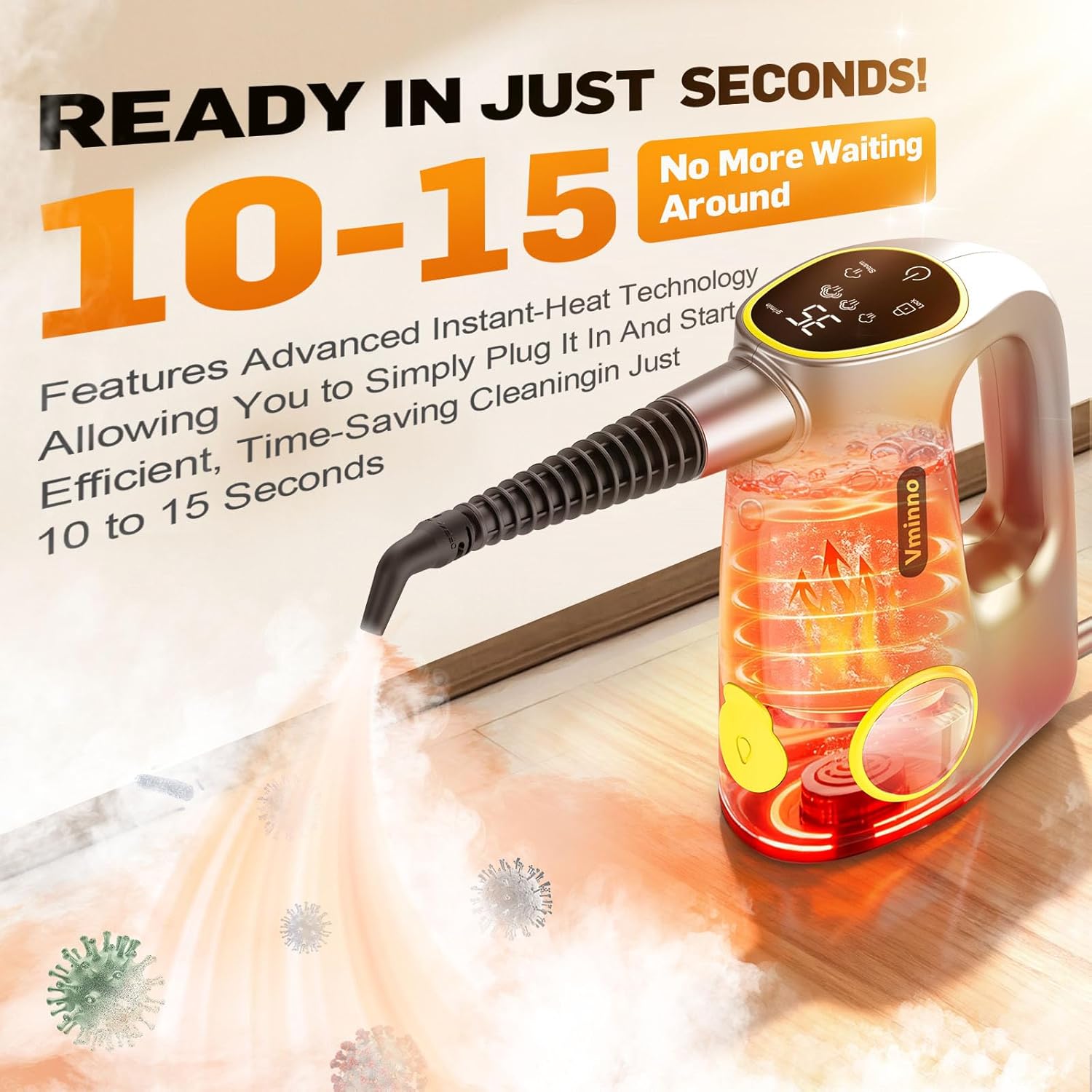
Figure 3: Vminno Steam Cleaner with 14pcs Accessories. This image displays the main steam cleaner unit along with all included attachments and accessories.

Figure 4: 14pcs Accessories for Vminno Steam Cleaner. This image provides a detailed view of the various brushes, nozzles, and tools included with the steam cleaner.
Setup
1. Filling the Water Tank
- Ensure the steam cleaner is unplugged from the power outlet.
- Locate the water tank cap on the top of the unit and twist to open.
- Using the provided measuring cup, carefully pour up to 380ml (13.12oz) of distilled or purified water into the tank. Do not overfill.
- Securely close the water tank cap by twisting it until it is tight.

Figure 5: Transparent Water Tank. This image highlights the transparent water tank, allowing users to easily monitor the water level.

Figure 6: Filling Water Tank. This image shows the process of detaching the lid and pouring water into the steam cleaner's tank.
2. Attaching Accessories
- Select the appropriate accessory for your cleaning task.
- Align the accessory with the nozzle opening on the main unit or the extension hose/nozzle.
- Push and twist until the accessory clicks securely into place. Ensure it is firmly attached to prevent steam leakage.
- For extended reach, first attach the connector to the main unit, then the extension hose, and finally your desired cleaning tool.
Video 2: Quick Start Guide of Vminno Steam Cleaner. This video provides a quick visual guide on how to set up and start using the Vminno steam cleaner, including filling the water tank and attaching accessories.
3. Powering On
- Plug the power cord into a grounded electrical outlet. The display will illuminate.
- Press and hold the child lock button for 3 seconds to unlock the device.
- Press the power button to turn on the unit. The steam cleaner will begin heating up.
- The unit heats up in approximately 15 seconds. The display will show the steam level.

Figure 7: Fast Heat-Up Time. This image highlights the rapid 10-15 second heat-up feature of the steam cleaner, showing steam being emitted from the nozzle.
Operating Instructions
1. Adjusting Steam Levels
The Vminno NJ-CS108 offers 3 adjustable steam levels to suit different cleaning needs:
- Low Steam: Ideal for delicate fabrics, light cleaning, or sensitive surfaces.
- Medium Steam: Suitable for windows, floors, and general surface cleaning.
- High Steam: For tackling tough grease, stubborn stains, and deep cleaning tasks.
Press the 'Steam' button on the control panel to cycle through the three steam levels. The selected level will be indicated on the digital display.

Figure 8: 3-Level Adjustable Steam. This image illustrates the digital control panel with options for adjusting steam intensity to three different levels.

Figure 9: Adjustable Steam Levels. This image visually represents the three distinct steam levels available, from low to high intensity, for varied cleaning applications.
2. General Cleaning Tips
- Always test the steam cleaner on an inconspicuous area first to ensure compatibility with the surface.
- Hold the nozzle close to the surface for optimal cleaning power.
- Use a clean cloth to wipe away loosened dirt and moisture after steaming.
- For heavily soiled areas, pre-treat with steam and allow it to penetrate before scrubbing with an appropriate brush attachment.
3. Specific Applications
The versatile accessories allow for cleaning various areas:
- Kitchen: Use the nylon brush or copper brush for stovetops, countertops, and sinks. The scraping tool can help with dried-on food.
- Bathroom: The grout brushes and angle tool are effective for tile grout, toilet bases, and shower corners.
- Floors: For hard floors, use the straight nozzle with a cloth cover for general cleaning.
- Upholstery/Fabrics: Use the fabric cleaning accessory (cloths) with the straight nozzle for refreshing upholstery, curtains, and pet beds.
- Windows/Glass: Attach the window squeegee for streak-free cleaning.
- Car Detailing: The various brushes and nozzles are suitable for cleaning car interiors, wheels, and engine compartments.
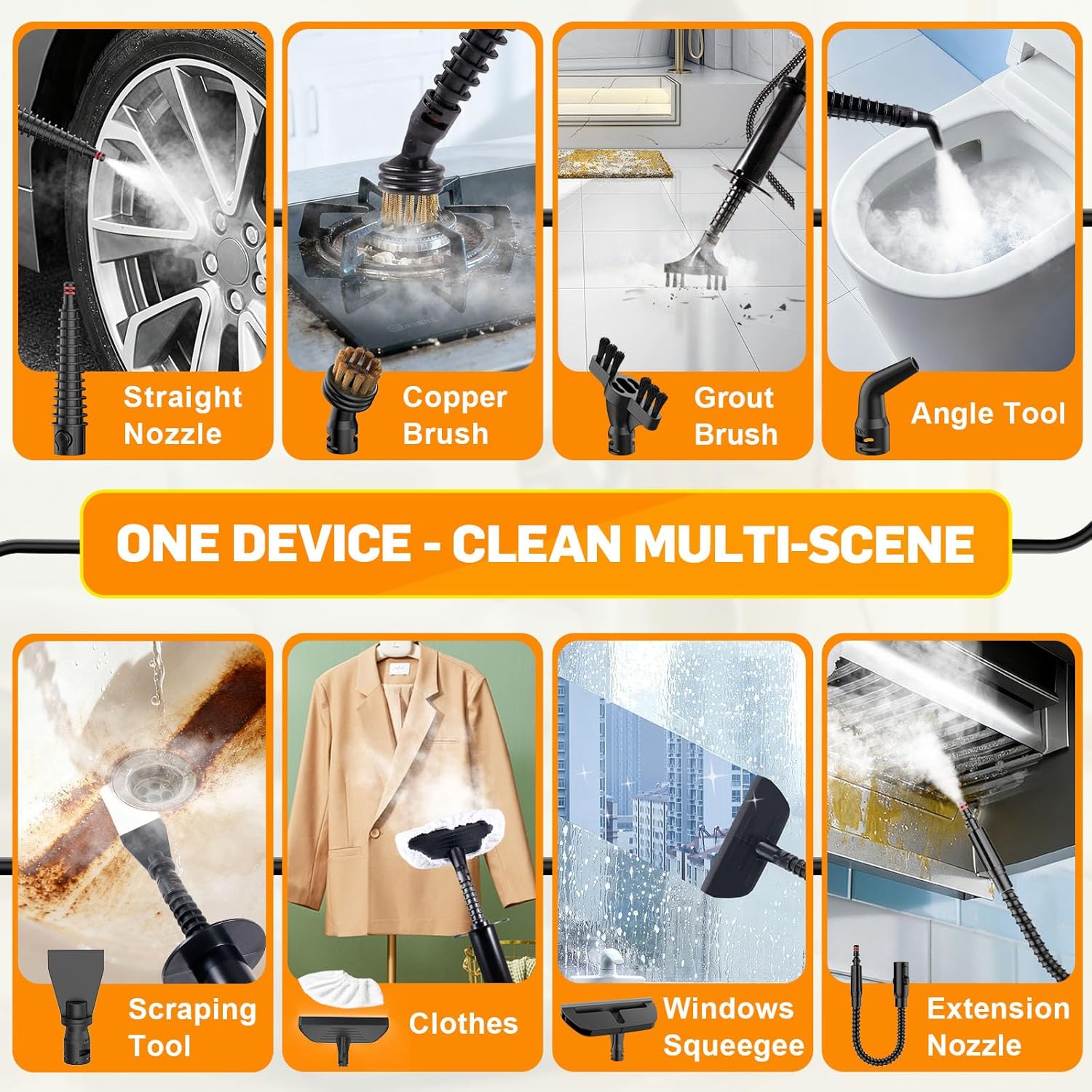
Figure 10: Multi-Scene Cleaning with Accessories. This image showcases various accessories being used for different cleaning tasks, including car wheels, stovetops, toilets, and windows.
Video 3: Steamer for Cleaning Floor, Upholstery, Grout and Car. This video demonstrates the steam cleaner's effectiveness on various surfaces like floors, upholstery, grout, and car interiors.

Figure 11: Steam Cleaner for House. This image illustrates the steam cleaner's application in various household areas, including pet beds, bathtubs, kitchen stoves, and sofas.

Figure 12: Steam Cleaner for Car. This image demonstrates the steam cleaner's use for car detailing, including interiors, tires, and engine areas.

Figure 13: Steam Cleaner for Outdoors. This image shows the steam cleaner being used for outdoor cleaning tasks such as BBQ grills, garden tools, and pool areas.
Maintenance
1. Cleaning the Unit
- After each use, unplug the appliance and allow it to cool down.
- Empty any remaining water from the tank.
- Wipe the exterior of the unit with a soft, damp cloth.
- Clean accessories as needed. Fabric covers can be machine washed. Brushes and nozzles can be rinsed with water.
2. Descaling (if necessary)
If you notice reduced steam output or mineral buildup, descaling may be required. Consult the full manual for detailed descaling instructions, typically involving a vinegar solution.
3. Storage
Store the steam cleaner and its accessories in a cool, dry place, away from direct sunlight and out of reach of children.
Troubleshooting
| Problem | Possible Cause | Solution |
|---|---|---|
| No steam output | Water tank empty; appliance not heated; child lock engaged. | Fill water tank; allow 15 seconds for heating; press and hold child lock for 3 seconds. |
| Weak steam output | Low water level; mineral buildup in nozzle. | Refill water tank; descale the unit. |
| Water droplets coming out with steam | Normal during initial heating or if the unit is tilted. | This is normal. Allow a few seconds for pure steam to emit. Avoid tilting the unit excessively. |
| Accessory not attaching securely | Incorrect alignment; debris in connection. | Ensure correct alignment and push until it clicks. Clean any debris from the connection points. |
Video 4: Water droplets or coming out first after heating is normal. This video clarifies that initial water droplets are a normal part of the steam cleaner's operation.
Specifications
- Brand: Vminno
- Model Name: NJ-CS108
- Special Feature: Handheld Steam Cleaner
- Wattage: 1500 watts
- Item Weight: 3.5 Pounds
- Tank Volume: 380 Milliliters
- Heat Time: 15-20 Seconds
- Maximum Temperature: 212 Degrees Fahrenheit
- Power Source: Corded Electric
- Voltage: 110 Volts
- Product Dimensions: 4.5"D x 4.5"W x 9"H
- Power Cord Length: 9.84ft (3m)
- Extension Hose Length: 3.74ft (1.14m)
Warranty & Support
For warranty information, technical support, or customer service inquiries, please refer to the contact details provided in your product packaging or visit the official Vminno website. Keep your purchase receipt for warranty claims.