
1. Introduction
The EARNMee 60A MPPT Solar Charge Controller is designed for efficient power management in various solar systems, including RVs, campers, and home photovoltaic arrays. It features a 60A capacity with a PV input range of 18-145VDC (for 12V batteries), 36-145VDC (for 24V batteries), and 70-145VDC (for 48V batteries). This controller is compatible with both monocrystalline and polycrystalline silicon panels, as well as lead-acid, colloidal, and lithium batteries.
Key features include:
- High-Amperage Performance: 60A capacity for demanding setups.
- Adjustable Output: Manually select 12V/24V/48V DC output voltage.
- Broad Compatibility: Works with common solar panel types and battery chemistries.
- Advanced Cooling & Protection: Intelligent temperature-controlled air cooling, along with overload, high/low voltage, over-temperature, and short circuit protection.
- Easy Monitoring: LCD display shows real-time system data.
- Durable Design: Dustproof and waterproof (IP21) construction.

Image: Front view of the EARNMee 60A MPPT Solar Charge Controller, highlighting its intelligent and efficient design, along with a table of key specifications including input voltage, controller type, charging current, and power output for 12V, 24V, and 48V systems.
2. Setup and Installation
Proper installation is crucial for the safe and efficient operation of your MPPT solar charge controller. Follow these steps carefully:
- Mounting: Choose a dry, well-ventilated location away from direct sunlight and heat sources. Ensure adequate clearance around the controller for air circulation, especially around the cooling fan.
- Battery Connection: Connect the battery to the controller first. Ensure correct polarity (positive to positive, negative to negative). The controller will detect the battery voltage.
- Solar Panel Connection: Connect the solar panels to the controller. Again, observe correct polarity. Ensure the PV input voltage is within the specified range for your battery system (18-145VDC for 12V, 36-145VDC for 24V, 70-145VDC for 48V).
- Load Connection (Optional): If using a DC load directly from the controller, connect it to the designated load terminals.

Image: A diagram illustrating the typical connection sequence for a solar power system, including solar panels, the MPPT solar charge controller, a battery, an inverter, and an AC load. This visual guide helps in understanding the overall system architecture.

Image: Detailed views of the MPPT solar charge controller, highlighting the LCD display, control buttons for battery voltage adjustment and type switching, PV panel input terminals, battery charge terminals, and the intelligent cooling fan.
Video: This video demonstrates the connection process of the 60A MPPT Charge Controller to a 12V lithium battery, showing how to properly wire the components for charging.
3. Operating Instructions
Once installed, the EARNMee MPPT Solar Charge Controller operates automatically. The LCD display provides real-time information about your solar system's performance.
3.1 LCD Display and Controls
The LCD screen displays critical system parameters such as PV voltage, charging current, battery voltage, and temperature. Use the buttons below the display to navigate through different screens and adjust settings.
- SET/Back: Enters settings menu or goes back to the previous screen.
- UP (+): Increases values or moves up in menu options.
- DOWN (-): Decreases values or moves down in menu options.
- CONFIRM: Confirms selections or enters sub-menus.
3.2 Battery Voltage and Type Adjustment
The controller allows manual selection of 12V, 24V, or 48V output DC voltage to match your battery type. Refer to the detailed views of the controller for button locations. Ensure the selected voltage matches your battery bank to prevent damage.
Video: This video provides a manual overview of the 60A MPPT Solar Charge Controller, demonstrating its features and basic operation, including how to navigate the display and adjust settings.
4. Maintenance
To ensure the longevity and optimal performance of your EARNMee MPPT Solar Charge Controller, regular maintenance is recommended:
- Cleaning: Periodically clean the exterior of the controller with a dry cloth. Ensure the cooling fan and ventilation openings are free from dust and debris to maintain efficient temperature control.
- Connection Checks: Regularly inspect all wiring connections for tightness and corrosion. Loose connections can lead to power loss or overheating.
- Environmental Conditions: While the controller is dustproof and waterproof (IP21), avoid exposing it to extreme moisture or direct water spray. Ensure it operates within its specified temperature range.
- Firmware Updates: Check the manufacturer's website for any available firmware updates to ensure your controller has the latest features and bug fixes.
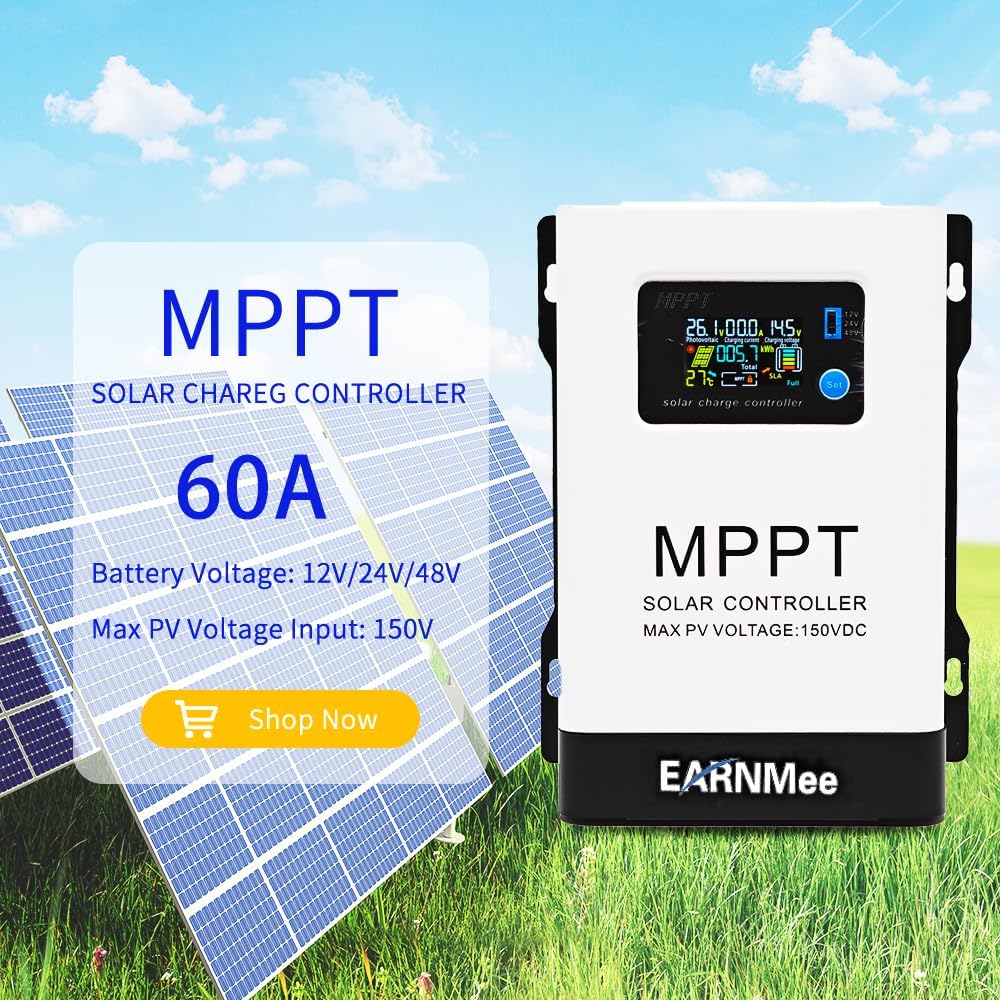
Image: The EARNMee 60A MPPT Solar Charge Controller showcasing its multiple protection features, including overload, polarity, over-charging, and over-temperature protection, ensuring safe operation.
5. Troubleshooting
This section addresses common issues you might encounter with your solar charge controller.
| Problem | Possible Cause | Solution |
|---|---|---|
| No display or power | Battery not connected or low voltage; loose wiring. | Check battery connections and voltage. Ensure battery voltage is above the minimum operating threshold. Tighten all wiring. |
| Battery not charging | Solar panels not connected; insufficient sunlight; PV voltage too low/high; incorrect battery type setting. | Verify solar panel connections and ensure adequate sunlight. Check PV input voltage. Confirm the correct battery type is selected in settings. |
| Over Voltage Protection (OVP) alarm for 48V batteries | Default or incorrect voltage settings for specific battery types (e.g., LFP). | Adjust the voltage settings to a lower value (e.g., 56.2V or 55V for 48V LFP batteries) to prevent over-voltage and protect the battery. Consult your battery's specifications for recommended charging voltages. |
| Wires getting hot | Loose connections; undersized wiring; excessive current. | Ensure all connections are tight. Use appropriate wire gauge for the current load. Reduce load if necessary. |
6. Specifications
| Feature | Detail |
|---|---|
| Brand | EARNMee |
| Model | 60A MPPT Solar Charge Controller |
| PV Input Voltage Range | 18-150VDC |
| Adjustable Output Voltage | 12V/24V/48V (Manual Selection) |
| Charging Current | 60A |
| Compatible Battery Types | Lead-Acid, Colloidal, Lithium |
| Display Type | LCD |
| Material | Metal |
| Product Dimensions (L x W x H) | 8.27" x 3.54" x 6.5" |
| Item Weight | 3.5 Pounds |
| Protection Rating | IP21 (Dustproof, Waterproof) |
7. Warranty and Support
The EARNMee 60A MPPT Solar Charge Controller comes with a 12-month warranty. For any technical assistance, troubleshooting, or warranty claims, please contact EARNMee customer support. 24/7 support is available to assist you.
For further information, you may visit the EARNMee Store on Amazon.