
1. Introduction
This manual provides comprehensive instructions for the assembly, operation, and maintenance of your LayBurst LM25072601 55-inch Farmhouse L-Shaped Desk. Please read this manual thoroughly before assembly and use to ensure proper function and longevity of your product. Keep this manual for future reference.

Figure 1: The LayBurst 55-inch Farmhouse L-Shaped Desk, showcasing its design and functionality in a home office environment.
2. Safety Instructions
- Always assemble the desk on a soft, clean surface to prevent scratches.
- Ensure all screws and fasteners are securely tightened before use. Periodically check and re-tighten as necessary.
- Do not overload drawers or shelves. Distribute weight evenly.
- Keep small parts and assembly tools away from children during assembly.
- Avoid placing hot items directly on the desk surface. Use coasters or protective pads.
- Do not stand or sit on the desk.
- When moving the desk, lift it rather than dragging to prevent damage to the legs and floor.
3. Package Contents
Verify that all components listed in the packing list are present before beginning assembly. If any parts are missing or damaged, please contact customer support.
- Desk panels (numbered)
- Hardware pack (screws, dowels, cam locks, keys)
- Charging station unit
- Assembly instructions manual
4. Assembly Instructions
Assembly is required for this product. All parts are numbered, and a detailed, step-by-step instruction manual is included to guide you through the process. It is recommended to have two people for assembly.
- Unpack all components and lay them out on a protected surface.
- Identify each part using the provided numbering system.
- Follow the included graphical and textual instructions carefully, step by step.
- Ensure all connections are secure before proceeding to the next step.
- Install the charging station unit into the designated cutout on the desktop.
- Once assembled, gently move the desk to its desired location.
Video 1: An overview of the LayBurst 55-inch Farmhouse L-Shaped Desk, demonstrating its features and overall aesthetic. This video provides a visual guide to the product's design and functionality.
5. Product Features
5.1 Rustic Farmhouse Design
The desk is crafted from refined MDF, featuring a vintage black tabletop paired with a white body. Cabinet surfaces are adorned with fluted designs, and the base has an elegant curved shape, enhancing its aesthetic appeal.
5.2 Diverse Storage Solutions
This executive desk offers versatile storage options to meet various organizational needs:
- Two Drawers: Located on the right side for general storage. The top drawer is lockable for securing valuables.
- Adjustable File Cabinet: Positioned below the drawers, this cabinet fits A4, legal, and letter-sized documents, equipped with horizontal bars for hanging folders.
- Open Storage Compartment: An accessible shelf for frequently used items or decorative pieces.
- Spacious Cabinet: Located on the left side, providing ample space for bulkier items like computer towers or binders.

Figure 2: Detailed view of the desk's left side, showing the open storage shelf and the cabinet, ideal for organizing books or a CPU tower.

Figure 3: A composite image highlighting the lockable top drawer for security, the elegant fluted design on cabinet surfaces, and the adjustable filing cabinet for various document sizes.
5.3 Built-in Charging Station
The integrated charging station on the desktop provides convenient power access, reducing cable clutter. It includes:
- Two (2) Power Outlets (125V/12A)
- One (1) USB Port (5V/2A)
- One (1) Type-C Port (5V/3A, 9V/2A, 12V/1.5A)
- Power Cord Length: 6.5 ft

Figure 4: The integrated charging station on the desk surface, featuring two AC outlets, one USB port, and one USB-C port for convenient device charging.
6. Operation
- Drawers and Cabinets: Gently pull handles to open. For the lockable drawer, insert the key and turn to secure or unlock.
- File Cabinet: Utilize the horizontal bars to hang standard A4, legal, or letter-sized hanging folders.
- Charging Station: Plug your devices into the appropriate AC outlets, USB, or Type-C ports. Ensure the desk's power cord is connected to a wall outlet.
7. Maintenance
- Cleaning: Wipe surfaces with a soft, damp cloth. Avoid harsh chemicals or abrasive cleaners that may damage the finish.
- Spills: Clean spills immediately to prevent staining or damage to the wood.
- Hardware: Periodically check and tighten all screws and fasteners to maintain stability.
- Sunlight Exposure: Avoid prolonged direct sunlight exposure to prevent fading or discoloration.
8. Troubleshooting
- Desk Wobbles: Ensure all assembly screws are fully tightened. Check that the desk is on a level surface. Adjust any leveling feet if present.
- Drawers Stick: Check for obstructions in the drawer slides. Ensure the drawer slides are properly aligned and lubricated if necessary.
- Charging Station Not Working: Verify the desk's power cord is securely plugged into a functional wall outlet. Check if the device being charged is properly connected to the charging station.
- Missing Parts: If any parts were missing upon delivery, refer to Section 3 and contact customer support.
9. Specifications
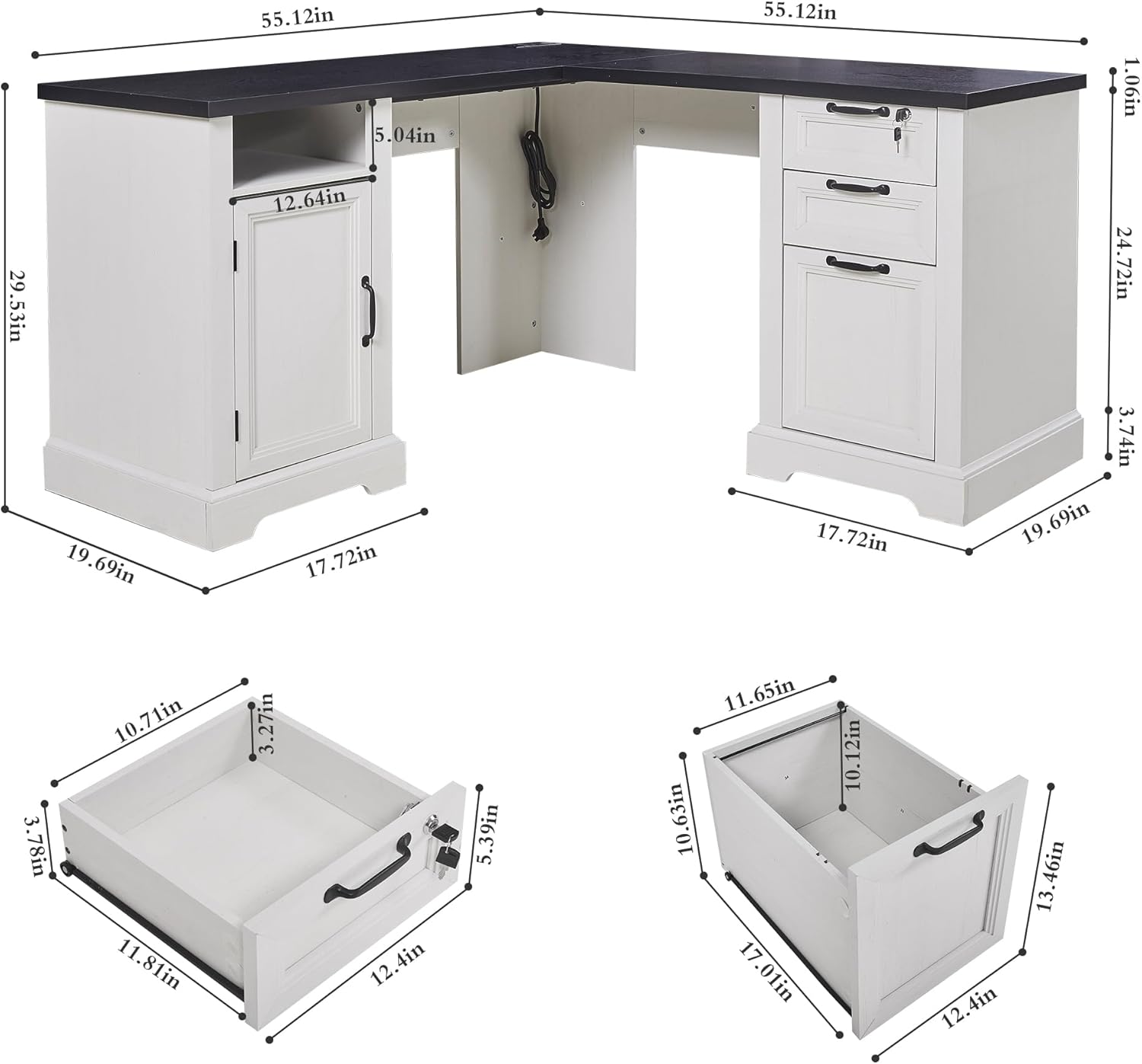
Figure 5: Dimensional drawing of the desk, illustrating its overall size and key measurements for planning your space.
| Feature | Detail |
|---|---|
| Brand | LayBurst |
| Model Number | LM25072601 |
| Product Dimensions (D x W x H) | 19.69"D x 55.12"W x 29.53"H |
| Color | White (with black tabletop) |
| Base Material | Engineered Wood |
| Top Material Type | Engineered Wood |
| Finish Type | Powder Coated |
| Item Weight | 112 Pounds |
| Special Features | Adjustable File Cabinet, Built-In USB Outlet, Lockable Drawers |
| Number of Drawers | 2 |
| Number of Cabinets | 2 |
| Required Assembly | Yes |
| Power Outlet (AC) | 2 (125V/12A) |
| USB Port | 1 (5V/2A) |
| Type-C Port | 1 (5V/3A, 9V/2A, 12V/1.5A) |
| Power Cord Length | 6.5 ft |
10. Warranty and Support
For warranty information, product support, or to report missing/damaged parts, please refer to the contact information provided at the point of purchase or visit the official LayBurst website. Please have your model number (LM25072601) and purchase date available when contacting support.