
Introduction
Thank you for choosing the CAILESER Robot Vacuum and Mop. This device is designed to provide efficient and convenient floor cleaning for your home. It features multiple cleaning modes, smart app control, and automatic functions to simplify your cleaning routine. Please read this manual thoroughly before operating the device to ensure proper use and maintenance.

Image Description: A white CAILESER robot vacuum cleaner is displayed centrally, accompanied by its remote control, a smartphone showing the control app interface, three blue mop pads, and a transparent blue water tank. This image illustrates the main components and control options of the product.
Package Contents
Verify that all items are present in the package:
- Robot Vacuum Cleaner x 1
- Mop Pad x 3
- Side Brushes x 2
- Cleaning Brush x 1
- Power Adapter x 1
- User Manual x 1
- Remote Control x 1
Setup
1. Initial Charging
Before first use, fully charge the robot vacuum cleaner. This prevents unexpected power loss during initial operation.
- Connect the power adapter to the robot's charging port and a wall outlet.
- Ensure the charging cable is not bent excessively and is stored in a cool, dry place.
- Use the original charger. If damaged, use a compatible charging cable.
- After the battery is depleted, recharge it. Charging efficiency will stabilize after several cycles.

Image Description: The image shows the robot vacuum charging. A power adapter is plugged into a wall socket, and its cable connects to the robot's USB charging port. A clear indicator light on the robot is visible, and the text "2000mAh" highlights the battery capacity. This illustrates the charging process and battery specification.
2. Installing Side Brushes
Attach the side brushes to their designated slots on the underside of the robot. Press firmly until they click into place.
3. Preparing for Mopping (Optional)
For mopping functions, fill the water tank with clean water and attach a mop pad. Insert the water tank into the robot.

Image Description: A four-panel image showing the robot vacuum in various scenarios. Top left: The robot in a clean room. Top right: The robot cleaning under furniture, highlighting its 6cm slim design. Bottom left: The robot navigating near stairs, demonstrating its anti-fall sensors. Bottom right: A hand inserting the transparent blue water tank into the robot, illustrating the mopping setup.
Operating Instructions
1. Power On/Off
Press the power button on the robot or the remote control to turn the device on or off.
2. Cleaning Modes
The robot offers 6 efficient cleaning modes to suit various needs:
- Free Cleaning: General cleaning pattern for open areas.
- Edge Cleaning: Focuses on cleaning along walls and furniture edges.
- "Arc" Shaped Cleaning: Cleans in a systematic, curved path.
- Silent Mopping: Low-noise mopping mode.
- Fixed Point Edge Cleaning: Concentrated cleaning in a specific area, often along an edge.
- Manual Cleaning: Control the robot's movement manually via the app or remote.

Image Description: A smartphone displays the CAILESER robot vacuum's control app, showing different cleaning modes such as "Free Cleaning," "Zig-Zag Cleaning," "Spot Cleaning," "Edge Cleaning," "Silent Mopping," and "Manual Cleaning." The robot is visible on a carpeted floor, with a dog in the background, illustrating the smart control capabilities and diverse cleaning options.
3. Smart App and Remote Control
Control your robot vacuum and mop easily through a smartphone application or the included remote control.
- App Control: Download the dedicated app to monitor cleaning progress, select modes, and schedule cleaning times.
- Remote Control: Use the physical remote for basic commands like start, stop, mode selection, and direction control.
4. Automatic Features
- Automatic Charging: The robot is designed to return to its charging base automatically when the battery is low.
- Anti-Fall Sensors: Equipped with three anti-fall sensors to intelligently identify and prevent the robot from falling down stairs or other drops.
- Obstacle Climbing: Can easily traverse carpets or door thresholds up to 8mm (0.8 inches) in height for uninterrupted cleaning.

Image Description: The robot vacuum is shown transitioning from a hard floor to a carpeted area. An arrow indicates "Automatic Elevation" and highlights its ability to climb obstacles up to 8mm (0.8 inches), ensuring seamless cleaning across different floor types.

Image Description: This image, titled "SUPER SUCTION POWER," illustrates the robot vacuum's effectiveness on different types of debris (dust, hair, condiments, particles) and floor surfaces (wood, marble, tile). The robot is shown cleaning a carpet with visible dirt, emphasizing its powerful suction capabilities.
Maintenance
Regular maintenance ensures optimal performance and extends the lifespan of your robot vacuum.
1. Cleaning the Dustbin
- Regularly empty and clean the 300ml dust collector to prevent blockages and maintain suction power.
- Remove the dustbin, discard collected debris, and rinse if necessary. Ensure it is completely dry before reinserting.
2. Cleaning Side Brushes
- Periodically inspect and clean the side brushes. Hair and debris can get tangled.
- You may use a screwdriver to remove the screws securing the side brushes for thorough cleaning.
3. Water Tank and Mop Pads
- After mopping, empty any remaining water from the tank and clean it.
- Wash used mop pads and allow them to air dry completely before reuse or storage.
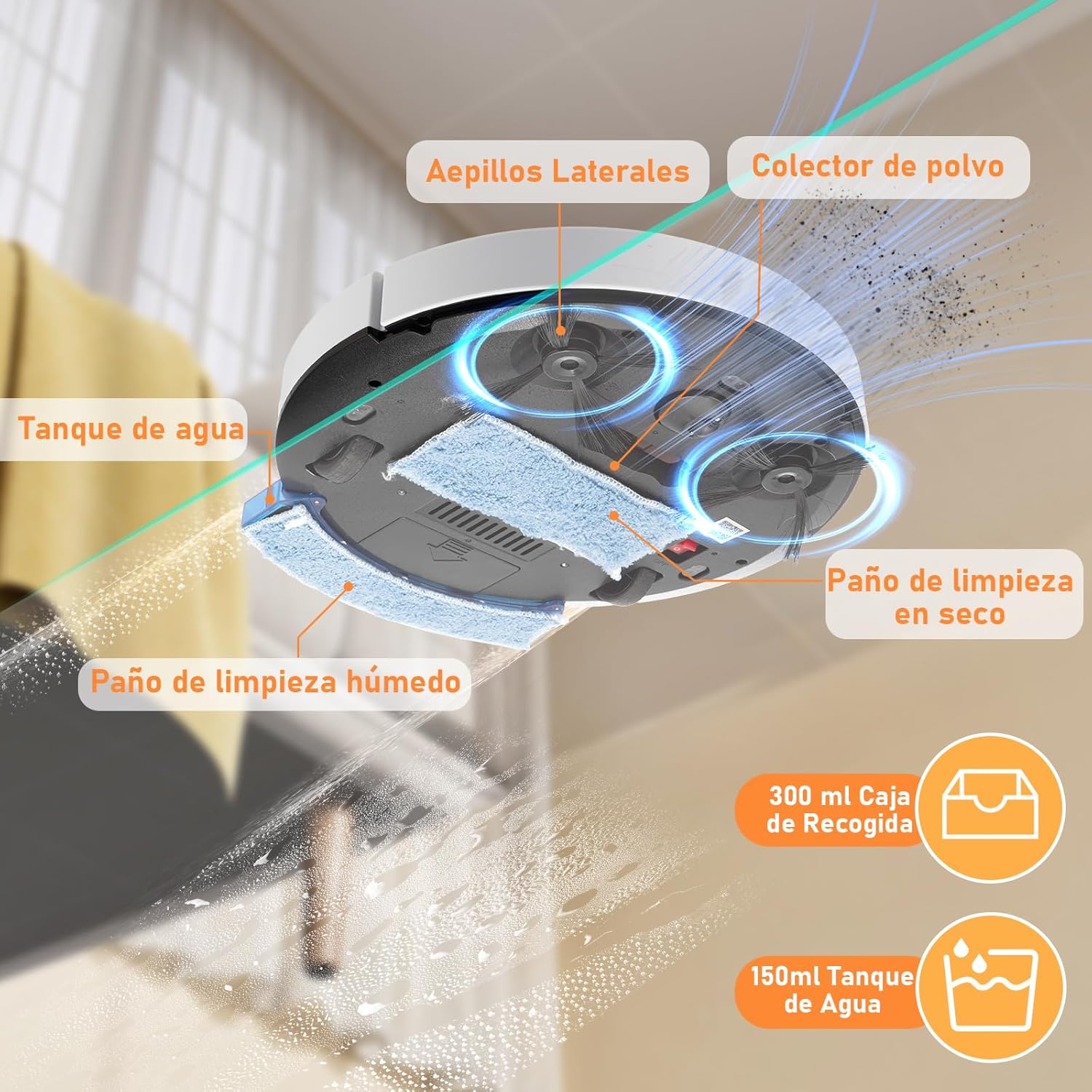
Image Description: An exploded view of the robot vacuum's underside, highlighting key components. Labels point to "Side Brushes," "Dust Collector," "Water Tank," "Wet Cleaning Cloth," and "Dry Cleaning Cloth." Icons for "300ml Dust Collection Box" and "150ml Water Tank" are also shown, detailing the cleaning mechanisms and capacities.
4. General Care
- Wipe the robot's exterior with a dry cloth.
- Avoid charging the appliance in a humid environment.
- Keep cables properly stored to prevent entanglement.
Troubleshooting
If you encounter issues with your CAILESER Robot Vacuum and Mop, please refer to the following common solutions:
- Robot not starting: Ensure the robot is fully charged. Check if the power button is pressed correctly.
- Reduced suction power: Clean the dustbin and check for blockages in the suction inlet. Ensure side brushes are free of tangled hair.
- Robot getting stuck frequently: Clear obstacles from the cleaning path. Ensure the robot can climb thresholds up to 8mm.
- Mopping not effective: Ensure the water tank is filled and the mop pad is correctly attached and wet.
- Charging issues: Verify the power adapter and charging cable are securely connected and undamaged. Avoid charging in humid environments.
For more detailed troubleshooting or if problems persist, please contact our customer service. An electronic PDF manual and instructional videos are available upon request.
Specifications
| Feature | Specification |
|---|---|
| Brand | CAILESER |
| Model Name | Robot Vacuum and Mop |
| Color | Gray |
| Product Dimensions | 31.3L x 31.3W x 8.2H cm (12.3 x 12.3 x 3.2 inches) |
| Package Dimensions | 31.24 x 31.24 x 8.13 cm (12.3 x 12.3 x 3.2 inches) |
| Product Weight | 1.5 kg (3.3 lbs) |
| Battery Capacity | 2000 mAh |
| Battery Life | Approx. 80 minutes (for areas less than 100 sq meters) |
| Cleaning Area | Up to 150 square meters (1614 sq ft) |
| Dustbin Capacity | 300 ml |
| Water Tank Capacity | 150 ml |
| Cleaning Modes | 6 (Free, Edge, Arc, Silent Mopping, Fixed Point Edge, Manual) |
| Obstacle Climbing Ability | Up to 8mm (0.8 inches) |
| Control Methods | Smart App, Remote Control |
| Special Features | Anti-fall sensors, Automatic charging, 4-in-1 (sweep, vacuum, dry mop, wet mop) |
Warranty and Support
Specific warranty details are not provided in this manual. For warranty information, please refer to the product packaging or contact your retailer.
For any questions regarding the product, technical support, or to request an electronic PDF manual or instructional video, please contact CAILESER customer service.
Contact information for customer service is typically found on the product packaging, official website, or purchase receipt.