
1. Product Overview
The EKBMELLJ Canbus Box FT-RZ-01 is designed to facilitate communication between your vehicle's existing systems and an aftermarket Android car radio. This device ensures that essential vehicle functions, such as steering wheel controls, door status, and climate control information, are correctly transmitted to and displayed on your new head unit. It is compatible with various Toyota models, including Corolla, Camry, CHR, RAV4, and Land Cruiser.
2. Safety Information
- Always disconnect the vehicle's battery before beginning any electrical installation to prevent short circuits and electrical shock.
- Ensure all connections are secure and properly insulated to avoid loose wires and potential hazards.
- If you are unsure about any step of the installation process, consult a qualified professional installer.
- Do not modify the Canbus box or wiring harness. Unauthorized modifications can lead to malfunction or damage.
- Keep the device away from water and excessive heat.
3. Package Contents
Please verify that all items are present in your package:
- 1x EKBMELLJ Canbus Box (FT-RZ-01)
- 1x Wiring Harness Power Cable

Image: The EKBMELLJ Canbus Box FT-RZ-01 shown alongside its accompanying wiring harness, illustrating the main components included in the package.
4. Setup and Installation
This section provides general guidelines for installing the Canbus Box and wiring harness. Specific installation steps may vary depending on your vehicle model and the aftermarket Android radio. It is highly recommended to refer to your vehicle's service manual and your Android radio's installation guide for detailed instructions.
- Preparation: Park your vehicle on a level surface, engage the parking brake, and turn off the ignition. Disconnect the negative terminal of the vehicle's battery.
- Access Radio Compartment: Carefully remove the trim panels and screws necessary to access the factory radio. Refer to your vehicle's specific disassembly instructions.
- Connect Wiring Harness: Disconnect the factory wiring harness from the original radio. Connect the provided EKBMELLJ wiring harness to the vehicle's factory harness. Ensure all connectors click securely into place.
- Integrate Canbus Box: Locate the designated connector on the EKBMELLJ wiring harness for the Canbus Box. Plug the FT-RZ-01 Canbus Box into this connector.
- Connect to Android Radio: Connect the other end of the EKBMELLJ wiring harness to your aftermarket Android car radio. Ensure all power, speaker, and signal wires are correctly matched according to your radio's manual.
- Test Connections: Before reassembling the dashboard, reconnect the vehicle's battery. Turn on the ignition and test the Android radio's functionality, including audio, steering wheel controls, and any other Canbus-dependent features.
- Final Assembly: If all functions are working correctly, carefully reassemble the dashboard and trim panels.
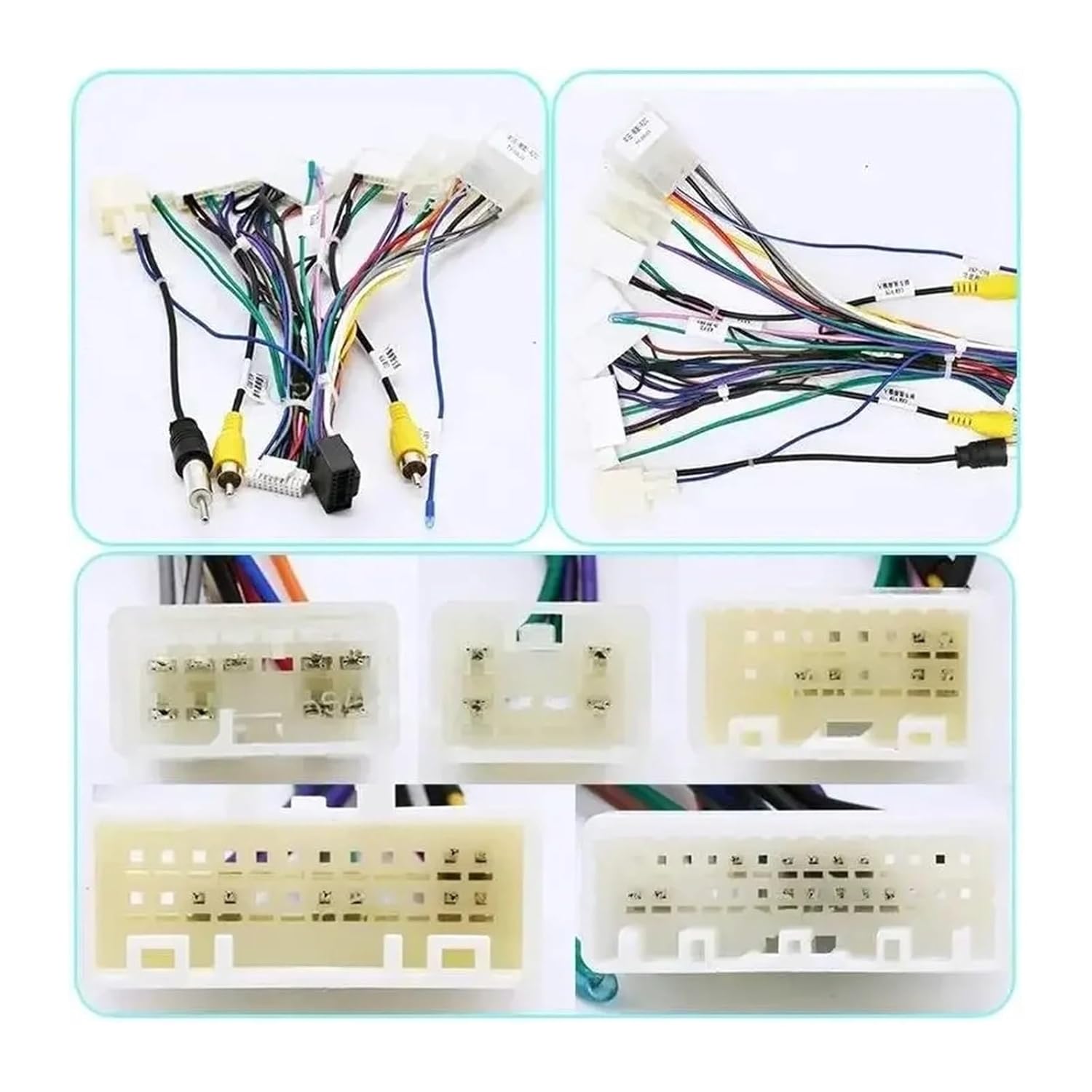
Image: A detailed view of the multi-pin connectors on the wiring harness, which connect to the vehicle's factory harness and the Android car radio.

Image: The EKBMELLJ Canbus Box FT-RZ-01, showing its primary connector port where it interfaces with the wiring harness.
5. Operating Instructions
The EKBMELLJ Canbus Box FT-RZ-01 operates automatically once correctly installed. Its primary function is to translate the vehicle's digital signals into a format compatible with your Android car radio. After installation, the Android radio should recognize and utilize the vehicle's Canbus data for features such as:
- Steering Wheel Control integration (volume, track skip, mode, etc.)
- Display of vehicle information (e.g., door open warnings, climate control status, if supported by the radio)
- Automatic illumination control
- Reverse gear detection for camera activation
No manual configuration is typically required for the Canbus box itself. Any settings related to Canbus functions will be managed through your Android car radio's interface.
6. Maintenance
The Canbus Box FT-RZ-01 is designed for maintenance-free operation. To ensure its longevity:
- Keep the device and its connections dry and free from moisture.
- Avoid exposing the unit to extreme temperatures or direct sunlight for prolonged periods.
- Do not apply excessive force or impact to the unit.
- Periodically check connections for any signs of loosening or corrosion, especially if experiencing intermittent issues.
7. Troubleshooting
If you encounter issues after installation, consider the following troubleshooting steps:
- No Power to Radio: Verify that the main power connections from the wiring harness to the vehicle and the radio are secure. Check vehicle fuses.
- Steering Wheel Controls Not Working: Ensure the Canbus Box is correctly plugged into the wiring harness. Check your Android radio's settings for Canbus or steering wheel control configuration options. Some radios require manual mapping of buttons.
- Intermittent Functionality: Inspect all wiring harness connections for looseness or damage. Ensure proper insulation.
- Incorrect Vehicle Information Displayed: Confirm that your Android radio's Canbus settings are configured for the correct vehicle model (if applicable).
- No Sound: Check speaker wire connections from the harness to the radio and to the vehicle. Ensure the radio's volume is up and not muted.
If problems persist after performing these checks, it is recommended to consult a professional car audio installer or contact EKBMELLJ customer support.
8. Specifications
| Feature | Detail |
|---|---|
| Model | FT-RZ-01 |
| Compatibility | Toyota Corolla, Camry, CHR, RAV4, Land Cruiser (specific years/trims may vary) |
| Function | Canbus data interpretation for Android car radios |
| Package Dimensions | 0.39 x 0.39 x 0.39 inches |
| Item Weight | 1.76 ounces |
9. Warranty and Support
For warranty information and customer support, please refer to the purchase documentation or contact the seller directly. Keep your proof of purchase for any warranty claims. EKBMELLJ is committed to providing quality products and assistance.