
1. Introduction
This manual provides detailed instructions for the installation, operation, and maintenance of the EKBMELLJ FT-RZ-01 Canbus Box and its accompanying wiring harness. This product is designed to facilitate the integration of an aftermarket Android car radio with the existing electrical system of compatible Toyota vehicles, including Corolla, Camry, CHR, RAV4, and Land Cruiser. Proper installation ensures seamless communication between the vehicle's systems and the new head unit.
2. Product Overview and Features
The EKBMELLJ FT-RZ-01 Canbus Box and wiring harness are engineered to provide reliable data communication and power supply for Android car radios in specific Toyota models. Key features include:
- Optimized Design: Reasonable design and proper layout planning reduce volume and weight, lowering load and improving space utilization within the vehicle's dashboard area.
- High-Quality Insulation: Utilizes high-quality materials such as polyvinyl chloride and rubber as insulation layers to prevent electrical leakage and short circuits, ensuring safety and durability.
- Interference Resistance: Features a compact structure with a shielding layer, providing high resistance to electromagnetic interference. This ensures stable signal transmission without attenuation, crucial for reliable vehicle data.
- Durable Wiring: Easily bendable parts of the wiring harness are specially treated with a reinforced braided layer and elastic material. This design allows the cables to withstand tens of thousands of bends without cracking, enhancing longevity.

Image 2.1: Top view of the EKBMELLJ FT-RZ-01 Canbus Box. This image shows the compact, black rectangular unit with a white label area on its top surface, indicating its small form factor.
3. Package Contents
Upon opening the package, verify that all components are present and undamaged:
- 1 x EKBMELLJ FT-RZ-01 Canbus Box
- 1 x Wiring Harness Power Cable (specific to Toyota models)

Image 3.1: The EKBMELLJ FT-RZ-01 Canbus Box shown alongside the various connectors of the wiring harness. This image illustrates the complete set of components included, highlighting the main Canbus box and the multiple plugs and cables for vehicle integration.
4. Setup and Installation
Installation of the Canbus Box and wiring harness requires careful attention to detail. It is highly recommended that installation be performed by a qualified professional to ensure correct wiring and prevent damage to the vehicle's electrical system or the product.
4.1 Safety Precautions
- Disconnect the vehicle's battery before beginning any electrical work.
- Ensure all connections are secure and properly insulated.
- Refer to your vehicle's service manual for specific wiring diagrams if necessary.
4.2 Installation Steps (General Guide)
- Remove Existing Head Unit: Carefully remove the factory car radio from the dashboard. This usually involves removing trim panels and unscrewing the head unit.
- Connect Wiring Harness: Connect the vehicle-specific end of the provided wiring harness to the corresponding connectors in your Toyota vehicle. Ensure a snug fit for all plugs.
- Integrate Canbus Box: Connect the EKBMELLJ FT-RZ-01 Canbus Box into the designated slot within the wiring harness. The Canbus box acts as an interface between the vehicle's data network and the Android car radio.
- Connect to Android Radio: Connect the other end of the wiring harness to your aftermarket Android car radio. This typically includes power, speaker, and data (Canbus) connections.
- Test Functionality: Before fully reassembling the dashboard, reconnect the vehicle battery and test the Android radio's functions. Verify that steering wheel controls, reverse camera (if applicable), and other vehicle-specific features are working correctly through the Canbus interface.
- Secure and Reassemble: Once all functions are verified, secure the Canbus box and wiring harness to prevent rattling. Carefully reassemble the dashboard trim and head unit.
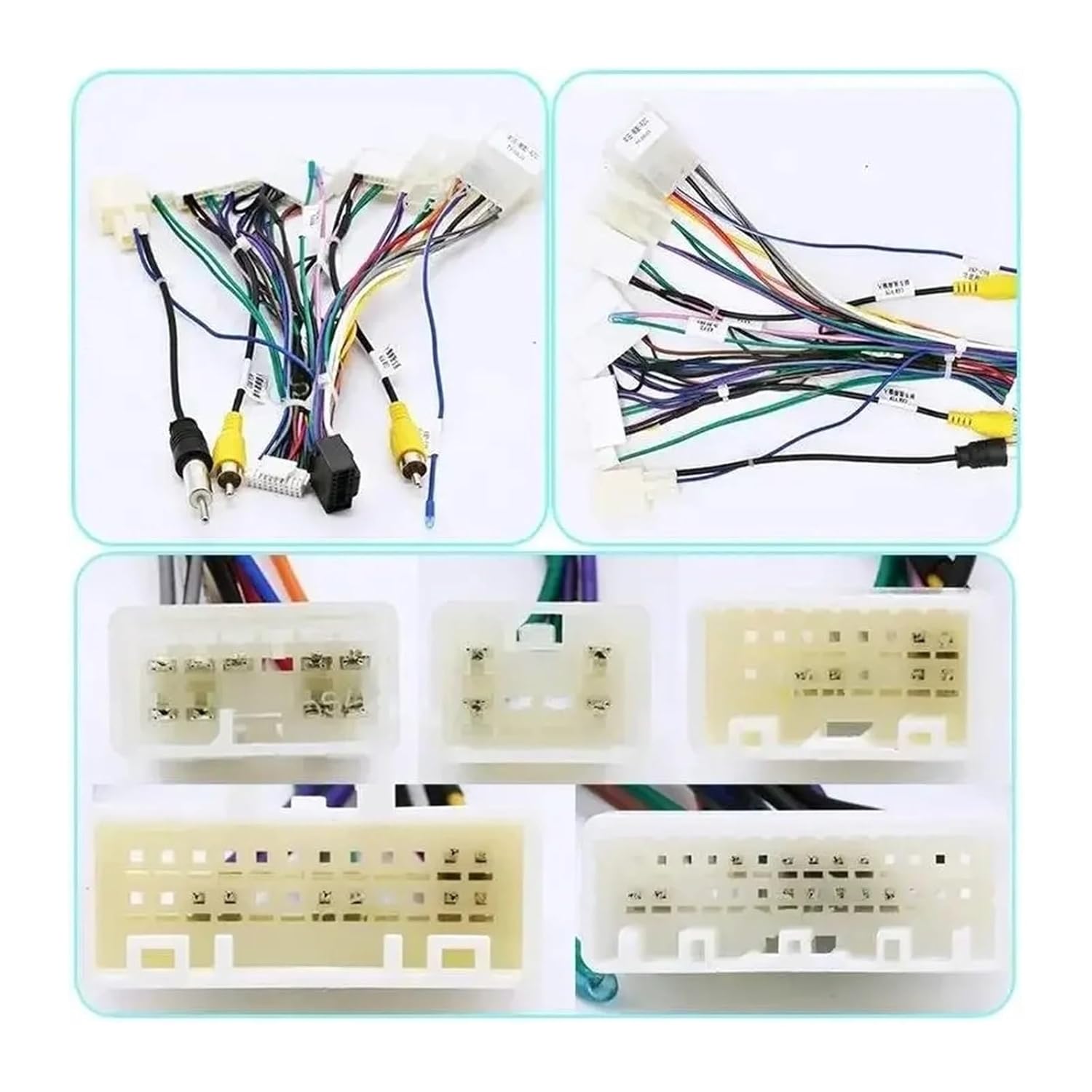
Image 4.1: A detailed view of the various connectors and cables that comprise the wiring harness. This image helps in identifying the different plugs for power, speakers, and data signals, crucial for correct installation.

Image 4.2: Side view of the EKBMELLJ FT-RZ-01 Canbus Box, clearly showing the multi-pin connector port where the wiring harness plugs in. This illustrates the connection point for the Canbus module.
5. Operating Instructions
The EKBMELLJ FT-RZ-01 Canbus Box operates automatically once correctly installed. Its primary function is to translate the vehicle's digital signals (e.g., steering wheel controls, ignition status, vehicle speed, reverse gear engagement) into a format that your aftermarket Android car radio can understand and utilize. There are no user-adjustable settings on the Canbus box itself.
- Steering Wheel Controls: After installation, your Android radio should recognize and allow configuration of the vehicle's steering wheel control buttons.
- Ignition/Accessory Power: The Canbus box provides the correct ignition and accessory power signals to the radio, ensuring it turns on and off with the vehicle.
- Vehicle Data: Depending on the Android radio's capabilities, the Canbus box can transmit vehicle speed, reverse gear status, and other relevant data for features like navigation and parking assistance.
6. Maintenance
The EKBMELLJ FT-RZ-01 Canbus Box and wiring harness are designed for maintenance-free operation. However, to ensure optimal performance and longevity:
- Keep Connections Secure: Periodically check that all wiring harness connections remain secure, especially if the vehicle experiences significant vibrations.
- Avoid Moisture and Extreme Temperatures: Ensure the Canbus box and wiring are not exposed to excessive moisture or extreme temperatures, which can degrade components over time.
- Cleanliness: Keep the area around the Canbus box free from dust and debris.
7. Troubleshooting
If you encounter issues after installing the EKBMELLJ FT-RZ-01 Canbus Box, consider the following troubleshooting steps:
- No Power to Radio:
- Check all power connections from the vehicle to the wiring harness and from the harness to the Android radio.
- Verify the vehicle's fuse for the radio is intact.
- Ensure the Canbus box is correctly seated in its connector.
- Steering Wheel Controls Not Working:
- Confirm the Canbus box is properly connected and receiving data.
- Check the settings within your Android car radio for steering wheel control configuration. Many radios require manual mapping of buttons.
- Ensure the Android radio is compatible with Canbus steering wheel control input.
- Incorrect Vehicle Data (e.g., reverse camera not activating):
- Verify all connections related to the specific function (e.g., reverse trigger wire).
- Check the Android radio's settings for the relevant feature.
- Intermittent Functionality:
- Inspect all connections for looseness or corrosion.
- Ensure no wires are pinched or damaged.
If problems persist after attempting these steps, consult a professional car audio installer or contact EKBMELLJ customer support.
8. Specifications
| Feature | Specification |
|---|---|
| Model Number | FT-RZ-01 |
| Compatibility | Toyota Corolla, Camry, CHR, RAV4, Land Cruiser (with Android Car Radio) |
| Package Dimensions | Approximately 0.39 x 0.39 x 0.39 inches |
| Item Weight | Approximately 1.76 ounces |
| Manufacturer | lengyu shop (Brand: EKBMELLJ) |
| ASIN | B0FMNKXFNQ |
9. Warranty and Support
For warranty information and customer support regarding your EKBMELLJ FT-RZ-01 Canbus Box and wiring harness, please refer to the documentation provided at the point of purchase or contact the seller directly. Keep your purchase receipt as proof of purchase.
If you require technical assistance or have questions not covered in this manual, please reach out to the EKBMELLJ customer service team through the platform where the product was purchased.