1. Introduction
Thank you for choosing the CAMECHO 5-inch Wireless CarPlay/Android Auto Motorcycle Navigator. This manual provides essential information for the safe and efficient operation of your device. Please read it thoroughly before use and retain it for future reference.

The CAMECHO 5-inch Motorcycle Navigator provides a clear display for navigation and entertainment, integrating seamlessly with your motorcycle's handlebars.
2. Safety Information
- Always prioritize road safety. Do not operate the device in a manner that distracts you from driving.
- Ensure the device is securely mounted and does not obstruct your view or control of the motorcycle.
- Avoid exposing the device to extreme temperatures or direct sunlight for prolonged periods when not in use.
- Do not attempt to disassemble or modify the device. Refer all servicing to qualified personnel.
3. Package Contents
Verify that all items are present in the package:
- 1 x CAMECHO 5-inch Motorcycle Navigator Unit
- 1 x 3.4m Power Cable
- Waterproof Rings (for cable connections)
- Strip Rolling (cable ties)
- 1 x User Manual
- Direct Package (Mounting Hardware: universal and adjustable bracket components)

The package includes the 5-inch navigator unit, a 3.4m power cable, waterproof rings, cable ties, a user manual, and various mounting components for universal installation.
4. Setup
4.1 Mounting the Device
The navigator comes with a universal and adjustable mounting bracket designed for motorcycle handlebars. Follow these steps for installation:
- Attach the clamp base to your motorcycle's handlebar, ensuring a secure fit.
- Connect the adjustable arm to the clamp base.
- Attach the device cradle to the adjustable arm.
- Slide the navigator unit into the cradle until it clicks securely into place. Adjust the viewing angle as needed.

This diagram shows the assembly process for the universal and adjustable mounting bracket, ensuring a secure fit on various motorcycle handlebars.
4.2 Power Connection
Connect the provided 3.4m power cable to your motorcycle's 12V power source. Ensure the connection is secure and protected from water using the waterproof rings.
4.3 Quick Release Mechanism
The navigator features a quick-release design for easy removal. To detach the device, press the release button on the mount and slide the unit upwards. This allows for convenient storage and helps deter theft when parked.

The quick-release design allows for easy attachment and detachment of the navigator from its mount, providing convenience and security when parking.
5. Operating Instructions
5.1 Powering On/Off
- To Power On: Press and hold the power button until the screen illuminates.
- To Power Off: Press and hold the power button until the shutdown prompt appears, then confirm.
5.2 Initial Setup
Upon first use, the device may prompt you to select a language, set the date and time, and configure other basic settings. Follow the on-screen instructions.
5.3 Wireless CarPlay & Android Auto Connection
To connect your smartphone wirelessly:
- Ensure Bluetooth and Wi-Fi are enabled on your smartphone.
- On the navigator, select the CarPlay or Android Auto icon.
- Search for the navigator's Bluetooth name on your smartphone and pair the devices.
- Confirm the pairing on both devices. CarPlay or Android Auto should now launch automatically.

This device supports wireless Apple CarPlay and Android Auto, allowing you to access navigation, music, and calls directly from your smartphone on the navigator's screen.
5.4 Bluetooth Connection for Audio
To connect your helmet's Bluetooth headset or external earphones:
- Ensure your helmet's Bluetooth headset is in pairing mode.
- On the navigator, navigate to the Bluetooth settings.
- Search for and select your headset from the list of available devices.
- Confirm pairing. Audio from the navigator (navigation prompts, music, calls) will now be routed to your headset.
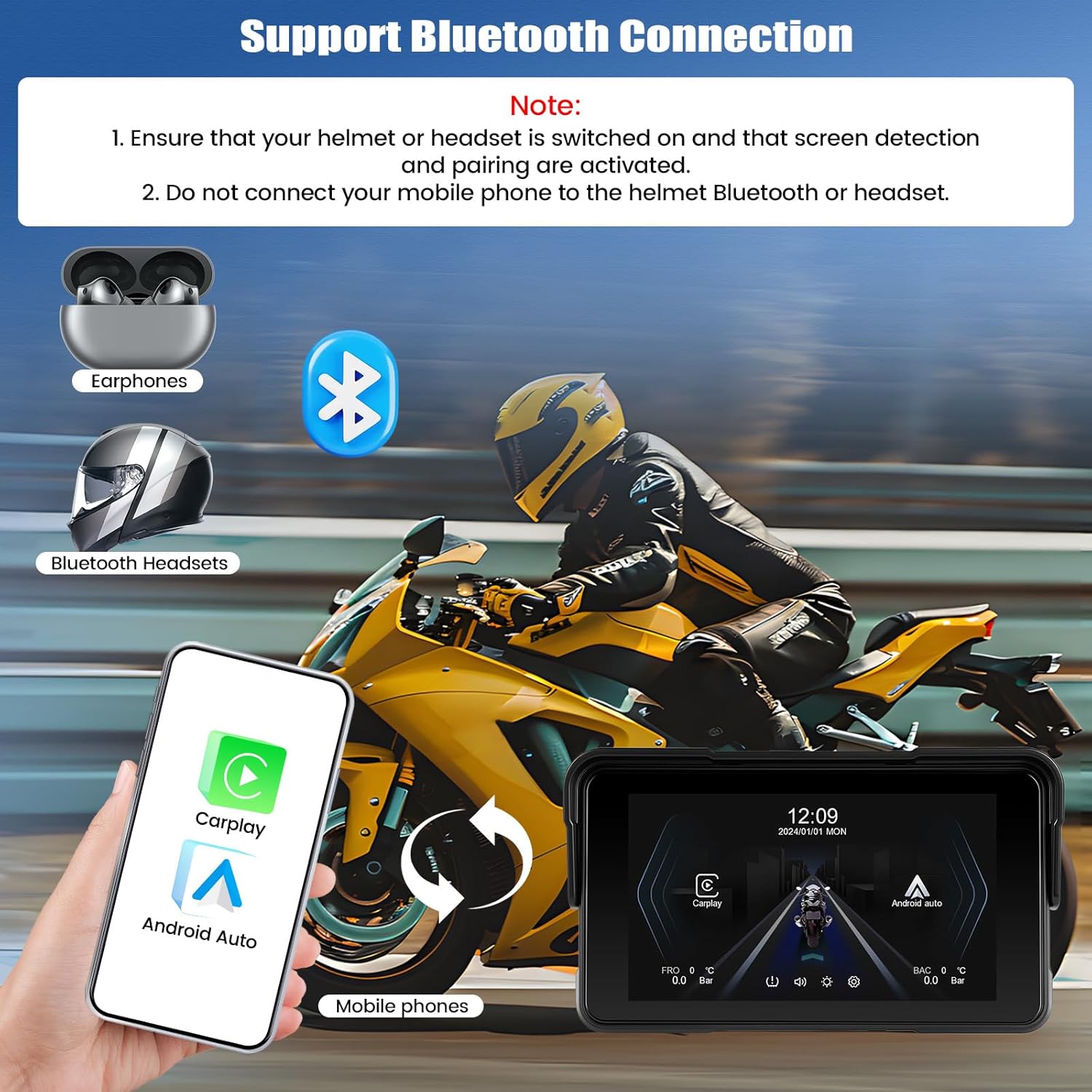
Connect your mobile phone to the navigator via Bluetooth to enable hands-free calls and music streaming. The navigator can then connect to your helmet's Bluetooth headset for audio output.
5.5 Brightness Adjustment
You can manually adjust the screen brightness through the device settings to optimize visibility for day or night riding.

The screen brightness can be manually adjusted to ensure optimal visibility in various lighting conditions, from bright daylight to nighttime.
5.6 Tire Pressure Monitoring (Optional)
The navigator supports tire pressure monitoring to enhance your safety. This feature requires the separate purchase and installation of a compatible sensor kit (ASIN: B0FNM7VGJS). Once installed, you can view real-time tire pressure and temperature on the device screen.

For enhanced safety, the device supports continuous tire pressure monitoring. This feature requires the separate purchase of a sensor kit (ASIN: B0FNM7VGJS).
5.7 User Interface Navigation
The device features an intuitive touchscreen interface. Swipe left or right to navigate between screens, tap icons to open applications, and use the settings menu to customize your experience.

Various user interface screens demonstrating navigation, settings, and feature displays.
6. Maintenance
6.1 Cleaning the Device
Wipe the screen and body with a soft, damp cloth. Avoid using abrasive cleaners or solvents that may damage the device's surface or waterproof seals.
6.2 Waterproofing (IP68)
The device is rated IP68 for dust and water resistance. This means it is protected against dust ingress and can withstand immersion in water up to 1.5 meters for 30 minutes. Ensure all ports are securely closed to maintain waterproofing.

Designed for all weather conditions, the navigator features an IP68 waterproof rating, ensuring reliable performance even in rain or dusty environments.
6.3 Software Updates
Periodically check for software updates to ensure optimal performance and access to new features. Updates can typically be performed via a TF card. Refer to the device settings for update options.

Software updates can be performed using a TF card to ensure your device has the latest features and improvements.
7. Troubleshooting
| Problem | Possible Cause | Solution |
|---|---|---|
| Device does not power on | No power, loose connection, discharged battery | Check power cable connection. Ensure motorcycle's ignition is on. |
| CarPlay/Android Auto not connecting | Bluetooth/Wi-Fi off, incorrect pairing, software glitch | Ensure phone's Bluetooth/Wi-Fi is on. Re-pair devices. Restart both phone and navigator. |
| No audio from headset | Headset not paired, volume low, incorrect audio output selected | Check headset pairing. Increase volume on both devices. Verify audio output settings on navigator. |
| Screen unresponsive | Temporary software issue | Perform a soft reset by holding the power button until the device restarts. |
8. Specifications
| Feature | Detail |
|---|---|
| Screen Size | 5 Inches |
| Waterproof Rating | IP68 |
| Connectivity | Wireless CarPlay, Wireless Android Auto, Bluetooth |
| Mounting Type | Universal and Adjustable |
| Vehicle Service Type | Motorcycle |
| Special Features | Bluetooth hands-free & music, Tire Pressure Detection (with optional accessory) |
| Model Name | NUOVO 2025 |
| Product Model Number | 1 |
9. Warranty and Support
9.1 Warranty Information
This CAMECHO product is covered by a 2-Year Warranty from the date of purchase, covering manufacturing defects. Please retain your proof of purchase for warranty claims.
9.2 Customer Support
For technical assistance, troubleshooting, or warranty inquiries, please contact CAMECHO customer support:
- Email: CAMECHOYI@123.com

Our customer support team is available to assist you with any questions or issues.


