
1. Introduction
This manual provides essential information for the safe and efficient installation, operation, and maintenance of the XTLECLYR 4KW 220V to 380V Variable Frequency Drive (VFD). A VFD is an electronic device used to control the speed of an AC motor by varying the frequency and voltage of its power supply. Please read this manual thoroughly before using the product to ensure proper function and to prevent damage or injury.

Image 1.1: Front view of the XTLECLYR Variable Frequency Drive. This image displays the main unit with its digital display and control buttons.
2. Safety Information
WARNING: Improper installation or operation can lead to serious injury or equipment damage. Always adhere to the following safety guidelines:
- Read the user's manual before installing. Ensure you understand all instructions and warnings.
- Do not open the cover while connecting power supply or for 10 minutes after disconnecting power supply. High voltage can remain in the capacitors even after power is disconnected, posing a severe electric shock hazard.
- Installation, wiring, and maintenance must be performed by qualified personnel only.
- Ensure the VFD is properly grounded to prevent electrical shock.
- Do not operate the VFD with damaged cables or if the enclosure is compromised.
- Always disconnect all power sources before performing any inspection or maintenance.
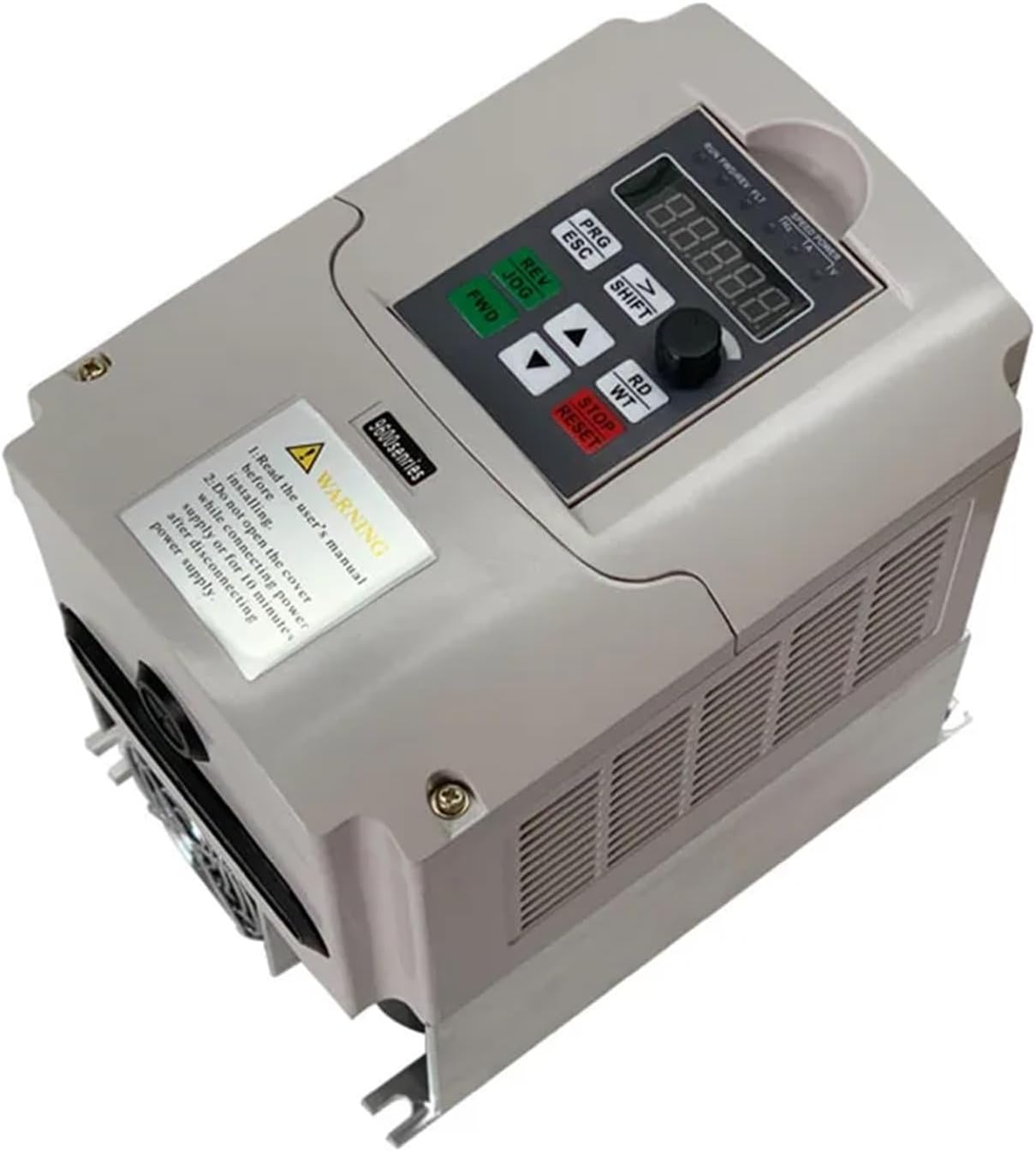
Image 2.1: Angled view of the XTLECLYR VFD, highlighting the warning label on the front panel. The label advises reading the manual before installation and not opening the cover while powered or shortly after disconnection due to residual voltage.
3. Product Features
The XTLECLYR VFD is designed for precise control and adjustment of AC motor speeds, offering robust performance and reliability. Key features include:
- Output Power: 4KW (for this specific model variant).
- Rated Frequency: 50Hz/60Hz.
- Output Frequency Range: 0~400Hz.
- Input Voltage Range: 1 phase 220V±15%.
- Output Voltage Range: 3 phase 380V±15%.
- Control Way: Open loop vector control (SVC) and V/F control.
- Main Function: Control and adjust the speed of the AC motor.
4. Specifications
Detailed technical specifications for the XTLECLYR 4KW 220V to 380V VFD:
| Specification | Value |
|---|---|
| Brand | XTLECLYR |
| Model Number | XTLECLYR (4KW 220V to 380V) |
| ASIN | B0FMN9DVT9 |
| Output Power | 4KW |
| Rated Frequency | 50Hz/60Hz |
| Output Frequency Range | 0~400Hz |
| Input Voltage Range | 1 phase 220V±15% |
| Output Voltage Range | 3 phase 380V±15% |
| Control Way | Open loop vector control (SVC), V/F control |
| Main Function | Control and adjust the speed of the AC motor |
| Dimensions (approx.) | 85mm x 125mm x 150mm |
| Item Weight | 1.76 ounces (Note: This weight seems unusually low for a 4KW VFD and may refer to packaging or a component. Refer to product packaging for accurate weight.) |
| Current Rating | 1 Amps (Note: This current rating seems unusually low for a 4KW VFD and may refer to a control circuit. Refer to product labeling for accurate motor current ratings.) |
| Circuit Breaker Type | Standard |
| Mounting Type | Bolt-On Mount |
| Number Of Poles | 1 |
5. Setup and Installation
Proper installation is crucial for the VFD's performance and safety. Ensure all local electrical codes and safety regulations are followed.
5.1 Mounting
- Mount the VFD vertically on a flat, stable surface using appropriate bolts for its weight.
- Ensure adequate clearance (at least 10 cm) around the VFD for proper ventilation and heat dissipation, especially above and below the unit.
- Avoid mounting in direct sunlight, high humidity, dusty environments, or areas with corrosive gases.

Image 5.1: Side view of the XTLECLYR VFD, illustrating the cooling fins and potential mounting points on the side panels. This view emphasizes the need for proper airflow.
5.2 Wiring
All wiring must be performed by a qualified electrician. Refer to the detailed wiring diagram provided in the full product manual (not included here) for specific terminal connections.
- Power Input (R, S): Connect the single-phase 220V AC power supply to the designated input terminals.
- Motor Output (U, V, W): Connect the three-phase 380V AC motor to the output terminals.
- Grounding (PE): Ensure a secure and proper ground connection for safety.
- Control Terminals: Connect external control signals (e.g., start/stop, speed reference, fault indication) as required by your application.
- Use appropriate wire gauges for all connections, considering the VFD's power rating and cable lengths.
6. Operating Instructions
This section provides basic guidance for operating the XTLECLYR VFD. For advanced settings and programming, consult the comprehensive programming manual.
6.1 Control Panel Overview
The VFD features a digital display and several buttons for control and parameter adjustment.

Image 6.1: Close-up view of the XTLECLYR VFD's control panel. It shows a five-digit LED display, a rotary encoder, and buttons labeled PRG/ESC, SHIFT, REV/JOG, FWD, UP, DOWN, RD/WT, and STOP/RESET.
- Digital Display: Shows operating status, frequency, voltage, current, and parameter values.
- PRG/ESC: Enters/exits parameter programming mode, or cancels current operation.
- SHIFT: Shifts cursor position during parameter editing.
- REV/JOG: Reverses motor direction or initiates jog operation.
- FWD: Starts the motor in the forward direction.
- UP/DOWN Arrows: Adjust frequency, parameter values, or navigate menus.
- RD/WT: Reads or writes (confirms) parameter settings.
- STOP/RESET: Stops the motor or resets fault conditions.
- Rotary Encoder: Used for fine adjustment of frequency or parameter values.
6.2 Basic Operation
- Power On: After ensuring all wiring is correct and safe, apply power to the VFD. The display will light up.
- Start Motor: Press the FWD button to start the motor in the forward direction.
- Adjust Speed: Use the UP and DOWN arrow buttons or the rotary encoder to increase or decrease the output frequency, thereby adjusting the motor speed.
- Stop Motor: Press the STOP/RESET button to stop the motor.
- Reverse Direction: If configured, press the REV/JOG button to reverse the motor's direction.
7. Maintenance
Regular maintenance helps ensure the longevity and reliable operation of your VFD. Always disconnect power before performing any maintenance.
- Cleaning: Periodically clean the VFD's exterior and cooling fins to prevent dust accumulation, which can hinder heat dissipation. Use a soft, dry cloth or compressed air. Do not use liquid cleaners.
- Inspection: Regularly inspect all wiring connections for tightness and signs of wear or damage. Check for any unusual noises or odors during operation.
- Environmental Check: Ensure the operating environment remains within the specified temperature and humidity ranges.
- Fan Check: Verify that the cooling fan (if present) is operating correctly and is free from obstructions.
8. Troubleshooting
This section outlines common issues and their potential solutions. For complex problems, contact technical support.
| Problem | Possible Cause | Solution |
|---|---|---|
| Motor does not run | No power, incorrect wiring, VFD in stop mode, fault condition. | Check power supply, verify wiring, press FWD, check for fault codes and reset. |
| Overcurrent fault | Motor overload, short circuit, rapid acceleration/deceleration. | Reduce load, check motor/cables, adjust acceleration/deceleration times. |
| Overvoltage fault | Input voltage too high, regenerative braking. | Check input voltage, increase deceleration time, consider braking resistor. |
| Undervoltage fault | Input voltage too low, power dip. | Check input voltage, ensure stable power supply. |
| VFD display is blank | No power, internal fault. | Check power connections, ensure power is applied. If problem persists, contact support. |
9. Warranty and Support
Specific warranty information for the XTLECLYR 4KW 220V to 380V VFD is not provided in this document. For details regarding warranty coverage, terms, and conditions, please refer to the product packaging, purchase documentation, or contact the manufacturer directly.
For technical support, service, or inquiries, please reach out to XTLECLYR customer service through the contact information provided at the point of purchase or on the manufacturer's official website.