
1. Introduction
Thank you for choosing the Decofy Fluted Nightstand with Charging Station. This modern end table is designed to enhance your bedroom or living space with its elegant fluted design, convenient charging capabilities, and ample storage. This manual provides detailed instructions for assembly, operation, and maintenance to ensure safe and optimal use of your new furniture.
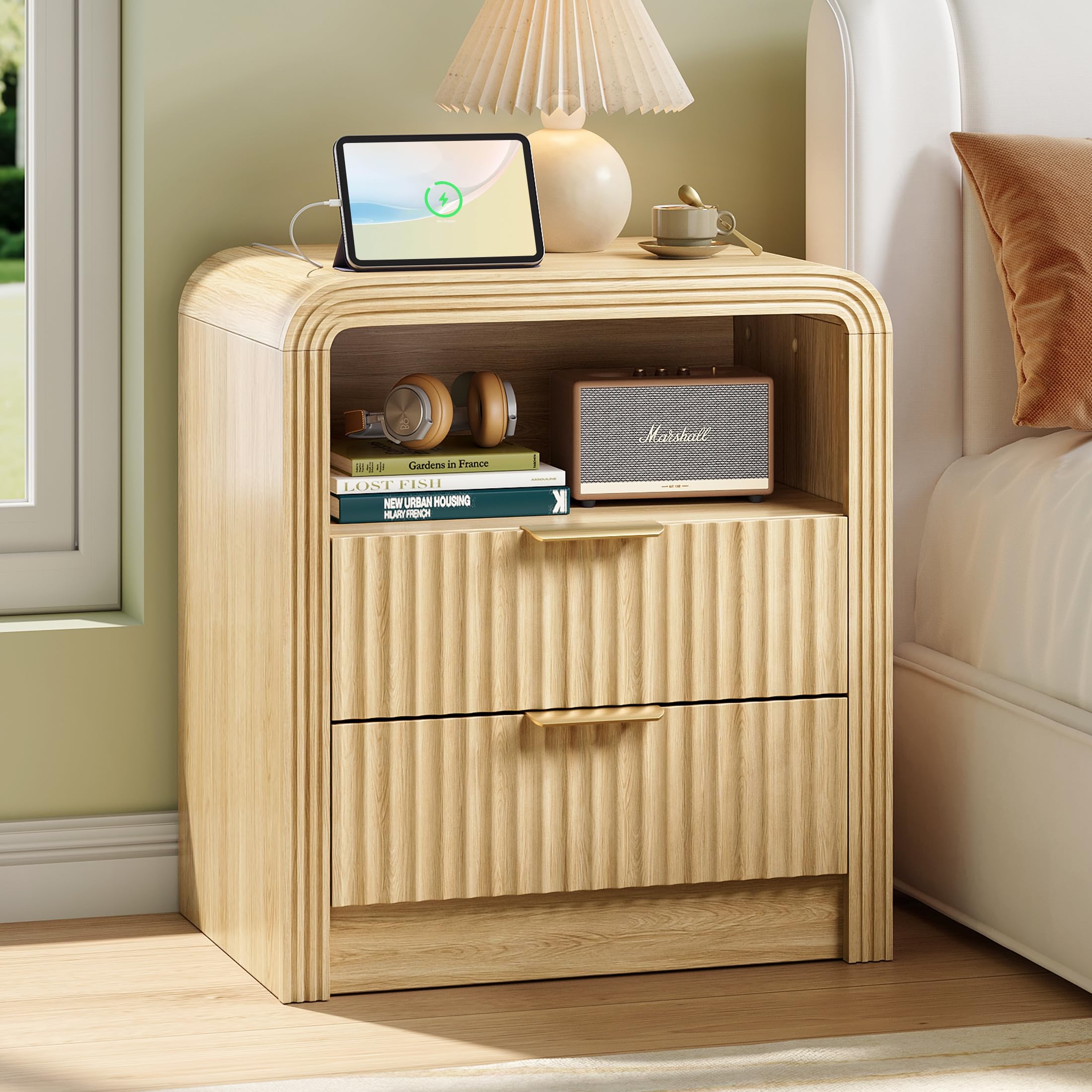
Image: The Decofy Fluted Nightstand in Natural Oak, showcasing its design and functionality.
2. Safety Information
Please read and understand all safety instructions before assembly and use. Failure to follow these instructions may result in injury or product damage.
- This product requires assembly. Always follow the provided instructions carefully.
- Do not exceed the maximum weight recommendation of 200 pounds (90.7 kg) for the tabletop.
- Ensure all screws and fasteners are securely tightened before use. Periodically check and re-tighten as necessary.
- Place the nightstand on a flat, stable surface to prevent tipping.
- Keep small parts and packaging materials away from children to prevent choking hazards.
- When using the charging station, ensure that electrical cords are not pinched or damaged. Do not overload the outlets.
- Avoid exposing the nightstand to excessive moisture or direct sunlight, which can cause damage to the engineered wood.
3. Package Contents
Before beginning assembly, verify that all parts and hardware are present. Refer to the included instruction manual for a complete list of components. Typically, your package will include:
- All necessary engineered wood panels for the nightstand frame, drawers, and shelves.
- Hardware kit (screws, dowels, cam locks, metal drawer slides, handles).
- Integrated charging station unit (1 Type-C, 1 USB, 2 AC power outlets).
- Assembly instructions manual.
- Basic assembly tools (e.g., screwdriver, Allen wrench) may be included.
4. Product Specifications
| Feature | Detail |
|---|---|
| Brand | Decofy |
| Model Number | DC-BG04 |
| Product Dimensions (D x W x H) | 15.5" x 19.61" x 24" (39.4 cm x 49.8 cm x 61 cm) |
| Item Weight | 34.83 Pounds (15.8 kg) |
| Maximum Weight Recommendation | 200 Pounds (90.7 kg) |
| Frame Material | Engineered Wood |
| Color | Natural Oak |
| Number of Drawers | 2 |
| Special Features | Built-in Charging Station (1 Type-C, 1 USB, 2 AC Outlets) |
| Assembly Required | Yes |
| Recommended Tools for Assembly | Screwdriver |
| Product Care Instructions | Wipe with Dry Cloth |
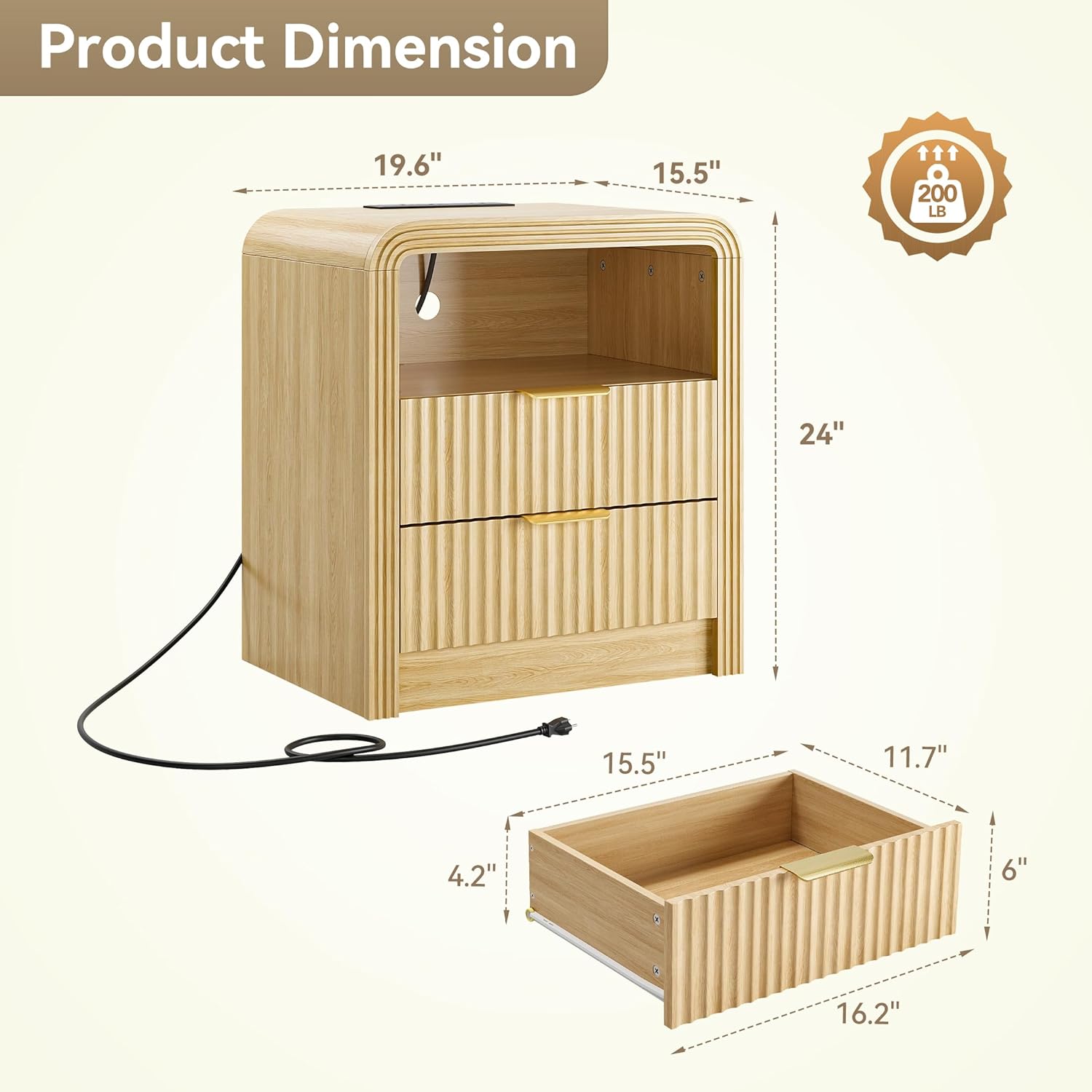
Image: Detailed product dimensions including height, width, and depth.
5. Setup & Assembly
Assembly is required for this nightstand. Please follow the steps below carefully. It is recommended to have a clean, open workspace. A screwdriver is the primary tool needed. For a visual guide, please refer to the assembly video below.
5.1. Assembly Video Guide
Video: Step-by-step installation guide for the Decofy Fluted Nightstand with 2 Drawers. This video demonstrates the full assembly process from unpacking to completion.
5.2. Step-by-Step Assembly Instructions
Refer to the included printed instruction manual for detailed diagrams and part numbers. The general steps are as follows:
- Unpack and Identify Parts: Lay out all wooden panels and hardware. Match each piece to the corresponding labels in the instruction manual.
- Assemble the Base Structure: Attach the side panels and internal support panels to the bottom panel using the specified hardware (dowels, cam locks, screws). Ensure all connections are firm.
- Install Drawer Glides: Secure the cabinet-side drawer glides to the internal panels using screws. Ensure they are oriented correctly for smooth drawer operation.
- Attach the Top Panel: Carefully place the top panel onto the assembled base, aligning the pre-drilled holes. Secure it with the appropriate hardware.
- Install the Charging Station: Insert the charging station unit into the cutout on the top panel and secure it with screws. Ensure the power cord is routed correctly through the designated opening.

Image: Close-up of the charging station being installed into the tabletop, showing the USB and AC outlets.
- Assemble the Drawers: Construct each drawer by connecting the front, back, and side panels to the drawer bottom. Attach the drawer-side glides and the decorative metal handles to the drawer fronts.

Image: Detail view of the fluted panel design and chic metal handles on the drawers, which are part of the drawer assembly.
- Insert Drawers: Gently slide the assembled drawers into the nightstand frame, ensuring they engage with the glides and operate smoothly.

Image: The nightstand with its drawers fully inserted and partially open, demonstrating ample storage space.
6. Operating Instructions
6.1. Using the Charging Station
The integrated charging station provides convenient power access for your electronic devices.
- Power Connection: Plug the nightstand's main power cord into a standard wall outlet.
- AC Outlets: Use the two 125V/12A AC outlets for lamps, laptops, or other small appliances.
- USB-A Port: The 18W Quick Charge USB-A port is suitable for charging smartphones and other compatible devices.
- USB-C Port: The 20W Fast Charging USB-C port provides rapid charging for modern devices.
- Safety Note: Do not exceed the maximum power rating of the charging station. Avoid using damaged cables or adapters.
Image: Close-up of the charging station on the nightstand, showing the USB-A, USB-C, and AC outlets.
6.2. Drawer Usage
The two smooth-gliding drawers provide concealed storage for your belongings.
- To open a drawer, gently pull the metal handle.
- To close, push the drawer firmly until it is fully seated.
- Avoid placing excessively heavy items in the drawers to ensure smooth operation and prevent damage to the slides.
Image: Detail view of the fluted panel design and chic metal handles on the drawers.
6.3. Open Shelf Storage
The open shelf provides easy access storage for books, decorative items, or frequently used essentials.

Image: The nightstand in a bedroom setting, showing items stored on the open shelf and a tablet charging on the top surface.
7. Maintenance
Proper care will extend the life and appearance of your Decofy nightstand.
- Cleaning: Wipe the surface with a dry, soft cloth. Avoid abrasive cleaners or harsh chemicals, which can damage the finish.
- Spills: Immediately wipe up any spills with a dry cloth to prevent water damage or staining.
- Hardware: Periodically check all screws and fasteners to ensure they remain tight. Re-tighten if necessary.
- Environment: Keep the nightstand away from direct heat sources, extreme temperatures, and prolonged exposure to humidity.
8. Troubleshooting
If you encounter any issues with your nightstand, refer to the following common problems and solutions:
| Problem | Possible Cause | Solution |
|---|---|---|
| Nightstand is wobbly. | Loose fasteners or uneven floor. | Check and tighten all screws. Ensure the nightstand is on a level surface. |
| Drawers do not slide smoothly. | Incorrectly installed drawer slides or obstruction. | Verify that drawer slides are installed correctly and aligned. Check for any objects obstructing the slides. |
| Charging station is not working. | Not plugged in, power outage, or faulty device/cable. | Ensure the nightstand's power cord is securely plugged into a live outlet. Test with a different device or cable. Check your home's circuit breaker. |
| Missing parts during assembly. | Packaging error. | Contact Decofy customer support with your purchase details and the list of missing parts. |
9. Warranty & Support
Decofy stands behind the quality of its products. For specific warranty information, please refer to the warranty card included with your purchase or visit the official Decofy website. If you require assistance with assembly, missing parts, or have any questions regarding your product, please contact Decofy customer support.
Contact Information: Please refer to your purchase documentation or the Decofy brand store for the most current contact details.
Video: An overview of the Decofy Fluted Nightstand, highlighting its features and design. This video is provided by the seller, Decofy-Store.