Introduction
This manual provides detailed instructions for the operation and maintenance of your ACTIVA x INVICTA DIGITAL ESSENTIALS digital watch, model ACWM424-001. Please read this manual thoroughly to ensure proper use and to maximize the lifespan of your timepiece.
Watch Components and Button Functions
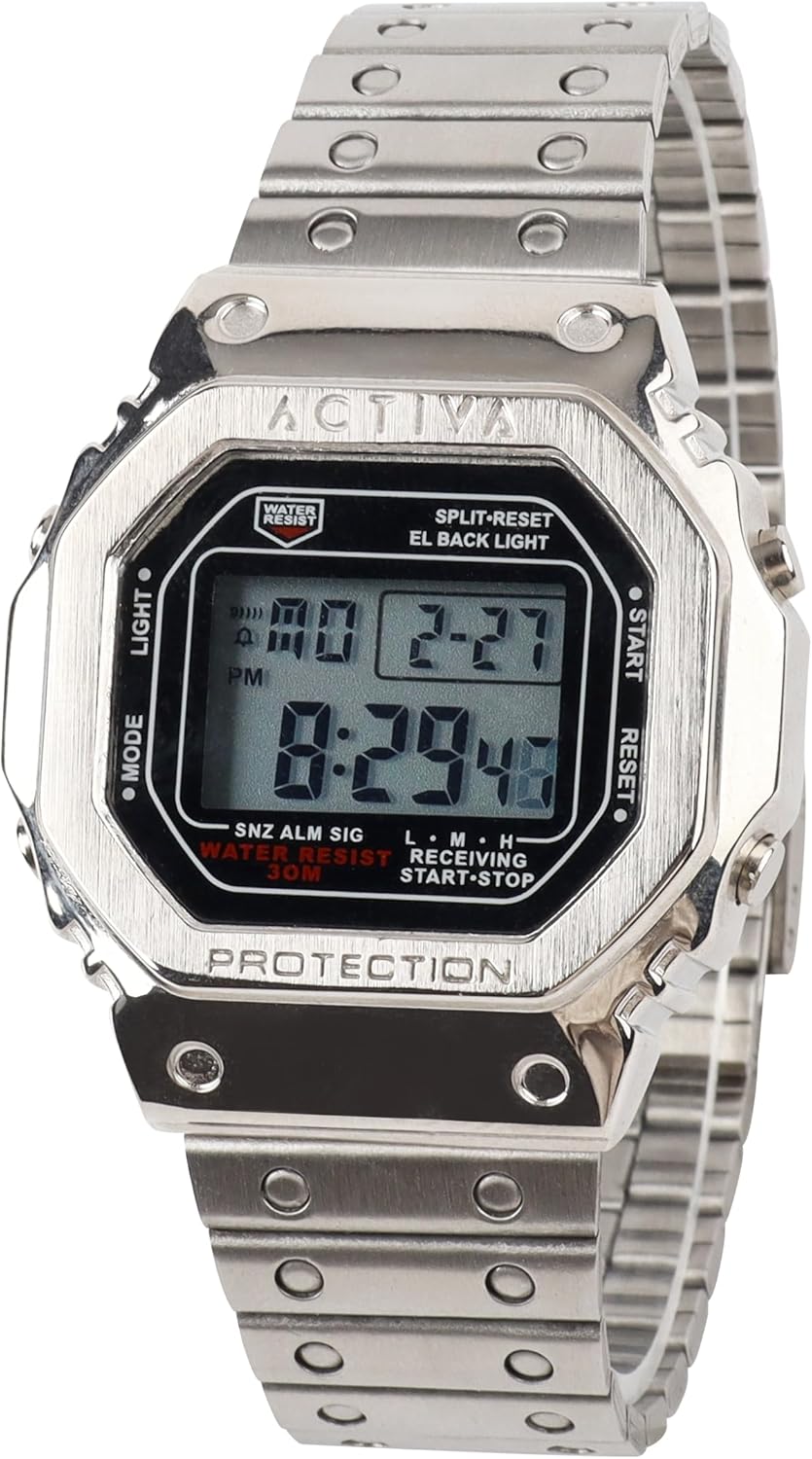
Image: Front view of the ACTIVA x INVICTA DIGITAL ESSENTIALS digital watch, model ACWM424-001. The watch features a silver-tone alloy case and bracelet, with a black digital display. Visible buttons are labeled MODE, LIGHT, START, and RESET.
Familiarize yourself with the watch's buttons and their primary functions:
- MODE Button (Left-Middle): Cycles through different modes: Timekeeping, Alarm, Stopwatch.
- LIGHT Button (Left-Top): Activates the EL (Electroluminescent) backlight for illumination of the display.
- START Button (Right-Top): Used to start/stop functions in Stopwatch mode and to adjust settings during setup.
- RESET Button (Right-Middle): Used to reset functions in Stopwatch mode and to select settings during setup.
Setup and Basic Operation
Setting Time and Date
- In Timekeeping mode, press the MODE button until the seconds begin to flash. This indicates setting mode.
- Press the RESET button to cycle through the settings: seconds, hour, minute, month, date, day.
- Use the START button to adjust the flashing value. Hold START to rapidly advance the value.
- Once all settings are correct, press the MODE button to exit setting mode.
Using the Alarm Function
- From Timekeeping mode, press the MODE button once to enter Alarm mode. The alarm time will be displayed.
- Press the RESET button to select the hour or minute to set.
- Use the START button to adjust the flashing hour or minute.
- Press the MODE button to confirm and exit alarm setting.
- To activate/deactivate the alarm, press the START button while in Alarm mode. An alarm icon (bell symbol) will appear/disappear on the display.
- To activate/deactivate the hourly chime (SIG), press the RESET button while in Alarm mode. A chime icon will appear/disappear.
Using the Stopwatch Function
- From Timekeeping mode, press the MODE button twice to enter Stopwatch mode. The display will show "00:00:00".
- Press the START button to begin timing.
- Press the START button again to pause timing.
- Press the RESET button to reset the stopwatch to "00:00:00".
- For split timing, press the RESET button while the stopwatch is running to display the split time. Press RESET again to return to elapsed time.
Using the Backlight
Press the LIGHT button (top-left) to illuminate the display for a few seconds, making it visible in low-light conditions.
Maintenance and Care
- Cleaning: Wipe the watch regularly with a soft, dry cloth to remove dirt and moisture. For stubborn dirt, a slightly damp cloth can be used, followed by drying.
- Water Resistance: This watch is water resistant to 30 meters (3 ATM). This means it is suitable for everyday use and can withstand splashes or brief immersion in water. It is not suitable for swimming, showering, or diving. Avoid operating buttons while the watch is wet.
- Temperature Extremes: Avoid exposing the watch to extreme temperatures (hot or cold) or sudden temperature changes, as this can affect its accuracy and lifespan.
- Chemicals: Keep the watch away from solvents, detergents, perfumes, and cosmetics, as these can damage the case, band, or seals.
- Battery: The watch uses a standard watch battery. When the display becomes dim or functions become erratic, it may be time for a battery replacement. It is recommended to have the battery replaced by a qualified watch technician to ensure proper sealing and water resistance.
Troubleshooting
| Problem | Possible Cause | Solution |
|---|---|---|
| Display is blank or dim. | Low battery. | Replace the battery. |
| Time is incorrect. | Time not set correctly or accidental button press. | Refer to "Setting Time and Date" section to reset the time. |
| Buttons are unresponsive. | Watch may be in a specific mode or internal issue. | Try pressing the MODE button repeatedly to cycle through modes. If issue persists, contact customer support. |
| Water inside the watch. | Exposure to water beyond 30M resistance or buttons operated underwater. | Immediately take the watch to a qualified technician for inspection and repair to prevent further damage. |
Specifications
- Model Number: ACWM424-001
- Case Diameter: 44.5mm
- Case Material: Alloy
- Display Type: Electronic Digital
- Water Resistance: 30 meters (3 ATM)
- Functions: Time, Date, Day, Alarm, Stopwatch, EL Backlight
Warranty Information
Your ACTIVA x INVICTA DIGITAL ESSENTIALS watch is covered by a manufacturer's warranty against defects in materials and workmanship. The specific terms and duration of the warranty may vary by region. Please retain your proof of purchase for warranty claims. For detailed warranty information, refer to the warranty card included with your product or visit the official Invicta website.
Customer Support
If you encounter any issues not covered in this manual or require further assistance, please contact Invicta customer support. Contact details can typically be found on the official Invicta website or on the packaging of your product.
For online support and frequently asked questions, please visit: Invicta Official Support


