
OneBlis H21014vc
OneBlis 70-inch TV Stand with 36-inch Electric Fireplace Instruction Manual
Model: H21014vc
1. Introduction
Thank you for purchasing the OneBlis 70-inch TV Stand with 36-inch Electric Fireplace. This manual provides essential information for safe assembly, operation, and maintenance of your new entertainment center. Please read all instructions carefully before beginning assembly and retain this manual for future reference.
2. Important Safety Information
WARNING: Failure to follow these instructions can result in electric shock, fire, or personal injury.
- Always unplug the electric fireplace from the power outlet before cleaning or performing any maintenance.
- Do not operate the fireplace with a damaged cord or plug, or if the heater malfunctions or has been dropped or damaged in any manner.
- Keep combustible materials, such as furniture, pillows, bedding, papers, clothes, and curtains at least 3 feet (0.9 m) from the front of the heater and keep them away from the sides and rear.
- Do not insert or allow foreign objects to enter any ventilation or exhaust opening as this may cause an electric shock or fire, or damage the heater.
- To prevent a possible fire, do not block air intakes or exhaust in any manner. Do not use on soft surfaces, like a bed, where openings may become blocked.
- The electric fireplace is hot when in use. To avoid burns, do not let bare skin touch hot surfaces.
- Close supervision is necessary when any heater is used by or near children or invalids and whenever the heater is left operating and unattended.
- This TV stand is designed to support TVs up to 80 inches. Ensure your TV's weight and dimensions are within the stand's capacity.
- Assembly should be performed by at least two adults.
3. Package Contents
Verify that all parts and hardware are present before beginning assembly. If any parts are missing or damaged, please contact customer support.
The product is shipped in two packages: one for the TV stand components and one for the electric fireplace unit.
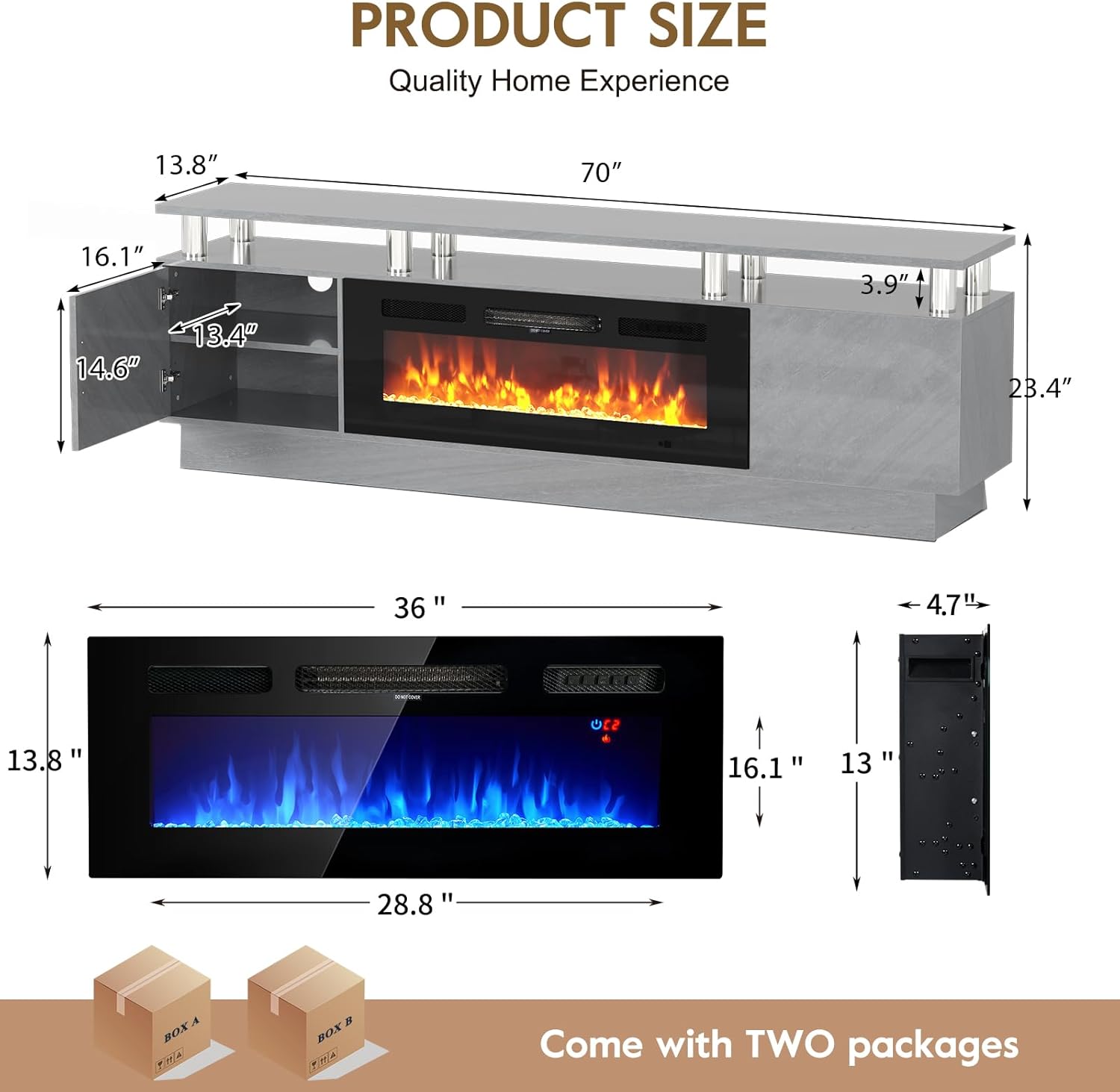
Image: Overview of product dimensions and packaging.
3.1. TV Stand Components
Refer to the assembly video for a detailed list of numbered wooden panels and lettered hardware components.
3.2. Electric Fireplace Unit
The electric fireplace unit includes the main fireplace appliance, remote control, strip lights, clips, and screws (ST3*12) for attaching the strip lights.
4. Assembly Instructions
Please follow these steps carefully. It is recommended to have two people for assembly.
4.1. Assembly Video Guide
Video: Official OneBlis Modern Fireplace TV Stand Installation Video. This video provides a step-by-step visual guide for assembling the TV stand and integrating the electric fireplace.
4.2. Step-by-Step Assembly
- Prepare Base Panel: Attach the specified screws (A x18) to the base panel (6). Ensure they are securely fastened.
- Assemble Side Panels: Attach the side panels (2, 3) to the base panel (6) using the designated hardware (B x8, H x8).
- Install Middle Supports: Secure the middle support panels (4) to the base panel (6) using dowels (D x4).
- Attach Top Panel: Place the top panel (1) onto the assembled structure, aligning it with the support posts (J x8) and securing with screws (I x8, A x8).
- Install Shelves: Insert the adjustable shelves (14) into the side compartments using the shelf pins (E x8).
- Attach Door Hinges: Install the hinges (F x4) onto the cabinet doors (15) and then attach the doors to the side compartments using screws (G x8). Adjust hinges as needed for proper door alignment.
- Prepare Fireplace Unit: Before installing the fireplace, remove the four silver screws from the sides of the heater (two on each side) and two screws from the front. Gently lift the tempered glass panel to remove it from the lugs on the side.
- Install Fireplace Unit: With two persons, gently place the electric fireplace appliance into the designated central opening of the TV stand. Fix the appliance to the TV stand with four black screws according to the pre-drilled holes.
- Reattach Fireplace Glass: Place the front glass surround over the front of the fire, aligning the slot in the bracket at each side of the glass panel with the lugs on the sides of the fire.
- Connect LED Strip Lights: Attach the strip lights to the back of the top panel (1) using the clips and ST3*12 screws provided in the electric fireplace package. Connect the strip lights to the fireplace unit's power source.

Image: The fully assembled OneBlis TV stand with the electric fireplace and LED lighting activated.
5. Operating Instructions (Electric Fireplace)
The 36-inch electric fireplace offers various settings for ambiance and heating. Use the control panel on the unit or the included remote control.

Image: Detailed view of the electric fireplace control panel and remote control functions.
- Power On/Off: Press the power button to turn the unit on or off.
- Heat Settings: Cycle through different temperature levels (62-82°F) using the 'Adjust Heater' button. The heater has two power settings: 700W and 1500W.
- Flame Brightness: Adjust the flame brightness through 5 different levels. Long press the 'Flame' button for 3 seconds to cycle through brightness adjustments.
- LED Colors: The fireplace features 12 LED color combinations for customizable ambiance.
- Timer: Set an automatic shut-off timer from 0 to 8 hours.
- Dynamic Embers: Hold the 'Timer' button for 5 seconds to switch to Dynamic Embers, creating a realistic fire effect by glowing brighter or dimmer. Hold for 5 seconds to return to the timer function.
- Overheat Protection: The unit is equipped with overheat protection and an auto shut-off timer for safety.
6. Storage and Cable Management
The OneBlis TV stand is designed with ample storage and convenient cable management features.
- Double-Layer Cabinets: Two side cabinets with doors provide enclosed storage for media accessories, gaming consoles, or other items.
- Adjustable Shelves: The shelves within the cabinets are adjustable, allowing you to customize the storage space to fit your needs.
- Cable Holes: Integrated cable holes in the back panel help organize wires and keep them out of sight for a clean and tidy appearance.
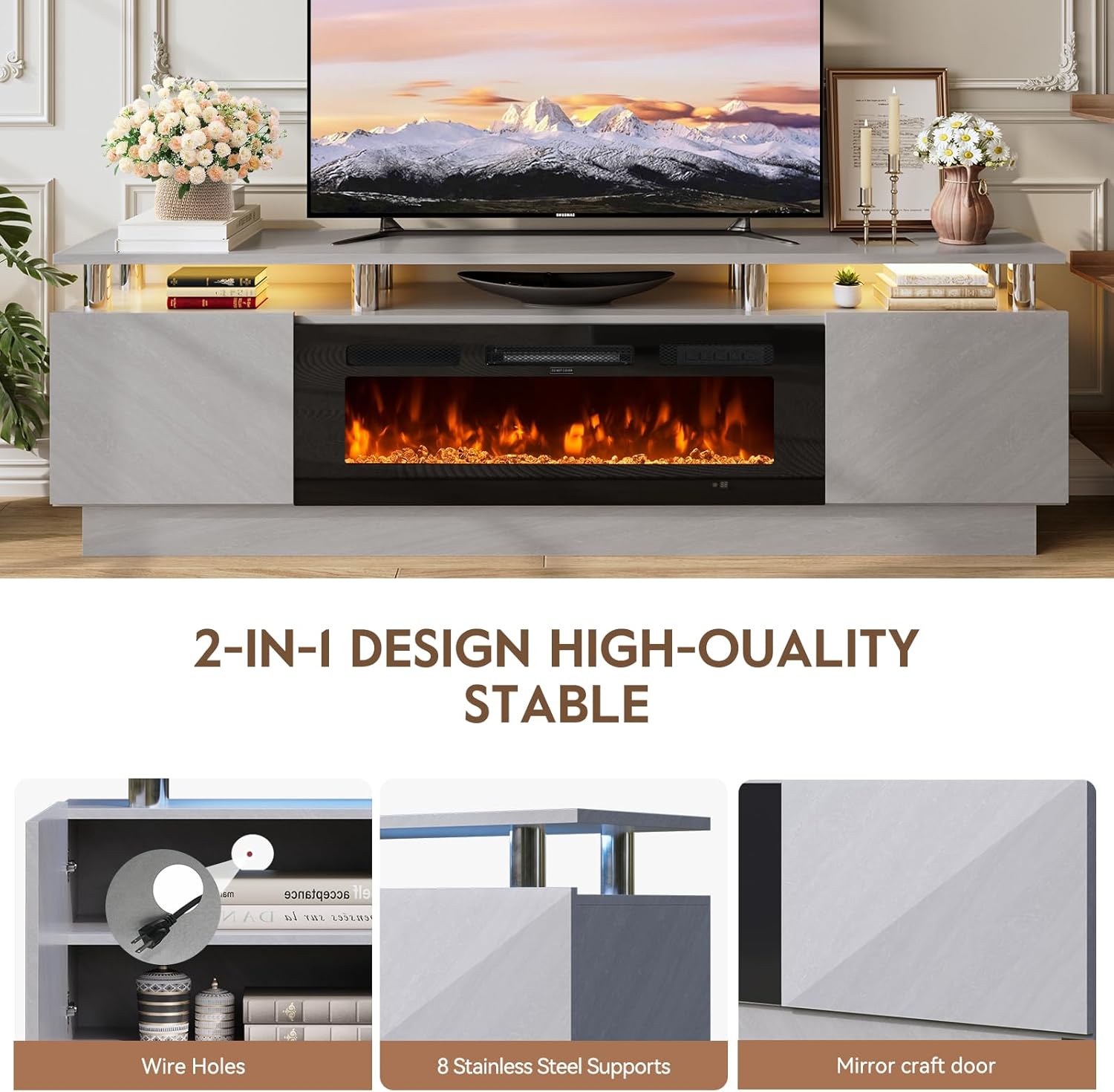
Image: View of the cabinet interior, highlighting the wire hole for cable management and adjustable shelf.
7. Maintenance
Regular maintenance will ensure the longevity and optimal performance of your TV stand and electric fireplace.
- Cleaning the Stand: Wipe surfaces with a soft, damp cloth. Avoid harsh chemicals or abrasive cleaners that may damage the finish.
- Cleaning the Fireplace: Ensure the fireplace is unplugged and cool before cleaning. Use a soft, damp cloth to wipe the exterior. Do not spray water directly onto the unit.
- Dusting: Regularly dust all surfaces, including the interior of the cabinets and around the fireplace vents, to prevent dust buildup.
- Inspecting Connections: Periodically check all screws and connections to ensure they remain tight. Retighten if necessary.
8. Troubleshooting
If you encounter any issues, refer to the following troubleshooting guide:
| Problem | Possible Cause | Solution |
|---|---|---|
| Fireplace not turning on. | Not plugged in; power switch off; circuit breaker tripped. | Ensure unit is plugged into a working outlet. Check the main power switch on the unit. Reset the circuit breaker if necessary. |
| No heat output. | Heat function not activated; temperature setting too low; overheat protection activated. | Activate the heat function. Increase the temperature setting. Unplug the unit for 15 minutes to reset overheat protection. |
| LED lights not working. | Loose connection; damaged strip. | Check the connection of the LED strip lights to the fireplace unit. Ensure all clips are secure. |
| Doors are misaligned. | Hinges not properly adjusted. | Adjust the screws on the hinges to align the doors. Refer to the assembly video for hinge adjustment details. |
If the problem persists after trying these solutions, please contact customer support.
9. Specifications
| Brand | OneBlis |
| Model Number | H21014vc |
| Product Dimensions | 70"D x 13.8"W x 23.23"H |
| Item Weight | 92 Pounds |
| Material | Stainless Steel, Wood (Engineered Wood) |
| Color | Grey and Black |
| Installation Type | Floor Mount |
| Power Source | Corded Electric |
| Heat Output | 1500 Watts |
| TV Size Compatibility | Up to 80 inches |
10. Warranty and Support
For warranty information or technical support, please refer to the contact details provided with your purchase or visit the official OneBlis website. Keep your purchase receipt as proof of purchase.