
1. Introduction
Thank you for choosing the Ruittos TM70-FB1 Video Tripod. This manual provides essential information for the safe and effective use of your new equipment. Please read it thoroughly before operation and retain it for future reference.
Package Contents
- Tripod x 1 (with Fluid Head)
- Carrying Bag x 1
- Hex Wrench x 2
- Extra Quick Release Plate x 1

2. Setup and Assembly
2.1 Unfolding the Tripod
- Place the tripod on a flat, stable surface.
- Gently spread the tripod legs outwards until they are fully extended.
- Adjust the leg angles by pressing the red angle adjustment tabs located at the top of each leg. There are multiple angle stops for varied stability and height.
2.2 Adjusting Leg Height
- Locate the quick flip leg locks on each leg section.
- Flip open the locks to extend or retract the leg sections to your desired height.
- Once the desired height is achieved, firmly close the quick flip locks to secure the leg sections in place.
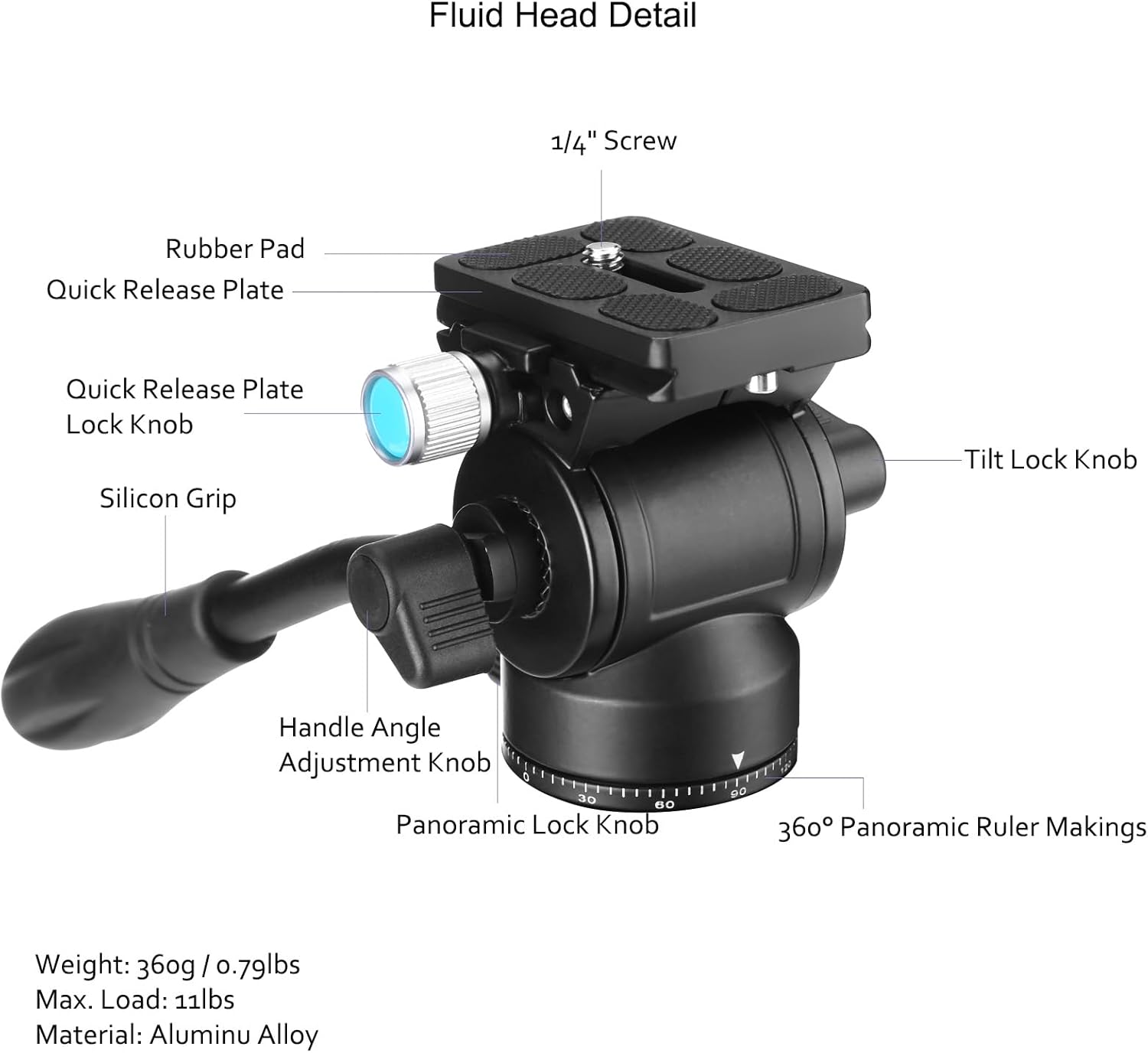
2.3 Attaching the Camera to the Fluid Head
- Ensure the quick release plate is detached from the fluid head. If not, loosen the quick release clamp lock knob and slide the plate out.
- Secure your camera to the quick release plate using the 1/4" screw. Ensure it is tightened firmly.
- Slide the camera-mounted quick release plate back into the fluid head's clamp.
- Tighten the quick release clamp lock knob to secure the camera. Ensure the anti-drop lock is engaged for added safety.

2.4 Video Demonstration: Setup and Features
3. Operating Instructions
3.1 Fluid Head Operation
The fluid head allows for smooth and precise camera movements. Use the handle to control panning and tilting. Adjust the tension knobs on the fluid head to achieve your desired level of resistance for both horizontal (pan) and vertical (tilt) movements.

3.2 Monopod Conversion
The Ruittos TM70-FB1 can be quickly converted into a monopod for increased portability and flexibility in tight spaces.
- Unscrew the weight hook from the bottom of the center column.
- Unscrew one of the tripod legs (the one with the foam grip) from the tripod base.
- Unscrew the center column from the tripod base.
- Attach the detached leg to the bottom of the center column. The fluid head remains attached to the top of the center column.
- Your monopod is now ready for use.

3.3 Macro Photography (Inverted Center Column)
For extreme low-angle or macro photography, the center column can be inverted.
- Fully extend the center column.
- Unscrew the weight hook from the bottom of the center column.
- Remove the center column from the tripod base.
- Re-insert the center column upside down into the tripod base and secure it.
- Mount your camera to the quick release plate on the inverted fluid head for ground-level shots.

4. Key Features
- Lightweight and Portable: Weighs approximately 3.3 lbs (1.5 kg) and folds to 21.6 inches, making it suitable for travel and outdoor use.
- Heavy Duty Fluid Head: Provides smooth damping for both photo and video shots. Features a symmetrical handle design for left or right-hand use and a quick release clamp with an anti-drop lock.
- 2-in-1 Tripod & Monopod: Easily converts to a monopod by combining the center column with a detachable leg, extending up to 72 inches.
- Inverted Center Column: Allows for ground-level macro photography.
- Weight Hook: Located under the center column, it can hold up to 33 lbs of additional weight to increase stability.
- Efficient and Flexible Leg Locks: Quick flip leg locks allow for rapid opening and closing of all leg sections with one hand.
- Durable Construction: Leg locks are tested for up to 50,000 cycles, and the surface is coated with an epoxy resin layer for scratch resistance.
5. Specifications

| Feature | Specification |
|---|---|
| Model Name | TM70-FB1 |
| Brand | Ruittos |
| Material | Aluminum |
| Maximum Height | 70 Inches (178 cm) |
| Minimum Height | 18.5 Inches |
| Folded Size | 21.6 Inches (55 cm) |
| Item Weight | 3.3 lbs (1.5 kg) |
| Weight Limit (Head) | 11 lbs (5 kg) |
| Weight Limit (Legs) | 33 lbs (15 kg) |
| Leg Sections | 4 |
| Tripod Head Type | Fluid Head |
| Compatible Devices | DSLR, SLR, Video Camcorder, Digital Cinema Cameras, Binoculars, Smartphone, Projector, Telescope |
6. Maintenance
Proper maintenance ensures the longevity and optimal performance of your tripod.
- Cleaning: Wipe down the tripod with a soft, dry cloth after each use to remove dust and dirt. For stubborn grime, use a slightly damp cloth and mild soap, then dry thoroughly. Avoid harsh chemicals.
- Lubrication: Periodically check the leg locks and fluid head mechanisms. If movements become stiff, apply a small amount of silicone-based lubricant. Do not over-lubricate.
- Storage: Store the tripod in its carrying case in a cool, dry place away from direct sunlight and extreme temperatures.
- Inspection: Regularly inspect all screws, knobs, and leg locks for tightness. Tighten any loose components using the provided hex wrenches.
7. Troubleshooting
7.1 Tripod Instability
- Issue: Tripod feels wobbly or unstable.
- Solution: Ensure all leg sections are fully extended and their quick flip locks are securely closed. Verify that the leg angle adjustment tabs are properly engaged. For added stability, hang a weight (e.g., your camera bag) from the weight hook under the center column.
7.2 Stiff Fluid Head Movement
- Issue: Panning or tilting is not smooth or feels stiff.
- Solution: Loosen the tension adjustment knobs on the fluid head. If the issue persists, clean the head mechanism and apply a small amount of silicone lubricant.
7.3 Camera Not Securely Attached
- Issue: Camera feels loose on the fluid head.
- Solution: Ensure the 1/4" screw on the quick release plate is tightly fastened to your camera. Verify that the quick release clamp lock knob on the fluid head is fully tightened and the anti-drop lock is engaged.
8. Warranty and Support
Ruittos products are manufactured with high-quality materials and undergo strict quality control. For warranty information, technical support, or service inquiries, please refer to the contact details provided with your purchase or visit the official Ruittos website.