
QFP queen bed frame
QFP LED Queen Bed Frame User Manual
Model: Queen Bed Frame | Brand: QFP
1. Introduction
Thank you for purchasing the QFP LED Queen Bed Frame. This bed frame is designed to provide comfort, convenience, and modern aesthetics to your bedroom. It features an adjustable headboard, integrated LED lighting, four under-bed storage drawers, and a built-in charging station. This manual provides detailed instructions for assembly, operation, maintenance, and troubleshooting to ensure you get the most out of your new bed frame.
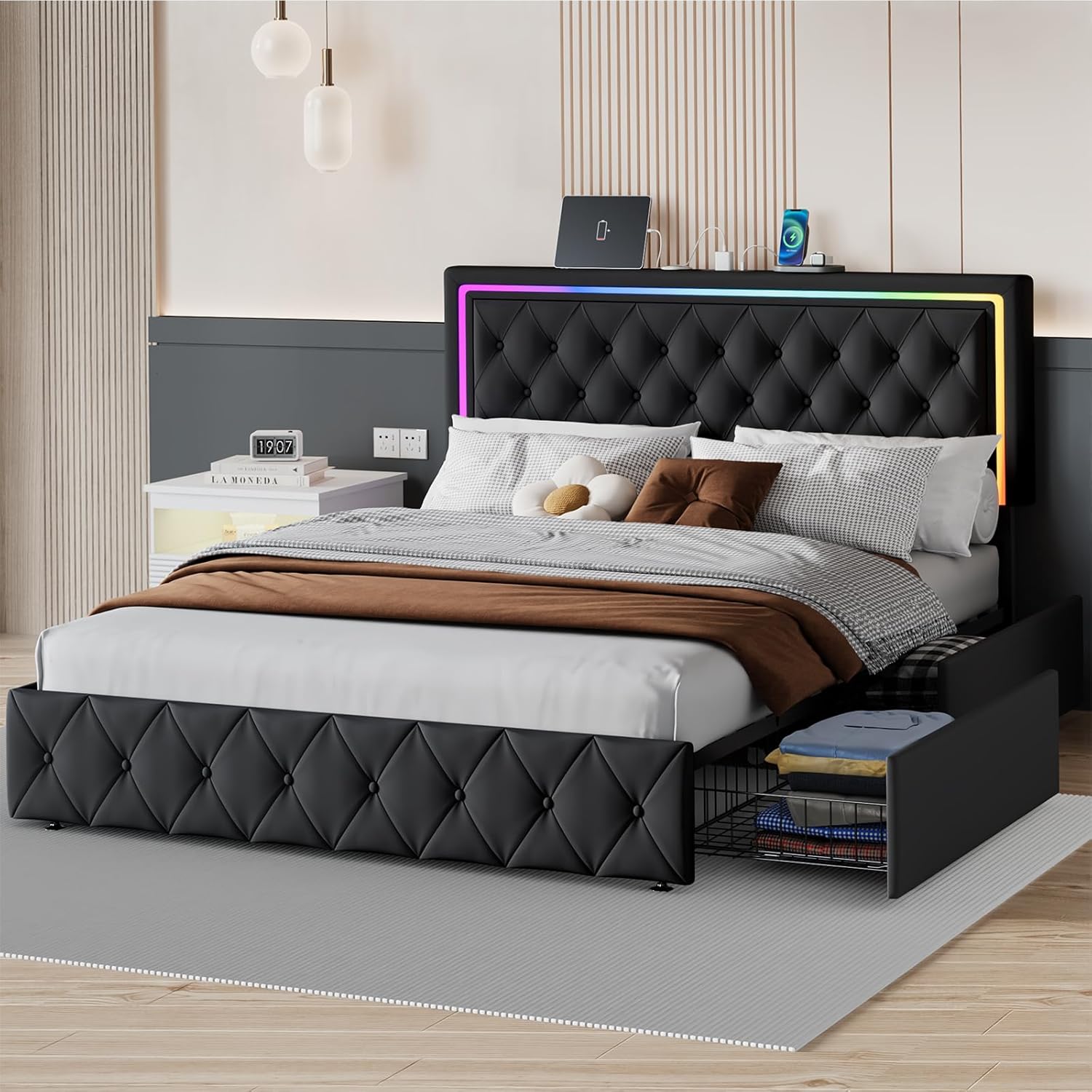
Figure 1.1: Fully assembled QFP LED Queen Bed Frame with LED lights on, showing storage drawers and charging station.
This image displays the complete bed frame setup in a bedroom environment, highlighting its key features such as the upholstered headboard with LED lighting, the integrated charging station on top of the headboard, and the pull-out storage drawers beneath the bed. The bed is made up with bedding, demonstrating its functional use.
2. Safety Information
Please read all instructions carefully before assembly and use. Keep this manual for future reference.
- Ensure all parts are present and undamaged before beginning assembly. Do not use if any parts are missing or broken.
- Assemble the bed frame on a soft, clean surface (e.g., carpet or cardboard) to prevent scratches.
- It is recommended that two or more people assemble this product for safety and ease.
- Do not overtighten screws during assembly, as this may damage the components.
- Ensure all connections are secure before placing a mattress on the frame.
- The bed frame has a maximum weight capacity of 1200 pounds. Do not exceed this limit.
- Keep children and pets away from the assembly area.
- For electrical components (LED lights, charging station):
- Only use the provided power adapter and cables.
- Do not expose electrical components to water or excessive moisture.
- Unplug the bed frame from the power outlet before cleaning or performing any maintenance on electrical parts.
- Do not attempt to modify or repair the electrical components yourself. Contact qualified personnel for service.
3. Package Contents
Before starting assembly, verify that all components listed below are included in your package. If any parts are missing or damaged, please contact customer support.
- Queen Bed Frame Components (Headboard, Side Rails, Footboard, Slats, Support Legs)
- 4 Storage Drawers with Wheels
- LED Light Strip and Controller (Remote Control)
- Charging Station Unit (with 2 USB Ports and 2 AC Outlets)
- Power Cord
- Assembly Hardware (Screws, Bolts, Washers, Allen Wrench)
- Installation Manual (This document)
- Additional Accessories (as specified in the parts list)

Figure 3.1: Detailed dimensions of the Queen bed frame and storage drawers.
This image provides a technical diagram of the Queen bed frame, showing its overall length (82.6"), width (63.1"), and headboard height (45"). It also details the dimensions of the under-bed storage drawers, including their height (10.23"), width (20.1"), and depth (37.2"), along with the bed's weight capacity of 1000 lbs.
4. Assembly Instructions
All parts are clearly labeled and numbered. Follow the steps in numerical order for a smooth assembly process. An Allen wrench is typically provided; additional tools may not be required.
4.1. Preparation
- Clear an open space for assembly.
- Lay out all components and hardware, matching them with the parts list in your manual.
4.2. Step-by-Step Assembly
- Assemble the Headboard: Attach the headboard legs to the main headboard panel. Ensure the adjustable height mechanism is correctly aligned. The headboard can be adjusted to 41 or 45 inches in height.
- Attach Side Rails: Connect the side rails to the assembled headboard and footboard. Secure with the provided bolts and nuts.
- Install Center Support: Place the center support beam(s) and attach any necessary support legs.
- Place Slats: Lay the solid wood slats across the bed frame. Ensure they are evenly spaced and secured, often with Velcro or plastic caps, to prevent movement and noise.
- Assemble Storage Drawers: Put together the four storage drawers. Attach the silent casters (wheels) to the bottom of each drawer.
- Integrate Drawers: Slide the assembled drawers under the bed frame. Utilize the built-in fixtures to secure the drawers in place, preventing them from being pulled out accidentally.
- Install LED Lights and Charging Station: Carefully attach the LED light strip to the designated area on the headboard. Connect the charging station unit to the headboard and route the power cord.
- Final Check: Verify all connections are tight and the frame is stable.

Figure 4.1: Components illustrating stable metal structure, solid wood slats, noise-free design, and easy assembly features.
This image shows four detailed insets: a stable metal structure with casters, solid wood slats for mattress support, a noise-free connection point, and a simplified diagram indicating easy assembly steps. These visuals demonstrate the robust construction and user-friendly design of the bed frame.

Figure 4.2: The headboard showing its two adjustable height options (41 and 45 inches).
This image illustrates the adjustable height feature of the upholstered headboard, showing how it can be set at either 41 inches or 45 inches from the floor, allowing for customization based on mattress thickness or user preference.
5. Operating Instructions
5.1. LED Lighting System
The integrated LED lights offer various customization options to enhance your bedroom ambiance.
- Power On/Off: Use the provided remote control or the mobile application to turn the LED lights on or off.
- Color Selection: Choose from a wide range of RGB colors or dynamic lighting modes.
- Brightness Adjustment: Adjust the intensity of the lights to your preference.
- Music Sync Mode: Activate this mode to make the LED lights flash and change color in rhythm with music playing in the room.
- Timing Function: Set a timer for the lights to automatically turn off.
- Mobile App Control: Download the dedicated mobile application (refer to the QR code or instructions on the LED controller packaging) for advanced control features.
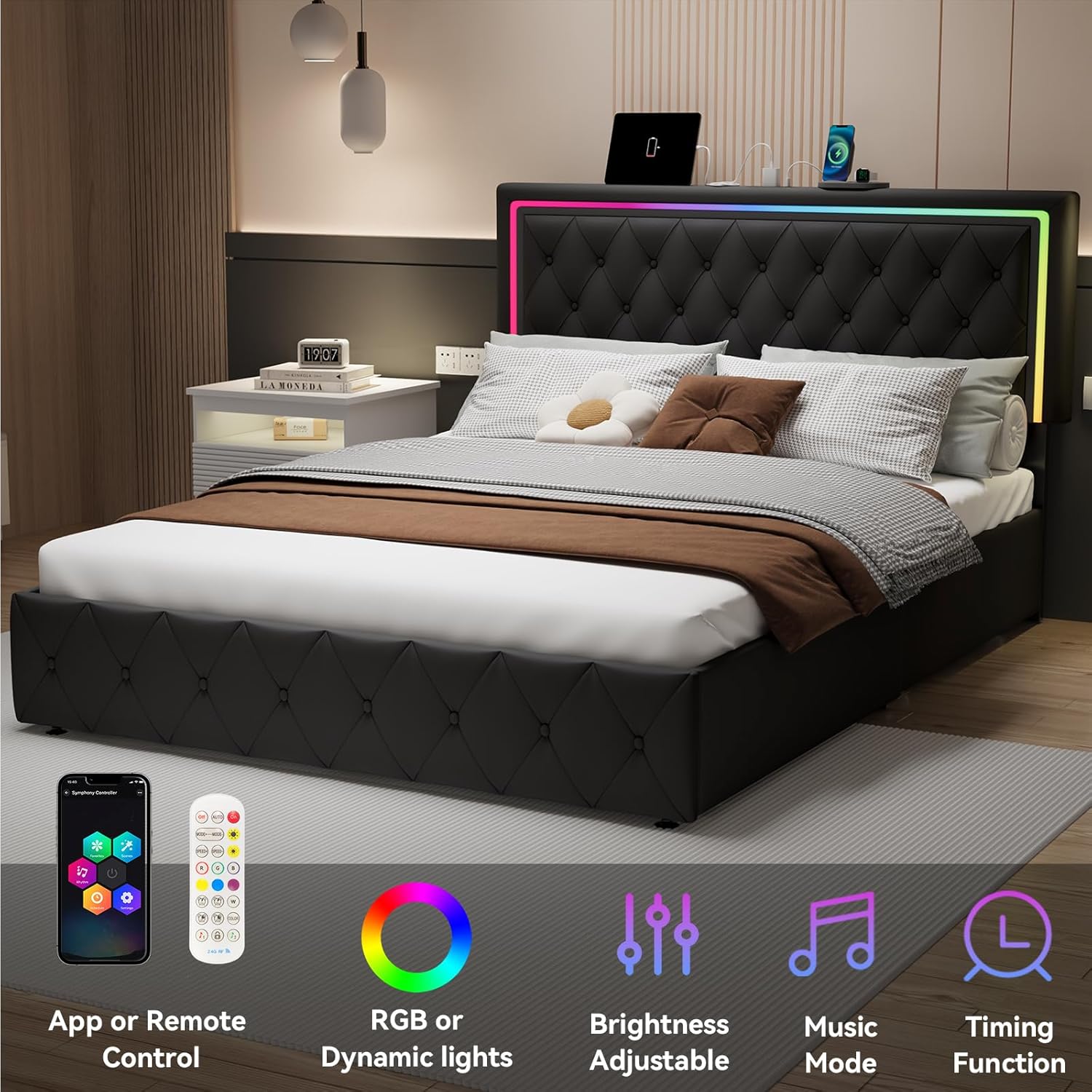
Figure 5.1: Visual representation of LED light control via app or remote, showing RGB, brightness, music mode, and timing functions.
This image highlights the smart features of the LED lighting system, including control via a mobile app or remote control, the ability to select RGB or dynamic light colors, adjustable brightness, a music sync mode, and a timing function for automatic shut-off.
5.2. Charging Station
The headboard features a convenient charging station for your electronic devices.
- USB Ports: Two 5V/2A USB ports are available for charging smartphones, tablets, and other USB-powered devices.
- AC Outlets: Two 125V/12A AC outlets are provided for plugging in laptops, lamps, or other electrical appliances.
- Power Connection: Ensure the bed frame's power cord is securely plugged into a wall outlet for the charging station to function.

Figure 5.2: Close-up view of the charging station with 2 USB ports and 2 AC outlets.
This image provides a detailed view of the built-in charging station located on the headboard, clearly showing the two USB ports and two standard AC outlets. It also indicates the 6.6-foot power cord for convenient placement.
5.3. Storage Drawers
The four under-bed storage drawers provide ample space for organizing your belongings.
- Access: Simply pull the drawers out from under the bed. They are equipped with silent casters for smooth operation.
- Security: The drawers feature fixtures designed to keep them securely in place when pushed in, preventing accidental pulling out by children or pets.
- Capacity: Each drawer is spacious, suitable for storing bedding, clothes, books, or other items.

Figure 5.3: Close-up of a storage drawer showing its silent casters and latch mechanism.
This image focuses on one of the under-bed storage drawers, highlighting its silent casters for easy movement and the reliable latch mechanism that secures the drawer against the bed frame, preventing it from rolling out unintentionally.
6. Maintenance
Proper care will extend the life and appearance of your QFP LED Queen Bed Frame.
- Cleaning the Upholstery: The velvet upholstered surface can be cleaned by wiping with a dry cloth. For spills, gently blot with a clean, damp cloth and mild soap, then dry thoroughly. Avoid harsh chemicals or abrasive cleaners.
- Dusting: Regularly dust the headboard, frame, and charging station with a soft, dry cloth.
- Checking Connections: Periodically check all bolts and screws to ensure they remain tight. Retighten if necessary to maintain stability and prevent noise.
- Drawer Maintenance: Keep the drawer tracks and wheels free of dust and debris for smooth operation.
- Electrical Components: Ensure the charging station and LED lights are unplugged before cleaning. Do not spray liquids directly onto electrical parts.

Figure 6.1: Close-up of the velvet surface, highlighting its breathable, soft, moisture-absorbing, and skin-friendly properties.
This image provides a close-up view of the bed frame's velvet upholstered surface, emphasizing its texture and comfort. Accompanying icons illustrate its breathable, soft, moisture-absorbing, and skin-friendly characteristics, which are important for maintenance and user comfort.
7. Troubleshooting
This section addresses common issues you might encounter with your bed frame.
| Problem | Possible Cause | Solution |
|---|---|---|
| Bed frame is squeaking or unstable. | Loose bolts or connections. Uneven floor. | Check and tighten all bolts and screws. Ensure the bed is on a level surface. Add felt pads under legs if needed. |
| LED lights are not working or stuck on one color. | Power connection issue. Remote control battery dead. Controller malfunction. | Ensure the bed frame's power cord is fully plugged in. Check the remote control battery and replace if necessary. If the issue persists, contact customer support. |
| Charging station (USB/Outlets) is not working. | Bed frame not plugged in. Power surge. Device compatibility. | Verify the bed frame's power cord is securely plugged into a live wall outlet. Test with a different device. If still not working, contact customer support. |
| Storage drawers do not slide smoothly or get stuck. | Debris in tracks. Damaged casters. Overloaded drawer. | Clean any debris from the drawer tracks and wheels. Check casters for damage. Do not overload drawers beyond their capacity. |
| Gap between headboard and mattress. | Mattress size or headboard height setting. | Ensure your mattress is a standard Queen size. Adjust the headboard to its higher setting (45 inches) if possible. A decorative pillow can be used to fill the gap. |
8. Specifications
| Feature | Detail |
|---|---|
| Size | Queen |
| Product Dimensions (L x W x H) | 82.6" x 63.09" x 45" |
| Headboard Height Options | 41 inches or 45 inches |
| Color | Black |
| Material | Velvet Upholstery, Metal Frame, Solid Wood Slats |
| Weight Capacity | 1200 pounds |
| Storage | 4 Under-bed Storage Drawers with Wheels |
| LED Lighting | RGB, Dynamic Modes, Brightness Adjustable, Music Sync, Timing Function (App/Remote Control) |
| Charging Station | 2 USB Ports (5V/2A), 2 AC Outlets (125V/12A) |
| Assembly Required | Yes |
| Product Weight | 114 pounds |
9. Warranty and Support
QFP stands behind the quality of its products. For specific warranty details, please refer to the warranty card included with your purchase or visit the official QFP website. If you encounter any issues, require replacement parts, or have questions not covered in this manual, please contact QFP customer support:
- Customer Service: Refer to the contact information provided on your purchase receipt or the QFP official website.
- Online Resources: Visit the QFP brand store on Amazon for FAQs and additional product information: QFP Store
Ask a question about this manual
Ask about setup, troubleshooting, compatibility, parts, safety, or missing instructions. Manuals+ will review the question and use this page’s manual context to help answer it.