
1. Important Safeguards
Please read all instructions carefully before operating the CHIVALZ Slushie Machine AD03. Retain this manual for future reference.
- Ensure the sugar content of liquids is more than 4%.
- For alcoholic beverages, ensure the alcohol content is between 2.8% and 16%.
- Always stir the mixture well before pouring it into the container.
- Do not add ice, solid ingredients, or hot liquids to the machine.
- Do not immerse the main unit in water or other liquids.
- Keep out of reach of children.
- Unplug the machine from the power outlet when not in use and before cleaning.
2. Product Overview
The CHIVALZ Slushie Machine AD03 is designed to create a variety of frozen beverages without the need for pre-chilling or ice. It features a high-performance compressor and flash-freezing technology for quick and consistent results.
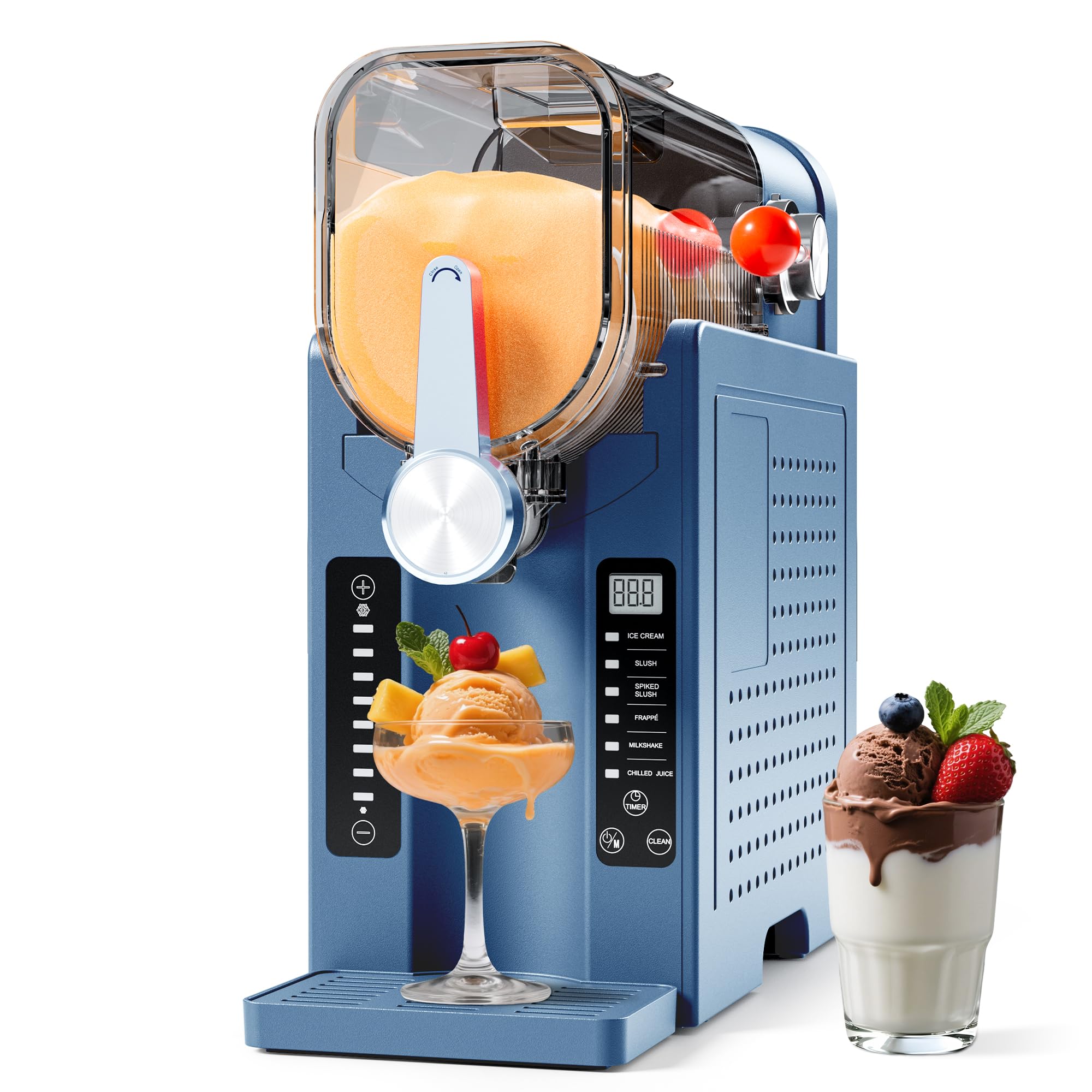
Image: The CHIVALZ Slushie Machine AD03 in operation, demonstrating its 'Ice Cream Mode' with children enjoying frozen treats. The machine is blue with a clear mixing chamber.
Key Features:
- Ice-Free Operation: Utilizes a compressor for direct freezing, eliminating the need for ice.
- 6 Preset Programs: Includes Ice Cream, Slush, Spiked Slush, Chilled Juice, Milkshake, and Frappe.
- LED Display: Provides clear program selection and status indication.
- 12-Hour Pre-Scheduling: Allows for delayed start to prepare beverages in advance.
- Large Capacity: Maximum liquid capacity of 68 ounces (54 fluid ounces recommended safe capacity).
- Self-Cleaning Function: Simplifies post-use cleanup.
- Dishwasher-Safe Components: Removable parts can be cleaned in a dishwasher.

Image: The CHIVALZ Slushie Machine AD03 highlighting its compact size (16.5" H x 7.7" W) and liquid capacity (64 oz max, 54 oz safe), shown with various frozen drinks.
3. Setup
3.1 Unpacking
- Carefully remove all components from the packaging.
- Check for any damage during transit. If damage is found, do not operate the machine and contact customer support.
- Remove all packing materials, stickers, and labels.
3.2 Initial Cleaning
- Before first use, wash all removable parts (mixing chamber, lid, dispenser handle, drip tray) with warm, soapy water.
- Rinse thoroughly and dry completely. Removable components are dishwasher-safe.
- Wipe the main unit with a damp cloth. Do not immerse the main unit in water.
3.3 Placement
- Place the machine on a stable, flat, and dry surface.
- Ensure adequate ventilation around the machine. Do not block air vents.
- Keep away from heat sources and direct sunlight.
- Plug the machine into a grounded electrical outlet.
4. Operating Instructions
4.1 Preparing and Filling the Vessel
- Prepare your desired liquid mixture. Remember to ensure sugar content is above 4% and alcohol content (if applicable) is between 2.8% and 16%. Stir thoroughly.
- Open the lid of the mixing chamber.
- Carefully pour the liquid into the mixing chamber. Do not exceed the maximum fill line (64 fluid ounces) and ideally stay within the recommended safe capacity (54 fluid ounces).
- Close the lid securely.

Image: A user pouring liquid into the easy-fill vessel of the CHIVALZ Slushie Machine, demonstrating the filling process. Important notes about sugar content are visible.
4.2 Selecting a Program
- Ensure the machine is plugged in.
- The LED display will illuminate.
- Press the 'Mode' button (often labeled with a power/mode icon) to cycle through the 6 preset programs: Ice Cream, Slush, Spiked Slush, Chilled Juice, Milkshake, and Frappe.
- Once your desired program is selected, press the 'Start' button (often indicated by a play/start icon) to begin the freezing process.

Image: The control panel of the CHIVALZ Slushie Machine, showing the LED display and buttons for selecting one of the six preset programs and other functions like Timer and Clean.
4.3 Using the Pre-Scheduling Feature (Delay Start)
- After filling the vessel and selecting a program (as per 4.1 and 4.2), press the 'Timer' button.
- Use the '+' and '-' buttons (if available, or cycle through with 'Timer' button) to set the desired delay time, up to 12 hours.
- Confirm the setting. The machine will start automatically after the set delay.

Image: The CHIVALZ Slushie Machine demonstrating its 12-hour delay start feature, showing a visual representation of setting the machine to start overnight for a morning treat.
4.4 Dispensing the Beverage
- Once the program is complete, place a cup or glass under the dispenser spout.
- Pull the dispenser handle forward to release the frozen beverage.
- Push the handle back to stop dispensing.
5. Maintenance
5.1 Self-Cleaning Function
- After dispensing all contents, add approximately 2 cups of warm water and a small amount of mild dish soap to the mixing chamber.
- Close the lid and select the 'Clean' program on the control panel.
- Allow the machine to run the cleaning cycle.
- Once complete, dispense the soapy water.
- Rinse the chamber with clean water and run the 'Clean' cycle again with just water to remove any soap residue. Dispense the rinse water.
5.2 Manual Cleaning and Dishwasher-Safe Parts
- For thorough cleaning, disassemble the removable parts: mixing chamber, lid, dispenser handle, and drip tray.
- These components are dishwasher-safe and can be placed on the top rack of your dishwasher.
- Alternatively, wash them by hand with warm, soapy water, rinse thoroughly, and dry completely before reassembling.
- Wipe the exterior of the main unit with a damp cloth. Do not use abrasive cleaners or immerse the main unit in water.

Image: The CHIVALZ Slushie Machine demonstrating its self-cleaning function and showing a removable component being placed into a dishwasher for easy cleaning.
6. Troubleshooting
If you encounter issues with your CHIVALZ Slushie Machine AD03, please refer to the following common problems and solutions:
| Problem | Possible Cause | Solution |
|---|---|---|
| Machine does not turn on. | Not plugged in; power outage; faulty outlet. | Ensure the power cord is securely plugged into a working outlet. Check your circuit breaker. |
| Liquid is not freezing or is too thin. | Insufficient sugar content; incorrect program selected; too much alcohol. | Ensure liquid has >4% sugar. Verify the correct program (e.g., 'Slush' or 'Ice Cream') is selected. Check alcohol content is within 2.8%-16%. |
| Machine is making unusual noises. | Improper assembly of parts; foreign object in mixing chamber. | Turn off and unplug the machine. Check that all removable parts are correctly assembled. Ensure no foreign objects are present. |
| Liquid is leaking from the machine. | Lid not properly sealed; dispenser handle not fully closed; overfilled. | Ensure the lid is securely closed. Check the dispenser handle is fully pushed back. Do not exceed the maximum fill line. |
If the problem persists after trying these solutions, please contact CHIVALZ customer support.
7. Specifications
| Feature | Detail |
|---|---|
| Brand | CHIVALZ |
| Model Name | AD03 |
| Item Model Number | AD03 |
| Material | Plastic |
| Package Dimensions | 17.32 x 17.13 x 8.27 inches |
| ASIN | B0FMF5SQR5 |
| Manufacturer | CHIVALZ |
| Date First Available | August 23, 2025 |
8. Warranty and Support
For warranty information, please refer to the documentation included with your product or visit the official CHIVALZ website. Warranty terms and conditions may vary.
For technical support, troubleshooting assistance, or to inquire about replacement parts, please contact CHIVALZ customer service.
Manufacturer: CHIVALZ
Contact information can typically be found on the product packaging, the official CHIVALZ website, or through your retailer.
