
1. Introduction
Thank you for choosing the Bestier Criss Cross Office Chair, Model H200773A. This manual provides essential information for the safe assembly, operation, and maintenance of your new chair. Designed for comfort and versatility, this chair features 5-position reversible armrests, multi-function adjustments, and a plush 6-inch thick cushion for extended use. Please read these instructions thoroughly before assembly and use.

Image: The Bestier Criss Cross Office Chair, showcasing its design and adjustable armrests.
2. Safety Information
- Weight Capacity: The office desk chair supports up to 300 lbs (136 kg). Do not exceed this weight limit.
- Armrest Usage: When the armrests are laid flat at 180°, it is not permitted to stand or place heavy objects on the armrests. Adults or children over 20 kg are prohibited from sitting on the armrest.
- Assembly: Ensure all parts are correctly assembled and tightened before use. Refer to the assembly instructions carefully.
- Stability: Do not use the chair on uneven surfaces.
- Children: Keep children away from moving parts during adjustment.
3. Package Contents
Verify that all components are present before beginning assembly. If any parts are missing or damaged, please contact customer support.
- Chair Base (1)
- Casters (5)
- Gas Lift Cylinder (1)
- Gas Lift Cover (1)
- Seat Cushion (1)
- Backrest (1)
- Armrests (2)
- Mechanism Plate (1)
- Mounting Brackets (2)
- Screws (various sizes, labeled A, B, C, D)
- Allen Wrench (1)
4. Assembly Instructions
Follow these steps for proper assembly. An assembly video is provided for visual guidance.
Video: Bestier Criss Cross Chair Assembly Direction. This video provides a step-by-step visual guide for assembling your chair.
- Assemble the Chair Base:
Insert the five base legs (Part 2) into the central hub (Part 3). Secure each leg with screws (Part A) using the provided Allen wrench (Part E). - Attach Casters and Gas Lift:
Press the five casters (Part 1) firmly into the holes at the end of each base leg. Insert the gas lift cylinder (Part 4) into the center hole of the assembled base. Place the gas lift cover (Part 3, smaller piece) over the gas lift cylinder. - Attach Armrests to Seat:
Position the seat cushion (Part 6) upside down. Attach the two armrests (Part 8) to the sides of the seat cushion using screws (Part C) and the Allen wrench (Part E). Ensure they are securely fastened. - Attach Mechanism Plate to Seat:
Align the mechanism plate (Part 5) with the pre-drilled holes on the underside of the seat cushion. Secure it with screws (Part B) using the Allen wrench (Part E). Ensure the adjustment lever faces the front of the chair. - Attach Backrest:
Attach the backrest (Part 7) to the seat cushion using the metal mounting bracket (Part 9) and screws (Part C) and (Part D). Ensure the backrest is firmly attached and stable. - Connect Seat to Gas Lift:
Carefully place the assembled seat and backrest onto the gas lift cylinder, ensuring the central hole of the mechanism plate aligns with the top of the gas lift. Press down firmly to secure.
5. Operating Instructions
Your Bestier Criss Cross Office Chair offers several adjustable features for personalized comfort.
5.1. Armrest Adjustment
The chair features 5-position reversible armrests that can be adjusted from 90° to 180°. This allows for a wider seating area, expanding from 21.3" to 40.9", ideal for cross-legged sitting or sharing space with pets.
- To adjust, gently lift and rotate the armrests to your desired position.
- Ensure the armrests click into place at one of the five locking positions.
Video: Bestier Criss Cross Chair with Flip-Up Arms. This video demonstrates the functionality of the adjustable armrests.

Image: The chair demonstrating the armrests in both the standard upright and fully extended (180°) positions.
5.2. Height Adjustment
The chair features a 4-inch height adjustment range to accommodate various desk heights.
- To raise the chair, lift the lever located under the seat while taking your weight off the seat.
- To lower the chair, lift the lever while remaining seated.
5.3. Tilt Function
The backrest can recline and lock within a 90°-105° range, allowing for seamless transitions between work and rest.
- To activate the rocking function, pull out the tilt knob located under the seat.
- To lock the backrest in an upright position, push the tilt knob in.
- Adjust the tension of the tilt mechanism by rotating the round knob under the seat. Turn clockwise to increase tension, counter-clockwise to decrease tension.
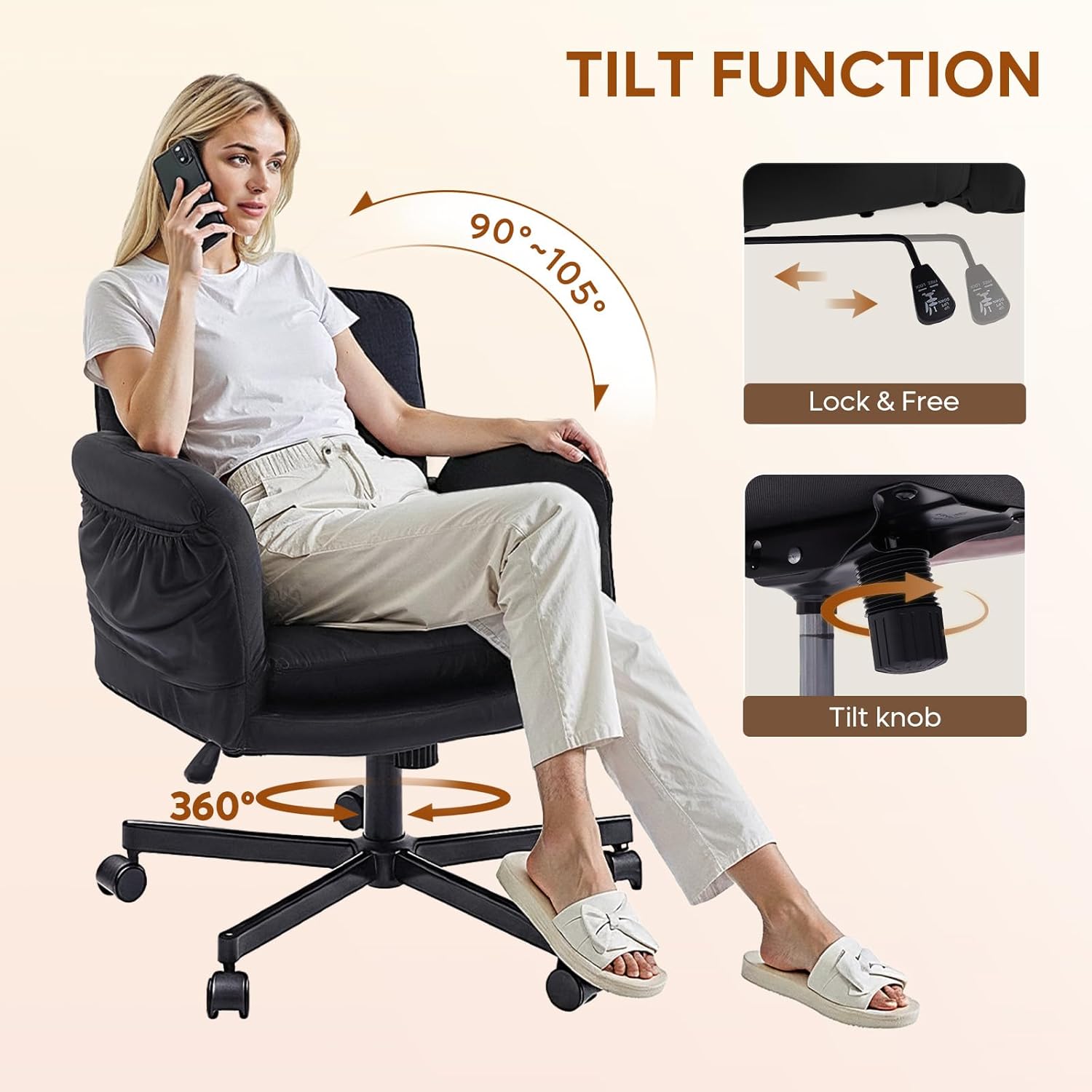
Image: A user demonstrating the chair's tilt function and 360-degree swivel capability.
5.4. 360-Degree Swivel
The chair features a 360-degree swivel seat, allowing for easy rotation and access to different areas of your workspace.
5.5. Side Pockets
Two integrated side pockets provide convenient storage for small items, keeping your essentials within easy reach.

Image: The chair highlighting the practical side storage pockets.
6. Maintenance
To ensure the longevity and appearance of your Bestier Criss Cross Office Chair, follow these simple maintenance guidelines:
- Cleaning: Wipe clean with a soft, damp cloth. Avoid harsh chemicals or abrasive cleaners, as they may damage the velvet fabric.
- Inspection: Periodically check all screws and bolts to ensure they remain tight. Re-tighten if necessary.
- Casters: Keep casters free of debris (hair, dust, etc.) to ensure smooth rolling.
- Fabric Care: The skin-friendly and breathable velvet fabric provides warmth without causing stuffiness. Avoid prolonged exposure to direct sunlight to prevent fading.
7. Troubleshooting
If you encounter any issues with your chair, refer to the following common solutions:
- Chair Squeaks: Check and tighten all assembly screws. A small amount of silicone lubricant can be applied to moving metal parts if the squeaking persists.
- Difficulty Adjusting Height: Ensure the gas lift lever is fully engaged. If the issue persists, the gas lift cylinder may need replacement.
- Chair Does Not Swivel Smoothly: Check for obstructions around the base and casters. Clean any debris from the casters.
- Armrests Do Not Lock: Ensure the armrests are fully rotated until they click into one of the five designated locking positions.
If these steps do not resolve the issue, please contact Bestier customer support.
8. Specifications
| Feature | Detail |
|---|---|
| Brand | Bestier |
| Model Name | H200773A |
| Color | Black |
| Product Dimensions | 26.77"D x 28.74"W x 38.19"H |
| Seat Depth | 19.69 inches |
| Arm Height | 3.54 Inches |
| Special Features | Flip-Up Armrests, Storage Pockets |
| Product Care Instructions | Wipe Clean |
| Maximum Weight Recommendation | 300 Pounds |
| Fill Material | Foam + Spring |
| Tilting | Yes (90°-105° Reclining) |
| Swivel | 360-degree |
| Item Weight | 38.6 pounds |
| UPC | 840408646284 |

Image: Detailed product dimensions and weight capacity of the chair.
9. Warranty and Support
For any assembly issues, product inquiries, or support, please contact Bestier customer service. While specific warranty details are not provided in this manual, Bestier is committed to customer satisfaction.
Customer Support Contact Information:
- North American: 888-666-1086 | Service.US@bestier.net
- Europe: Service.UK@bestier.net, Service.DE@bestier.net, Service.FR@bestier.net, Service.IT@bestier.net, Service.ES@bestier.net
- Asia: 04-8888-0283 | Service.JP@bestier.net
- Global: Service@bestier.net


