
1. Introduction
Welcome to the user manual for your OM SYSTEM OLYMPUS Stylus 400 4MP Digital Camera. This guide provides essential information for setting up, operating, and maintaining your camera to ensure optimal performance. The Stylus 400 is a compact, all-weather digital camera featuring a 4.0-megapixel sensor and a 3x optical zoom lens, designed for capturing high-quality images in various conditions.
2. What's in the Box
Please verify that all the following items are included with your OM SYSTEM OLYMPUS Stylus 400 camera:
- OM SYSTEM OLYMPUS Stylus 400 Digital Camera
- Rechargeable Lithium-Ion Battery
- USB Cable
- Wrist Strap
- Instruction Manual (this document)
- Warranty Card
- Remote (if applicable to your specific package)
3. Product Overview
Familiarize yourself with the key components of your Stylus 400 digital camera.
3.1 Front View
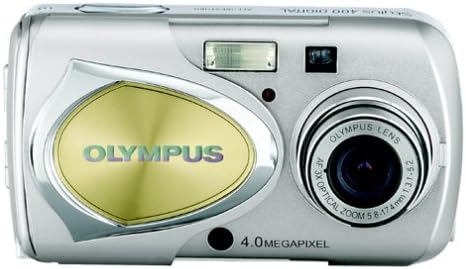
This image displays the front of the camera, highlighting the lens with 3x optical zoom, the built-in flash, the optical viewfinder, and the 4.0 Megapixel branding. The camera features an all-metal body for durability.
3.2 Rear View

The rear view shows the 1.5-inch LCD screen for framing shots and reviewing images. To the right of the screen are the control buttons, including the directional pad for navigation, the 'OK' button for selection, and dedicated buttons for Quick View and zoom control (W/T).
3.3 Side View (Closed)

This image illustrates the compact and sleek profile of the Stylus 400 when closed, emphasizing its portability and all-metal construction.
3.4 Camera in Hand

This photo demonstrates the ergonomic design and compact size of the camera, showing how comfortably it fits in an average adult hand, making it easy to carry and operate.
3.5 Angled Front View
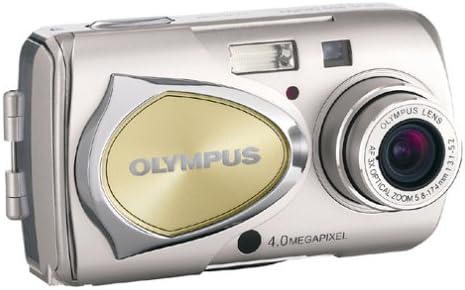
An angled view of the camera's front, providing a comprehensive look at its design elements, including the lens, flash, and the distinctive silver and gold accents.
4. Setup
4.1 Battery Installation
- Locate the battery compartment cover on the bottom or side of the camera.
- Slide the latch to open the cover.
- Insert the rechargeable Lithium-Ion battery, ensuring the correct orientation as indicated by the polarity markings inside the compartment.
- Close the battery compartment cover securely until it latches.
- Charge the battery fully before first use using the provided charger (if included) or by connecting the camera via USB to a power source.
4.2 Memory Card Insertion
The camera uses an XD Picture Card for storage. A 16 MB XD memory card is typically included.
- Locate the memory card slot, usually near the battery compartment.
- Open the memory card slot cover.
- Insert the XD Picture Card with the label facing the correct direction (refer to the diagram near the slot). Push gently until it clicks into place.
- Close the memory card slot cover securely.
4.3 Initial Power On
Press the power button, typically located on the top of the camera, to turn on your Stylus 400. The LCD screen will illuminate, and the lens may extend.
5. Operating Instructions
5.1 Taking Photos
- Turn on the camera.
- Frame your shot using the LCD screen or the optical viewfinder.
- Press the shutter button halfway down to activate the autofocus system. The camera will focus on your subject.
- Once focus is achieved (indicated by a green light or beep), press the shutter button fully down to capture the image.
5.2 Zoom Function
Use the zoom lever or buttons (often marked 'W' for Wide and 'T' for Telephoto) to adjust the focal length.
- Optical Zoom: The camera features a 3x optical zoom for clear magnification without loss of image quality.
- Digital Zoom: Beyond the optical zoom, a 4x digital zoom is available, providing a total of 12x zoom. Note that digital zoom may reduce image quality.
5.3 Flash Modes
The Stylus 400 typically operates with an automatic flash mode, which activates the flash when lighting conditions require it. Consult your camera's on-screen menu for options to force flash on/off or use red-eye reduction if available.
5.4 Viewing Images
To review your captured photos:
- Press the 'Quick View' button or switch the camera to playback mode.
- Use the directional pad to scroll through your images.
- Press the 'OK' button to view image details or access playback options.
5.5 Connecting to a Computer
To transfer images to your computer:
- Ensure the camera is turned off.
- Connect the camera to your computer using the provided USB cable.
- Turn on the camera. It should be recognized as a removable storage device by your operating system (Mac or PC).
- Access the camera's memory card contents and copy your photos to your computer.
6. Maintenance
6.1 Cleaning
- Lens: Use a soft, lint-free cloth specifically designed for optical lenses. Do not use harsh chemicals.
- LCD Screen: Gently wipe with a soft, dry cloth. Avoid pressing too hard.
- Camera Body: Wipe the all-metal body with a soft, slightly damp cloth. Ensure no moisture enters openings.
6.2 Storage
When not in use, store your camera in a cool, dry place, away from direct sunlight and extreme temperatures. Remove the battery if storing for extended periods to prevent leakage.
7. Troubleshooting
If you encounter issues with your camera, refer to the following common solutions:
- Camera does not power on: Ensure the battery is fully charged and correctly inserted.
- Cannot take photos: Check if the memory card is inserted correctly and has sufficient free space.
- Blurry images: Ensure the lens is clean and the autofocus has locked onto the subject before fully pressing the shutter button. Check lighting conditions.
- Memory card error: Reinsert the memory card. If the error persists, try formatting the card (this will erase all data) or use a different card.
- Camera unresponsive: Remove and reinsert the battery to perform a soft reset.
For more complex issues, contact customer support.
8. Specifications
| Feature | Specification |
|---|---|
| Model Name | Stylus 400 |
| Photo Sensor Resolution | 4 MP |
| Photo Sensor Technology | CCD |
| Optical Zoom | 3 x |
| Digital Zoom | 4 x |
| Maximum Focal Length | 105 Millimeters |
| Minimum Focal Length | 35 Millimeters |
| Maximum Aperture | 5.2 f |
| Max Shutter Speed | 1/1000 Seconds |
| Min Shutter Speed | 1/2 seconds |
| Flash Memory Type | XD Picture Card |
| Memory Storage Capacity | 16 MB (included) |
| Screen Size | 1.5 Inches |
| Display Type | LCD |
| Focus Type | Auto Focus |
| Connectivity Technology | USB |
| Battery Type | Lithium Ion |
| Enclosure Material | Metal |
| Water Resistance Level | Water Resistant |
| Item Weight | 0.49 Pounds |
9. Warranty and Support
9.1 Warranty Information
Your OM SYSTEM OLYMPUS Stylus 400 Digital Camera is covered by a 90-day limited warranty. This warranty covers manufacturing defects under normal use. Please retain your proof of purchase for warranty claims. For full details regarding warranty terms and conditions, refer to the included Warranty Card.
9.2 Customer Support
If you require further assistance, have questions not covered in this manual, or need to report a defect, please contact the retailer or the manufacturer's customer support channels. Contact information can typically be found on the Warranty Card or the manufacturer's official website.


